

RACI Matrix For Achieving High Performance In Projects




Try Before you Buy Download Free Sample Product
 Impress Your
 Audience
 100%
100% Editable
 Save Hours
 of Time


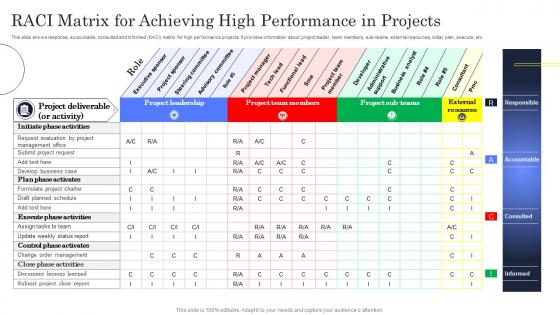
This slide shows response, accountable, consulted and informed RACI matrix for high performance projects. It provides information about project leader, team members, sub teams, external resources, initial, plan, execute, etc.
People who downloaded this PowerPoint presentation also viewed the following :
RACI Matrix For Achieving High Performance In Projects with all 6 slides:
Use our RACI Matrix For Achieving High Performance In Projects to effectively help you save your valuable time. They are readymade to fit into any presentation structure.





FAQs for RACI Matrix For Achieving High
RACI matrices are lifesavers when projects get messy. Basically you make a chart - tasks on one side, people across the top. Then assign roles: Responsible (does the actual work), Accountable (approves it), Consulted (gives input), Informed (just gets updates). Honestly, it sounds boring but it prevents so much drama later. Like when Sarah thinks Mike's handling the budget but Mike thinks it's totally Sarah's job? Yeah, that won't happen anymore. Just pick your main deliverables first and work from there. Way better than figuring out responsibilities mid-crisis when everyone's already stressed.
RACI matrices are seriously underrated. Basically you map out who's Responsible for doing the work, who's Accountable for results, who needs to be Consulted, and who just gets Informed. No more of that "I thought you were handling this" nonsense. Remote teams especially benefit since you can't just tap someone on the shoulder to clarify roles. Three people won't accidentally work on the same task anymore (been there). Your standups will actually move faster too. Worth trying on your next project - I've seen it prevent so many headaches.
So RACI breaks down like this: **Responsible** does the actual work, **Accountable** owns the final outcome, **Consulted** gives input beforehand, and **Informed** just needs updates after stuff happens. Picture launching a feature - developer's Responsible for building it, product manager's Accountable for shipping on time. You'd Consult the design team first, then keep executives Informed once it's live. Here's the thing though: only put ONE person as Accountable per task. I've seen too many projects crash because three people thought someone else was handling it. Classic nightmare scenario.
Okay so RACI is actually pretty straightforward once you get it. **Responsible** = whoever's literally doing the work. **Accountable** is the one person (seriously, just one!) who owns the final outcome and signs off. Don't make this a committee thing or you'll regret it. **Consulted** people give you input before decisions - like your subject matter experts or key stakeholders. **Informed** folks just need the updates afterward. The trick is being brutal about not adding extra people "just in case." That's how these things get bloated and useless. Map out who actually does what versus who just needs to know about it.
Honestly, getting everyone on board is the hardest part. People always clash over who's doing what - classic "too many cooks" situation. Don't even get me started on explaining responsible vs accountable... I mix those up half the time myself! Keep your first matrix super basic though. Complex ones just confuse everyone more. Have an actual meeting to hash out roles instead of firing off emails that nobody reads. Oh, and you'll need to update it when people leave or processes change - which happens way more than you'd think.
Honestly, just tweak the RACI based on what you're actually dealing with. Big projects? Break it down into layers - maybe one for high-level stuff, another for day-to-day ops. Agile teams often add an "S" for Support, which works pretty well. I've seen people throw in a "V" for Verify when compliance is breathing down their necks (total pain but whatever). Small teams can combine roles or go broader with categories. The real trick is making it match how decisions actually happen in your world. Don't just copy some template - that's how you end up with a useless document nobody follows.
Honestly? Just use Excel or Google Sheets - most people overthink this stuff. Everyone already knows how to use spreadsheets anyway. But if you want something more integrated with your actual project work, tools like Asana or Monday.com have RACI features built right in, which is pretty convenient. Miro's great too if your team's into the whole visual collaboration thing (though I find it can get messy sometimes). My advice? Go with whatever tool your team's already using every day. There's no point building the perfect RACI matrix if nobody bothers to look at it.
Sure thing! So in software projects, you'd typically have your Product Manager as Responsible for requirements, Engineering team Accountable for actually shipping it, QA gets Consulted on testing stuff, and Marketing just needs to be Informed about release dates. Construction works similarly - Site Manager handles day-to-day operations (Responsible), Project Manager owns the whole thing (Accountable), architects get pulled in when design changes happen (Consulted), and clients get progress updates (Informed). Marketing campaigns are pretty straightforward too. Usually it's Marketing Specialist doing the work, CMO accountable for results, Sales consulted for input, execs informed. Just don't copy some random template though - actually think about how decisions get made on your team.
Honestly, update it whenever something big shifts - new team members, scope changes, or when people start getting confused about who's supposed to do what. Monthly check-ins work well too. I learned this the hard way when our RACI sat untouched for months and became totally useless. Major milestones are perfect times to review it. If someone quits or joins mid-project? Update it right away. During retrospectives, just ask the team if roles still make sense. The whole point is keeping it relevant - otherwise it's just another document everyone ignores.
Dude, seriously put your RACI matrix in your presentation slides. People get confused about who does what all the time - this fixes that instantly. You'll spot weird gaps where nobody's actually responsible for something (happens more than you'd think). Also catches those awkward situations where like three people think they're in charge of the same thing. My meetings run so much smoother now because we're not constantly figuring out ownership mid-conversation. Just make a simple table, walk everyone through their roles upfront. Honestly saves me probably 20-30 minutes per meeting, which adds up fast.
Honestly, RACI matrices are total lifesavers for managing changes. They map out who's doing what - like who actually implements stuff, who gives approval, who you need to check with first, and who just needs the FYI. I learned this the hard way on a project where three people thought someone else was handling client communication. Awkward doesn't begin to cover it! The trick is keeping your RACI updated when things shift around. Otherwise people get confused about their roles and important stuff slips through. It's basically your "don't let chaos win" insurance policy.
Dude, overlapping RACI roles are a nightmare. Nobody knows who actually owns what when you've got multiple people tagged as "Responsible" for one task. Things just fall through the cracks constantly. Having too many "Accountable" people is even worse - missed deadline? Suddenly it's finger-pointing central. I learned this the hard way on a project last year, ugh. Each task needs exactly one "A" person, and honestly just one "R" makes life so much easier. Clean that matrix up and watch how much smoother everything runs. Your team will actually know what they're supposed to do.
So here's what I'd do - turn those "Informed" people into actual contributors by having them give input during checkpoint meetings, not just listen to updates. Your Accountable person needs to schedule real review sessions with the Consulted folks (this is honestly where most RACIs crash and burn because people think consultation is one-way). Set up recurring 15-minute feedback sessions for bigger projects. Document what feedback you actually use and why you might ignore some of it - trust me, people appreciate the transparency. The whole thing only works if you're as systematic about collecting feedback as you were about assigning roles in the first place.
Show them a simple table first - way easier to scan than paragraphs. During kickoff, walk through the main tasks and point out who does what. Honestly, don't just email it because half your team won't even open it. Get people to actually confirm they understand their roles, especially Responsible vs Accountable (that one always confuses everyone). Reference it when questions come up later - and they will. Oh, and keep updating it as things change. You want something they'll actually look at, not another document gathering digital dust.
Honestly, RACI matrices are perfect for agile teams. They clear up confusion about who does what without adding a bunch of red tape. Start with your sprint basics - who owns user stories, who gets consulted on tech stuff, that kind of thing. Keep it simple though, maybe just focus on your main ceremonies first. Your team's gonna change anyway (agile teams always do), so don't stress about making it perfect upfront. I'd say update it as you go and add more detail when you actually hit accountability issues. Way easier than trying to predict everything from day one.
-
A beautiful, professional design paired with high-quality images and content that is sure to impress. It is a must-use PPT template in my opinion.
-
Been using SlideTeam for some time now…can’t imagine why I wasted all that time in front of the screen trying to make the perfect presentation.