


Security Systems Brochure Bifold




Try Before you Buy Download Free Sample Product
 Impress Your
 Audience
 100%
100% Editable
 Save Hours
 of Time


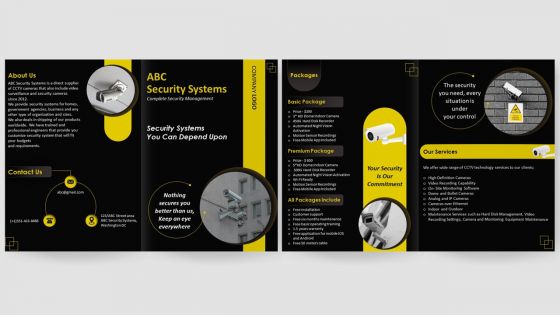
Advertise your CCTV security business or services by using our visually appealing security installation Bifold Brochure Template. Use this Security company pamphlet presentation template to provide information about advanced equipment and CCTV systems to assure business, homes, firms, government agencies and other commercial areas safety and protection. With the assistance of security system brochure PowerPoint theme, you can provide information about wide range of CCTV technology services available for customers. Leverage this security brochure PowerPoint theme to talk about variety of packages with benefits, warranty, installation and pricing details. Employ this professionally designed PPT brochure to represent benefits, applications and specialties of your business to provide 24x7 recording with network IP security cameras.
People who downloaded this PowerPoint presentation also viewed the following :
Security Systems Brochure Bifold with all 1 slides:
Use our Security Systems Brochure Bifold to effectively help you save your valuable time. They are readymade to fit into any presentation structure.
FAQs for Security
Honestly, start with figuring out your weak spots first - that's half the battle right there. You need three things working together: stuff that catches problems (cameras, motion sensors, door alarms), things that scare people off (good lighting, visible cameras, security signs), and systems that actually respond when something happens. Notifications to your phone, loud alarms, backup power so nothing dies when the lights go out. I swear sometimes those fake cameras work almost as well as real ones - people can't tell the difference. The whole point is layering everything so one piece failing doesn't screw you over.
Think of access control like having a really good bouncer who never forgets a face. You can lock down sensitive spots - server rooms, executive floors, wherever. When someone quits, just click a button and boom, their access is gone. No more worrying about stolen keycards or wondering who's wandering around after hours. The best part? Everything gets logged automatically, so if something sketchy happens, you've got a digital paper trail. Honestly, the audit reports practically write themselves. I'd start with your most critical areas first - you know, the places where real damage could happen.
Honestly, surveillance stuff works great as a deterrent - criminals see cameras and usually just move on to easier targets. When that doesn't work though, you've got solid evidence for the cops. Motion sensors and cameras create this whole psychological thing where people know they're being watched. The newer smart systems are pretty cool, they'll actually ping your phone if something sketchy is happening. You definitely want to cover all your entry points and any blind spots around the house. Oh, and make sure whatever you get actually records clear enough to see faces - learned that one the hard way when my neighbor's grainy footage was basically useless after their break-in.
Walk through your whole place first and write down entry points, valuable stuff, and weak spots. Your employees are goldmine for this - they notice things you don't. I'd honestly ask them before doing anything else. Look at your industry's weird risks too, plus local crime stats if you can find them. Budget matters obviously, so rank your biggest threats first. That risk matrix thing works - just list what's likely vs. what would really hurt. Oh and don't forget compliance stuff if that applies to you. Most people try to do everything at once and end up with half-baked security everywhere.
Honestly, zero-trust architecture is huge right now - basically don't trust any device by default. AI threat detection for cameras and access control is everywhere too. Oh, and thank god we're finally encrypting device communications instead of sending everything in plain text like idiots. Most companies are moving to cloud-based security ops centers. IT and physical security teams are merging since it's all networked anyway, which makes sense but creates drama sometimes. I'd start with auditing what you have now. Then patch those old legacy systems first - they're usually the weak spots.
Dude, smart systems blow traditional ones out of the water. You control everything from your phone and get alerts instantly. No need for rewiring when you want to move stuff around either - which is honestly a game changer if you're indecisive like me. Traditional setups require professional installation and those annoying monitoring contracts. Smart ones connect to your other devices too. Motion detected? Lights automatically flip on. You can watch multiple properties from one app and customize different alert types. Best part is starting small with maybe just a camera, then building up when you've got more cash.
First thing - figure out what you're actually trying to protect and check your area's crime stats. Cameras, alarms, or access control? Maybe all three depending on your budget. Don't make my mistake of ending up with like 4 different apps to check everything - integration matters way more than you'd think. Self-monitoring saves money but professional services are obviously more reliable. Cloud storage adds up fast too. Get quotes from a couple vendors and definitely ask for references from businesses similar to yours. Oh and think about expansion plans since retrofitting security later is a pain.
So basically you get all your security stuff working together instead of separately. Motion sensors can flip on lights AND cameras at once. Smart locks will ping your phone if someone's messing with them. The whole setup responds way faster since everything's connected. You can check in from anywhere too - honestly feels kinda cool being able to spy on your own house lol. Way fewer blind spots this way. Just connect what you already have through a hub first. You'll notice the difference right away, trust me.
Honestly, network connectivity is gonna be your biggest headache. When sites can't talk to your main hub, everything falls apart. Each location will have weird quirks too - different layouts, old wiring, local codes that don't play nice with your standard setup. Training staff across multiple sites? Good luck coordinating that mess. I learned this the hard way on a project last year. Different teams, same system, but somehow everyone interprets it differently. Do yourself a favor and walk through each site first. Don't just look at blueprints - actually go there before you buy anything.
Look, training your people is absolutely everything when it comes to security. I've seen companies blow tons of money on fancy systems only to have Dave from accounting click every suspicious link that hits his inbox. Without proper training, you'll get false alarms constantly and miss the real threats. But train them right? They become your best defense. Most places do that boring one-day session and call it good - huge mistake. You need regular refreshers because honestly, people forget this stuff fast. It's way more important than whatever equipment you're running.
Check your cameras, sensors, and alarms every week - catches problems early. Monthly software updates are a must (learned that when our office got hacked last year, ugh). Train your team on basic fixes so they're not texting you at midnight over simple stuff. Keep maintenance logs and have a backup plan ready. Honestly, the annual pro inspections are worth every penny - they spot things you'll totally miss. Oh, and don't skip the firmware updates even though they're annoying.
Honestly, RFID tags are a game changer for retail theft. Stick them on your products and they'll track everything in real-time - when stuff moves, when it leaves without being scanned, all of it. The tags are super small now and don't cost much. Door sensors catch shoplifters automatically, plus you can spot sketchy inventory patterns that might be internal theft. Oh, and you'll know when you're running low on popular items instantly. I'd start with whatever gets stolen most in your store - that's where you'll see the biggest difference in your shrinkage. Pretty smart investment tbh.
Ok so first thing - check your local laws because some states are crazy strict about this. You'll want written consent for audio recording, that's non-negotiable. Post clear signs about cameras too. Don't put them in bathrooms or break rooms obviously, people expect privacy there. Storage policies matter - who gets access and for how long? Honestly the legal stuff gets messy fast. I'd talk to a lawyer before you buy anything. Oh and create actual written policies about footage access. Employees will ask questions so be ready with answers about what you're doing with their data.
So alarm systems watch your doors, windows, and rooms for break-ins or weird movement. There's three main types - wired ones work great but installing them sucks, wireless is super easy to set up yourself (though changing batteries gets old fast), and smart systems that ping your phone. Most use basic sensors on entry points plus motion detectors and cameras. When something trips it, either a monitoring company gets alerted or it goes straight to your phone. Honestly, I'd go wireless for your first system since you can install it yourself and add more stuff later if you want.
Dude, the smart security stuff is getting insane. Cameras now actually know if it's a person vs your dog wandering around - finally! No more 3am alerts because leaves moved. Everything connects to the cloud so you can check footage from anywhere without those bulky recorder boxes. The facial recognition tech is honestly a little creepy how accurate it's gotten. My buddy just upgraded and his system spotted a sketchy guy before he even got to the door. IoT sensors are connecting door locks, alarms, everything into one network. Oh, and definitely get something that plays nice with whatever setup you already have.
-
I have been using SlideTeam for the past six months. Very happy and satisfied!
-
Definitely recommend SlideTeam to all who need help with PowerPoint presentations. Their design team can create anything you need.