

Smart Attendance Tracking Systems Dashboard Iot In Education To Transform IoT SS




Try Before you Buy Download Free Sample Product
 Impress Your
 Audience
 100%
100% Editable
 Save Hours
 of Time


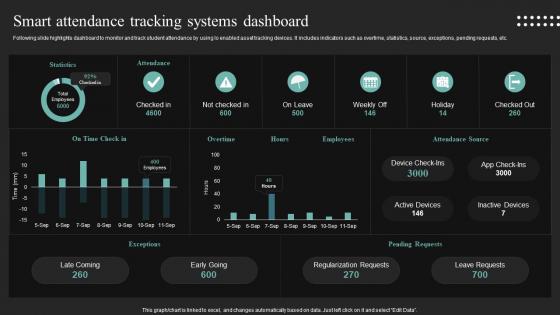
Following slide highlights dashboard to monitor and track student attendance by using Io enabled asset tracking devices. It includes indicators such as overtime, statistics, source, exceptions, pending requests, etc.
People who downloaded this PowerPoint presentation also viewed the following :
Smart Attendance Tracking Systems Dashboard Iot In Education To Transform IoT SS with all 10 slides:
Use our Smart Attendance Tracking Systems Dashboard Iot In Education To Transform IoT SS to effectively help you save your valuable time. They are readymade to fit into any presentation structure.








FAQs for Smart Attendance Tracking Systems Dashboard Iot In Education To
You definitely need real-time tracking and geofencing - seriously, people will try to clock in from their couch if you let them. Facial recognition or mobile check-ins work great for identification. Auto report generation saves tons of time too. Make sure whatever you pick plays nice with your current HR setup, because integration headaches are the worst. Mobile access for managers is pretty much mandatory these days. Oh, and customizable notifications help catch issues before they become problems. I'd say start with your biggest attendance headaches right now, then find a system that actually fixes those specific things.
Honestly, biometric systems are a game-changer for attendance accuracy. Your coworkers can't clock you in anymore since it needs your actual fingerprint or face scan. No more "I forgot my badge" excuses either, which is honestly refreshing. Manual entry errors disappear completely. The data becomes way more reliable because there's a direct link between the person and their record - makes payroll and audits so much cleaner. Sure, someone might find a way around it eventually, but for now it's basically bulletproof. Definitely worth it if you're tired of dealing with sketchy attendance issues.
Dude, mobile attendance is a total game changer. Your phone becomes the time clock - GPS tracking, QR codes, even facial recognition through the camera. Way better than those ancient punch card machines that always jammed when you were running late lol. The best part? Real-time everything. Managers can approve your PTO requests instantly instead of waiting days for paperwork. You get notifications about schedule changes too. Honestly, if your company's still doing manual timesheets, you should bug them about upgrading. It'll save so much hassle for everyone.
Honestly, these smart attendance systems work great for remote learning. They track who's actually present through webcams and login data - way better than calling roll every time. Plus you get real-time info on whether kids are genuinely participating or just logged in while doing something else entirely. The systems can even monitor attention during video calls, which is kinda wild if you think about it. Best feature though? Automated alerts when someone's missing too much class. That way you can check in before they're completely lost. Parents and admins love the reporting too.
So the big thing is you're collecting super sensitive bio data that can't just be reset if it gets hacked. Like, if someone steals your fingerprints, you can't exactly grow new ones, right? Data breaches are honestly terrifying with this stuff. Some employees get weird about the whole surveillance vibe too - feels very Big Brother-ish to them. You'll need proper consent since biometric data has crazy strict rules in most places. Definitely check your local privacy laws first and figure out rock-solid encryption before you even think about starting this.
So most smart attendance systems just plug right into whatever you're already using - LMS, student info systems, HR stuff. The data syncs automatically which is nice since nobody wants to be manually entering attendance records all day. APIs handle most of the heavy lifting. Canvas, Blackboard, PowerSchool - they've all got ready-made integrations now. Setup's way easier than it used to be, honestly. If you need something custom, CSV exports are usually an option too. I'd definitely ask for a demo first though - see how it actually works with your specific setup before you sign anything.
Yeah so expect to drop $5K-$50K+ depending on your school size and what system you go with. RFID's cheaper but biometric looks way cooler - kids actually think the fingerprint scanners are pretty neat. You'll have ongoing stuff like software licenses and maintenance too. Most schools break even in 2-3 years though, saves tons of admin time and attendance gets way better. Oh and definitely start small! Try it with just one grade first before you commit to the whole school - learned that one the hard way from watching other districts mess it up.
Honestly, the pattern recognition is wild - it'll catch stuff like your team being late every Monday or how rainy days tank attendance. You get automatic alerts when someone's absence patterns look weird, which usually means burnout or personal stuff. Then there's the predictive thing (which still feels like magic to me) - it can tell you about staffing shortages weeks out. No more panic when half your team calls in sick. Weather trends, seasonal patterns, all that gets factored in. I'd start with automated absence reports first. That alone saves me like 3 hours weekly of manually tracking who's where.
Honestly, start with encrypting everything - data storage and transmission. Multi-factor authentication is a must because passwords get stolen all the time. Limit access to only staff who actually need it, and set up clear policies on how long you keep records. Regular security audits help catch problems early (super boring but necessary). Don't forget backups - trust me on this one. Software updates might seem tedious but they patch security holes. I'd audit your current system first to see what's already broken, then prioritize from there.
Honestly, these systems are total lifesavers for compliance stuff. You get automatic audit trails and accurate records that meet all the labor law requirements. No more employees claiming "I definitely clocked in on time!" when they were 20 minutes late - the time stamps don't lie. They track everything: breaks, overtime, leave patterns, wage regulations. Data stays secure for privacy rules too. When auditors show up (ugh), you can pull reports instantly instead of scrambling through spreadsheets for days. Worth every penny just for that peace of mind.
Yeah, automated attendance definitely helps with engagement from what I've seen. You're not wasting 5-10 minutes on roll call anymore, which honestly students hate anyway - all that "here, here, here" stuff while half of them zone out. More class time = better. The real-time tracking is pretty useful too since you can catch patterns early, like if someone's always missing Mondays (we've all been there lol). Students seem more accountable when they know it's automatically logged. I'd check your engagement numbers before and after though - every classroom's different so you'll want to see if it actually moves the needle for your specific situation.
Honestly, attendance data is super useful for figuring out who needs help. Like if a kid keeps missing first period but shows up later, they probably need those morning materials sent home or whatever. Students with solid attendance? Push them harder - they're clearly engaged. Also watch for when your whole class starts zoning out (usually right before lunch, let's be real). That's when you know to switch up your pacing or try something different. Just pull those weekly reports and look for the obvious patterns. Then try different stuff based on what you're seeing. It's basically detective work but for teaching.
So cloud systems basically put everything on remote servers that you access through your browser. Way easier setup - like renting vs buying a house, honestly. On-premise runs on your own servers locally. You'll pay monthly for cloud but get automatic updates and can work from anywhere, which is pretty sweet. With on-premise you control everything and usually get better security, but then you're stuck doing all the IT stuff yourself. Really depends on your budget and if people need remote access. Oh and how paranoid you are about data security lol.
Dude, you'll save SO much time on paperwork and data entry. No more hunting down absent kids or manually calling parents - the system handles all that automatically. Morning attendance becomes way less chaotic when you're juggling everything else. Plus you can pull up real-time data and spot attendance patterns super fast. The compliance reports that used to take forever? Now they're done in minutes. Honestly, I think the automatic parent notifications are the best part - one less thing to worry about. Figure out what's eating up most of your time with attendance tracking first, that's where you'll feel the biggest difference.
Honestly, facial recognition is where it's at right now - crazy how fast it can ID people walking in. Biometric stuff like fingerprint scanning has gotten super accurate too. IoT sensors are pretty neat, they just automatically know when someone's in the room. Most of these systems play nice with whatever HR software you're already using. Cloud-based is definitely the way to go if you're upgrading - way less headache than dealing with servers and all that. Some can even predict attendance patterns, which is kind of wild when you think about it.
-
Thank you for offering such fantastic custom design services. The team is really helpful and innovative. In a very short time, I received my personalized template.
-
Use of different colors is good. It's simple and attractive.