

Software Architecture Layers Powerpoint Ppt Template Bundles





Try Before you Buy Download Free Sample Product
 Impress Your
 Audience
 100%
100% Editable
 Save Hours
 of Time


Our Software Architecture Layers Powerpoint Ppt Template Bundles are topically designed to provide an attractive backdrop to any subject. Use them to look like a presentation pro.
People who downloaded this PowerPoint presentation also viewed the following :
Software Architecture Layers Powerpoint Ppt Template Bundles with all 18 slides:
Use our Software Architecture Layers Powerpoint Ppt Template Bundles to effectively help you save your valuable time. They are readymade to fit into any presentation structure.

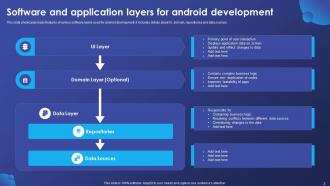
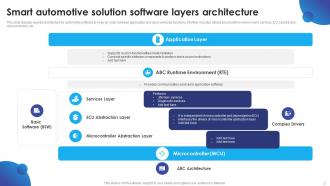
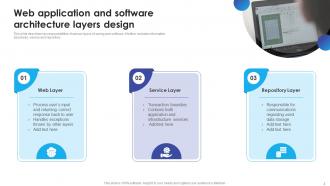
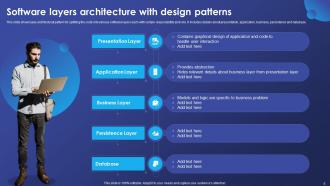







FAQs for Software Architecture Layers Powerpoint
Honestly, just break everything into focused pieces that do one thing well - separation of concerns is your best friend here. Keep components loosely connected but make sure each one is tightly organized internally. Hide the messy stuff behind clean interfaces (abstraction saves your sanity later). Think about how it'll scale and whether you can actually maintain this thing in six months. KISS principle all the way - I've seen so many projects die because someone tried to be too clever. Sketch out your main components first before you get lost in implementation details. Trust me on that one.
So basically microservices split your app into tiny separate pieces that talk to each other through APIs. Monoliths? Everything's just crammed into one massive codebase. The cool part is you can update or scale individual services without nuking your entire system. Different teams can work on their own services too without constantly conflicting. Plus if one service dies, the rest keep chugging along. But honestly, the networking gets messy and data consistency becomes a pain. My take? Build a monolith first, then split it up later when you're actually hitting scaling issues.
So scalability is how well your system handles growth without crashing and burning. More users, data, traffic - you get it. Honestly, you've gotta plan for this upfront because trying to fix it later? Total pain. I learned that the hard way lol. Think horizontal scaling (more servers) vs vertical (bigger servers). Load balancing and database sharding are your friends here. Microservices too, though some people go overboard with those. Build stuff modular so pieces can grow independently. Otherwise you'll be rebuilding everything when you actually start getting users.
Look, ADRs are basically just writing down *why* you picked certain tech decisions so you don't have those awkward "wait, why microservices again?" meetings later. They capture what you were thinking at the time - the context, other options you looked at, trade-offs you made. New people joining the team? Just send them the ADR instead of explaining everything again. The trick is writing them right when you decide, not three weeks later when you've forgotten half the reasoning. Keep it short and simple - I usually just grab a basic template and start there. Trust me, future you will thank present you.
Hey! So consistency is huge - stick to RESTful patterns when they actually make sense. Version everything from the start (trust me on this one). Your error messages need to be useful, not those awful "oops something broke" responses that tell you nothing. Document as you go, don't wait until the end. HTTP status codes matter too. Here's the thing though - design for what developers actually want to do, not how your database is structured. That mindset shift makes all the difference. Sketch out real use cases first, then build around those.
Dude, architectural patterns are honestly game-changers for keeping your code sane. MVC, MVVM, Clean Architecture - whatever you pick, just be consistent about it. The whole point is separating your concerns so UI stuff doesn't get tangled up with business logic. Sounds dry, I know, but you'll thank yourself later when you're not hunting bugs through spaghetti code. Your team can actually work in parallel without breaking each other's stuff. Testing becomes less of a nightmare too. Just commit to one pattern early - switching mid-project is painful.
Security can't be an afterthought - build it in from the start. Authentication and authorization are your first priorities (who gets access, what can they actually do). Encrypt everything, both stored data and stuff moving between services. Input validation is huge for stopping injection attacks. Honestly, logging and monitoring saved my butt more times than I can count - you want alerts when weird stuff happens. Oh, and do threat modeling early on. It sounds boring but it'll help you spot weak points before hackers do. Way easier than retrofitting security later.
Honestly, first figure out where your actual bottlenecks are - sometimes the "slow" code isn't even the real problem. Measure if those fancy optimizations actually help before going down that rabbit hole. How often does your team touch that code? If it's business logic changing all the time, readable beats fast every day. But performance-critical stuff that rarely gets modified? Go nuts with the optimization. I'll usually just build both versions quickly when I can't decide - sounds like overkill but it's saved me so many headaches. Oh and write down why you chose what you did, because you'll definitely forget in six months.
Honestly, cloud-native is a game changer for deployment speed and scaling. Traffic spikes? Your app handles them automatically without you scrambling to spin up servers at 2am (been there, done that). The best part is deploying services individually - no more massive releases that torpedo everything. Your team can actually work on different pieces without constant merge conflicts. Oh, and containerization means way fewer "works on my machine" disasters. Start with just one service though. Don't go crazy and try to containerize everything at once - that's how you end up hating life.
Start with modular design patterns and loose coupling - seriously, this saves so much headache later. Separate your business logic from technical stuff so you can swap pieces out without everything exploding. I've watched teams completely screw themselves by coupling everything tightly together (total nightmare when things change). Interfaces and abstractions are your friends here. Don't hardcode business rules into core systems either. Oh, and check in with stakeholders regularly - way cheaper to catch changes early than deal with massive refactors down the road.
Dude, technical debt will absolutely wreck your codebase if you don't stay on top of it. Everything becomes tangled together, nothing follows the same patterns, and suddenly you're spending three days just to add a button. I swear I've worked on projects where changing one tiny thing breaks stuff in completely unrelated areas - it's maddening. Best approach? Set aside like 20-30% of your sprint time specifically for cleaning up code. Audit regularly, get your team on board with consistent standards, and treat debt fixes like actual features instead of afterthoughts. Otherwise you'll hate your life later.
Three things you really need: architectural diagrams that show how stuff connects, decision records for why you picked certain tech, and a solid README tying it all together. Seriously, those ADRs are lifesavers when someone asks "wtf were we thinking with microservices?" six months later. Document while you're building - not after when you've forgotten everything. I learned this the hard way lol. Keep everything in your repo so it doesn't get lost. Start basic and add details as you go. Don't try to make it perfect right away.
Don't try doing everything at once - that's where most people mess up. Legacy data is way messier than you think it'll be, trust me on that one. Skip the full rewrite temptation because it always takes forever and usually crashes and burns. Go incremental instead, maybe try the strangler fig pattern. Get your business people involved early or they'll freak out about timelines later. Start small with one module first to test your approach. Oh, and plan way more time for data migration than seems reasonable - it's always the worst part.
Honestly, architecture decisions completely change how your team functions day-to-day. Monoliths? Total nightmare for deployments - everyone's constantly blocking each other. Microservices let different teams work on their own stuff without waiting around. Here's the thing though - Conway's Law isn't just some theory, it actually happens. Your system ends up looking like your org chart whether you plan it or not. So figure out how your team naturally breaks down first, then build your architecture around that. Way easier than trying to force people into some structure that doesn't make sense.
You've got tons of good options - Lucidchart and Draw.io are solid for basic diagrams. Miro's great too. If you want something fancier, check out ArchiMate or Structurizr for C4 models. But honestly? I've seen teams kill it with just whiteboard sessions - there's something about standing around drawing boxes that gets people talking. For tracking decisions, throw some ADRs in your repo or use Confluence if that's what you've already got. The trick is finding something everyone will actually use instead of letting it collect digital dust. Start basic, then upgrade when things get messy.
-
Amazing variety of PowerPoint slides. Really helpful in designing professional presentations.
-
Wow! The design and quality of templates on SlideTeam are simply the best.