


Software Architecture Powerpoint Ppt Template Bundles





Try Before you Buy Download Free Sample Product
 Impress Your
 Audience
 100%
100% Editable
 Save Hours
 of Time


Dive into the intricate world of Software Architecture with our comprehensive PPT presentation. Explore the core elements of software framework development, delving into the detailed design methodologies that underpin efficient systems. Uncover the nuances of data management strategies, focusing on their pivotal role in shaping robust software infrastructures. Learn how quality attributes such as scalability, reliability, and performance are meticulously integrated into architectural decisions, ensuring high quality software design. Gain insights into cutting edge practices, from modular design to microservices, and understand their impact on system agility and maintenance. This presentation offers a profound understanding of software architecture, equipping you with the knowledge to design and develop resilient, scalable, and adaptable software systems.
People who downloaded this PowerPoint presentation also viewed the following :
Software Architecture Powerpoint Ppt Template Bundles with all 25 slides:
Use our Software Architecture Powerpoint Ppt Template Bundles to effectively help you save your valuable time. They are readymade to fit into any presentation structure.











FAQs for Software Architecture Powerpoint
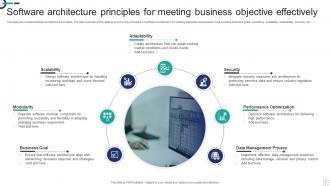
Look, start with separation of concerns and loose coupling - basically keep things focused and don't make everything depend on everything else. High cohesion matters too. Stick with patterns like layered architecture or microservices if they actually make sense for what you're building. The real trick? Just be consistent with whatever you pick - I've seen way too many projects fail because people kept switching approaches halfway through. Design for scalability and testing upfront since retrofitting sucks. Oh, and document your decisions! You'll hate yourself later if you don't remember why you made certain choices.
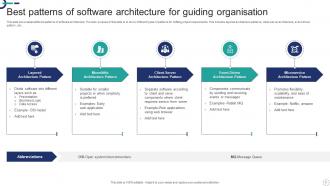
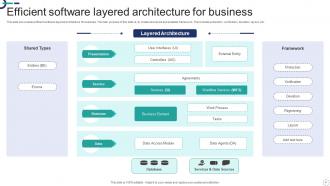
So basically, monoliths are dead simple to start with but you'll hit a wall pretty quick when traffic picks up. Microservices are the opposite - way more flexible for scaling but honestly kinda overkill unless you're dealing with serious load. Event-driven stuff handles crazy throughput really well, though it gets messy fast. Layered architectures? Super predictable but can bottleneck hard. I'd say just start with whatever's simplest for your use case - you can always refactor later once you actually know where your pain points are. No point overengineering from day one.
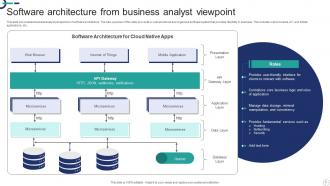
So microservices basically chop up your app into tiny independent pieces - like one handles payments, another does user logins, etc. You can scale individual parts when they get hammered, teams don't block each other during deployments, and honestly developers get pretty excited about using whatever tech they want for their piece. But here's the thing - you're gonna hate dealing with all the networking complexity and figuring out how services talk to each other. Plus distributed logging is a nightmare. Don't jump into this unless you're actually hitting walls with a regular monolith.
Good architecture is basically about drawing clear lines between different parts of your system. Teams can work on their stuff without constantly bumping into each other. Think of it like - okay this analogy is kinda weird but - having actual property lines between houses. Everyone knows their space! You want clean interfaces and modular pieces so each team understands their chunk and how it plugs into everything else. Document your API contracts well upfront. That way people can build in parallel instead of scheduling meetings every five minutes. Map out your major components first before anyone touches code.
Dude, biggest mistake is over-engineering right out the gate. We all love our fancy design patterns but you'll just create problems that don't exist yet. Keep your components loosely coupled. Don't build some crazy distributed system when a simple monolith does the job perfectly fine - I've seen so many teams burn themselves on this one. Performance and security matter from the start, but don't go overboard. Skip the "self-documenting code" excuse too, future you will hate present you. Start basic, get it working, then improve as you actually learn what breaks.
So cloud computing totally changes how you build software - everything becomes distributed and scalable. Instead of panicking about server limits, you can just spin up whatever you need. Microservices become way more practical, and you'll want to go API-first since resources are so flexible. Honestly, once you get used to it, going back to old-school architecture feels super limiting. Design for stateless services and events from the start though - trying to break apart a huge monolithic app later is such a pain. Oh, and containers make everything so much cleaner in the cloud.
Build everything around abstractions instead of locking into specific tech. Like, design patterns such as dependency injection let you swap out databases or APIs without touching your core logic. I always think of it as modular rooms in a house - replace the kitchen but keep the foundation intact. Obviously you can't predict the future, but this approach makes pivots so much less brutal. Start by wrapping your flakiest dependencies behind clean interfaces. The adapter pattern works great for this stuff too.
Honestly, there are four main things I'd track: maintainability (how easy it is to change stuff later), performance under load, scalability for growth, and testability. That last one is huge - I've seen so many projects where nobody thought about testing upfront and debugging becomes absolute hell. Short sentences work too. Also check how tightly coupled your components are and whether the whole thing actually matches what the business needs. Oh, and pick the metrics that matter most for YOUR specific situation first, then track them consistently so you can catch problems early.
Honestly, you've got to build security right into your design from the start - patching it later is a nightmare. Do some threat modeling first to spot weak points. Then layer your defenses: authentication, authorization, input validation, encryption, the works. Zero trust is everywhere now and actually makes sense. Give each component the bare minimum access it needs, nothing more. Oh, and log everything for when things inevitably go sideways. The trick is putting on your hacker hat while you're building - where would you attack this thing?
Honestly, it's all about complexity vs scalability. Monoliths are way easier to deploy and debug, but everything has to scale together even when just one piece needs more juice. Distributed systems? You can scale individual services and mix different tech stacks, which is awesome when it works. Network issues will make you want to pull your hair out though, plus data consistency gets messy fast. Way more stuff to monitor too. If you're a small team, just go monolithic. Don't overcomplicate things unless you actually need the distributed approach.
Non-functional requirements totally shape your whole architecture - they're what force specific design choices. Need high performance? You're building for horizontal scaling and caching. Security demands zero-trust models and encrypted service communication. For reliability, think redundancy and circuit breakers. I've watched teams skip this stuff early and pay for it later (messy retrofits are the worst). Map each requirement to actual architectural patterns right from the start. Way easier than trying to bolt things on after you've already deployed everything.
Honestly, I'd go with the basics first - Lucidchart or Draw.io for diagrams, maybe Miro if your team's into that collaborative vibe. Confluence or Notion are solid for storing all your specs and design decisions (though Notion can get a bit messy if you're not careful). PlantUML's pretty cool if you want diagrams that generate from code, but that might be overkill depending on what you're building. Whatever you pick, just stick it in Git with your code. Trust me on this one - documentation that lives separately from your codebase is documentation that dies a slow death. Pick something everyone will actually use consistently.
So architecture patterns like MVC and MVVM are basically blueprints that save you from constantly deciding where stuff goes. Business logic? Model. UI nonsense? View. The glue between them? Controller or viewmodel. Honestly, it's way better than winging it every time. Testing becomes actually doable since you can mock different pieces separately. Plus when you need to change the UI or business rules later (and you will), you won't be digging through everything. I'd just pick whatever your platform likes best to start - no point fighting the framework.
ATAM is solid for spotting risks and tradeoffs upfront. SAAM works too if you're doing scenario-based stuff. But honestly? Sometimes just sitting down with your team for a regular architecture review catches way more problems than any formal method. Code quality metrics help, plus dependency analysis tools and technical debt assessments. Pick whatever actually fits your situation though - no need to overcomplicate things. I'd start simple with a basic health check covering maintainability, performance, and how well it'll scale. That usually tells you what you need to know.
Dude, stakeholder communication is huge - way more than most architects think. Business people, dev teams, ops, even legal sometimes need to understand what you're doing. I've watched amazing architectures completely bomb because nobody talked to the security team upfront (classic mistake). Each group cares about different stuff, so you gotta translate your tech decisions accordingly. Business wants to hear about performance. Developers care about how maintainable it'll be. DevOps doesn't want their lives made harder. Start figuring out who your stakeholders are and what actually matters to them. Trust me on this one.
-
This design is not only aesthetically pleasing but it has many uses making the cost worthwhile. The graphics look stunning, and you can edit them as per your needs.
-
They helped us design the pamphlets for our church’s food drive! The people loved the design, and I’m happy to say it was successful. Thank you, SlideTeam!