

RPA Architecture Powerpoint Ppt Template Bundles




Try Before you Buy Download Free Sample Product
 Impress Your
 Audience
 100%
100% Editable
 Save Hours
 of Time


Our RPA Architecture Powerpoint Ppt Template Bundles are topically designed to provide an attractive backdrop to any subject. Use them to look like a presentation pro.
People who downloaded this PowerPoint presentation also viewed the following :
RPA Architecture Powerpoint Ppt Template Bundles with all 25 slides:
Use our RPA Architecture Powerpoint Ppt Template Bundles to effectively help you save your valuable time. They are readymade to fit into any presentation structure.






FAQs for RPA Architecture Powerpoint
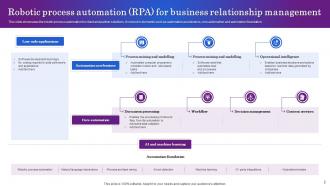
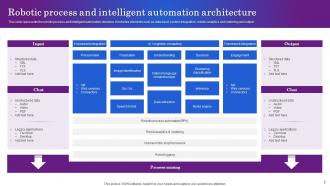
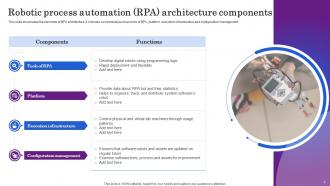
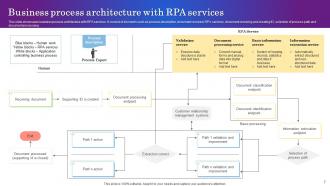
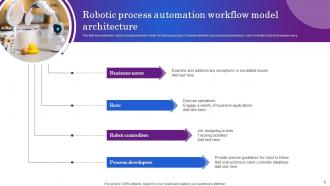
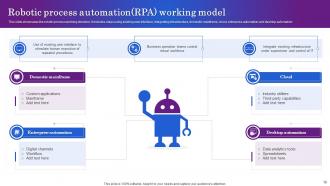
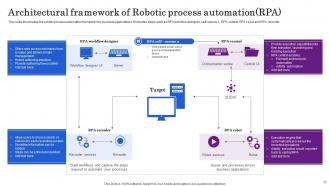
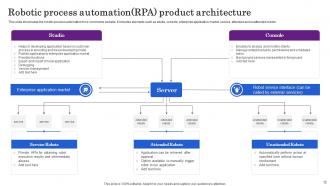
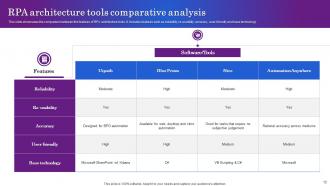
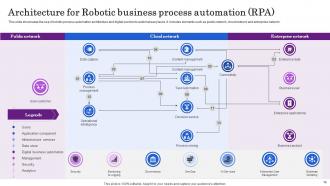
So RPA basically has three main parts you need to know about. There's the bot runner where everything actually happens, then your control room that manages it all, and the design tool for building bots. Oh and definitely set up logging - I can't tell you how many times that's saved me from looking like an idiot when stuff breaks. Bigger setups might throw in load balancers or extra security layers too. Map out how these pieces connect before you start building though, trust me on that one.
So here's the deal with RPA - it basically sits on top of whatever systems you already have instead of replacing them. Your bots just interact with apps the same way you would, clicking buttons and typing stuff. No messing with APIs or databases (thank god, because that's usually a headache). Traditional automation makes you integrate directly into everything, which takes forever. With RPA you can get things running way faster since you're not waiting around for IT to change a bunch of systems. Way less technical drama involved.
So orchestration is like the control center for all your RPA bots. It handles scheduling, decides which bot does what and when, plus monitors everything so nothing crashes and burns. Without it, you'd have bots just doing their own thing with zero coordination - total chaos. The conductor analogy is pretty spot-on actually, just way less theatrical. You get centralized visibility into your whole setup, which honestly saves you from so many headaches later. Performance monitoring, failure handling, workload distribution - it's all there. Don't skip setting this up properly early on, trust me.
You definitely need bot management - it's like mission control for all your automation stuff. Monitors performance, handles when things break (and they will break), schedules everything, manages resources. Without it? Total chaos. Bots will crash into each other, processes fail quietly, and you won't know what the hell is going on. Honestly, I learned this the hard way when our entire workflow died overnight and nobody noticed for hours. Set up centralized logging first - sounds boring but it'll save your sanity when you're troubleshooting at weird hours.
So RPA basically uses this orchestrator setup where you can run multiple bots across different servers. When things get busy, spin up more bot instances. Slow periods? Scale them back down. The control room handles workload distribution automatically - saves you from micromanaging everything. Here's the cool part: you can copy automations that work well and roll them out to other departments without starting over. I'd honestly start with just one process first, show it actually saves money, then gradually expand. Don't go crazy right away or you'll crash your infrastructure.
Honestly, security should be baked into your RPA setup from the start - don't try to bolt it on later. Get role-based access controls working and use encrypted credential vaults. Never hardcode passwords directly into bots (trust me on this one, I've watched that blow up spectacularly). Bot authentication is crucial too. Set up audit logging and isolate your RPA environment with network segmentation. Monitor continuously for weird bot behavior. Encrypt everything - data moving around and data sitting still. Also, review every new bot deployment for security issues before going live.
So data integration is what actually makes your RPA bots work - they're pulling info from databases, APIs, all sorts of places. Without good integration, your bots can't really do much since they need access to move data around between systems. The whole setup includes connectors and transformation tools that clean everything up for your workflows. Honestly, I've seen too many projects fail because people built the bots first. You gotta design those integration points upfront, then build your automation around reliable data flows. Makes everything way smoother.
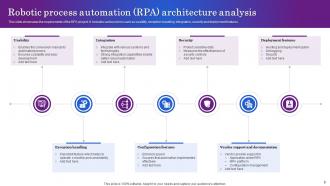
Honestly, the hardest parts are gonna be planning for scale, keeping everything secure, and getting your processes standardized. Design for growth right from the start - I learned this the hard way when we had to rebuild half our architecture later. Legacy systems are absolute pain when you're trying to integrate them with new automation. Exception handling gets messy fast once you have multiple bots running. Oh, and monitoring everything becomes its own headache. My advice? Map out your current processes first and figure out what actually needs automation versus just... better organization, I guess.
Honestly, the whole cloud vs on-premises thing completely flips how you build your RPA setup. Cloud's nice because it scales automatically and you don't have to babysit servers. But here's the catch - latency gets annoying when your bots keep hitting internal systems. On-premises is faster for that stuff, though now you're the IT department. Most places I've seen just do both anyway (hybrid's pretty much inevitable). My advice? Figure out where your important data actually sits first. Then put the bots wherever makes sense - either close to the data or in the cloud if you hate infrastructure management as much as I do.
So basically, AI turns your bots from dumb task-followers into actual problem-solvers. Regular RPA breaks the second an invoice format changes - super annoying. But with AI? Your bots can still pull the right data even when documents look different. They handle messy, unstructured stuff and make real decisions instead of just clicking predetermined steps. Machine learning makes them better over time, and computer vision lets them "see" screens like we do. Honestly, just look at where your current bots keep failing because of small changes - that's where you'll want to add AI first.
Track your bot uptime, speed, and error rates first - that's your technical foundation. Business metrics matter just as much though: actual cost savings, faster processing times, better accuracy. Here's what I learned the hard way - get solid baseline data before automating anything. You'll thank yourself later when executives ask for ROI numbers. Test if your bots handle demand spikes without crashing. Some architectures look great until Black Friday hits. Run quarterly health checks and build dashboards both IT and business folks can read. Don't make it rocket science.
Honestly, governance and standards first - trust me on this one. You don't want to deal with a chaotic mess of random bots later. Build everything modular and scalable from the start. Error handling and monitoring aren't optional either. Security needs to be built in, not slapped on after (seen way too many disasters there). Oh, and set up a center of excellence early or everyone will just do their own thing. Keep the logic simple so other people can actually figure out what you built. Sounds boring but it'll save you so much headache down the road.
Dude, RPA is a game-changer for compliance stuff. Everything gets logged automatically - what the bot did, when it happened, what data got touched. Your audit trails become bulletproof without any extra work. Bots follow the same rules every single time, which makes auditors happy (they're weird like that). No more worrying about someone having an off day and skipping steps. Your compliance team can pull reports instantly instead of drowning in spreadsheets for weeks. Just make sure you set up logging from the start - adding it later is a total pain.
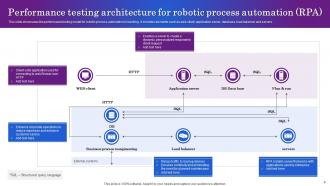
Track your execution times first - are bots actually faster than humans? Bot utilization rates matter too since you don't want expensive automation sitting idle. Error rates are honestly the big one though, broken bots are worse than no bots. Exception handling needs to work smoothly or you'll spend more time fixing than automating. During peak hours, check how many processes can run simultaneously without choking your system. Real-time dashboards help catch problems early. Oh and scalability planning - probably obvious but easy to overlook when everything's running fine.
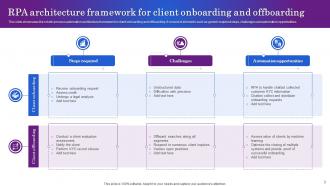
First thing - do a full assessment of what systems you've got running. Map out your APIs and data flows so you know where bots can actually plug in without breaking stuff. Pick an RPA platform that works well with your current setup (some vendors are honestly just terrible at this). Get your IT security folks involved early or they'll make your life hell later with access and compliance issues. Oh, and don't try to replace everything at once. Build your automation to work alongside existing processes. Start with small pilot projects to test things out before going big.
-
I want to thank SlideTeam for the work that they do, especially their customer service.
-
“One of the best experiences with SlideTeam for my presentation.Everything on time, communication is efficient and price is reasonable. All good in one place.”