


Location based services app pitch deck ppt template




Try Before you Buy Download Free Sample Product
 Impress Your
 Audience
 100%
100% Editable
 Save Hours
 of Time


Most modern applications use location based services LBS features to improve performance, user experience, and capability expansion. LBS applications provide assistance and information relevant to the user in a particular location. Here is a professionally designed pitch deck on the Location-Based Services App. To begin, the company can use slides of smartphone usage statistics, market statistics, key facts, and figures to present potential investors with critical stats about the location-based application and its usage. Slides such as the opportunity and solution we offer will assist the organization in addressing the market opportunity for location-based apps and product details they are introducing in the market. To support and provide proof for the new product or service, the company can use slides, namely target market, target customer group, underlying magic, location type and services, market growth projection, business model canvas, competitive landscape, why invest with us, managing team and go to market strategy. Lastly, the company can inform its potential investors about the funding needs through the investment ask slide. Customize this 100 percent editable and insightful pitch deck now.
People who downloaded this PowerPoint presentation also viewed the following :
Content of this Powerpoint Presentation
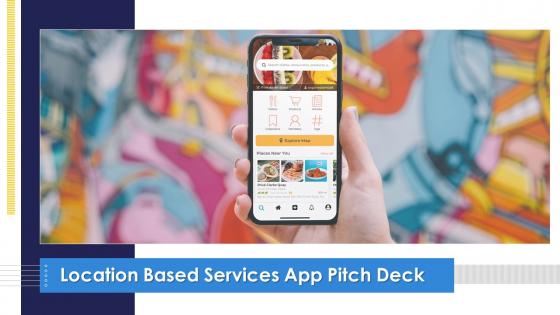
Slide 1: This slide introduces Location Based Services App Pitch Deck. State Your Company Name and begin.
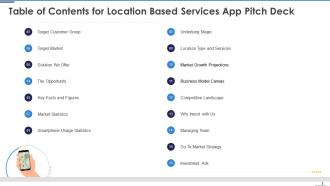
Slide 2: This slide shows Table of Content for the presentation.
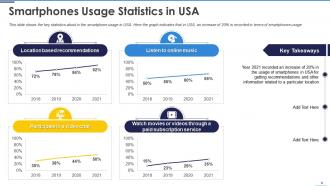
Slide 3: This slide displays the key statistics about in the smartphone usage in USA.
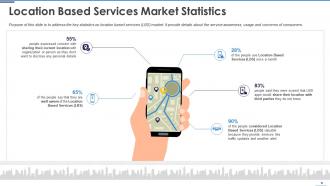
Slide 4: This slide presents key statistics on location based services (LBS) market.
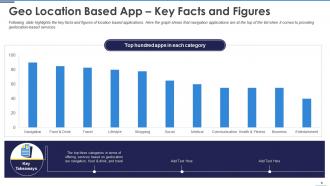
Slide 5: This slide represents key facts and figures of location based applications.
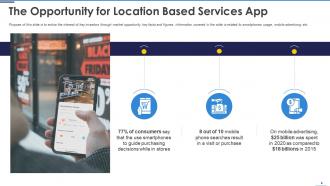
Slide 6: This slide is to entice the interest of key investors through market opportunity key facts and figures.
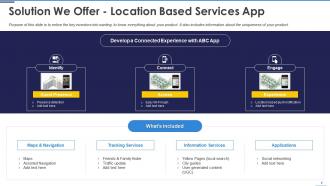
Slide 7: This slide showcases key investors into wanting to know everything about your product.
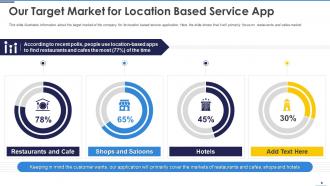
Slide 8: This slide shows Our Target Market for Location Based Service App.
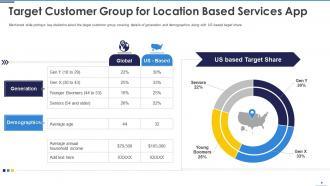
Slide 9: This slide presents Target Customer Group for Location Based Services App.
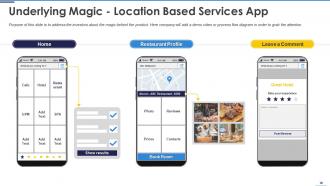
Slide 10: This slide address the investors about the magic behind the product.
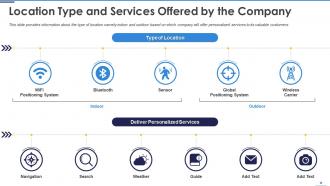
Slide 11: This slide displays Location Type and Services Offered by the Company.
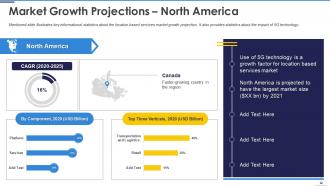
Slide 12: This slide illustrates key informational statistics about the location based services market growth projection.
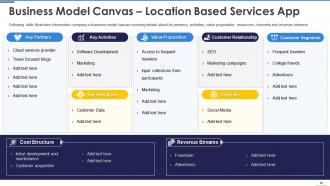
Slide 13: This slide represents company’s business model canvas covering details about its partners, activities, value proposition, etc.
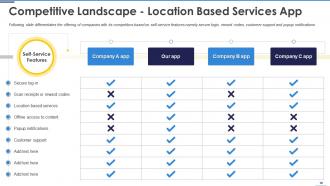
Slide 14: This slide showcases offering of companies with its competitors based on self-service features.
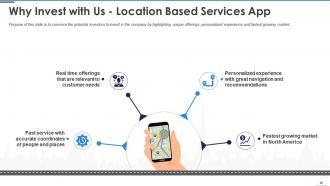
Slide 15: This slide convince the potential investors to invest in the company by highlighting unique offerings.
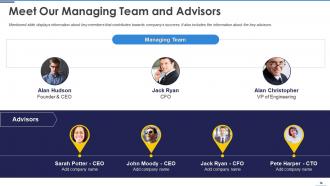
Slide 16: This slide shows information about key members that contributes towards company’s success.
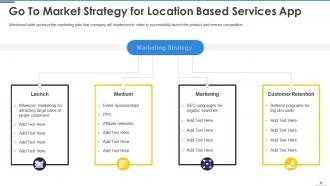
Slide 17: This slide presents Go To Market Strategy for Location Based Services App.
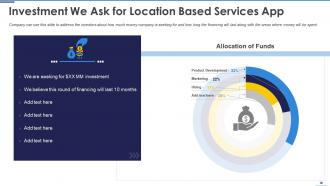
Slide 18: This slide displays Investment We Ask for Location Based Services App.
Slide 19: This slide represents Contact us for Location Based Services App.
Slide 20: This slide is titled as Additional Slides for moving forward.
Slide 21: This is About Us slide to show company specifications etc.
Slide 22: This is Our Mission slide with related imagery and text.
Slide 23: This is Our Team slide with names and designation.
Slide 24: This slide shows Post It Notes. Post your important notes here.
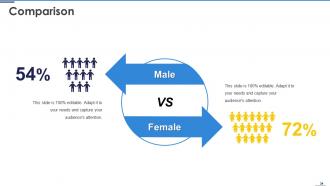
Slide 25: This is a Comparison slide to state comparison between commodities, entities etc.
Slide 26: This slide contains Puzzle with related icons and text.
Slide 27: This slide presents Roadmap with additional textboxes.
Slide 28: This is a Timeline slide. Show data related to time intervals here.
Slide 29: This slide provides 30 60 90 Days Plan with text boxes.
Slide 30: This slide is titled as Icon Slide.
Slide 31: This is a Thank You slide with address, contact numbers and email address.
Location based services app pitch deck ppt template with all 36 slides:
Use our Location Based Services App Pitch Deck Ppt Template to effectively help you save your valuable time. They are readymade to fit into any presentation structure.





FAQs for Location based services app pitch
So basically your phone is constantly pinging GPS satellites, Wi-Fi networks, and cell towers to figure out where you are. GPS works great outdoors, but indoors you'll need Wi-Fi triangulation or Bluetooth beacons. GIS systems handle all the mapping data and coordinate stuff - that's where the real magic happens honestly. Most developers just use APIs like Google Maps or Mapbox to build their apps rather than reinventing the wheel. Oh, and definitely figure out if you need indoor positioning first since that's way more complex than just outdoor GPS tracking.
So basically you set up GPS geofencing around your store (and honestly, your competitors too) to ping customers with timely offers. Like "20% off for the next hour" right when they're walking by - works pretty well. The foot traffic data is actually super useful for figuring out your real busy times and staffing accordingly. I'd also track patterns around competitor locations if you can swing it. Just don't be that annoying brand that spam-texts people. Make sure they opt in first, and the deals you're sending should actually be worth their time.
Honestly, location tracking is wild when you really think about it. Companies basically know your entire routine - where you work, sleep, grab coffee, everything. Plus there's always that risk of data breaches exposing all your spots. I'd go through your apps and turn off location for anything that doesn't actually need it. Like why does my weather app need "always" access? Switch stuff to "only while using" instead. Also check if location history is turned on in your settings - I totally forgot mine was running for years. Takes like 5 minutes but you'll feel way better about it.
Dude, location stuff is everywhere in apps now. GPS isn't just for maps anymore - food delivery, dating apps, even shopping all use where you are to show you better content. Users basically expect it at this point, which is kinda crazy when you think about it. Apps are getting super local with recommendations and doing AR things based on your exact spot. Honestly, if you're building something mobile, you should probably figure out how location makes your app stickier. It's not just a nice-to-have anymore.
Oh man, there's so much cool stuff you can steal ideas from! Pokemon Go was wild - they literally got couch potatoes walking miles to catch fake creatures. Uber's the obvious one, matching drivers based on where you actually are. Starbucks does this thing where their app knows when you're walking past and hits you with deals (kinda creepy but it works?). Foursquare built everything around check-ins and telling you what's good nearby. The trick isn't just slapping location onto your app though - figure out what actual problem it solves first.
Dude, location services are a game changer for retail. Your customers can get personalized deals right when they're walking past stuff they actually want. Indoor maps help people find things in huge stores - honestly, IKEA should've figured this out years ago. You can track foot traffic to see which areas work best, plus do contactless pickup when someone pulls up. Customers dig being able to check inventory before driving over, or finding your closest location. I'd start simple though - try geofenced notifications for your loyalty members first and see how it goes.
Google My Business is your best friend here - totally free and gets you on maps right away. Claim that listing and throw some good photos up there. Keep those hours current too, seriously. You could try geofencing apps that ping people when they're close by, but don't go crazy with it or everyone just turns notifications off. Instagram and Facebook have location stuff you should definitely use. Just make sure your address matches everywhere - Google hates inconsistency. Oh, and bug your customers to check in and leave reviews with location tags. That actually helps your local ranking way more than you'd think.
So GPS works by talking to satellites to figure out where you are - more satellites means better accuracy. But honestly, it's pretty finicky. Buildings mess with the signal, weather can throw it off, and don't even get me started on how wonky it gets in parking garages or indoors. Your phone's gotten smarter though - it'll use cell towers and WiFi data to help fill in when GPS craps out. Just keep in mind there's always gonna be like a 3-10 meter error margin, so if you're building something that needs location data, plan for that wiggle room.
Location services are a game changer for real-time marketing - basically you can target people based on exactly where they are right now. Send a push notification when someone walks by your store. Show different ads to folks in different cities. Or promote lunch deals only to users within like 5 miles during busy hours. Think of it as having a salesperson who magically knows when prospects are nearby (which honestly sounds a bit creepy when I put it that way). The trick is making your location triggers actually helpful instead of stalker-ish, so always give customers something genuinely useful.
Ugh, data format mismatches are gonna be your worst nightmare. Your CRM definitely wasn't designed for real-time location stuff, so you'll need some middleware to make everything talk to each other. Privacy compliance is a whole mess too - legal's gonna freak out about storing location data with customer info. Too many API calls will kill your performance, plus mobile batteries will drain like crazy. Oh and start small! Run a pilot with just your sales team's locations first, then worry about customer geofencing later.
Location data is honestly pretty powerful for figuring out customer patterns and finding new opportunities. I'd start by tracking where people are coming from - helps you decide on new store spots or delivery areas. Peak traffic analysis is gold for staffing right, which cuts down wait times and saves money. You can also spot gaps where competitors aren't serving areas with clear demand. The really cool stuff happens when you mix in demographics and what people actually buy. But don't go crazy with it at first - pick one specific question like "should we open another location?" and let the data answer that. Way easier than trying to analyze everything at once.
Honestly, just be super upfront about what location stuff you're grabbing and why you need it. People hate when companies are sketchy about this - like burying permissions in those massive terms nobody ever reads lol. Let users bail out or wipe their data easily whenever. Only grab what you actually need too, not every single data point you can get your hands on. Oh and definitely don't hide if you're sharing info with other companies. I'd start with auditing what you're doing now. You might be surprised how much unnecessary data you're hoarding.
Dude, cultural stuff totally changes how people use location apps. Germany's super paranoid about privacy so adoption is way slower there. Meanwhile collectivist cultures? They're all about sharing where they are with friends. Religious factors play in too - some places won't use apps that might expose sensitive spots like their mosque or whatever. Trust levels for tech companies are all over the map, which honestly makes total sense given how different regulations are. If you're going global, definitely dig into each market's privacy hangups and social weird quirks first.
Dude, location stuff is about to get wild. Indoor mapping is finally happening, plus AR integration everywhere. Privacy's becoming huge though - expect way more processing right on your phone instead of sending everything to the cloud. Smart cities will ping you hyper-local alerts, like "parking spot 2 blocks north" or air quality warnings for your exact street. Your devices will start auto-adjusting based on where you are, which is honestly pretty cool. The scary part? Apps will predict where you're going before you even decide. Definitely think about how this affects your projects, especially the privacy angle.
Dude, definitely keep location services on. When you call 911, it automatically sends your GPS coordinates to dispatch - super helpful if you're in an accident somewhere you don't recognize or having a medical emergency. Honestly, I never really thought about it until my cousin got in a wreck on some back road and couldn't tell them where he was. Your phone also gets those emergency alerts for tornadoes and stuff based on where you are. Plus they use it to coordinate evacuations during disasters. I know people worry about privacy, but this one's worth it - could literally save your life.
-
Really like the color and design of the presentation.
-
Enough space for editing and adding your own content.