


Strategic Email Marketing Plan For Customer Engagement Powerpoint Presentation Slides




Try Before you Buy Download Free Sample Product
 Impress Your
 Audience
 100%
100% Editable
 Save Hours
 of Time


Email marketing is an effective form of direct marketing. Its primary goal is to enhance customer retention and cultivate a loyal customer base. This comprehensive Strategic Email Marketing Plan for Customer Engagement PowerPoint presentation begins with an overview of email marketing statistics, industry best practices, emerging trends, and their application across different sectors. Additionally, The Email marketing strategies PPT module provides a detailed plan for developing an email marketing campaign. It includes setting clear goals, identifying the target audience, and implementing an actionable plan for promotional emails. Moreover, the Digital Marketing presentation outlines an email marketing team structure with defined roles, responsibilities, and a training plan for skill improvement. It also covers budget planning for various campaigns and tools chosen. Lastly, the Promotional emails PPT module showcases the potential impact of implementing an email promotional plan on overall business performance. Download our fully editable and customizable strategic marketing ppt , compatible with Google Slides and achieve tremendous success in engaging and converting customers.
People who downloaded this PowerPoint presentation also viewed the following :
Content of this Powerpoint Presentation
Slide 1: This slide introduces Strategic Email Marketing Plan for Customers Engagement. State your company name and begin.
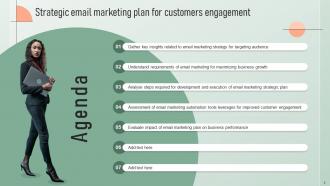
Slide 2: This is an Agenda slide. State your agendas here.
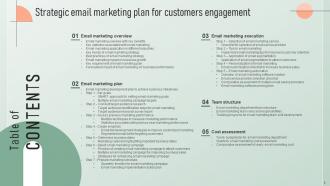
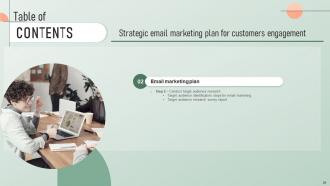
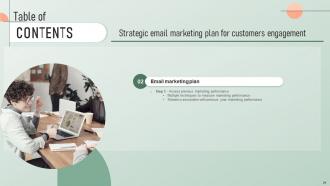
Slide 3: This slide shows Table of Content for the presentation.
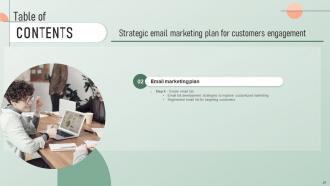
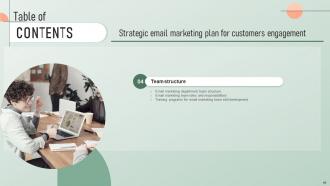
Slide 4: This slide also shows Table of Content for the presentation.
Slide 5: This slide shows title for topics that are to be covered next in the template.
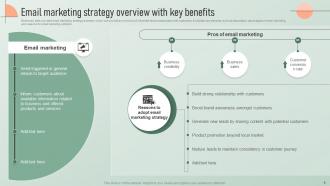
Slide 6: This slide provides email marketing strategy summary which can provide an overview of influential factors associated with customers.
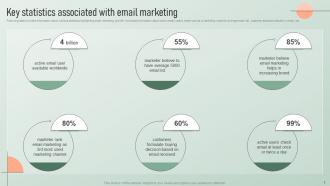
Slide 7: This slide presents information about various statistics highlighting email marketing growth.
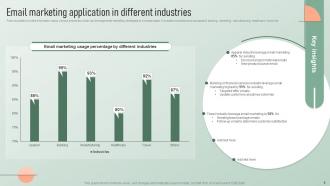
Slide 8: This slide describes information about various industries which can leverage email marketing strategies to increase sales.
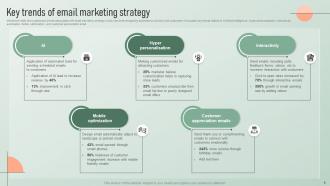
Slide 9: This slide showcases key trends associates with email marketing strategy which can be leveraged by business to connect with customers.
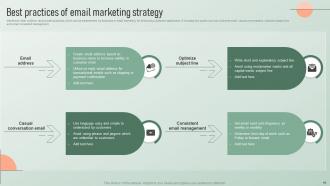
Slide 10: This slide outlines various best practices which can be implemented by business in email marketing for enhancing customer satisfaction.
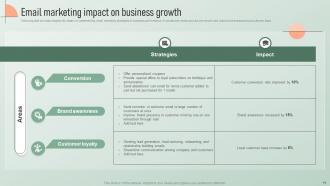
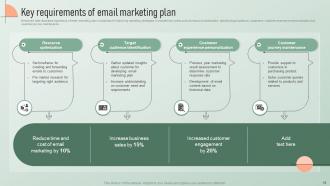
Slide 11: This slide provides insights into impact on implementing email marketing strategies on business performance.
Slide 12: This slide illustrates importance of email marketing plan in business for improving marketing strategies.
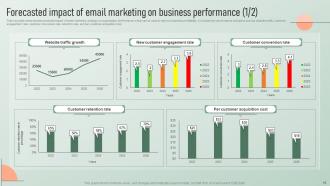
Slide 13: This slide demonstrates predicted impact of email marketing strategy on organisation performance.
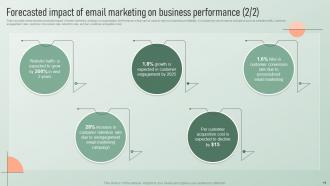
Slide 14: This slide also demonstrates predicted impact of email marketing strategy on organisation performance.
Slide 15: This slide shows title for topics that are to be covered next in the template.
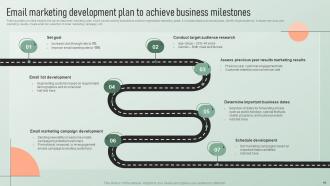
Slide 16: This slide provides insights into seven step email marketing plan which can be used by business to achieve organisation marketing goals.
Slide 17: This slide shows title for topics that are to be covered next in the template.
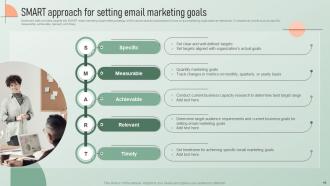
Slide 18: This slide provides insights into SMART email marketing target setting strategy.
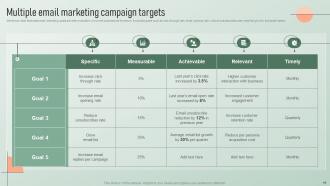
Slide 19: This slide illustrates email marketing goals set after evaluation of current business performance.
Slide 20: This slide shows title for topics that are to be covered next in the template.
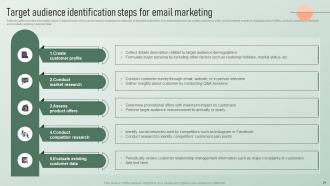
Slide 21: This slide provides information about 5 step process which can be used by business for selection of targeted customers.
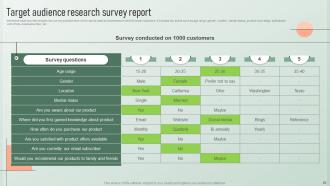
Slide 22: This slide presents insights into survey questionnaire which can be used by businesses to identify target customers.
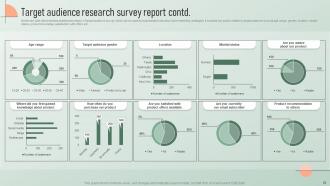
Slide 23: This slide demonstrates statistical summary of target audience survey which can be used by businesses to develop future marketing strategies.
Slide 24: This slide shows title for topics that are to be covered next in the template.
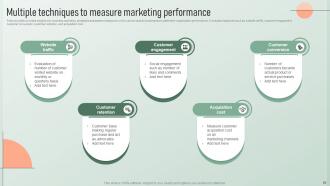
Slide 25: This slide provides insights into business marketing strategies assessment measures.
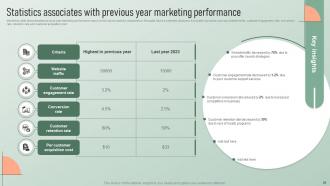
Slide 26: This slide demonstrates previous year marketing performance report.
Slide 27: This slide shows title for topics that are to be covered next in the template.
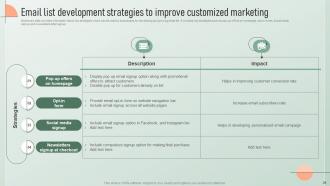
Slide 28: This slide provides information about key strategies which can be used by businesses for developing and growing email list.
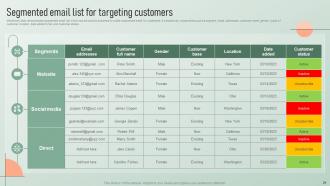
Slide 29: This slide demonstrates segmented email list which can be used by business to create customized email for customers.
Slide 30: This slide shows title for topics that are to be covered next in the template.
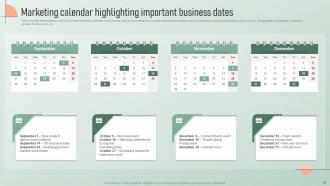
Slide 31: This slide demonstrates overview of email marketing calendar which can be used by businesses to increase customer subscription rate.
Slide 32: This slide shows title for topics that are to be covered next in the template.
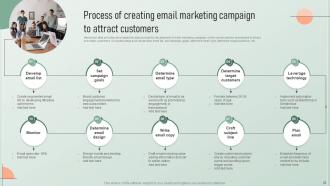
Slide 33: This slide provides ten step process for development of email marketing campaign.
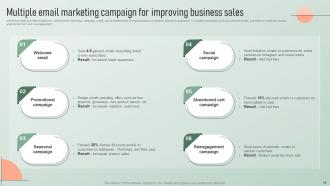
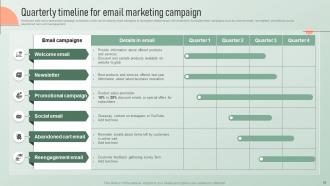
Slide 34: This slide presents insights into various email marketing campaign.
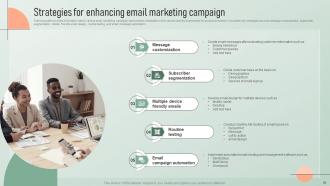
Slide 35: This slide showcases information about various email marketing campaign improvement strategies.
Slide 36: This slide shows title for topics that are to be covered next in the template.
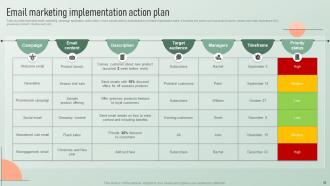
Slide 37: This slide showcases email campaign schedules which can be used by email managers to strengthen relationships with customers.
Slide 38: This slide illustrates email marketing campaign application action plans which can be used by businesses to increase organisation sales.
Slide 39: This slide shows title for topics that are to be covered next in the template.
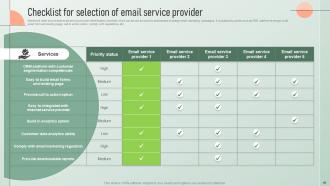
Slide 40: This slide presents best email service provider identification checklist which can be can be used by businesses to design email marketing campaigns.
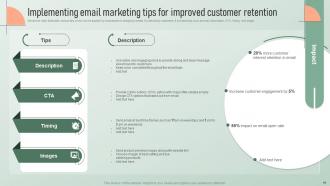
Slide 41: This slide illustrates various tips which can be applied by businesses in designing emails for attracting customers.
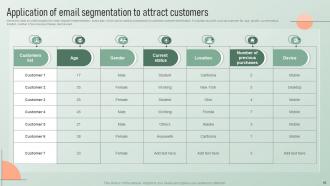
Slide 42: This slide provides insights into email segment implementation action plan which can be used by businesses for potential customer identification.
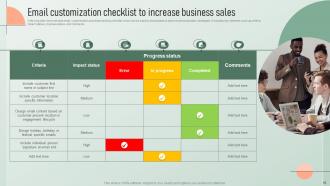
Slide 43: This slide demonstrates email customization practices tracking checklist which can be used by businesses to improve personalization strategies.
Slide 44: This slide shows title for topics that are to be covered next in the template.
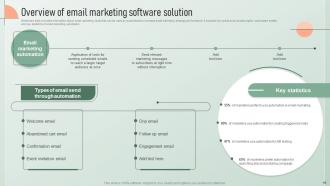
Slide 45: This slide provides information about email marketing tools that can be used by businesses.
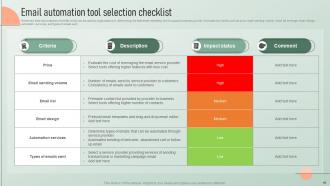
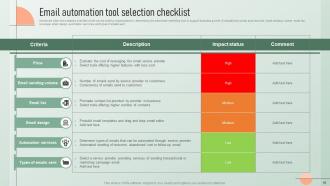
Slide 46: This slide showcases a checklist which can be used by organizations in determining the best email marketing tool to support business growth.
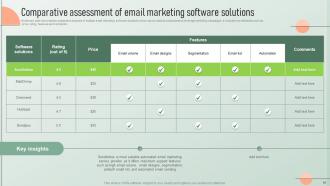
Slide 47: This slide presents comparative analysis of multiple email marketing software solutions.
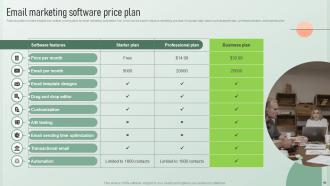
Slide 48: This slide provides insights into multiple pricing plans for email marketing automation tool which can be used to improve marketing process.
Slide 49: This slide shows title for topics that are to be covered next in the template.
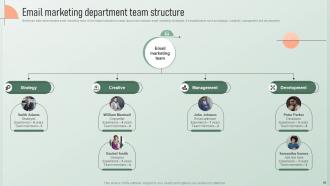
Slide 50: This slide demonstrates email marketing team which helps business to create, launch and optimize email marketing strategies.
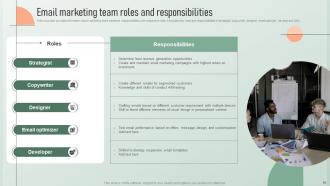
Slide 51: This slide presents information about marketing team members responsibilities with respective roles.
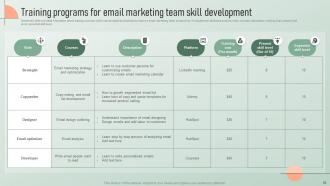
Slide 52: This slide provides information about training courses which can be opted by business to improve email marketing team productivity.
Slide 53: This slide shows title for topics that are to be covered next in the template.
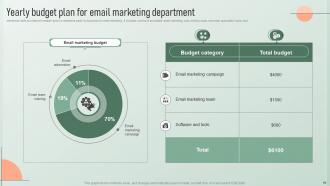
Slide 54: This slide provides information about investments made by business for email marketing.
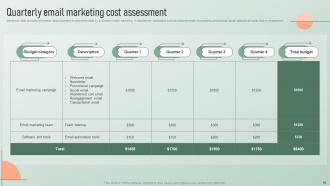
Slide 55: This slide presents information about quarterly investments made by business in email marketing.
Slide 56: This slide showcases a checklist which can be used by organizations in determining the best email marketing tool to support business growth.
Slide 57: This slide shows title for topics that are to be covered next in the template.
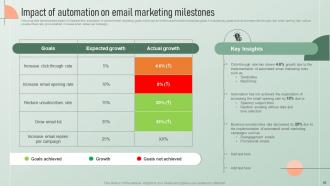
Slide 58: This slide demonstrates impact of implementing automation to achieve email marketing goals.
Slide 59: This slide shows title for topics that are to be covered next in the template.
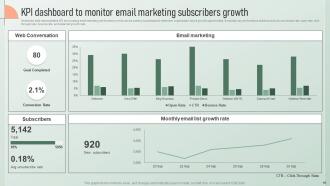
Slide 60: This slide demonstrates KPI showcasing email marketing performance.
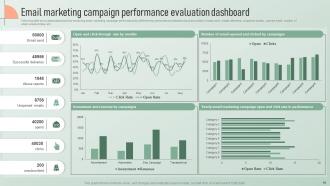
Slide 61: This slide showcases dashboard for monitoring email marketing campaign performance by different key performance indicators.
Slide 62: This slide shows title for topics that are to be covered next in the template.
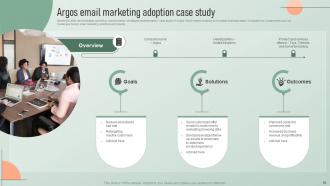
Slide 63: This slide demonstrates marketing communication strategies implementation case study of Argos.
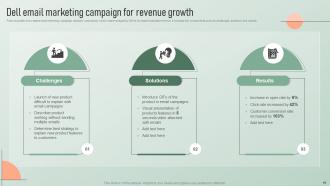
Slide 64: This slide showcases email marketing campaign adoption case study which was leveraged by Dell to increase business revenue.
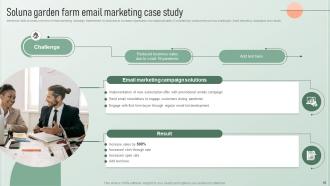
Slide 65: This slide provides overview of email marketing campaign implemented by business to increase organisation non seasonal sales.
Slide 66: This slide shows all the icons included in the presentation.
Slide 67: This slide is titled as Additional Slides for moving forward.
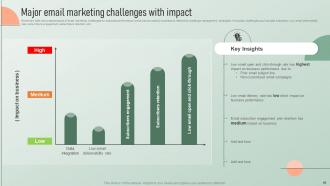
Slide 68: This slide showcases impact of email marketing challenges on business performance.
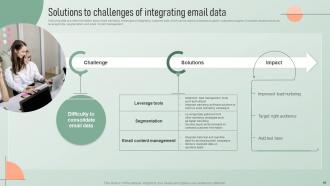
Slide 69: This slide provides information about email marketing challenges of integrating customer data.
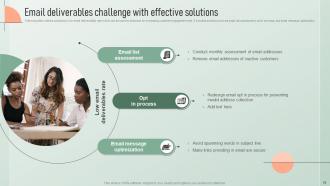
Slide 70: This slide outlines solutions to low email deliverability rate.
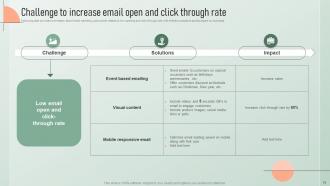
Slide 71: This slide provides information about email marketing pain points related to low opening and click through rate with effective solutions and its impact on business.
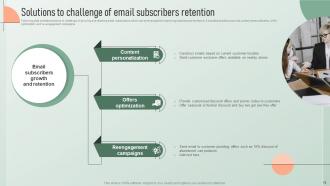
Slide 72: This slide exhibits solutions to challenge of growing and retaining email subscribers which can be leveraged for improving business performance.
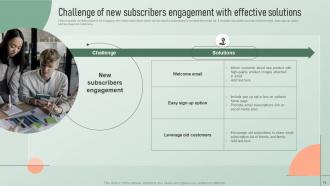
Slide 73: This slide presents solutions for engaging new email subscribers which can be used by businesses to increase their email list.
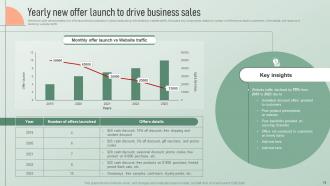
Slide 74: This slide demonstrates new offer launched by business on yearly basis along with declining website traffic.
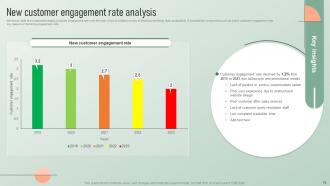
Slide 75: This slide showcases decreasing customer engagement rate over the year which provided overview of declining marketing team productivity.
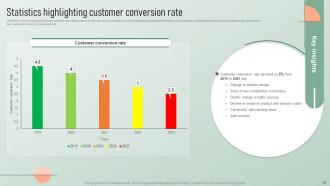
Slide 76: This slide presents reducing customer conversion rate over the year which provided overview of declining business performance.
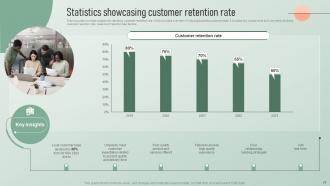
Slide 77: This slide provides insights into declining customer retention rate which provides overview of reducing business customer base.
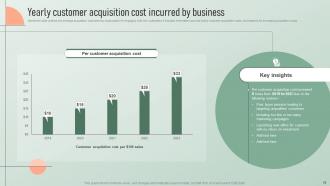
Slide 78: This slide outlines the average acquisition cost spent by organization for engaging with new customers.
Slide 79: This is a Thank You slide with address, contact numbers and email address.
Strategic Email Marketing Plan For Customer Engagement Powerpoint Presentation Slides with all 84 slides:
Use our Strategic Email Marketing Plan For Customer Engagement Powerpoint Presentation Slides to effectively help you save your valuable time. They are readymade to fit into any presentation structure.






FAQs for Strategic Email Marketing Plan For Customer Engagement
Focus on segmenting your audience and crafting subject lines that don't suck. Content needs to actually help people - nobody wants another sales pitch disguised as "value." Mobile optimization is non-negotiable since everyone's glued to their phones anyway. Timing matters too. I once sent emails at 6am on Sunday... yeah, don't do that. A/B test your subject lines and send times religiously. Clean up your email list regularly or you'll tank your deliverability. Oh, and make your CTAs crystal clear - tell people exactly what you want them to do. Pick one thing to fix first instead of trying to overhaul everything at once.
So basically, you want to send people stuff they actually care about instead of just blasting everyone with the same boring email. Like, why would someone get dog food ads if they own cats? Makes no sense. Personalized subject lines boost open rates by 26% - pretty solid number. You can split your list by customer behavior, what they've bought before, or just basic demographics. I'd start simple though, maybe just 2-3 groups based on who opens your emails vs who doesn't. Then you can get fancier with targeting once you figure out what works. It's honestly one of the easiest ways to see better results without doing a ton of extra work.
Okay so definitely track your open rates, click-through rates, and conversions - those are like the big three. Opens tell you if people actually care about your subject lines. Click-through shows whether your content's any good. Conversions are obviously the money maker though, that's what I'd obsess over most. Don't ignore unsubscribe rates either - watching people bail sucks but you need to know. Oh and bounce rates mess with your deliverability which is annoying. List growth is good to watch too. Honestly just check everything weekly in whatever platform you're using so you can catch problems before they get worse.
Honestly, A/B testing changed everything for me - it's way better than just winging it and hoping for the best. Pick one thing to test (subject lines, send times, whatever) and split your list to see what actually gets results. I used to be obsessed with "clever" subject lines until the data totally humbled me lol. The trick is only changing one variable at a time, otherwise you won't know what worked. Once you find a winner, roll it out to everyone else. Even something super basic like testing two different subject lines can bump your performance up 20-30%. Worth it!
Keep them short - like under 50 characters. Nobody's got time for novels in their inbox. I always personalize mine and make it super clear what's actually inside. You want people curious but not annoyed by those cringey "You'll never guess!" subject lines. Use action words, throw in numbers when they make sense. Urgency can work but don't overdo it or you'll sound desperate. Stay away from ALL CAPS - spam filters hate that stuff. Honestly? Just A/B test everything. Track which styles get opened and do more of those. Your audience might be totally different from mine anyway.
Skip buying email lists - total waste of money and you'll just annoy people. Focus on getting real signups with lead magnets or useful content behind email gates. Get clear permission and tell people what they're signing up for. Here's the tedious part nobody talks about: clean your list every few months. Boot the dead emails and people who never open anything. Also segment based on what people actually do - way better than blasting everyone the same stuff. Oh, and audit your current signup flow first. See where you can add more value to attract quality subscribers instead of just chasing numbers.
Dude, focus on triggered emails first - they're crushing it with like 4-5x better returns than regular newsletters. Your welcome series and abandoned cart stuff? Pure gold since people are already thinking about your brand. Post-purchase follow-ups work crazy well too. Honestly, I'd rather get ten targeted emails than one generic blast that screams "we sent this to 50,000 people." Behavioral segmentation is where it's at. Set up automations for those key moments in the customer journey and you'll see your conversions jump. Those spray-and-pray mass emails just annoy everyone anyway.
Dude, automation tools are a lifesaver - they handle all that tedious stuff like welcome emails and cart reminders without you having to click send every time. Once you set up triggers based on what people do, it just runs itself. Welcome someone new? Done. Someone ditches their cart? Reminder sent. The segmentation thing is clutch too since different groups get different messages. Honestly, doing email marketing manually sounds like actual torture at this point. Oh, and they work while you sleep which is nice. Just start with a basic welcome series first though.
Dude, you HAVE to optimize for mobile - like 70% of people are reading emails on their phones these days. Make your subject lines shorter and those CTA buttons way bigger. I totally screwed this up once and our click rates died because the buttons were microscopic on mobile, whoops. Your layout needs to actually work on small screens too. Oh and images should load quickly and look good on those fancy retina displays. Honestly? Just check your emails on your actual phone before sending them out. Don't trust the desktop preview - it'll lie to you every time.
Stories work best when they're woven throughout your sequence, not just randomly thrown in. Customer success stories are pure gold for building trust. Follow the classic arc: problem, struggle, solution, transformation. Personal anecdotes hit different though - especially in welcome emails or behind-the-scenes stuff. I honestly love emails that feel like texting a friend about something wild that happened. Keep stories short but emotional. Next time, try opening with something like "Sarah told me something last week that totally changed how I think about..." Trust me, your open rates will thank you. Just don't make every email a novel.
Okay so CAN-SPAM is the main thing you gotta worry about in the US. Include your actual business address, don't BS people with sketchy subject lines, and always have an unsubscribe link that actually works. GDPR's way more strict if you're hitting up anyone in Europe - you need real consent, not just some checkbox they accidentally clicked. Handle unsubscribe requests fast, like within 10 days max. Honestly, some industries have their own weird rules on top of this stuff. But the basics? Keep your list clean, don't be shady about who you are, and make opting out brain-dead simple.
Dude, visuals can seriously bump up your email engagement by like 40-60%. Hero images work great, product shots too - basically anything that makes people actually pause instead of just deleting. I'm obsessed with GIFs lately but don't make your email look like a rave, you know? Most people are reading on mobile so keep your images optimized for that. Alt text is clutch for accessibility. File sizes under 1MB or they'll load forever. Your CTA button needs to pop visually - test different spots to see what gets clicks. Oh and honestly? Sometimes simple graphics work better than fancy ones.
Start with a "we miss you" campaign - offer something actually valuable like exclusive content or a decent discount. Segment by how long they've been inactive so you can adjust the messaging. Honestly? Win-back emails work way better when you just acknowledge the awkward silence. Send 2-3 emails about a week apart, each with different angles. After that, if they're still radio silent, make it super easy for them to unsubscribe or update preferences. Trust me, a smaller engaged list beats having a bunch of dead emails tanking your deliverability rates.
Honestly, seasonal trends are huge for email marketing. People's mindsets totally shift throughout the year - January's all about wellness and fresh starts, while November everyone's hunting for deals. Your content needs to match what they're already thinking about. December open rates can be absolutely insane btw. Summer timing hits different too since people aren't glued to their phones as much. I'd start planning campaigns like 6-8 weeks out so you're not stressed later. Subject lines, images, even how often you send - it all should feel seasonal. Black Friday prep in October, not November!
So email marketing is getting pretty wild lately. AI personalization goes way beyond just "Hey [First Name]" - it's analyzing how people actually behave and serving up super targeted content. Interactive stuff is everywhere now too... polls, carousels, videos right in the email. Dark mode finally caught on (seriously, what took so long?). Privacy's the big thing though since cookies are basically dead. Brands are using predictive analytics to figure out perfect send times. Oh, and subject lines that don't suck. My take? Try adding some interactive elements to your next campaign and watch your engagement numbers jump.
-
I can always count on your designs for my professional needs. I believe I found a one-stop-shop for PPTs.
-
They had the topic I was looking for in a readymade presentation…helped me meet my deadline.