


Structure Of Writing A Business Letter Training Ppt




Try Before you Buy Download Free Sample Product
 Impress Your
 Audience
 100%
100% Editable
 Save Hours
 of Time


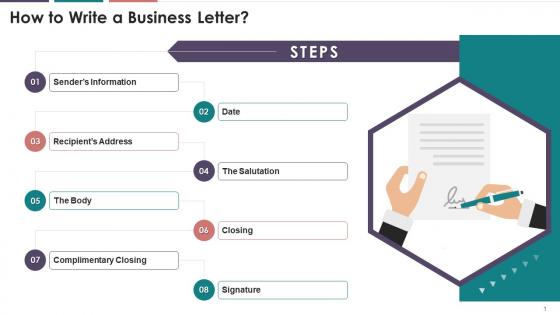
This slide illustrates information regarding the format of writing a business letter. It mentions the steps to write a business letter. The steps are writing senders information, date, recipients address, the salutation, body, closing, complimentary closing, and signature.
People who downloaded this PowerPoint presentation also viewed the following :
Structure Of Writing A Business Letter Training Ppt with all 17 slides:
Use our Structure Of Writing A Business Letter Training Ppt to effectively help you save your valuable time. They are readymade to fit into any presentation structure.






FAQs for Structure Of Writing A Business
So you need the basics: your address up top, then the date, then their address. After that comes your greeting - "Dear Mr./Ms. [Name]" works best. Honestly, "To Whom It May Concern" makes you sound ancient. Get straight to the point in your first paragraph - don't make them guess why you're writing. Keep your body paragraphs short and clear. I always end with "Sincerely" or "Best regards," then leave some white space for your actual signature above your typed name. Professional but not robotic, you know?
Honestly, tone is everything when you're trying to get people to help you out. Sound too stiff and formal? You'll come off like a robot nobody wants to deal with. Too casual though and they might not take you seriously. I always try to hit that middle ground - warm but still respectful, you know? Also, think about who you're actually writing to. Your CEO gets a different vibe than that client you've worked with forever. Here's what actually works: read your email out loud before hitting send. If it sounds weird coming out of your mouth, rewrite it.
Honestly, most people mess up the tone - either way too casual or weirdly formal. Lead with your main point right away instead of burying it halfway through (I swear everyone does this). Typos in names or company titles? Total cringe. Skip the corporate speak that makes readers' eyes glaze over. Oh, and definitely read it out loud before hitting send - you'll catch all the weird phrasing that seemed fine in your head but sounds clunky when spoken.
Basically, email business letters ditch all that old-school formatting - no addresses or dates since the email header covers that. Jump right into a solid subject line that actually says something useful. Keep the same structure though: intro, main stuff, wrap-up. But here's the thing - people's attention spans are shot, so be way more concise than you would on paper. You can loosen up the tone a bit too while staying professional. Skip the whole "Sincerely" thing and just use your email signature instead. Oh, and seriously make sure your subject line isn't vague garbage like "Question" or whatever.
So basically, branding in business letters is just letting your company's vibe come through on paper. Use your letterhead, stick with brand colors and fonts - the usual stuff. Your tone should match what people expect from you. A tech startup can be super casual while law firms... well, they're gonna sound like law firms, right? Keep your writing style consistent with everything else you do. Oh, and don't underestimate sign-offs! They matter more than you'd think. Definitely save a template though. Starting fresh every single time is such a pain.
Dude, formatting is huge for business letters! Break up walls of text with bullet points and white space - nobody's reading a dense paragraph these days. Bold the important stuff so it pops. Headers and numbered sections help too. I actually love using simple tables when I need to organize complex info. Charts work great if you're dealing with numbers. The whole point is making it scannable since executives are crazy busy. Clean formatting makes you look professional and honestly? It's way more likely they'll actually read what you wrote and do something about it.
Okay so for business letters, stick with "Dear" plus their title and last name - "Dear Ms. Johnson" or whatever. Don't know their gender? Just use the full name like "Dear Alex Thompson." Honestly, "To Whom It May Concern" makes me die a little inside because it's so generic, but you can still use it if you're really stuck. Multiple people? Go with "Dear Team" or "Dear Hiring Committee." Pro tip though - spend like two minutes on LinkedIn stalking to find the actual person's name. Shows you're not just mass-emailing everyone, you know?
Oh man, this is so important! Different cultures have totally different expectations for business letters. Japanese companies want super formal, indirect language - none of that American casual stuff. Germans? Complete opposite - they want you direct and to the point. Meanwhile Americans do this weird friendly-but-professional thing that honestly took me forever to figure out. Some places expect you to spend paragraphs on relationship building before getting to business (which feels so awkward at first). Research the country's norms beforehand or just ask someone local. Your tone, formality level, even how you sign off - it all matters way more than you'd think.
Lead with your main point right away - don't make people hunt for it. When you've got multiple things to cover, use bullets or numbered lists. One idea per paragraph, that's it. Here's what I do: write everything first, then cut out all the fluff (seriously, there's always way more than you think). Go for active voice instead of passive, and pick strong verbs over boring ones like "use" or "make." Skip those long-winded intros too. People are busy, and being direct actually makes you sound more confident anyway.
Put your call to action right at the end, just before you sign off - that's where people look for it anyway. Get specific about what you want and when. Skip the wimpy "please consider our proposal" stuff. Try something like "confirm your interest by Friday so we can set up that demo next week." Make it pop as its own sentence or paragraph. Here's the thing - if you bury it in a chunk of text, they'll totally miss it. One clear action works best. Throw in a deadline if it makes sense, and honestly? Make responding stupidly easy for them.
Dude, watch out for making promises you can't actually follow through on - even casual business letters can become binding contracts. Don't trash talk competitors or share confidential stuff unless you've got proper NDAs sorted. HR letters are especially tricky since they always seem to resurface later as evidence (learned that one the hard way). Honestly? I've watched so many companies get burned by letters that seemed totally harmless when they sent them. If it involves money, commitments, or firing someone, just get legal to eyeball it first. Trust me on this one.
Oh man, I learned this the hard way once! First thing - always triple-check who you're sending to before hitting send. Mark stuff "confidential" when needed, but honestly the subject line is where people mess up most. Don't put specifics there since it shows up in previews. Password-protect anything super sensitive, or better yet, just call them instead. Sometimes I wonder if we put too much in writing anyway? But yeah, my rule now is: would I be screwed if my boss's boss saw this forwarded around? Usually keeps me out of trouble.
Just cut to the chase right away - "I'm following up on our meeting" or "Need your help with Johnson project." Skip all that "hope this finds you well" stuff unless you actually know them. Honestly, people way overthink the closing part. "Let me know if you have questions" works fine. Or if you need something back: "Looking forward to hearing from you by Friday." Then just do "Best regards" or whatever. The main thing? Be clear about next steps. Don't make them guess what you want. I learned this the hard way after sending way too many emails that just... hung there with no direction.
Honestly? Most people just wing it until their templates feel super awkward. I'd say twice a year works - maybe when you do reviews or budget stuff so you don't forget. Contact info changes are obvious update triggers. Same with branding shifts or when your writing style evolves (happens more than you'd think). New compliance rules too, unfortunately. Oh, and keep a little running note of fixes throughout the year instead of trying to remember everything at once. Set that calendar reminder now or you'll be one of those people using a template from 2019.
Oh dude, definitely check out the templates in Word or Google Docs first - they'll handle all the annoying formatting stuff. Grammarly is honestly a lifesaver for catching weird typos and making sure you don't sound too formal or whatever. If you're sending tons of letters, Word's mail merge thing is pretty sweet for personalizing them without going insane. Mailchimp works too but that's more for email campaigns I think? Anyway, start with Word templates and grab the Grammarly browser extension. Makes everything so much faster.
-
Every time I ask for something out-of-the-box from them and they never fail in delivering that. No words for their excellence!
-
You know what? I'm so glad I opted for this PPT design. It has been a total game-changer for me and my presentations. Thank you!