

System landscape overview ppt example




Try Before you Buy Download Free Sample Product
 Impress Your
 Audience
 100%
100% Editable
 Save Hours
 of Time


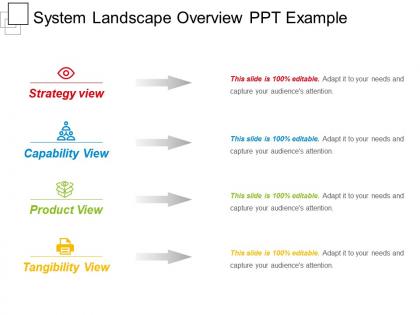
Highlight system landscape and architecture for your business with our one of the most innovative system landscape overview PPT example. You can display all the system development related activities with this intelligently designed SAP landscape architecture diagram. PPT is useful for testing clients. They can use it for testing purpose of all the developments before transporting it to the production environment. Demonstrate the overview of techniques used for the arrangement of servers and system landscape optimization e.g. development servers, production server or quality assurance server. You can also display the architecture of an enterprise system i.e. strategy view, capability view, product view and tangibility view with this sustainable landscape PPT diagram. Design is just perfect for system landscape optimization related presentations. Display the summary of system landscape in a unique way to your clients, investors, shareholders or internal team members. So, don’t wait for it, download this sustainable landscape PPT diagram and create unique presentations to meet your business requirements. Boost your image in the eyes of your colleagues with our System Landscape Overview Ppt Example. Improve existing impressions.
People who downloaded this PowerPoint presentation also viewed the following :
System landscape overview ppt example with all 5 slides:
Delve on intelligent banking with our System Landscape Overview Ppt Example. Bring out the importance of joint accounts.




FAQs for System landscape
You'll want to map out all your apps and systems first, showing how data flows between them. Include your infrastructure stuff too - databases, middleware, cloud services, all that. Integration points and dependencies are crucial. Security boundaries matter since those always become talking points later (trust me on this one). User access points should be visible as well. The diagram needs to show where info moves through your environment and highlight potential bottlenecks or failure spots. Oh, and make the text big enough to actually read - I've wasted hours staring at tiny, cluttered diagrams that were basically useless.
Honestly, mapping out your systems is a game-changer for project planning. You'll spot dependencies before they bite you in the ass - no more "wait, this connects to WHAT?" moments three weeks in. Visibility into all your connections means better timeline estimates too. I learned this the hard way on a project where we completely forgot about some ancient billing integration. Bottlenecks become obvious early. Even a messy diagram beats flying blind. Start simple - just sketch out what talks to what. Your future self will thank you when everything doesn't implode mid-project.
So integration points are like the wiring between all your different systems - APIs, databases, file transfers, message queues, you name it. Without knowing how everything connects, you're basically guessing when stuff breaks (and trust me, it will break). They're super useful for figuring out what might get screwed up when you change something. I'd start with your most critical connections first - the ones that'd cause real chaos if they went down. Then just work your way out from there. It's honestly one of those boring documentation tasks that actually saves your ass later.
System landscape overviews are game-changers for spotting where you're wasting money on duplicate systems. Most companies don't realize how much overlap they have until they map it out visually. You can see integration opportunities, figure out which systems actually add value, and ditch the ones that don't. When you're planning big moves like mergers or digital transformations, you'll know what you're working with instead of guessing. I'd audit your landscape quarterly - sounds boring but it really helps prioritize your tech roadmap. Way better than making decisions based on hunches.
Look, think of it as your safety net - you map out how all your systems talk to each other, then boom, the risky stuff jumps out at you. Those ancient servers that could die tomorrow? You'll spot them. Dependencies that'll domino effect if something breaks? Yep, those too. Security holes become obvious when you see the full picture. Honestly, I always thought compliance audits were a nightmare until I started doing this. Map your most critical business stuff first - like the processes that would actually hurt if they went down - then follow those threads through your tech stack. Single points of failure become super clear.
So cloud computing basically turns your whole setup upside down. You go from having these clunky physical servers sitting around to resources that actually scale when you need them. Your apps get spread across different services, which honestly took me a while to wrap my head around. APIs become super important for connecting everything together. The tricky part? Your data's flowing between different locations now instead of just sitting in one place. I'd start by just listing what you've got locally vs what could realistically move to the cloud first.
Draw up a high-level architecture diagram first - show how everything connects and where data moves. Document what each system does, the tech stack, main integrations. Trust me, I've watched teams get burned when someone quits and nobody knows how anything works. Keep it visual instead of writing essays nobody will read. Make sure you nail down dependencies and who owns what data. Oh and actually update the thing when stuff changes - stale docs are basically useless. Lucidchart works great, or Miro if your team likes collaborating on this kind of stuff.
Dude, visualization tools are seriously worth it. They turn those nightmare spreadsheets into actual maps you can understand without wanting to cry. You'll see how everything connects, where your data goes, and catch those scary bottlenecks before they bite you. Plus when you need to explain stuff to your boss (or anyone non-tech), visual beats walls of text every time. Oh, and migrations become way less terrifying when you can actually see what you're dealing with. Start with your most critical processes first - that's where you'll feel the difference immediately.
Start with the basics - response times, throughput, error rates. That stuff tells you if things are actually working. CPU, memory, and storage usage across everything is critical too. Dependencies between systems? That's honestly where most disasters happen, so watch those integration points like a hawk. Business side matters just as much though - uptime, how happy users are, cost per transaction. Security metrics and compliance tracking obviously can't be ignored. Map out what you currently have first. Then pick maybe 5-10 metrics that genuinely impact users and your bottom line. Don't go overboard initially.
So small businesses usually just have like 3-4 systems that play nicely together - CRM, accounting stuff, maybe some basic tools. But enterprises? Total different beast. They've got literally hundreds of systems that built up over years, and half of them barely work together. Legacy stuff that everyone's scared to update, different departments doing their own thing with random software. My old company had this ancient inventory system from like 2003 that somehow still ran everything. The whole thing becomes this massive juggling act just to keep data flowing between systems. Definitely map what you've got first before adding more chaos.
Oh man, the documentation thing is brutal - teams never update it when they change stuff. Your diagrams go stale so fast it's not even funny. Tracking integrations is a nightmare too because half the time devs aren't even sure how their own systems connect (which is terrifying if you think about it). Then you've got shadow IT throwing random cloud services into the mix without telling anyone. What works? Regular check-ins with each team, plus some automated tools to catch the stuff people forget to mention. Still messy though.
Build everything modular from day one - think microservices instead of huge monolithic apps. Cloud-native stuff makes experimenting way cheaper too. Seriously, I've watched so many teams get completely screwed by vendor lock-in because they coupled everything together. Keep your data portable and add abstraction layers wherever you can. API-first architecture lets you swap components when better tech shows up. Oh, and document your current integrations now before you forget how anything works. Trust me on that one.
Ugh, legacy systems are such a nightmare. One slow old component drags everything else down with it. Connecting new stuff to ancient systems? Good luck with that integration mess. Your data gets trapped in silos, which is honestly the worst part. The security thing really bugs me - you're basically running outdated protection while hackers get smarter. Maintenance costs just keep climbing too. Oh, and forget about scaling anything smoothly. I'd start by figuring out which legacy pieces cause the biggest headaches first. That way you can tackle the real troublemakers before they tank your whole setup.
Dude, you gotta map out your system landscape or you'll keep having those awkward meetings where nobody knows which service does what. Seriously, it's annoying when half the room is confused about basic architecture stuff. Once everyone gets how things connect, decisions happen way faster - whether you're building features or fixing bugs. I'd start with just one simple diagram showing your main systems and how they talk to each other. Share it at standup or whatever. Also do regular architecture reviews (though honestly those can drag on forever). But trust me, you'll waste way less time explaining the same stuff over and over.
Dude, you're gonna be flying blind without knowing how your systems connect. Changes become super risky because who knows what'll break? I've literally seen teams forget about entire systems for months - total security mess. New people joining your team will be so confused trying to figure out how anything works. Plus you'll end up building the same thing twice in different places without realizing. Impact analysis? More like wild guessing. Honestly, even a crappy diagram beats nothing. Just start mapping your main systems and how they talk to each other.
-
The content is very helpful from business point of view.
-
Great product with highly impressive and engaging designs.