Powerpoint Templates for Departments Relationship
Save time and engage your audience with our fully editable PowerPoint PPT Templates and Slides.
-

Hierarchy chart to show lateral relationship between departments positions or organisation roles
Presenting this set of slides with name - Hierarchy Chart To Show Lateral Relationship Between Departments Positions Or Organisation Roles. This is a three stage process. The stages in this process are Hierarchy Chart, Org Chart, Flow Chart.
-

Bank Organizational Chart Departments And Reporting Relationships PPT Summary AT
Ditch the Dull templates and opt for our engaging Bank Organizational Chart Departments And Reporting Relationships PPT Summary AT deck to attract your audience. Our visually striking design effortlessly combines creativity with functionality, ensuring your content shines through. Compatible with Microsoft versions and Google Slides, it offers seamless integration of presentation. Save time and effort with our pre-designed PPT layout, while still having the freedom to customize fonts, colors, and everything you ask for. With the ability to download in various formats like JPG, JPEG, and PNG, sharing your slides has never been easier. From boardroom meetings to client pitches, this deck can be the secret weapon to leaving a lasting impression.
-
Procurement information business relationships performance departments
If you require a professional template with great design, then this Procurement Information Business Relationships Performance Departments is an ideal fit for you. Deploy it to enthrall your audience and increase your presentation threshold with the right graphics, images, and structure. Portray your ideas and vision using thirteen slides included in this complete deck. This template is suitable for expert discussion meetings presenting your views on the topic. With a variety of slides having the same thematic representation, this template can be regarded as a complete package. It employs some of the best design practices, so everything is well-structured. Not only this, it responds to all your needs and requirements by quickly adapting itself to the changes you make. This PPT slideshow is available for immediate download in PNG, JPG, and PDF formats, further enhancing its usability. Grab it by clicking the download button.
-
One to many relationship among different departments in organization
Presenting this set of slides with name One To Many Relationship Among Different Departments In Organization. This is a four stage process. The stages in this process are Employee, Departments, Organization. This is a completely editable PowerPoint presentation and is available for immediate download. Download now and impress your audience.
-
Department Hierarchy Roles And Reporting Relationships PPT Structure AT
Ditch the Dull templates and opt for our engaging Department Hierarchy Roles And Reporting Relationships PPT Structure AT deck to attract your audience. Our visually striking design effortlessly combines creativity with functionality, ensuring your content shines through. Compatible with Microsoft versions and Google Slides, it offers seamless integration of presentation. Save time and effort with our pre-designed PPT layout, while still having the freedom to customize fonts, colors, and everything you ask for. With the ability to download in various formats like JPG, JPEG, and PNG, sharing your slides has never been easier. From boardroom meetings to client pitches, this deck can be the secret weapon to leaving a lasting impression.
-
Departmental Hierarchy And Reporting Relationships PPT Sample AT
Ditch the Dull templates and opt for our engaging Departmental Hierarchy And Reporting Relationships PPT Sample AT deck to attract your audience. Our visually striking design effortlessly combines creativity with functionality, ensuring your content shines through. Compatible with Microsoft versions and Google Slides, it offers seamless integration of presentation. Save time and effort with our pre-designed PPT layout, while still having the freedom to customize fonts, colors, and everything you ask for. With the ability to download in various formats like JPG, JPEG, and PNG, sharing your slides has never been easier. From boardroom meetings to client pitches, this deck can be the secret weapon to leaving a lasting impression.
-
Relationship diagram department shown with human images and venn diagram
Presenting this set of slides with name - Relationship Diagram Department Shown With Human Images And Venn Diagram. This is a four stage process. The stages in this process are Relationship Diagram, Cause And Effect Relationships, Entity Relationship Model.
-
Relationship diagram department offers receives in flowchart shape
Presenting this set of slides with name - Relationship Diagram Department Offers Receives In Flowchart Shape. This is a five stage process. The stages in this process are Relationship Diagram, Cause And Effect Relationships, Entity Relationship Model.
-
One to many relationship between department and employees
Presenting this set of slides with name One To Many Relationship Between Department And Employees. This is a three stage process. The stages in this process are Employee, Secretary, Engineer. This is a completely editable PowerPoint presentation and is available for immediate download. Download now and impress your audience.
-
Entity relationship diagram with employee and department
Presenting this set of slides with name Entity Relationship Diagram With Employee And Department. The topics discussed in these slides are Entity Relationship, Diagram, Employee, Department. This is a completely editable PowerPoint presentation and is available for immediate download. Download now and impress your audience.
-
Improve relations between departments ppt background designs
Presenting improve relations between departments ppt background designs. This is a improve relations between departments ppt background designs. This is a eight stage process. The stages in this process are improve customer service process, improve safety of physical plants, update marketing, improve relations between departments, increase knowledge of governance, improve skills and knowledge, increase production capacity, improve knowledge of customer.
-
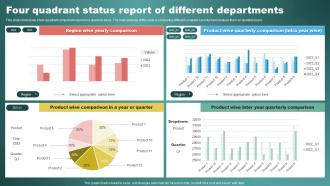
Four Quadrant Status Report Of Different Departments
This slide showcases a four quadrant comparison report on a quarterly basis. The main purpose of this slide is comparing different companys product and analyse them on quarterly basis. Presenting our well structured Four Quadrant Status Report Of Different Departments. The topics discussed in this slide are Region Wise Yearly Comparison, Product Wise Inter Year.This is an instantly available PowerPoint presentation that can be edited conveniently. Download it right away and captivate your audience.
-
Building A Framework For Departmental Alignment PPT Presentation AT
Do not compromise on a template that erodes your messages impact. Introducing our engaging Building A Framework For Departmental Alignment PPT Presentation AT complete deck, thoughtfully crafted to grab your audiences attention instantly. With this deck, effortlessly download and adjust elements, streamlining the customization process. Whether you are using Microsoft versions or Google Slides, it fits seamlessly into your workflow. Furthermore, it is accessible in JPG, JPEG, PNG, and PDF formats, facilitating easy sharing and editing. Not only that you also play with the color theme of your slides making it suitable as per your audiences preference.
-
Competing Priorities Proportion In Organizational Departments
This slide depicts the proportion and numbers of competing priorities in an organization to take appropriate actions to manage them. Presenting our well structured Competing Priorities Proportion In Organizational Departments. The topics discussed in this slide are Competing Priorities, Organization Departments, Finance Department. This is an instantly available PowerPoint presentation that can be edited conveniently. Download it right away and captivate your audience.
-
Learning And Development Programs For Multiple Departments Developing Effective Team
This slide illustrates learning and development programs for various teams. It provides information about communication, spreadsheet management, task management, reporting, finance, trading, analytics, dashboard, email writing, etc. Present the topic in a bit more detail with this Learning And Development Programs For Multiple Departments Developing Effective Team. Use it as a tool for discussion and navigation on Communication Skill Development, Task Management, Finance And Trading. This template is free to edit as deemed fit for your organization. Therefore download it now.
-
Our team introduction with reporting relationships
Presenting this set of slides with name - Our Team Introduction With Reporting Relationships. This is a three stage process. The stages in this process are Our Team, Our Group, Our Members.
-
Internal Benchmarking Tool Compare Departments And Divisions PPT Graphics AT
While your presentation may contain top-notch content, if it lacks visual appeal, you are not fully engaging your audience. Introducing our Internal Benchmarking Tool Compare Departments And Divisions PPT Graphics AT deck, designed to engage your audience. Our complete deck boasts a seamless blend of Creativity and versatility. You can effortlessly customize elements and color schemes to align with your brand identity. Save precious time with our pre-designed template, compatible with Microsoft versions and Google Slides. Plus, its downloadable in multiple formats like JPG, JPEG, and PNG. Elevate your presentations and outshine your competitors effortlessly with our visually stunning 100 percent editable deck.
-
Inter Department Communication PPT Example VA
Stuck in a maze of forwarded emails and disjointed updates between teams Your projects deserve better than fragmented Slack threads that bury critical context. This corporate presentation gives you a structured way to align marketing operations and sales under one clear narrative. Every slide in this PowerPoint template turns messy handoffs into a visual storytelling opportunity mapping shared goals and clarifying ownership with crisp data visualization. You can adapt these creative layouts for your next strategy deck using the editable slides to build consensus quickly. Stop repeating yourself across departments and start presenting a unified plan with these professional PPT graphics.
-
Human Resource Department Roles And Responsibilities
The purpose of this slide is to showcase the key responsibilities of the human resource department within the workforce of a company. The key responsibilities include maintaining work culture, employee development, legal formalities and recruitment process. Presenting our set of slides with name Human Resource Department Roles And Responsibilities. This exhibits information on four stages of the process. This is an easy-to-edit and innovatively designed PowerPoint template. So download immediately and highlight information on Maintaining Work Culture, Employee Development, Recruitment, Legal Formalities.
-
Departmental Issues Tracking And Analysis Report
This slide showcases the analysis table for the reported departmental issues. It also includes the issue priority level, initiator, status, opening date, opening hour, closing date, ending hour, description, etc. Presenting our well structured Departmental Issues Tracking And Analysis Report. The topics discussed in this slide are Project Name, Project Manager, Analysis Report. This is an instantly available PowerPoint presentation that can be edited conveniently. Download it right away and captivate your audience.
-
Benchmark Comparison Analysis Of Different Departments
This slide shows benchmark comparison analysis for various departments in organization to track overall performance of each department. It include benchmark categories like headcount, performance and sick leaves etc. Presenting our well structured This slide shows benchmark comparison analysis for various departments in organization to track overall performance of each department. It include benchmark categories like headcount, performance and sick leaves etc. The topics discussed in this slide are Basic, Premium, Standard. This is an instantly available PowerPoint presentation that can be edited conveniently. Download it right away and captivate your audience.
-
Strategic Plan To Improve Inter Departmental Communication
This slide consists of a strategic plan for organizations to improve the inter department communication and build trust. The strategies are to conduct regular meetings, avoid technical jargons, use communication tools and alter office space Presenting our set of slides with Strategic Plan To Improve Inter Departmental Communication. This exhibits information on five stages of the process. This is an easy to edit and innovatively designed PowerPoint template. So download immediately and highlight information on Strategic, Improve, Departmental.
-
HR Graph To Compare Yearly Employee Count By Department
This slide showcases graph that can help organization to compare the yearly change in employees numbers of different departments. It showcases comparison for a period of two years Introducing our HR Graph To Compare Yearly Employee Count By Department set of slides. The topics discussed in these slides are HR Graph, Compare Yearly, Employee Count Department. This is an immediately available PowerPoint presentation that can be conveniently customized. Download it and convince your audience.
-
Benchmark Comparison Analysis Of Organization Different Departments
This slide showcases benchmark comparisons analysis of different departments, which helps to find the best and worst performing areas. It includes elements such as sales, IT, research, development, marketing, human resources, headcount and revenue. Introducing our Benchmark Comparison Analysis Of Organization Different Departments set of slides. The topics discussed in these slides are Headcount, Revenue Generated, Employeeretention Rate. This is an immediately available PowerPoint presentation that can be conveniently customized. Download it and convince your audience.
-
Cost Allocation Icon To Multiple Departments
Introducing our premium set of slides with Cost Allocation Icon To Multiple Departments. Ellicudate the four stages and present information using this PPT slide. This is a completely adaptable PowerPoint template design that can be used to interpret topics like Cost Allocation, Icon To Multiple, Departments. So download instantly and tailor it with your information.
-
Organizing Departments For Clear Roles And Responsibilities PPT Example AT
Do not compromise on a template that erodes your messages impact. Introducing our engaging Organizing Departments For Clear Roles And Responsibilities PPT Example AT complete deck, thoughtfully crafted to grab your audiences attention instantly. With this deck, effortlessly download and adjust elements, streamlining the customization process. Whether you are using Microsoft versions or Google Slides, it fits seamlessly into your workflow. Furthermore, it is accessible in JPG, JPEG, PNG, and PDF formats, facilitating easy sharing and editing. Not only that you also play with the color theme of your slides making it suitable as per your audiences preference.
-
Achieving Operational Alignment Across Departments PPT Information AT
Ditch the Dull templates and opt for our engaging Achieving Operational Alignment Across Departments PPT Information AT deck to attract your audience. Our visually striking design effortlessly combines creativity with functionality, ensuring your content shines through. Compatible with Microsoft versions and Google Slides, it offers seamless integration of presentation. Save time and effort with our pre-designed PPT layout, while still having the freedom to customize fonts, colors, and everything you ask for. With the ability to download in various formats like JPG, JPEG, and PNG, sharing your slides has never been easier. From boardroom meetings to client pitches, this deck can be the secret weapon to leaving a lasting impression.
-
Multiple Project Status Report Of Different Organizational Departments
This slide shows the report representing status of various projects of departments of organization. It represents the projects name, duration, start and finish date and completion percentage of the projects along with resource names. Introducing our Multiple Project Status Report Of Different Organizational Departments set of slides. The topics discussed in these slides are Marketing, Product Prototypes, Sales. This is an immediately available PowerPoint presentation that can be conveniently customized. Download it and convince your audience.
-
Role Of Different Departments In Employee Equity Plan
The slide indicates process flow of equity compensation. The purpose of the slide is to give an overview of different departments collaboration and their role in implementing an employee equity plan. It include payroll and HR department, equity team, broker, and accounting team.Presenting our set of slides with Role Of Different Departments In Employee Equity Plan. This exhibits information on four stages of the process. This is an easy to edit and innovatively designed PowerPoint template. So download immediately and highlight information on Payroll Departments, Accounting Team, Human Resource.
-
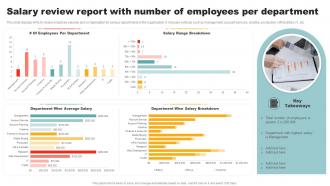
Salary Review Report With Number Of Employees Per Department
This slide displays KPIs to review employee salaries and compensation for various departments in the organization. It includes verticals such as management, account services, creative, production, HR facilities, IT, etc. Introducing our Salary Review Report With Number Of Employees Per Department set of slides. The topics discussed in these slides are Department Wise Salary Breakdown. This is an immediately available PowerPoint presentation that can be conveniently customized. Download it and convince your audience.
-
Organizational Hierarchy In Departments Overview PPT Example AT
Do not compromise on a template that erodes your messages impact. Introducing our engaging Organizational Hierarchy In Departments Overview PPT Example AT complete deck, thoughtfully crafted to grab your audiences attention instantly. With this deck, effortlessly download and adjust elements, streamlining the customization process. Whether you are using Microsoft versions or Google Slides, it fits seamlessly into your workflow. Furthermore, it is accessible in JPG, JPEG, PNG, and PDF formats, facilitating easy sharing and editing. Not only that you also play with the color theme of your slides making it suitable as per your audiences preference.
-
Department Wise Staffing Model For Hrs
The purpose of this slide is to highlight clearly demonstrate companys workforce requirements for each department for the branchs routine functioning. Presenting our well structured Department Wise Staffing Model For Hrs The topics discussed in this slide are Department, Hours Required, DesignationThis is an instantly available PowerPoint presentation that can be edited conveniently. Download it right away and captivate your audience.
-
Departmental Job Roles Change Impact Analysis
The slide showcases the assessment of impacted groups, job roles and its severity of impact. It covers areas like business division, department, groups, current and future job roles, job changes, level of impact and number of affected staff. Introducing our Departmental Job Roles Change Impact Analysis set of slides. The topics discussed in these slides are Sales, Manufacturing, Finance. This is an immediately available PowerPoint presentation that can be conveniently customized. Download it and convince your audience.
-
Departmental Organization And Benefits PPT Example AT
Do not compromise on a template that erodes your messages impact. Introducing our engaging Departmental Organization And Benefits PPT Example AT complete deck, thoughtfully crafted to grab your audiences attention instantly. With this deck, effortlessly download and adjust elements, streamlining the customization process. Whether you are using Microsoft versions or Google Slides, it fits seamlessly into your workflow. Furthermore, it is accessible in JPG, JPEG, PNG, and PDF formats, facilitating easy sharing and editing. Not only that you also play with the color theme of your slides making it suitable as per your audiences preference.
-
Data Summary For Various Departments PPT Summary AT
While your presentation may contain top-notch content, if it lacks visual appeal, you are not fully engaging your audience. Introducing our Data Summary For Various Departments PPT Summary AT deck, designed to engage your audience. Our complete deck boasts a seamless blend of Creativity and versatility. You can effortlessly customize elements and color schemes to align with your brand identity. Save precious time with our pre-designed template, compatible with Microsoft versions and Google Slides. Plus, its downloadable in multiple formats like JPG, JPEG, and PNG. Elevate your presentations and outshine your competitors effortlessly with our visually stunning 100 percent editable deck.
-
Diversity Training Programs For Different Department
This slide highlights the diversity training program domains for assessing behavioural approach, policy guidelines and measure impact. Presenting our set of slides with Diversity Training Programs For Different Department This exhibits information on Three stages of the process. This is an easy to edit and innovatively designed PowerPoint template. So download immediately and highlight information on Executives And Managers, Professional, Administrative Staff
-
Departmental Organization Meaning And Types PPT Example AT
Ditch the Dull templates and opt for our engaging Departmental Organization Meaning And Types PPT Example AT deck to attract your audience. Our visually striking design effortlessly combines creativity with functionality, ensuring your content shines through. Compatible with Microsoft versions and Google Slides, it offers seamless integration of presentation. Save time and effort with our pre-designed PPT layout, while still having the freedom to customize fonts, colors, and everything you ask for. With the ability to download in various formats like JPG, JPEG, and PNG, sharing your slides has never been easier. From boardroom meetings to client pitches, this deck can be the secret weapon to leaving a lasting impression.
-
Quarterly Recruiting Report Status For Various Departments
Following slide demonstrates quarterly hiring status which assist organizations to assess overall success of recruitment campaign and identify areas for improvement. This slide provides data regarding various organizational departments, job position and four quarters. Introducing our Quarterly Recruiting Report Status For Various Departments set of slides. The topics discussed in these slides are Engineering, Finance, Sales And Marketing. This is an immediately available PowerPoint presentation that can be conveniently customized. Download it and convince your audience.
-
Our business team framework showing reporting relationships
Presenting this set of slides with name - Our Business Team Framework Showing Reporting Relationships. This is a three stage process. The stages in this process are Our Team, Our Group, Our Members.
-
Functional Organization Chart For Departments PPT Structure AT
Step up your game with our enchanting Functional Organization Chart For Departments PPT Structure AT deck, guaranteed to leave a lasting impression on your audience. Crafted with a perfect balance of simplicity, and innovation, our deck empowers you to alter it to your specific needs. You can also change the color theme of the slide to mold it to your companys specific needs. Save time with our ready-made design, compatible with Microsoft versions and Google Slides. Additionally, its available for download in various formats including JPG, JPEG, and PNG. Outshine your competitors with our fully editable and customized deck.
-
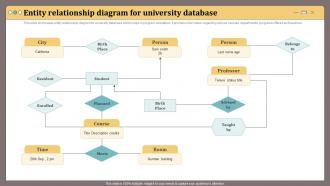
Entity Relationship Diagram For University Database
This slide showcases entity relationship diagram for university database which helps in program orientation. It provides information regarding various courses, departments, programs offered and teachers. Presenting our set of slides with Entity Relationship Diagram For University Database. This exhibits information on one stages of the process. This is an easy to edit and innovatively designed PowerPoint template. So download immediately and highlight information on Person, Meets, Course.
-
Reporting Relationships Chain Of Command Explained PPT Demonstration AT
Do not compromise on a template that erodes your messages impact. Introducing our engaging Reporting Relationships Chain Of Command Explained PPT Demonstration AT complete deck, thoughtfully crafted to grab your audiences attention instantly. With this deck, effortlessly download and adjust elements, streamlining the customization process. Whether you are using Microsoft versions or Google Slides, it fits seamlessly into your workflow. Furthermore, it is accessible in JPG, JPEG, PNG, and PDF formats, facilitating easy sharing and editing. Not only that you also play with the color theme of your slides making it suitable as per your audiences preference.
-
Company Showing Different Departments PPT Presentation AT
Ditch the Dull templates and opt for our engaging Company Showing Different Departments PPT Presentation AT deck to attract your audience. Our visually striking design effortlessly combines creativity with functionality, ensuring your content shines through. Compatible with Microsoft versions and Google Slides, it offers seamless integration of presentation. Save time and effort with our pre designed PPT layout, while still having the freedom to customize fonts, colors, and everything you ask for. With the ability to download in various formats like JPG, JPEG, and PNG, sharing your slides has never been easier. From boardroom meetings to client pitches, this deck can be the secret weapon to leaving a lasting impression.
-
Checks And Balances Among Government Departments PPT Designs AT
Do not compromise on a template that erodes your messages impact. Introducing our engaging Checks And Balances Among Government Departments PPT Designs AT complete deck, thoughtfully crafted to grab your audiences attention instantly. With this deck, effortlessly download and adjust elements, streamlining the customization process. Whether you are using Microsoft versions or Google Slides, it fits seamlessly into your workflow. Furthermore, it is accessible in JPG, JPEG, PNG, and PDF formats, facilitating easy sharing and editing. Not only that you also play with the color theme of your slides making it suitable as per your audiences preference.
-
Strategies To Enhance Interdepartmental Communication PPT Summary AT
Do not compromise on a template that erodes your messages impact. Introducing our engaging Strategies To Enhance Interdepartmental Communication PPT Summary AT complete deck, thoughtfully crafted to grab your audiences attention instantly. With this deck, effortlessly download and adjust elements, streamlining the customization process. Whether you are using Microsoft versions or Google Slides, it fits seamlessly into your workflow. Furthermore, it is accessible in JPG, JPEG, PNG, and PDF formats, facilitating easy sharing and editing. Not only that you also play with the color theme of your slides making it suitable as per your audiences preference.
-
Define role of team members organizational behavior and employee relationship management
You can edit this slide and mention the responsibilities of key team members involved in the organization management process Present the topic in a bit more detail with this Define Role Of Team Members Organizational Behavior And Employee Relationship Management. Use it as a tool for discussion and navigation on Associate Product Manager, Product Manager, Senior Product Manager. This template is free to edit as deemed fit for your organization. Therefore download it now.
-
Reducing Conflict With Effective Interdepartmental Communication Techniques PPT Presentation AT
Step up your game with our enchanting Reducing Conflict With Effective Interdepartmental Communication Techniques PPT Presentation AT deck, guaranteed to leave a lasting impression on your audience. Crafted with a perfect balance of simplicity, and innovation, our deck empowers you to alter it to your specific needs. You can also change the color theme of the slide to mold it to your companys specific needs. Save time with our ready-made design, compatible with Microsoft versions and Google Slides. Additionally, its available for download in various formats including JPG, JPEG, and PNG. Outshine your competitors with our fully editable and customized deck.
-
OGSM Overall Status With Key Departments
This slide shows objectives, goals, strategies and measureOGSM progress with major departments. It provides information about vendors, innovation, marketing, finance, production, accountability, status, etc.Presenting our well structured OGSM Overall Status With Key Departments. The topics discussed in this slide are Marketing Strategy, Financial Model, Product Innovation. This is an instantly available PowerPoint presentation that can be edited conveniently. Download it right away and captivate your audience.
-
Mastering Collaboration Across Departments Effectively PPT Presentation AT
Step and up and your and game and with and our and enchanting and Mastering and Collaboration and Across and Departments and Effectively and PPT and Presentation and AT and deck, and guaranteed and to and leave and a and lasting and impression and on and your and audience. and Crafted and with and a and perfect and balance and of and simplicity, and and and innovation, and our and deck and empowers and you and to and alter and it and to and your and specific and needs. and You and can and also and change and the and color and theme and of and the and slide and to and mold and it and to and your and companys and specific and needs. and Save and time and with and our and ready-made and design, and compatible and with and Microsoft and versions and and and Google and Slides. and Additionally, and its and available and for and download and in and various and formats and including and JPG, and JPEG, and and and PNG. and Outshine and your and competitors and with and our and fully and editable and and and customized and deck.
-
Headcount By Department Overview PPT Structure AT
Step up your game with our enchanting Headcount By Department Overview PPT Structure AT deck, guaranteed to leave a lasting impression on your audience. Crafted with a perfect balance of simplicity, and innovation, our deck empowers you to alter it to your specific needs. You can also change the color theme of the slide to mold it to your companys specific needs. Save time with our ready-made design, compatible with Microsoft versions and Google Slides. Additionally, its available for download in various formats including JPG, JPEG, and PNG. Outshine your competitors with our fully editable and customized deck.
-
Functional Organization To Clarify Department Roles PPT Demonstration AT
Step up your game with our enchanting Functional Organization To Clarify Department Roles PPT Demonstration AT deck, guaranteed to leave a lasting impression on your audience. Crafted with a perfect balance of simplicity, and innovation, our deck empowers you to alter it to your specific needs. You can also change the color theme of the slide to mold it to your companys specific needs. Save time with our ready made design, compatible with Microsoft versions and Google Slides. Additionally, its available for download in various formats including JPG, JPEG, and PNG. Outshine your competitors with our fully editable and customized deck.
-
Functional Organization Chart Grouping By Department Roles PPT Summary AT
Step up your game with our enchanting Functional Organization Chart Grouping By Department Roles PPT Summary AT deck, guaranteed to leave a lasting impression on your audience. Crafted with a perfect balance of simplicity, and innovation, our deck empowers you to alter it to your specific needs. You can also change the color theme of the slide to mold it to your companys specific needs. Save time with our ready made design, compatible with Microsoft versions and Google Slides. Additionally, its available for download in various formats including JPG, JPEG, and PNG. Outshine your competitors with our fully editable and customized deck.
-
Department Wise Internal Audit Report
This slide represents department specific internal audit report for financial controls such as payroll, human resources, inventory, etc. Introducing our premium set of slides with Department Wise Internal Audit Report. Ellicudate the five stages and present information using this PPT slide. This is a completely adaptable PowerPoint template design that can be used to interpret topics like Human Resources, Banking And Cash, Electronic Data. So download instantly and tailor it with your information.
-
It Department Key Role And Function
Introducing our premium set of slides with It Department Key Role And Function. Ellicudate the six stages and present information using this PPT slide. This is a completely adaptable PowerPoint template design that can be used to interpret topics like Equipment, Technology, Network. So download instantly and tailor it with your information.
-
Diagonal Model To Improve Interdepartmental Communication Hr Communication Strategies Employee Engagement
This slide showcases model that allows communication among various levels in company. It further includes impact which are improve employee morale fast flow of information. Present the topic in a bit more detail with this Diagonal Model To Improve Interdepartmental Communication Hr Communication Strategies Employee Engagement. Use it as a tool for discussion and navigation on Interdepartmental, Communication, Organizational. This template is free to edit as deemed fit for your organization. Therefore download it now.
-
Types Of Departmental Organization PPT Mockup AT
While your presentation may contain top notch content, if it lacks visual appeal, you are not fully engaging your audience. Introducing our Types Of Departmental Organization PPT Mockup AT deck, designed to engage your audience. Our complete deck boasts a seamless blend of Creativity and versatility. You can effortlessly customize elements and color schemes to align with your brand identity. Save precious time with our pre designed template, compatible with Microsoft versions and Google Slides. Plus, its downloadable in multiple formats like JPG, JPEG, and PNG. Elevate your presentations and outshine your competitors effortlessly with our visually stunning 100 percent editable deck.
-
Key activities in various departments in business
Presenting this set of slides with name - Key Activities In Various Departments In Business. This is a four stage process. The stages in this process are Key Activities, Key Tasks, Key Lists.
-
Department Overview PPT Sample AT
Step up your game with our enchanting Department Overview PPT Sample AT deck, guaranteed to leave a lasting impression on your audience. Crafted with a perfect balance of simplicity, and innovation, our deck empowers you to alter it to your specific needs. You can also change the color theme of the slide to mold it to your companys specific needs. Save time with our ready made design, compatible with Microsoft versions and Google Slides. Additionally, its available for download in various formats including JPG, JPEG, and PNG. Outshine your competitors with our fully editable and customized deck.
-
Lateral Communication Boosting Collaboration Across Departments PPT PowerPoint AT
Step up your game with our enchanting Lateral Communication Boosting Collaboration Across Departments PPT PowerPoint AT deck, guaranteed to leave a lasting impression on your audience. Crafted with a perfect balance of simplicity, and innovation, our deck empowers you to alter it to your specific needs. You can also change the color theme of the slide to mold it to your companys specific needs. Save time with our ready-made design, compatible with Microsoft versions and Google Slides. Additionally, its available for download in various formats including JPG, JPEG, and PNG. Outshine your competitors with our fully editable and customized deck.
-
Department Wise Employee Separation Report
This slide covers the report of the employees who are exiting form the enterprise due to some reasons. It includes exit date , reason , type and department of the employee. Presenting our set of slides with Department Wise Employee Separation Report. This exhibits information on one stages of the process. This is an easy to edit and innovatively designed PowerPoint template. So download immediately and highlight information on Department Wise Employee Separation Report.