

Entity Relationship Diagram For University Database




Try Before you Buy Download Free Sample Product
 Impress Your
 Audience
 100%
100% Editable
 Save Hours
 of Time


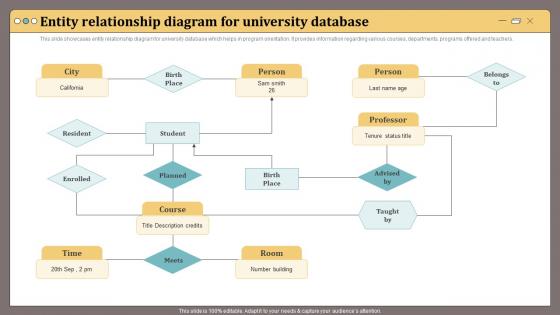
This slide showcases entity relationship diagram for university database which helps in program orientation.It provides information regarding various courses, departments, programs offered and teachers.
People who downloaded this PowerPoint presentation also viewed the following :
Entity Relationship Diagram For University Database with all 6 slides:
Use our Entity Relationship Diagram For University Database to effectively help you save your valuable time. They are readymade to fit into any presentation structure.





FAQs for Entity Relationship Diagram
Ok so you'll definitely need Student, Course, Faculty, Department, and Enrollment as your foundation. Those cover the basic relationships - students taking classes, professors teaching them, etc. I'd also throw in Program/Degree, Semester, and maybe Classroom too. Don't get caught up adding every possible thing like textbooks right off the bat though. That's where people go wrong honestly. Focus on nailing the core stuff first. Once you've got those entities mapped out properly with their relationships, then you can layer on grades, prerequisites, scheduling - whatever else you need. Way easier to expand later than fix a messy foundation.
You're gonna need a many-to-many setup here - throw an "Enrollment" table between Student and Course tables. Students take tons of courses, courses have tons of students, so this handles that mess perfectly. The Enrollment table should grab student ID, course ID, plus stuff like semester, year, grade, enrollment date. Honestly, this approach is way cleaner than trying to cram everything into two tables. It lets you track old enrollments and current ones separately too. Just sketch out those three tables first - don't overthink the fancy features like prerequisites yet.
Man, many-to-many relationships are honestly the worst part of university ERDs. You'll be creating junction tables left and right - stuff like "Enrollments" connecting Students to Courses, or "Appointments" for Faculty-Department links. Makes sense though, since students obviously take multiple classes and professors often work across departments. The annoying thing? Your database suddenly has twice as many tables with these composite keys everywhere. Pro tip: figure out what data actually belongs in those junction tables first (enrollment dates, appointment percentages, whatever) because going back to add that stuff later is such a headache. Trust me on this one.
Just add a "delivery_mode" field to your Course entity - like an enum with "online," "in-person," "hybrid," whatever. Super straightforward and you can always add more types later. If you need to track crazy specific stuff like which platform or classroom requirements, then maybe create a separate CourseDelivery entity. But honestly? Start simple with just the attribute first. Way easier to refactor later when (not if) your requirements get weird. Oh and don't forget your app logic needs to filter and display courses by delivery type. That part's pretty important obviously.
You'll definitely need the basics: student_id as your primary key, first_name, last_name, email, phone_number, date_of_birth, and enrollment_date. Also throw in student_status for tracking active/inactive/graduated students. GPA and class_level are must-haves since professors ask for that data all the time. Oh, and if you're doing separate tables for majors, add major_id as a foreign key. Skip social security numbers though - way too much privacy headache. Just use a system-generated ID instead. You can always add more fields later once you see what your specific school actually needs.
So you'll want to set up entities like Department, College, University, then add role entities for the admin positions - Dean, Department Head, Provost, whatever. Link them with "manages" or "heads" relationships. The annoying part is when someone wears multiple hats, like a prof who's also department chair. Honestly, just separate the person from their roles so you can track who reports to whom. That way you get the reporting chains and budget stuff sorted. Oh, and definitely sketch out the whole "who answers to who" thing on paper first - trust me on this one. Makes the data modeling way clearer.
Dude, foreign keys are seriously clutch for keeping your university database from turning into a mess. They stop orphaned records by making sure relationships between tables actually make sense - like every enrollment has to link to real students and courses that exist. Without them you'd have grades for deleted students, enrollments pointing nowhere... basically a nightmare. Plus they'll block you from accidentally deleting a student who's still enrolled in stuff. I learned this the hard way on my first project lol. Just set up those constraints when you're building the schema and you won't hate yourself later.
So you'll need an "Enrollments" table that sits between Students and Courses - it's basically your junction table. Each row = one student taking one course in a specific term. Include stuff like enrollment_date, semester, year, grade, status. Way cleaner than stuffing everything into the Student table, trust me. For the primary key, use a composite with student_id, course_id, and semester/year so students can retake classes. This setup makes queries super easy and you can track their whole academic history without losing data. Perfect for generating transcripts later too.
Start with the basics - department name, code (CS, MATH, whatever), and a unique ID as your primary key. College/school info matters since most universities work that way. Budget data and department head are good additions, though honestly the head thing gets messy with all those interim appointments. Oh, and definitely standardize those department codes across your whole system. Keep it straightforward because you'll be connecting courses, faculty, and students to these departments all the time. Simple is better here - trust me on that one.
So you'll need a many-to-many setup between Students and Faculty - advisors handle multiple students, and students switch advisors sometimes. I'd make an "Advising" table to connect them. Throw in start_date, end_date, maybe advisor_type for academic vs career stuff. Oh, and add a current_advisor flag so you don't have to mess with date ranges every time you need active relationships. This way you keep all the history too, which is honestly pretty useful for reports later. Trust me, it's way cleaner than trying to cram everything into the student table.
So you'll need a recursive relationship on your Course table - basically courses pointing to other courses as prerequisites. Pretty straightforward concept, but the implementation gets a bit messy since it's many-to-many (one course can have multiple prereqs, and one course can be required by multiple others). I'd set up a junction table called something like CoursePrerequisites with CourseID and PrerequisiteCourseID as foreign keys. Makes querying super easy when students want to see what they need before enrolling. Database design is honestly one of those things that seems simple until you actually start building it.
So you'll need a separate ExtracurricularActivities table that links to Student through a many-to-many relationship. That way you can track who's in what activities plus store stuff like dates and roles. The "impact" thing is honestly more about business rules than database design - kinda depends what your university actually cares about measuring. You could add fields for GPA correlation or leadership scores or whatever. I'd start basic with just participation tracking first. Then see what your registrar actually needs for transcripts and expand from there. Way easier than trying to predict everything upfront.
Start with normalization and think modular from day one. Break everything into domains - academics, student services, HR, finance - so you can expand one area without breaking others. Create a generic "person" table that handles students, faculty, and staff instead of separate entities for each (learned this the hard way on my last project). Universities always want to add random new fields, so build flexible attribute tables upfront. Way easier than trying to bolt scalability onto a mess later. Oh, and don't overthink the initial design - you can refactor as you go.
So basically, the ERD shows you exactly how all your tables connect - students to courses to grades to professors. Makes writing queries so much easier since you don't have to guess which tables to JOIN together. You can build dashboards tracking GPA trends, which courses students bomb most, instructor performance, whatever. Honestly, without it you'd spend forever just figuring out the relationships. Plus those constraints prevent your reports from pulling duplicate records or missing data. Trust me, it's like having a map instead of wandering around lost in your database.
Okay so first thing - figure out which entities have the really sensitive stuff. SSNs, grades, financial data, medical records, all that. Color-code those entities because it honestly makes security reviews so much less of a headache later. Build role-based access right into your model - students only see their grades, professors get their class rosters, you know the drill. Oh and definitely add audit trail entities for tracking changes. Sounds boring but you'll be thanking yourself when someone messes something up and you need those logs. Mark any fields that'll need database-level encryption too.
-
Their products can save your time, effort and money. What else you need. All in one package for presentation needs!
-
The website is jam-packed with fantastic and creative templates for a variety of business concepts. They are easy to use and customize.