

Database Entity Relationship Diagram For E Commerce




Try Before you Buy Download Free Sample Product
 Impress Your
 Audience
 100%
100% Editable
 Save Hours
 of Time


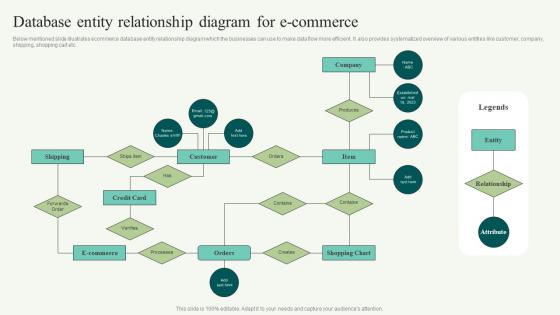
Below mentioned slide illustrates ecommerce database entity relationship diagram which the businesses can use to make data flow more efficient. It also provides systematized overview of various entities like customer, company, shipping, shopping cart etc.
People who downloaded this PowerPoint presentation also viewed the following :
Content of this Powerpoint Presentation
“Customers don’t expect you to be perfect. They do expect you to fix things when they go wrong.” - Donald Porter, VP at British Airways
You can only fix things when you know the minutest of details about your business processes and have a stored database for your reference!
Planning to start an online business? But confused how to chalk out the steps for your e-commerce website?
We have got you covered with our 100% ready to use and editable PPT templates on Database Entity Relation (ER) Diagram for E-Commerce. Creating an effortless online shopping experience for your customers is the need of the hour and our templates will help you achieve just that. It shows how entities or data interact within your established system and what attributes they ought to have.
ER diagrams make use of data modeling techniques to define business processes, thus, serving as the foundation for a relational database. Let’s understand this better with the help of an easy example. Suppose you are planning to join a course. In this case, there are two entities: You and the course and the act of enrolling into the course is the relationship. Similarly, for an e-commerce website the entities would be customer, product, order and payment. The ER diagram will help define the relationships amongst all your entities within the system and reflect the structure of your stored data.
You can have a better understanding of the essential components that combine clarity and concise expression through our entity-relationship-diagram-essential-components PPT Templates. Download to have an in-depth understanding before delving into the actual ER diagram.
Template 1: Database entity relationship diagra

Want to be successful in your e-commerce business? First of all you need to understand the demands of your users and provide them with an effective and seamless shopping experience. For that, you need to preplan your database before implementing it. Doing this will help you know which fields are required to be embedded for that particular entity. For a wholesome shopping experience for your customers and an effective management of the process starting from the order to the final payment and delivery, our PPT Template is what you need. This e-commerce database entity diagram covers entities like customer name, email address, credit card details and verification steps for your database records. Also, entities such as the order details wherein the item name and number, products in his shopping cart, what the order contains, etc has been inbuilt for your thorough knowledge. For your convenience, shipping details such as all processes for tracking of the order are also available as the entities in this template. Once a customer searches an item, you can provide him with the company names that produce the particular item so that the customer can make his choicest decision. Download our template now and carry forward your e-commerce business with ease and accuracy.
Very similar in structure, but bearing a few more entities for even a better network of operations for the e-commerce website are our ppt templates on entity-relationship-diagram-for-ecommerce-website.
ORGANIZING DATA KEY
A well-engineered database entity relationship diagram for e-commerce presents a structured approach to analyzing and maintaining the e-commerce platform. It helps to organize and manage data within the system and understand their functionality and relationships of entities in an e-commerce system.
PS: A good product delivery network will help you carry out the delivery process without any fault. Download our eight stage entity-relationship-mapping-diagram-for-product-delivery ppt templates now!
Database Entity Relationship Diagram For E Commerce with all 6 slides:
Use our Database Entity Relationship Diagram For E Commerce to effectively help you save your valuable time. They are readymade to fit into any presentation structure.





FAQs for Database Entity Relationship Diagram
So you're gonna need the basics first - Customer, Product, Order, Category, and Payment. Those are like your foundation. OrderItem is clutch for connecting orders to products since that's a many-to-many thing. Cart's pretty much mandatory too, obviously people need to dump stuff somewhere before buying. Supplier's good if you care about tracking where inventory comes from. Honestly though? Don't overcomplicate it right away. Reviews and shipping can just be simple fields at first - you don't need separate entities for everything. Build those core relationships first, then add the fancy stuff later when you actually need it.
Look at what each one actually does first. Products are your individual items - SKU, price, description, all that stuff. Categories group them together like "Electronics" or whatever makes sense for your store. Customers are obviously the people buying things. The data they hold is totally different though. Products track inventory levels, categories can have subcategories (which gets messy fast btw), and customers store order history plus preferences. Just sketch them as separate boxes initially, then draw lines between them. Customers purchase products, products fit into categories. Makes way more sense when you see it visually.
So you'll want a one-to-many relationship here - each customer can have tons of orders, but every order belongs to just one customer. Stick a customer_id foreign key in your Orders table that points back to your Customers table. Oh, and don't forget referential integrity constraints or you'll end up with random orders that don't belong to anyone (been there, not fun). You might also think about whether you need extra stuff on the relationship itself - like order timestamps or maybe customer-specific preferences that change how orders get handled. Really depends on what you're building though.
Create a Payment entity that links to your Order - either one-to-one or one-to-many if you're doing split payments. Include stuff like payment_method, amount, transaction_id, payment_status, timestamp. I'd also make a PaymentMethod entity for saved cards and customer preferences. Way cleaner than shoving everything in one table, trust me. Connect it to your Customer entity too. Just reference transaction IDs and avoid storing actual payment details - that's a security nightmare you don't want to deal with.
So inventory management is totally the backbone of your e-commerce ER model. You'll need an Inventory entity tracking quantities and stock levels for each product variant - connects to Products and feeds into Order processing so you don't oversell (learned that one the hard way). The real headache comes when you're dealing with real-time updates across multiple sales channels. Your ER diagram needs to show how stock adjustments happen from orders, returns, and manual updates. Honestly, concurrent transactions will bite you later if you don't plan for them now. It gets messy quick.
Just make separate tables for Promotions and Discounts that connect to your main stuff. Link promotions to products for specific deals, and to orders for things like free shipping. You'll need fields like discount_percentage, start_date, end_date, promo_code. Honestly, throw in a promotion_type field now - trust me on this one. When marketing comes asking for BOGO deals later, you'll thank yourself. Also connect promotions to customer segments if you're doing targeted offers. The whole thing needs to be flexible because marketing will definitely come up with crazy discount ideas you haven't thought of yet.
So you'll need the obvious stuff first - product_id, name, description, price. Then add category, brand, SKU for search/filtering purposes. Stock quantity is crucial, plus weight and dimensions if you're calculating shipping. Average rating and review count help with social proof too. Image URLs are super important - honestly, crappy photos kill sales faster than anything. I'd also throw in status fields like is_active so you can handle out-of-stock items without breaking everything. Start with these basics and add specialized stuff like color variants later depending on what you're selling.
So basically you want your Customer, Cart, Order, and Payment tables talking to each other without making your database cry. Instead of joining everything separately, throw some commonly-used stuff like shipping addresses right into the Order table. Yeah it's not perfectly normalized but whatever - nobody's got time for slow checkouts. Cache those cart totals too so you're not doing math every time someone blinks. One solid query should grab what you need for the whole checkout page. Oh and definitely don't make people wait forever or they'll just abandon their cart and buy from Amazon instead.
So basically, keep vendor stuff totally separate from your main platform - different tables for Vendors, Products, and Storefronts since each vendor needs their own little corner. Payment splitting is where things get tricky though, especially tracking commissions (learned that the hard way). Your User table should handle both regular customers and vendor accounts with proper roles. Oh and inventory per vendor is crucial - can't have vendors selling stuff they don't actually have. Order routing gets complex too. Start with that Vendor-Product-Order foundation and expand from there. Trust me, plan the money flow first or you'll regret it later.
So you'll need a Reviews table that links to both Users and Products with foreign keys. Each review gets user_id, product_id, rating (1-5), review text, and timestamp. Oh and definitely throw in a helpful_votes field - people go crazy for that stuff! One user can write tons of reviews, products can have tons of reviews, but each review belongs to just one user and one product. You calculate averages by pulling all reviews for each product. Honestly, just sketch out those three tables first and how they connect. Makes everything way clearer.
Yeah so adding shipping to your ER diagram gets a bit messy but it's worth it. You'll connect it to orders, customers, maybe products for weight stuff. Tracks costs, delivery status, carrier details - all that good stuff. Oh and you can do multiple shipping methods per order which is clutch for weird cart situations. Database gets more complex obviously, your queries too. But honestly the tracking capabilities you get are pretty solid for customer service. I'd totally add shipping addresses as separate entities btw - people ship everywhere except their billing address half the time.
So supplier-product relationships are basically the core of your inventory setup in ER diagrams. Most of the time you'll want many-to-many since suppliers carry multiple products and products come from different suppliers. Junction tables are where you store the good stuff - wholesale prices, lead times, all that vendor-specific data. Honestly, this is one of those things you really don't want to mess up because it cascades everywhere. Your purchase orders depend on it. Product availability too. Getting the relationship structure right upfront saves you tons of headaches later when you're trying to track stock levels and pricing.
So basically, ER diagrams let you bake security right into your database design instead of scrambling to add it later. I'd separate sensitive stuff like payment details and passwords into their own isolated tables - that way if someone breaks in, they can't grab everything in one go. You can also map out user permissions super clearly (customers definitely shouldn't peek at admin data!). The visual layout helps you spot exactly where you need encryption and audit trails. Pro tip I learned the hard way - mark your sensitive entities in red while designing. Forces you to actually think about protection from day one rather than playing catch-up.
So I'd set up a CustomerSegment entity with a many-to-many relationship to Customer - people bounce between segments all the time. Track stuff like segment_type, criteria_used, and date_assigned so you know how they got there. Honestly, I always create a separate SegmentCriteria entity because marketing teams change their minds constantly and it's way easier to manage. Add some derived attributes to Customer too - total_purchases, avg_order_value, whatever feeds your segmentation. Start basic with "high-value" or "frequent buyer" segments first, then go crazy later.
So primary keys are super important - they stop duplicate records from messing things up. Foreign keys connect your tables properly (like linking customers to their orders). Honestly, constraints will save your sanity - NOT NULL for required stuff, CHECK constraints for valid ranges, UNIQUE where it makes sense. Normalize your data to cut redundancy, but don't get too obsessed with it. Set up referential integrity so you can't accidentally delete a customer who still has orders floating around. Oh, and index the fields you query a lot. These basics will catch most problems early on.
-
The website is jam-packed with fantastic and creative templates for a variety of business concepts. They are easy to use and customize.
-
Great designs, really helpful.