


Database Relationship Diagram For Pharmacy Management System




Try Before you Buy Download Free Sample Product
 Impress Your
 Audience
 100%
100% Editable
 Save Hours
 of Time


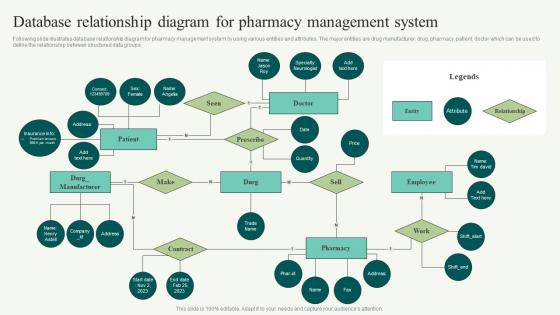
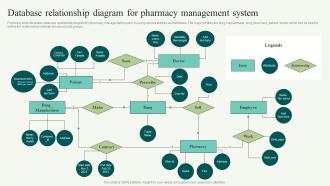
Following slide illustrates database relationship diagram for pharmacy management system by using various entities and attributes. The major entities are drug manufacturer, drug, pharmacy, patient, doctor which can be used to define the relationship between structured data groups.
People who downloaded this PowerPoint presentation also viewed the following :
Database Relationship Diagram For Pharmacy Management System with all 6 slides:
Use our Database Relationship Diagram For Pharmacy Management System to effectively help you save your valuable time. They are readymade to fit into any presentation structure.





FAQs for Database Relationship Diagram For
Honestly, start with the basics - inventory tracking, prescription management, and a solid patient database. Insurance claims processing is huge too, plus you need reporting for compliance stuff. Integration with your POS is critical because doing manual reconciliation will make you want to quit pharmacy forever. Drug interaction checks are obviously essential, and automated refill reminders save so much time. Don't forget barcode scanning for accuracy and label printing. Oh, and controlled substance tracking isn't optional - the DEA doesn't mess around. List your biggest headaches first, then demo whatever systems tackle those problems.
So basically, pharmacy management systems track all your inventory automatically - no more manual counting nightmare. You set reorder points for each med, and it'll ping you when stock gets low. Some even generate purchase orders by themselves, which is pretty sweet. The reports are actually useful too - shows you fast vs slow movers so you can adjust stock levels and avoid tossing expired stuff. Oh, and start with your reorder thresholds based on what you normally go through. It's like having that super organized coworker who actually remembers everything.
Dude, automation is a game changer for pharmacies. It takes care of all that tedious stuff - counting pills, data entry, inventory tracking - so your pharmacists can actually talk to patients instead. The dispensing systems are pretty slick, honestly. Way fewer errors too, which is huge. Your workflow speeds up like crazy when you're not doing everything manually. I'd say start with whatever's eating up the most time right now and automate that first. Oh, and your staff will actually enjoy their jobs more when they're counseling patients about drug interactions instead of being glorified pill counters all day.
Look, pharmacy management systems are total game-changers for compliance stuff. They'll automatically track your controlled substances and spit out those DEA reports without you having to think about it. The software catches drug interactions before they blow up and keeps tabs on expiration dates too. Honestly, the audit trail feature alone is worth it - saves your butt during inspections. You get alerts for license renewals and inventory issues that could trigger regulatory problems. My cousin runs a pharmacy and swears by the automated reports. Set it up right and it'll spot compliance issues way before any inspector shows up at your door.
Dude, pharmacy-EHR integration is a total lifesaver. No more endless data entry or those annoying back-and-forth calls with doctor offices - you know how that goes. Real-time patient histories, meds, allergies, all right there when you're dispensing. The system catches drug interactions automatically, plus you can actually see lab results that affect dosing. Honestly cuts down medication errors like crazy. My advice? Start with whatever EHR systems you work with most - you'll feel the difference immediately. Makes the whole workflow so much smoother.
So basically these systems catch mistakes before they become disasters. Barcode scanning makes sure you're not grabbing the wrong med, which honestly happens more than we'd like to admit. Drug interaction alerts pop up automatically when there's trouble brewing. Real-time inventory tracking tells you what's actually in stock - no more guessing games. The system checks prescriptions against patient files and dosing rules too. You can set custom alerts for risky meds or patients with weird conditions. It's like having a really paranoid coworker watching over your shoulder, but in a good way.
Honestly, start with encryption - AES-256 for everything, data sitting around and stuff moving between systems. Multi-factor auth is absolutely essential, no exceptions there. Set up role-based permissions so people can't peek at data they shouldn't see. You'll want regular security audits and pen testing too. Here's something most people mess up though - they'll lock down everything perfectly but forget to encrypt their backups. Don't be that person. Also throw in session timeouts and keep detailed logs for compliance stuff. But yeah, encryption and MFA first. That's where you'll get the most protection right off the bat.
Oh man, pharmacy management systems are game-changers for this stuff! They'll send automated texts and emails when refills are due. Plus you can sync all a patient's meds to the same pickup date - saves them so many trips. The system flags people who are overdue and creates reports showing who needs help. Some even text dosing reminders straight to patients (honestly didn't know that was a thing until recently). You can auto-transfer prescriptions from other pharmacies too. Just use those alerts to call patients before they run out - way better than waiting for them to remember.
Look, the analytics in your pharmacy system are actually super useful once you start paying attention to them. Track your fast-moving meds versus the stuff just sitting there eating up your cash flow. I love the predictive features - they'll show you refill patterns so you're not scrambling to cover shifts. Seasonal trends help with ordering too. The profit margin breakdowns by category? Game changer for figuring out what's worth your time. Honestly just pull those monthly reports and let them guide your inventory buys and staffing for next quarter.
Ugh, data migration is gonna be your worst nightmare - nothing transfers as cleanly as they promise. Staff will hate learning new systems while trying to help customers, so expect some grumpy days. Insurance integrations? Total pain. Your POS might not play nice either. Honestly, double whatever training time they recommend because it's never enough. Oh, and definitely keep your old system running alongside the new one for at least a week. Trust me on that - you'll catch so many little issues that would've screwed you over otherwise.
So the PMS handles all your insurance stuff automatically - super helpful honestly. It submits claims right when you process prescriptions, checks if patients are covered, figures out copays instantly. All those annoying rejections and prior auth requests? The system deals with that back-and-forth for you. Plus it tracks your billing and shows what money's still coming in. Oh, and it catches errors early which saves you from bigger headaches later. Your team won't be drowning in paperwork anymore either. Seriously cuts down on the administrative nightmare.
Honestly, staff training can make or break your whole system. I've literally seen places where everyone just ignores the automated inventory features and does everything by hand - such a waste! Your team needs to actually know how to navigate quickly and handle basic problems themselves. Otherwise you're just paying for expensive software that sits there unused. Quick hands-on training sessions work best, plus maybe some simple reference sheets they can grab when they're stuck. Once people get comfortable with it, that's when you'll actually see it pay off.
Honestly, having mobile access to your pharmacy system will change everything. You can check inventory, process prescriptions, and help customers from anywhere in the store - no more running back to terminals constantly. Staff can grab tablets and actually assist people on the floor properly. Real-time alerts for low stock and ready prescriptions are clutch too. Customers definitely notice when service is faster and you're not glued to one workstation. Oh, and being able to check things remotely is pretty nice when you're not there. I'd start with just enabling mobile inventory checks first - that alone speeds things up like crazy.
So you're gonna want to look at AI clinical decision support - that's huge right now. Cloud systems are everywhere too since they scale way better. Mobile apps? Yeah, patients basically demand that now, can't blame them. Real-time inventory with IoT sensors is getting popular - nobody wants to deal with stockouts anymore. The interoperability thing with EHRs is finally improving, thank god, means way less manual entry for your team. Oh and telepharmacy integration is becoming standard. I'd definitely check how your current setup handles cloud migration especially - seems like that's where everyone's headed anyway.
Look, these pharmacy systems are pretty amazing for patient safety. They'll catch drug interactions automatically and flag allergies before anything bad happens. Real-time alerts pop up when you're prescribing something risky - honestly saved my butt more times than I can count during crazy shifts. The dosing calculations happen instantly too. What's cool is how they track if patients are actually taking their meds and refilling on time. Oh, and no more running out of critical drugs because the inventory stuff handles itself. Start with the medication therapy management features first - that's where the real safety magic happens. Then work on the adherence tracking later.
-
Innovative and creative templates with high-quality designs. Helped me with my presentation as the slides were easy to edit.
-
Exclusive and extensive collection of templates. Really helped me create a professional presentation in just no time.