

Pharmacy Management System Structure Database Management Healthcare Organizations




Try Before you Buy Download Free Sample Product
 Impress Your
 Audience
 100%
100% Editable
 Save Hours
 of Time


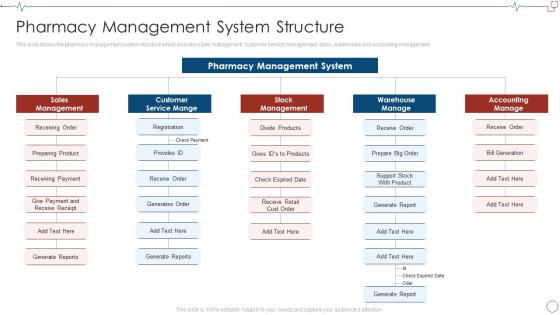
This slide shows the pharmacy management system structure which includes sales management, customer service management, stock, warehouse and accounting management.
People who downloaded this PowerPoint presentation also viewed the following :
Pharmacy Management System Structure Database Management Healthcare Organizations with all 6 slides:
Use our Pharmacy Management System Structure Database Management Healthcare Organizations to effectively help you save your valuable time. They are readymade to fit into any presentation structure.





FAQs for Pharmacy Management System Structure Database
Honestly, the biggest game-changer is getting real-time inventory tracking instead of those manual logs we all hate. Automated reorder alerts save your butt when you're running low on stuff. Error rates drop like crazy because the system catches drug interactions automatically - way better than relying on memory. Insurance claims go so much faster (seriously, this saves me hours every day). Oh, and compliance reports? Takes seconds instead of digging through piles of paperwork when auditors show up. Everything connects with suppliers and insurance networks too. If you're thinking about upgrading, start with inventory management first - that's where you'll actually see the money back quickly.
You'll love the real-time inventory tracking - no more surprise "oh crap, we're out" moments. The system catches drug interactions and dosage errors before they become disasters, which honestly saves so much stress. Barcode scanning is where it gets really good though - finally, no more deciphering doctors' chicken scratch handwriting. Was that supposed to be 15mg or 150mg? Who knows. The automated alerts for expired meds are clutch too. You can even set up auto-reordering for your bestsellers. My advice? Start with the barcode system first - you'll see the biggest difference right away.
Look, automation just takes care of all that boring repetitive stuff your team hates doing anyway. Prescription refills get processed automatically, inventory stays tracked, drug interactions get flagged - no more manually checking every single order. Honestly, the error reduction alone is worth it. Those dispensing robots are crazy fast compared to filling everything by hand. Plus you won't get caught with empty shelves on critical meds anymore. I'd start with whatever's eating up most of your day-to-day time first. Then your staff can actually focus on patients instead of paperwork hell.
So your PMS basically looks at all your past prescription data - like which meds fly off the shelves during flu season or how patient age groups affect what you're dispensing. Pretty neat how clear the patterns get once you start digging in. The system can actually predict when you'll run low on specific drugs before it happens, which saves you from those super awkward moments when patients show up and you're completely out. Honestly, I'd start by just exploring whatever reporting tools your system has. Set up some automated alerts for your bestsellers and see what happens.
So you'll need HIPAA compliance for patient data - that's the big one. DEA regs too if you're tracking controlled substances. State pharmacy board requirements are honestly such a headache because every state's different, but you can't skip them. FDA guidelines for drug safety reporting, USP standards if you do any compounding. Oh and don't forget prescription monitoring programs. The system needs solid audit trails and secure storage obviously. I'd grab a compliance checklist from your state board first, then see what your vendor actually covers before you commit to anything.
Honestly, a decent PMS is a game-changer for talking to doctors. You get secure messaging and shared records, so no more endless phone tag (thank god). When something's off with a prescription or there's a drug interaction, you can flag it right away. Doctors can actually see if patients picked up their meds and how they're doing with adherence. I'd set up those automated alerts first - they're lifesavers for critical stuff. Oh, and you can document your clinical interventions and shoot them straight to the prescriber. Makes everything way smoother and patients end up better off too.
Honestly, the biggest game-changer is your pharmacists can see complete patient histories instantly - catches those scary drug interactions before they happen. No more duplicate data entry either (seriously, such a time suck). Workflows get smoother, fewer med errors, and you actually see how well patients stick to their prescriptions. Everything connects so your documentation gets way better too. Oh, and definitely map out how data currently flows between your systems first. Shows you exactly where you're bleeding time and which spots will give you the most bang for your buck once integrated.
Honestly, if the interface sucks, your staff will hate it from day one. Pharmacists and techs are already crazy busy - nobody wants to wrestle with clunky software that makes everything take twice as long. You need something intuitive where people can actually find what they're looking for without clicking through a million screens. When it's easy to learn, your team won't spend weeks complaining about the "old system" (we've all been there). The smoother the transition, the faster you'll see real results. Simple interfaces = happy staff = better adoption rates.
Oh man, you're in for it with data migration - that's always a nightmare. Staff will hate you at first because nobody wants to learn new systems when they're already buried in work. Expect at least 2-3 weeks where everything moves like molasses. Your inventory's gonna get screwed up during the switch too. Insurance integration is another headache - vendors always make it sound easier than it actually is. Definitely run both systems together for a few days before you pull the plug on the old one. The downtime alone will have customers complaining, but honestly there's no way around it.
Dude, mobile access is honestly huge for pharmacy stuff. You can check inventory and handle prescriptions from anywhere - your couch, vacation, wherever. Patients love it too because they get instant updates and can request refills without calling. The coolest part? When someone has an urgent question and you're not even there, you can still help them out. Really saves your sanity with work-life balance. I mean, nobody wants to be chained to the pharmacy computer 24/7, right? Everything just flows better when both you and patients can access what they need on the go.
Start with encryption - that's your biggest priority for data storage and transfers. Set up role-based access so random staff can't peek at records they shouldn't see. Honestly, the audit trail thing is huge too - you need to track every single person who opens patient files. HIPAA compliance is obviously non-negotiable here. Regular security checks will save your butt later, trust me. Oh, and don't slack on backups or software updates. I'd probably run a full security assessment first though - figure out where you're most vulnerable and tackle those gaps.
So PMS systems are actually pretty solid for getting patients more engaged. They send out automated refill reminders and medication alerts - honestly, most people need that nudge. Patients can track their prescriptions through portals, check their med history, and set their own reminders. The system even catches when someone's skipping refills so you can follow up. Oh, and there's cool stuff like pill syncing that makes everything less of a hassle. If you're just starting out, definitely go with the automated reminders first - that's where you'll see the biggest boost in adherence.
Yeah, so smaller pharmacies definitely get hit harder with PMS costs per prescription - you're splitting those licensing and setup fees across way fewer transactions. Big chains? They've got it easy with volume discounts and can spread costs across tons of locations. But honestly, don't let that scare you away if you're small! Most places see the investment pay off in like 12-18 months through fewer screw-ups and better inventory tracking. Oh, and faster processing too. I'd grab quotes from maybe 3 or 4 vendors first - just make sure to ask about their packages for smaller operations specifically.
Dude, real-time reporting is a game changer - you can see inventory, sales, and profit margins as they're actually happening. No more waiting around for those monthly reports that tell you what went wrong three weeks ago. Stock running low? You'll know immediately and can reorder before you're scrambling. Same with spotting which meds are selling like crazy vs sitting there collecting dust (and expiring). Honestly, the best part is setting up alerts for the critical stuff so you're not glued to your screen all day. Let the system ping you when something actually needs fixing.
So AI's definitely the big thing - automated prescription checks, drug interaction warnings, predictive inventory stuff. Cloud systems are taking over too since they're way more flexible than those old clunky setups everyone used to have. Mobile access is getting huge, like managing everything from a tablet while you're actually with patients. The patient-focused features are pretty cool - medication tracking, personalized dosing, direct messaging tools. Honestly? I'd start looking into vendors already doing AI integration. You don't want to scramble later when everyone expects it as standard. Better to get ahead of it now.
-
Spacious slides, just right to include text. SlideTeam has also helped us focus on the most important points that need to be highlighted for our clients.
-
Great templates that you can use in your next keynote or conference. They are perfect for quick and visually-engaging delivery.