

Entity Relationship Diagram For Banking System




Try Before you Buy Download Free Sample Product
 Impress Your
 Audience
 100%
100% Editable
 Save Hours
 of Time


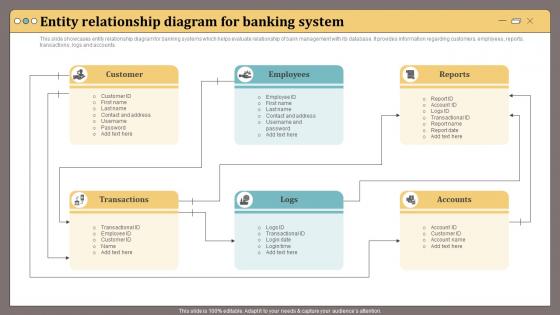
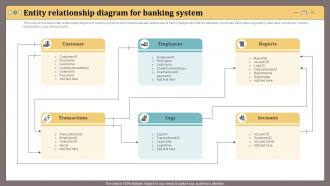
This slide showcases entity relationship diagram for banking systems which helps evaluate relationship of bank management with its database.It provides information regarding customers, employees, reports, transactions, logs and accounts.
People who downloaded this PowerPoint presentation also viewed the following :
Entity Relationship Diagram For Banking System with all 6 slides:
Use our Entity Relationship Diagram For Banking System to effectively help you save your valuable time. They are readymade to fit into any presentation structure.





FAQs for Entity Relationship Diagram
You'll want Customer, Account, Transaction, Branch, and Employee as your main ones. Loan and Card are pretty much must-haves too since banks make tons of money there. ATM and Service entities could be useful depending on what you're building - though honestly this stuff gets messy quick if you overthink it. The fun part is connecting everything: customers with multiple accounts, accounts with tons of transactions, employees tied to specific branches. I'd just start simple with those core ones and add more later when you figure out what you actually need.
So you'll need three main entities: Customer, Account, and Transaction. Connect them with relationships - customers "own" accounts (one-to-many since people have multiple accounts), and accounts "generate" transactions. I always make Transaction a weak entity because it literally can't exist without an account. Way cleaner that way. Don't forget attributes like customer ID, account numbers, transaction amounts, timestamps - the usual stuff. Joint accounts are honestly the annoying part, but just use a many-to-many relationship between Customer and Account. Start simple with these core pieces. You can mess with complexity later once it's working.
So attributes are just the data fields for each bank account in your ER model. You'd want stuff like account_number, account_type, balance, date_opened, customer_id as foreign key. Picture them as your table column headers - that's what makes each account distinct and trackable. Some will be required fields (definitely account_number), others optional based on what your bank actually needs. Oh and I'd totally sketch out all the account data first before you lock in your final attribute list. Makes life way easier later.
Set up a many-to-many relationship between Customer and Loan - that's gonna be your best bet. One customer can have multiple loans, plus you might get co-borrowers on the same loan, so it works both ways. Connect them with a relationship diamond, maybe call it "Borrows" or whatever. Then stick attributes right on that relationship - loan_date, interest_rate, loan_status, that kind of stuff. Don't forget your primary keys (customer_ID, loan_ID) or you'll hate yourself later when you're actually building the database. Sure, some people just do one-to-many to keep things simple, but honestly? The many-to-many is way more realistic for how banks actually work.
So basically, one-to-many means one thing connects to multiple other things - like how one customer can have several bank accounts. Makes sense, right? Many-to-many is where it gets messier. Picture customers and banking services - each customer uses multiple services, but each service also gets used by tons of different customers. You'll need a junction table to make that work (honestly took me forever to wrap my head around that concept). The relationship type totally determines how you'll set up your tables, so figure that out first when you're doing your ER diagram.
Make a Branch entity first - branch_id, name, address, manager_id, the usual stuff. Connect it through your Account table since each account sits at one specific branch anyway. Customers can bank at multiple branches, but the account-to-branch relationship is where it actually matters, so stick the branch_id foreign key there. Honestly, I'd map out what operations even need branch data before going crazy with it. You might need ATM or loan officer entities later but don't overthink it right now. Keep it simple and you can always add more complexity.
So basically, you don't want customer data scattered everywhere getting out of sync - that's what normalization fixes. Banking systems are super picky about this stuff because inconsistent account balances = angry customers and compliance headaches. Get your design to 3NF (third normal form) and you'll handle most redundancy problems. Your queries will run faster too. Oh, and start by mapping out functional dependencies first - makes the whole process way less painful. Break down any tables that violate the rules. Trust me, it's worth doing right the first time.
Set up a many-to-many relationship with a junction table - call it "AccountHolder" or whatever makes sense. Include customer ID, account ID, and definitely add a role field (primary holder, beneficiary, etc). Trust me, you don't want to skip that part and have to add it later when things get messy. Maybe throw in a date_added field too if you need to track when people joined accounts. Before you build anything though, just sketch out a few real joint account situations first. Like, what happens with married couples vs business partners? That'll show you what fields you're actually missing.
Real-time transaction tracking is gonna be your nightmare here - you're juggling login attempts, push notifications, the whole mess. Biometric auth makes your diagram look like spaghetti, especially with device tokens and offline queuing thrown in. Mobile users want everything instantly, so you'll need cached balances and transaction histories. Honestly feels like building three apps that somehow need to talk to each other. I'd map out the basic banking stuff first - accounts, transactions, users. Then pile on the mobile chaos like device registration. Trust me, start simple or you'll lose your mind.
So you wanna bake security right into your ER diagram? Add entities like "User_Authentication" and "Permission_Roles" - stuff like that. Connect customers to their auth records, link employees to role permissions. Every transaction should tie back to audit logs too. Honestly gets pretty messy but beats trying to add security later (trust me on this one). Don't forget attributes for encryption flags and timestamps on sensitive data. The whole point is mapping out who can see what and when. That way your database actually enforces the rules instead of hoping your app layer catches everything.
So PCI DSS is your main thing for payment data, obviously. SOX handles the financial reporting side. Then you've got AML/KYC stuff for customer ID and transaction monitoring - Basel III throws another wrench in there with risk modeling requirements. GDPR's a pain if you have EU customers, and honestly privacy regs just keep getting worse. Your ER diagram needs audit trails and data lineage tracking built in. Oh, and separate your sensitive entities from regular data. I'd map each entity to compliance requirements right at the start before things get messy.
So for this you'd want to set up inheritance in your ER model. Start with a main "Financial Product" entity that has the basic stuff - product_id, interest_rate, creation_date, whatever's common to all of them. Then create your specific ones like "Mortgage," "Credit Card," "Personal Loan" that inherit from the main one. Each gets its own special attributes too. Mortgages get property_value and loan_term, credit cards get credit_limit and annual_fee, you get the idea. Way cleaner than copying those base attributes all over the place (learned that the hard way). Just use ISA relationships or whatever subtype notation your tool supports.
Set up a "processed at" connection between your transactions and branches - basically showing where each transaction actually happened. Most transactions will point to one branch, but branches can handle tons of transactions, so it's a many-to-one thing. Oh, and definitely throw in a timestamp attribute for each transaction. Trust me, you'll thank yourself later when you're trying to run reports. If you need teller info or other processing details, those can go in the relationship too. I'd start by figuring out which branch handles what transaction types first, then build everything else around that.
Ok so foreign keys are like your database's bodyguards - they stop you from having random accounts just floating around with no actual customer attached. Trust me, you don't want to explain phantom accounts to anyone lol. They make sure every relationship actually makes sense and won't let you delete a customer who still has active accounts. Plus they handle all the cascading stuff when you update records. Honestly, just set up your foreign key constraints from the start. Way easier than trying to fix a mess later when your data's already wonky.
Dude, banking diagrams turn into absolute chaos if you don't stay organized. Break those complex processes down into smaller chunks first. Color-code everything - loans, deposits, transfers, whatever. Swimlanes work great for separating departments too. Honestly? Don't try cramming it all into one giant chart - that's a recipe for disaster. Multiple linked diagrams save your sanity. Diamond shapes for decision points, consistent naming (boring but necessary), and start with the main flow before diving into details. Trust me, you'll hate yourself later if it's unreadable.
-
SlideTeam is my one-stop solution for all the presentation needs. Their templates have beautiful designs that are worth every penny!
-
The way SlideTeam professionals work is exceptional. Thanks for being so helpful!