


Entity Relationship Diagram For Ecommerce Website




Try Before you Buy Download Free Sample Product
 Impress Your
 Audience
 100%
100% Editable
 Save Hours
 of Time


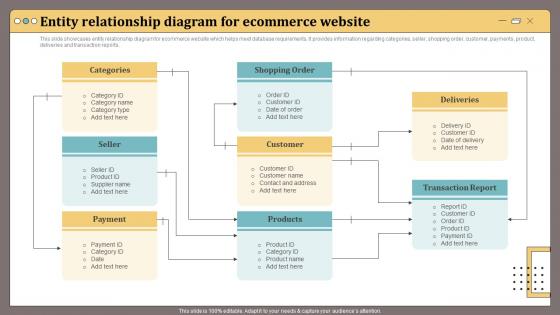
This slide showcases entity relationship diagram for ecommerce website which helps meet database requirements.It provides information regarding categories, seller, shopping order, customer, payments, product, deliveries and transaction reports.
People who downloaded this PowerPoint presentation also viewed the following :
Entity Relationship Diagram For Ecommerce Website with all 6 slides:
Use our Entity Relationship Diagram For Ecommerce Website to effectively help you save your valuable time. They are readymade to fit into any presentation structure.





FAQs for Entity Relationship Diagram
Honestly, you can't go wrong starting with the big four: Customer, Product, Order, and Order_Item. Those cover like 90% of what you need. Most people also throw in Category for product organization, plus Payment and Shipping_Address - pretty standard stuff. Some folks get carried away adding Shopping_Cart, Review, Supplier entities but that's kinda overkill unless you really need them. The magic happens in how Customer connects to Order, which connects to Order_Item, which links back to Product. That's your main flow right there. Build those relationships first, then see what else your business actually needs. Way easier than trying to map everything at once.
So customer relationships are gonna be the foundation of your whole ER diagram - they dictate how everything else connects. Map out customer-to-order first (one-to-many usually), then customer-to-address if they have multiple shipping spots. Don't forget payment methods too. Guest checkout is where it gets messy though - that'll completely change your setup. You might need wishlist and review relationships depending on what you're building. Honestly, I'd just list out every way customers touch your system first, then build backwards from there. Makes the whole thing way less overwhelming.
So for payment methods in your ER diagram, you'll want to set them up as their own entity that links to both customers and orders. This way people can save multiple cards, PayPal accounts, whatever. The entity holds stuff like payment type, encrypted card numbers, billing addresses - the usual suspects. What's cool is customers can manage all their saved payment info in one spot. Different payment processors? No problem, this setup handles them all. Just don't forget about security when you're mapping out those relationships - that's where things can get messy if you're not careful.
Don't stuff variations into your main Product table - trust me on this one. Create separate entities instead. So you'd have a Product table for the base item, then a ProductVariation table that links back to it. Each variation gets its own row with size, color, price, SKU, whatever. One product can have tons of variations - like one "Nike Air Max" entry with separate records for each size/color combo. People sometimes add an Attributes table too but that's honestly way more complex than most stores need. Just track inventory at the variation level since that's what customers actually purchase.
Inventory management is honestly the backbone of your whole eCommerce setup. It tracks stock levels and prevents those nightmare scenarios where customers buy stuff you don't actually have - trust me, angry emails aren't fun. You'll need fields for quantity on hand, reserved stock, reorder points, warehouse locations. Physical products are straightforward to track, but digital ones get weird since there's technically infinite stock? Anyway, it connects to your products, orders, and suppliers so you get real-time visibility into what's available. Without it, you're basically flying blind and hoping for the best.
So you'll need a Returns table that links to Orders - throw in return_reason, return_date, return_status, refund_amount. This stuff gets super messy though, trust me on that one. I'd also set up a separate Refunds table connected to Returns for the money side of things. Refund dates, payment methods, all that. Oh and don't forget to update Order_Items so you can track individual returned items instead of just whole orders - that'll save you headaches later. Honestly just start basic and build it out as you figure out what your actual return process looks like.
So you need a one-to-one thing between Customer and ShoppingCart - one active cart per customer basically. Timestamps are super helpful for when it was created and last updated. Maybe throw in a status field too (active, abandoned, whatever). Guest users are honestly such a pain though! You'll probably need some session-based workaround for people who aren't logged in. Link your cart items to both the cart AND the products directly with quantities. Oh, and abandoned cart tracking - your marketing people will bug you about that later for their email campaigns, trust me.
Okay so you'll need a "LoyaltyProgram" entity that links to Customer with a many-to-many relationship - customers can be in multiple programs, programs have tons of members. Basic stuff like program_name, points_balance, tier_level, enrollment_date. Oh and definitely add a "Transactions" entity because people WILL bug you about their point history nonstop (learned this the hard way). Connect it to your Orders so points get added automatically when they buy stuff. This way you can run different loyalty things without your database falling apart later.
Normalize to 3NF but don't stress about going further - it's honestly the sweet spot for most apps. I'd use an EAV model for product attributes since you'll inevitably get some bizarre specs you didn't plan for. Separate your main entities (users, products, orders) and index those foreign keys properly. Start thinking about partitioning big tables like order_items now, even if you implement later. Your user and inventory tables need to handle heavy reads/writes from the start - learned that one the hard way! Also sketch out a sharding strategy early, trust me on this one.
Yeah so create a separate Shipping_Options table that links to Orders with a foreign key. Store the method name, cost, delivery time, carrier - all that stuff. Don't just dump it straight into the Orders table though, that becomes a nightmare later when you're trying to manage different shipping tiers. Trust me on this one. Let customers pick their option at checkout by referencing the shipping table. Makes it super easy to update costs or add new carriers without messing with your existing order data. Way cleaner setup overall.
Your order history data is seriously underrated - there's so much buried in there. Look at purchase frequency and spending patterns first, that's where you'll spot your best customers. Seasonal trends jump out pretty quickly too. I'd start tracking how often people buy and what they're adding to their baskets over time. You can predict who might stop buying (super useful) and figure out which products keep people coming back. Honestly the basket evolution thing is fascinating once you get into it. Plus it helps with inventory planning and personalized recommendations.
For your ER diagram, I'd just add a "role" attribute to your User entity - store stuff like "admin," "customer," "vendor" in there. Way simpler than the inheritance route where you make separate entities for each role type. Though honestly, I've seen people do that too if they want to get fancy with it. You could also create a separate UserRole table if users need multiple roles, but that can turn into a nightmare pretty quick. I learned that the hard way on my last project! Start basic with the role attribute. You can always change it later when things get messier.
Honestly, vendor isolation is gonna be your biggest headache. You're basically juggling separate products, orders, and inventory for each vendor while keeping shared stuff like reviews working. The relationships between vendors, customers, and orders get ridiculously tangled too. Then there's commission structures - every vendor wants different rates and payout schedules. Oh, and don't forget vendor-specific shipping rules and tax calculations because apparently nothing can be simple. My take? Build a single-vendor diagram first, then slowly add the multi-vendor chaos. Get those vendor relationships bulletproof before you worry about anything fancy.
So you'll need separate Promotions and Campaigns tables, then connect them to your Orders/Products through junction tables. I always do discount_type, discount_value, plus start/end dates for the Promotion entity - saves me headaches later when trying to figure out what's still running. The junction tables handle the messy many-to-many stuff since promos can hit multiple products and orders can stack discounts. Campaigns are great if you're doing bigger marketing pushes with multiple promos bundled together. Honestly, start simple though. You can always bolt on more complexity once you see how your promo strategy actually shakes out in practice.
Honestly, data privacy laws totally changed how you build eCommerce databases. GDPR and CCPA mean you can't just dump customer info wherever - I learned this the hard way. You gotta think about data minimization from day one, plus add audit trails for everything. The tricky part? Designing clean deletion paths when customers want their data removed. Document your retention periods upfront and build consent tracking right into your schema. Trust me, it's way easier than retrofitting this stuff later when compliance comes knocking.
-
I was never satisfied with my own presentation design but SlideTeam has solved that problem for me. Thank you SlideTeam!
-
Extensive range of templates! Highly impressed with the quality of the designs.