


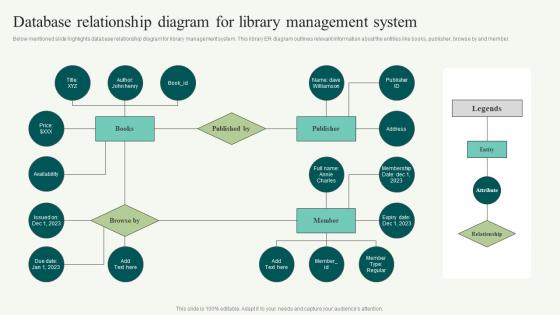
Database Relationship Diagram For Library Management System




Try Before you Buy Download Free Sample Product
 Impress Your
 Audience
 100%
100% Editable
 Save Hours
 of Time


Below mentioned slide highlights database relationship diagram for library management system. This library ER diagram outlines relevant information about the entities like books, publisher, browse by and member.
People who downloaded this PowerPoint presentation also viewed the following :
Database Relationship Diagram For Library Management System with all 6 slides:
Use our Database Relationship Diagram For Library Management System to effectively help you save your valuable time. They are readymade to fit into any presentation structure.





FAQs for Database Relationship Diagram For
So you'll want Books, Members, Authors, and Loans as your main tables. Books and Authors need a many-to-many setup since one book can have multiple authors. Members is just your user info. Loans is where the magic happens - it tracks who borrowed what and when they need to return it. Oh, and don't forget Publishers if you want decent reporting later (I always skip them initially then regret it). Categories are nice too but not essential. Start with those four core ones though. You can always add more complexity once you've got the basic borrowing system working.
So you need a "borrows" table to connect patrons and books - that's your bridge. It grabs the patron ID and book ID as foreign keys, plus checkout date, due date, and return date. The return date stays NULL until they bring it back (honestly, seeing a bunch of NULLs there always stresses me out lol). It's many-to-many since people borrow multiple books and the same book gets passed around. Oh, and definitely index those foreign keys or you'll hate yourself when someone wants their full borrowing history.
Oh dude, that books-authors relationship is like a goldmine for data! You can track how productive each author is, see who's publishing the most, check out circulation patterns - which writers get checked out constantly vs sitting on shelves. Genre diversity per author is cool too. Also checkout rates, wait lists, all that stuff. Honestly I'd just start simple though - maybe a basic dashboard showing top authors by circulation and how many books they've got in your system. That alone will tell you tons about what's actually working in your collection. The collaboration stuff is neat if you have co-authored books but that might be overthinking it for now.
So you'll want a many-to-many setup with a junction table - something like "LibrarianPatronInteractions" that sits between your main Librarians and Patrons tables. This tracks all the touchpoints: reference help, account problems, program signups, whatever. Some systems throw a librarian foreign key right into checkout tables too, which honestly makes sense for tracking who processed what. Then you can run reports either way - see which patrons worked with specific librarians or flip it around. Way more flexible than trying to cram everything into one relationship.
Your transaction table is basically the receipt system for your library - tracks every checkout and return with timestamps. Each time someone borrows a book, boom, new record gets created. Returns either update that record or make a new entry (honestly depends how you want to structure it). The whole thing becomes your lifesaver for tracking overdue stuff, calculating late fees, and pulling up someone's borrowing history when they swear they returned that book last week. Links users to books with all the status updates. Just set this up from the start - trust me, you don't want to build it retroactively when you've got angry patrons.
Just make a separate Fines table that links to your Loans table. Run a daily job to check overdue books and auto-create fine records with loan ID, amount, date, payment status. The weekend/holiday logic is honestly such a pain to get right - I always mess that up first try. Email reminders are clutch since chasing people down manually sucks. You can track who's paid and pull reports on outstanding fines pretty easily once it's set up.
For your library system, go with 3NF - it's honestly the best balance between clean data and not overengineering things. Separate your books, authors, members, and transactions into different tables. Each non-key field should depend only on the primary key. Skip the fancy 4NF stuff unless you're running the Library of Congress or something. I watched my old team spend forever optimizing for like 8,000 books - total waste of time. You'll need a junction table for the book-author relationship since books can have multiple authors. Run some test queries early though, just to make sure performance doesn't suck.
So basically you want two separate tables - one for book info (title, author, ISBN stuff) and another for the actual physical copies. Each copy gets its own barcode and tracks whether it's available or checked out. Think of it like how stores track the same item but different units on the shelf. Oh and definitely add fields for condition and location in your copies table - learned that the hard way when trying to figure out which damaged books were where. This setup lets you check out individual copies while keeping all the book details organized in one spot.
Oh man, multimedia stuff is gonna mess with your whole setup. File sizes get massive, so you'll probably want cloud storage for the actual files and just keep metadata in your database. Search becomes way more complex too - now you're dealing with video length, audio quality, format compatibility, all that jazz. Cataloging is honestly the worst part since every media type has different requirements. My advice? Figure out your metadata standards first or you'll be cleaning up that mess forever. It's like going from organizing books to organizing... well, everything else.
Set up RBAC with separate tables for users, roles, and permissions. Junction tables are your friend here - they link users to roles and roles to permissions. Way more flexible than hardcoding stuff. Start simple with Admin, Librarian, Member roles, then add more later. Keep permissions granular though - "can_edit_books" beats vague "librarian_access" every time. You'll thank yourself when you need to tweak things. Oh, and test the permission logic early because debugging access control later is honestly a nightmare. Document what each role actually does too.
Honestly, full-text search indexing is gonna be your biggest game changer - hit those title, author, and description fields first. Set up normalized tables for genres and publishers so filtering actually works. ISBN numbers are clutch for librarians doing reference stuff (they love that). Oh, and create search aliases for common typos because people can't spell to save their lives. Tags or keyword fields are solid too - lets staff add searchable terms as they go. But yeah, start with that full-text indexing. You'll see results immediately and it's not as painful to implement as it sounds.
Yeah, ILL stuff is a pain for databases. You're basically tracking books you don't own, which gets messy fast. I'd set up separate ILL transaction tables that connect to your existing patron/item tables. But you also need space for the lending library's info, their due dates (probably different from yours), and linking patron records to outside systems. Oh, and build in fields for return shipping and fees right away - I learned that one the hard way when I had to go back and add them later. It's annoying upfront but saves headaches.
Yeah totally! Your database can handle ebooks no problem. The main stuff stays the same - patrons checking things out and all that. Just add fields for file format, download limits, digital rights... that kind of thing. Actually way simpler than physical books since you don't need to worry about where stuff is on shelves. I'd probably start with a "resource_type" field to split physical vs digital, then add separate tables for the licensing headaches later. Oh and access restrictions too - libraries love their restrictions lol.
Set up daily database backups and transaction log backups every 15-30 minutes - trust me on this one. Test those backup files regularly because finding out they're corrupted during an emergency is the absolute worst. Keep copies locally and in the cloud. Document your recovery steps so clearly that even Dave from accounting could follow them (okay, maybe not Dave, but you get it). Practice the whole recovery process quarterly with test data. Sounds boring but you'll thank yourself later when something actually breaks.
So you can hook up Tableau or Power BI straight to your library database - APIs or ODBC connections work great. Power BI's actually gotten way better lately, just saying. Most of these tools auto-refresh with real-time stats which is nice. I've seen some libraries do these amazing heat maps showing when people actually show up and which sections get hit the most. Pretty wild seeing those patterns. Focus on circulation trends and who's using what resources first. Honestly? Start super simple with one dashboard, then build from there once you get the hang of it.
-
I am not the best at presentations but using SlideTeam’s PPT template made it easier for me. Thank you SlideTeam!
-
Use of icon with content is very relateable, informative and appealing.