


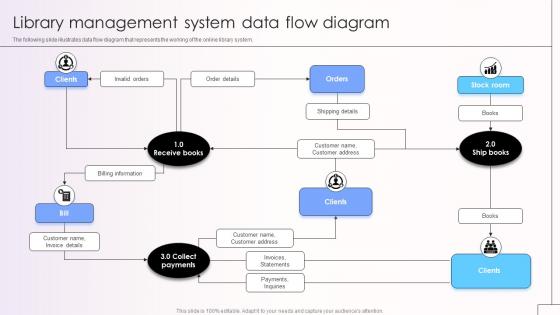
Library Management System Data Flow Diagram




Try Before you Buy Download Free Sample Product
 Impress Your
Audience
 100%
Editable
 Save Hours
of Time


The following slide illustrates data flow diagram that represents the working of the online library system.
People who downloaded this PowerPoint presentation also viewed the following :
Library Management System Data Flow Diagram with all 9 slides:
Use our Library Management System Data Flow Diagram to effectively help you save your valuable time. They are readymade to fit into any presentation structure.



FAQs for Library Management System
Okay so the absolute must-haves are automated check-in/out, searchable catalog, and member management. Overdue tracking with auto-notifications will save your sanity - trust me on that one. Mobile access is basically non-negotiable now, and barcode scanning makes everything way faster. Integration with whatever systems you're already using is clutch. Honestly, don't sleep on the reporting features either - they're surprisingly helpful for spotting usage trends and justifying budget stuff. I'd focus first on what your users actually do most (usually searching and checking their accounts), then add the other bells and whistles later.
Honestly, it's pretty amazing what patrons can do now - search the catalog, reserve books, renew stuff, check their account whenever they want. No more standing in line for basic tasks. You'll get way fewer annoyed people since they can handle most things themselves online. The data you get is super helpful too for figuring out what people actually read (versus what you think they want). Oh, and automated reminders save you from those awkward overdue conversations. Most people have no clue they can do half this stuff themselves, so definitely push the online features more.
So automation is basically what keeps libraries running these days. Check-ins, overdue notices, inventory - all happens automatically. No more handwritten cards (thank god). It connects with digital databases too, which is huge. The best part? You actually get time for the fun stuff like helping people and running programs instead of drowning in paperwork. When you're looking at systems, go for the ones with solid automation features. Trust me, dealing with manual processes gets old fast. Your sanity will definitely appreciate it later!
Your library's got decent security - encrypted databases, staff can only see what they need for their job, regular security checks. Most importantly though, they dump your borrowing history pretty fast, usually right when you return stuff. No long-term tracking of your reading habits, which is honestly refreshing these days. Web traffic's encrypted too. The cool thing is libraries are actually super committed to privacy - their policies often go way beyond what's legally required. Worth checking your specific library's privacy policy to see exactly how long they keep your data and if you can delete it yourself.
Ugh, data migration is going to be your worst enemy - catalog records, patron info, all that messy circulation history never transfers as smoothly as they promise. Staff pushback is brutal too since everyone's used to the old system. Budget's probably tight but don't forget training costs and downtime when you switch over. Oh, and timeline? Whatever they tell you, double it. I learned that the hard way. Get your team involved in picking the new system early though - makes the whole transition way less painful when they actually had a say in it.
Honestly, cloud-based systems are so much better than the old on-premise stuff. No more server headaches or update nightmares - everything just happens automatically. Your team can log in from literally anywhere, which has been a lifesaver since everyone's working remotely now. The best part? Growing your storage or adding features is actually simple instead of requiring some huge IT overhaul. I mean, my cousin's company switched last year and they're obsessed with how easy it is. Just shop around a bit first - different providers have wildly different pricing and features, so you'll want to compare a few options.
Honestly, you'll want to track four main things with your LMS. Usage stats are huge - checkouts, renewals, holds, all that stuff shows what people actually do vs what they say they need. Login frequency and database searches tell you about engagement too. System performance matters because slow searches make everyone cranky (learned that the hard way). Staff processing times for cataloging and patron requests help you spot bottlenecks. The magic happens when you combine usage patterns with performance data - that's where you see the real story of what's broken and what's crushing it.
So basically, most modern LMS systems have these built-in digital asset modules that store everything - ebooks, videos, you name it. Super convenient since you can set permissions and track who's using what. Plus they connect with vendors like OverDrive and Hoopla, which honestly saves so much headache compared to managing separate platforms. Your patrons can search physical and digital stuff all at once through your catalog. The analytics are pretty useful too. I'd take a look at your current setup first - bet there's room to streamline things with an integrated approach.
Honestly, integration is where most libraries mess up their LMS choice. Your new system needs to talk to whatever you're already using - student databases, accounting stuff, online catalogs. APIs and SIP2 protocols handle most of the heavy lifting these days. Don't forget about barcode scanners and RFID readers too (and payment systems because, let's face it, people will always have overdue books). The goal is smooth data flow without someone manually entering everything twice. Map out your current tech stack first. Then grill vendors about specific integrations - "yes we integrate" means nothing without details.
Honestly, LMS systems are game-changers for cataloging. You can import records straight from OCLC WorldCat instead of typing everything manually - saves so much time. Set up your classification system (Dewey, LC, whatever) and it'll keep your team consistent. Subject headings actually make sense now too, unlike those nightmare card catalogs we used to deal with. Your patrons can search multiple ways to find stuff, which they'll love. Oh, and definitely clean up your existing records first before you start processing new materials. Trust me on that one - learned it the hard way!
So for open-source library systems, you've got three solid options. Koha's everywhere - seriously, it's like the WordPress of library software. Been around forever with tons of community support. For bigger consortiums sharing resources, Evergreen is clutch. FOLIO's the shiny new one that's modular, so you can cherry-pick features (though honestly it might be overkill depending on your size). My advice? See what similar libraries near you are running first. Then demo your top two choices. Nothing beats actually clicking around to see if the interface makes you want to scream.
Dude, user feedback is everything for LMS improvements. It tells you exactly what's broken when real people try to use your system. Like when librarians can't stand the search function or patrons get lost trying to renew stuff - that's exactly what developers need to hear. Libraries that skip this step? They end up with systems that work fine in theory but suck to actually navigate. Plus the feedback helps you figure out what to fix first and catches bugs your testing missed. Oh, and throw some quick surveys right into the interface - makes collecting responses way easier.
Yeah, most LMS companies include training stuff in their packages. You'll get the usual online tutorials and webinars, plus user manuals. Live training sessions are clutch though - way better than trying to figure things out solo. They usually have phone support too. Oh, and check if there's a user forum! Other librarians post really helpful tips there, sometimes better than the official docs honestly. I'd start by training your main people first, then let them teach everyone else. Way less overwhelming that way. Just double-check what's actually included in your contract before you sign anything.
Oh yeah, the newer LMS platforms are actually really good with accessibility stuff now. You've got screen reader support, keyboard nav, text sizing options - all that. High contrast modes too for people with vision issues. Plus they handle different languages and reading levels with audio features and simpler layouts. Way better than the old clunky systems we used to deal with! Most follow WCAG and ADA standards, so you can serve everyone from teenagers to older folks who need bigger buttons. I'd definitely check what gaps your current system has though.
Library systems are getting crazy advanced these days! They're basically becoming full digital platforms now - think Netflix recommendations but for books and research stuff. AI handles cataloging automatically, everything's moving to the cloud, and there's way better integration with e-books and databases. Mobile-first design is huge too since people want to browse on their phones. Libraries aren't just quiet book places anymore, they're becoming community hubs. Oh, and if you're upgrading anything, definitely go cloud-based with good APIs - that's where it's all heading anyway.
-
Crisp and neat slides. Makes it fun and easier to curate presentations.
-
My presentations were a bit amateur before I found SlideTeam’s designs. I’ve been able to find slides for nearly every topic I’ve had to present. Thanks, Slideteam!