


Data Flow Diagram For Online Banking System




Try Before you Buy Download Free Sample Product
 Impress Your
 Audience
 100%
100% Editable
 Save Hours
 of Time


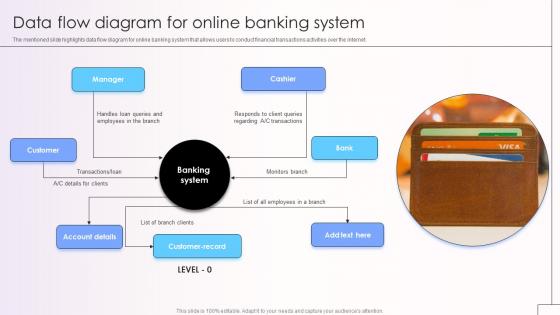
The mentioned slide highlights data flow diagram for online banking system that allows users to conduct financial transactions activities over the internet.
People who downloaded this PowerPoint presentation also viewed the following :
Data Flow Diagram For Online Banking System with all 9 slides:
Use our Data Flow Diagram For Online Banking System to effectively help you save your valuable time. They are readymade to fit into any presentation structure.








FAQs for Data Flow Diagram For
So you've got your frontend (web/mobile), then authentication servers, app servers, databases, and payment networks. Data flows through security layers - firewalls, encryption, fraud detection - before hitting core banking systems. Real-time transaction processing is honestly where things get messy, especially syncing between your bank's database and third-party networks like ACH. When that breaks? Those "temporarily unavailable" errors that make customers lose their minds. Map out your data paths first. Then figure out where bottlenecks happen - that's usually where you'll spend most of your time troubleshooting anyway.
So basically when you're doing online banking, your info gets scrambled into random code before it goes anywhere. Hackers might intercept it, but they'll just see complete nonsense instead of your actual account numbers. Most banks use 256-bit SSL encryption - honestly pretty crazy that it's military-grade stuff. The scrambling happens right when you hit send, stays protected the whole trip, then only gets unscrambled once it hits the bank's servers safely. Oh and always check for that little padlock in your browser first! I learned that one the hard way.
So basically APIs are like middlemen that let your bank talk to other apps safely. You know how you can connect your account to Mint or whatever budgeting app? That's APIs doing the work. They're digital translators moving your balance info and transaction history between systems. Honestly pretty cool tech - saves us from typing in every purchase manually like cavemen. Security stays tight throughout the whole process. If you're building anything fintech-related, definitely check out the API docs first though. Trust me on that one.
So banks encrypt your data at like multiple levels - basically military-grade security. Your info travels through these secure TLS channels, then gets stored in separate databases with tons of monitoring. They also do this thing called tokenization where your real account numbers aren't even in their main systems (which is honestly pretty smart). Real-time fraud detection scans everything too. Oh, and here's the big red flag - legit banks never store your login info in plain text. So if anyone calls or emails asking you to "verify" your password or whatever, that's 100% a scam. Don't fall for it.
So banks basically watch how you click around their app to make the interface less annoying. They'll predict stuff you might need - like reminding you about bills when they're due. Obviously there's fraud detection running constantly (because nobody has time for that mess). Your spending patterns get analyzed too, which is how you get those budgeting suggestions. The whole point is making everything feel natural instead of frustrating. Oh, and if you're building something similar - just focus on fewer clicks and try to guess what people actually want to do next.
Dude, you definitely want real-time monitoring turned on. Your bank can spot weird stuff instantly - like if someone's trying to use your card in another state or buying something totally random. Way better than the old system where they'd check everything overnight and call you three days later like "hey, did you buy a jet ski?" The algorithms learn your spending habits, so they know when something's off. If fraud happens, they'll freeze your card in seconds instead of letting it rack up charges. Honestly the alerts can be annoying sometimes, but it's worth it.
Man, banking compliance is brutal. PCI DSS hits you first - that's all the encryption stuff for payment cards. SOX controls your financial reporting data, which honestly feels like overkill sometimes. Don't forget CCPA either, customers can demand you delete their info now. GLBA makes data sharing between banks a total pain with all its safeguards. The worst part? Rules change constantly. I'd seriously set up quarterly check-ins with your legal team or you'll get blindsided by some new requirement.
So basically banks have these ML algorithms constantly watching your spending patterns. They're tracking where you shop, how much you usually spend, what device you're using - all that stuff. Honestly it's kinda creepy but also useful? When something looks off, like a huge purchase somewhere random, it'll either flag it or straight up block your card. The system learns from mistakes too, so it gets better at spotting real fraud vs you just doing something different. Oh and definitely give your bank a heads up before traveling - learned that one the hard way when my card got declined buying dinner in Vegas.
So most banks run on a crazy mix of old mainframes for processing transactions, plus newer APIs to connect everything together. Oracle and DB2 handle the account data storage. They've got message queues dealing with tons of transactions, encryption for obvious reasons, and load balancers keeping it all stable. Honestly, the legacy systems are ancient but they work - banks hate risking downtime. Cloud migration is happening but it's slow as hell. If you're getting into this, definitely start with understanding how APIs bridge the frontend to those core banking systems first.
So here's the thing - when your UI is confusing, users keep clicking around trying to figure stuff out. That creates a ton of unnecessary server requests. Good design means people know exactly what to do, so they get in and out quickly with minimal database hits. I've seen banking apps that are so cluttered they fire off like 10 API calls just loading the homepage - total nightmare for performance. The smoother the user experience, the less your backend gets hammered. It's honestly one of those things where UX and system efficiency go hand in hand.
Ugh, legacy systems are the worst - they hate talking to anything modern. Plus you're drowning in real-time data that could crash everything if you mess up. Customer info is everywhere too - banking core, CRM, loans - and none of it matches up properly. Security compliance? That'll slow you down like crazy since it's all sensitive stuff. Oh and the data quality issues... duplicate records and weird formats mess up everything downstream. Honestly though, start with decent data governance and get middleware that can actually handle the heavy lifting. Trust me on that part.
So authentication is basically your bouncer for online banking - it controls who gets in and what they can do. Once you log in, the system creates this secure token that follows you around for every request. Checking your balance? Token gets verified. Moving money? Same thing. It's actually pretty slick how seamless it feels from the user side. Each API call double-checks that token to make sure you're still you and you're allowed to do whatever you're attempting. Here's the thing though - if authentication breaks, everything else falls apart. That's why banks are so paranoid about it.
Definitely start with a solid password that's different from your other accounts, plus turn on two-factor auth. Never do banking on public wifi - I learned that one the hard way. Type your bank's URL directly instead of clicking random links, and look for that padlock icon. Keep your phone/computer updated too. Log out completely when you're finished, not just closing the tab. Set up transaction alerts so you'll know right away if something weird happens. Honestly, checking your accounts weekly is probably smart. Anything suspicious? Call them immediately.
So basically, every time someone opens their banking app or checks their balance, it's hitting your servers for fresh data. That's totally different from the old days when people just logged into websites once in a while. The traffic is honestly crazy - like millions of tiny requests constantly flowing in. Banks had to rebuild their whole data setup to handle all these micro-transactions happening instantly. Oh, and the API calls? Way more than you'd think. Your team's probably gonna need to plan for serious data synchronization beyond normal web stuff.
Banking's getting crazy fast right now. Real-time data processing is becoming standard, and fraud detection with AI is getting scary good at catching stuff. Most banks are switching to API-first setups so third-party apps can actually talk to your accounts smoothly. Instant payments are the new normal too. Oh, and edge computing - basically processing happens right near you instead of some distant server, which makes everything snappier. Legacy banks are honestly kind of panicking trying to catch up. Bottom line? Expect transactions under a second and way more personalized experiences based on your actual spending habits.
-
Incredibly beautiful designs that will help you get noticed! These eye-catching templates are perfect for corporate presentations that can be altered to fit any occasion or taste.
-
“I've always gotten excellent slides from them and the customer service is up to the mark.”