


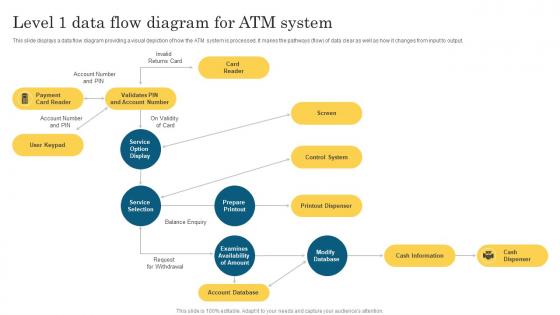
Level 1 Data Flow Diagram For Atm System




Try Before you Buy Download Free Sample Product
 Impress Your
 Audience
 100%
100% Editable
 Save Hours
 of Time


This slide displays a data flow diagram providing a visual depiction of how the ATM system is processed. It makes the pathways flow of data clear as well as how it changes from input to output.
People who downloaded this PowerPoint presentation also viewed the following :
Level 1 Data Flow Diagram For Atm System with all 6 slides:
Use our Level 1 Data Flow Diagram For Atm System to effectively help you save your valuable time. They are readymade to fit into any presentation structure.






FAQs for Level 1 Data Flow Diagram
So you've got the ATM itself - the card reader, PIN pad, cash dispenser, receipt printer. Basic stuff. Then there's this host processor that's basically like traffic control, routing all the transactions. Your bank's core system talks to network switches that connect different banks, plus security modules handle encryption. Honestly, the monitoring systems are super important because ATMs break ALL the time. I'd start by tracing how a simple withdrawal moves through each piece - makes troubleshooting way easier when you can see the whole flow.
So basically your PIN gets encrypted right when you type it in, then checked against your bank's database. The chip and magnetic strip on your card are super hard to copy perfectly - though sketchy people obviously keep trying lol. Every transaction gets checked in real time against your account and spending habits to catch weird stuff. The whole process uses end-to-end encryption too. Always cover your PIN with your hand and look for anything suspicious on the card reader or random cameras stuck around the ATM. Better safe than sorry!
So basically your PIN and all that stuff gets scrambled up before it goes anywhere - hackers can't read it even if they somehow grab it. Think of it like putting your info in a locked box that only your bank has the key for. ATMs actually use multiple encryption layers too, which is pretty smart when you think about it. Your card data, the messages between systems, everything gets protected. I read somewhere it's the same level they use for military stuff, which honestly makes me feel way better about using those sketchy-looking ATMs at gas stations lol.
So basically biometric auth uses your fingerprint, face, or eye scan as your password - which is way harder to fake than a regular PIN. Even if someone steals your card info, they'd still need YOU there physically to get into your account. Pretty neat how it works in real-time like that. Your biological stuff is unique and always with you, unlike cards that can get cloned or PINs people can peek at. I've noticed way fewer fraud issues at ATMs with this tech. Makes me feel safer using sketchy machines too, honestly.
Honestly, the biggest pain is card compatibility - some ATMs in Asia are super picky about foreign cards (Japan was a nightmare for me). European ones usually work fine though. Fee-wise, you'll get hit harder in the US for out-of-network stuff, while Germany has tons of free ATMs. Withdrawal limits vary everywhere too. Oh, and some places are PIN-only which can trip you up. Definitely call your bank first to see what partner networks they have abroad - saves you from standing there looking like an idiot when your card gets rejected.
So when you stick your card in, the ATM basically shoots a message to your bank using this secure protocol called ISO 8583 - sounds fancy but it's just how they talk to each other. Takes a few seconds unless the network's having a moment. Your bank checks if you've got the cash, then fires back yes or no. The whole thing goes through encrypted connections and security tokens, which honestly is pretty impressive when you think about it. Even if it's not your bank's ATM, it can still grab your account info instantly through these banking networks. Pretty wild that it all happens so fast.
Oh man, you're gonna deal with network timeouts constantly - those usually fix themselves in a few minutes though. Cash jams are the absolute worst, especially when it's busy and you need a tech to come out. Card readers act up a lot too, but that's mostly just cleaning or clearing the card path. Printer stuff is usually easy - just paper jams or refills. You can try rebooting for quick fixes, but don't mess with anything cash-related without calling support. Oh, and always grab those error codes first before you start troubleshooting anything.
Dude, ATMs are way cooler now with mobile stuff. Your phone can find nearby ones, let you start transactions before you even get there, and some banks do cardless withdrawals with NFC or QR codes - no plastic needed. COVID really pushed the contactless thing hard. You can deposit checks through your camera too, which still blows my mind honestly. Oh, and there's this thing where you can send cash to friends and they pick it up at ATMs without cards. Check your banking app - I bet there's features you don't even know about that'll save you time.
Honestly, ATM compliance is a total mess because every region does their own thing. You've got financial services regs, data protection, and accessibility standards pretty much everywhere though. US means dealing with ADA compliance, PCI DSS, plus whatever state banking rules apply. Europe's got GDPR privacy stuff and EMV standards - the privacy requirements there are actually kind of insane. Each Asia-Pacific country has different banking authority rules, and some make you support local languages or hit specific transaction limits. I'd definitely hit up your target region's central banking website first for the basics, then maybe find a compliance consultant who actually knows ATM regs specifically.
So for making ATMs more accessible - audio guidance is huge for blind users, plus braille on the keypads. Wheelchair height matters too, obviously. Tactile buttons help people navigate by feel, and screen magnification is clutch for low vision folks. Oh, and some have headphone jacks now which is actually pretty cool! Voice commands are getting more popular. Honestly, it's way better when companies design this stuff from scratch instead of trying to fix it later. If you're checking out vendors, definitely ask about their ADA features and whether they've actually tested with disabled users.
So ATMs have these monitoring systems that track cash levels and send alerts when they're running low. Based on location patterns and holidays, algorithms predict when refills are needed. Armored trucks handle the actual restocking - usually on set schedules, but busy locations might get hit multiple times a day. Honestly seems like overkill sometimes, but I guess those downtown machines get hammered. Your cash management software can sync with the armored services to time everything better and cut costs. It's really about finding that sweet spot between keeping machines stocked and not overspending on security runs.
Dude, ATMs are honestly a game changer for customer satisfaction. 24/7 cash access without dealing with those annoying bank hours? Yes please. People can check balances, grab money, do basic stuff whenever - my mom literally uses one at like 11pm sometimes lol. Rural customers especially love them since branches can be super far away. It just makes banking feel way more convenient and instant. Plus if your bank has crappy ATMs that are always broken, customers will definitely bounce to somewhere else. Hard to imagine going back to the old days of waiting in those long teller lines.
So banks basically look at three main things when placing ATMs. First is foot traffic - they want busy spots like malls, train stations, business areas where people actually need cash. Demographics matter too - they study income levels and how different neighborhoods use banking services (honestly kind of crazy how much data they collect on us). Plus they check competitor locations since there's no point putting two of your own ATMs right next to each other. The goal is finding places where customers genuinely need the convenience, not just throwing them anywhere with crowds.
Contactless payments are huge right now - people just tap their card or phone instead of inserting it. Way faster and cleaner, especially after COVID made everyone germ-conscious. ATMs are getting fancy with fingerprint scanners and facial recognition too, which honestly feels pretty futuristic. There's this cash recycling thing where machines reuse the bills people deposit for the next person's withdrawal. Smart, right? Oh, and some let you start the transaction on your phone app first, then finish at the machine. Your customers probably expect this stuff now, so it's worth staying on top of what's out there.
So basically third-party ATMs are just independent companies that own the machines, not your actual bank. You'll see them everywhere - gas stations, sketchy convenience stores, concerts. They charge way more in fees since they don't make money off you in other ways like banks do. Sometimes the cash limits are different too, or they won't let you do deposits and stuff. Honestly I've been burned by this before - those $3-4 fees add up fast when you're not paying attention. Always check that little fee screen before hitting yes!
-
Attractive design and informative presentation.
-
Thanks for all your great templates they have saved me lots of time and accelerate my presentations. Great product, keep them up!