

Entity Relationship Diagram Of Library Management System




Try Before you Buy Download Free Sample Product
 Impress Your
 Audience
 100%
100% Editable
 Save Hours
 of Time


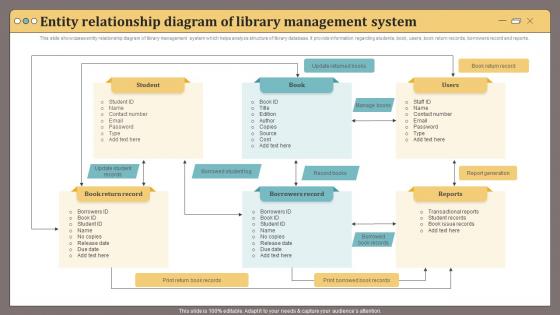
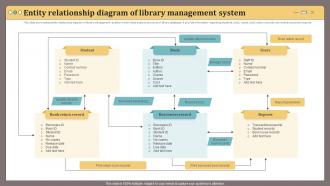
This slide showcases entity relationship diagram of library management system which helps analyze structure of library database.It provide information regarding students, book, users, book return records, borrowers record and reports.
People who downloaded this PowerPoint presentation also viewed the following :
Entity Relationship Diagram Of Library Management System with all 6 slides:
Use our Entity Relationship Diagram Of Library Management System to effectively help you save your valuable time. They are readymade to fit into any presentation structure.





FAQs for Entity Relationship Diagram Of
Honestly, start with the basics that'll save your sanity daily. Good search and cataloging so people can actually find books. Circulation management for all the checkout/return stuff - that's bread and butter. Member tracking is huge too, knowing who's got what overdue. Automated reminders are seriously clutch, saves so much nagging! You'll also want inventory features and some reporting to see how your collection's doing. Oh, and make sure it plays nice with any digital stuff you have. Pick something intuitive though - nobody wants to spend weeks learning a complicated system when you're already swamped.
Honestly, an LMS is a game-changer for libraries. Patrons can search catalogs and renew books from their couch at 2am - no more waiting in those annoying lines. They get personal accounts that track reading history and send notifications about due dates. Most systems bundle everything together too, so people can find regular books and e-books in one search. The tricky part is making the interface super user-friendly. I've seen patrons give up after like 30 seconds if they can't figure something out. Digital resources get way more use when everything's integrated properly.
So your LMS analytics basically takes all that circulation data and user behavior stuff and turns it into something you can actually use. You'll see which books people really check out (not just the ones we think they should - classic librarian problem lol). Peak hours become super obvious, plus you can spot borrowing trends and figure out when to schedule staff. The system tracks everything - what sections get totally ignored, busy times, all of it. Honestly, I'd start simple with just circulation stats and peak hours first. Then you can dive deeper into the fancy stuff later once you get comfortable with it.
So basically, an LMS lets all your library branches share one big catalog - patrons can see what's available everywhere and grab stuff from any location. They can return books wherever too, which people love. You'll be able to coordinate buying so you don't end up with like 50 copies of the same romance novel across branches. Digital collections get shared too. Staff can help each other with cataloging, and some systems show you borrowing trends across locations. Just make sure your policies are consistent from day one - trust me, fixing that mess later is a nightmare nobody wants.
Start with encrypting everything - storage, transmission, all of it. Role-based access is huge too, so your staff can't peek at data they don't need. Multi-factor auth for admins is a must. Regular security audits will save your butt before hackers find the weak spots first. Oh, and backup encryption - learned that one the hard way at my last job. Create a breach response plan now while you're thinking clearly about it. Hoping nothing bad happens isn't exactly what I'd call a solid strategy, you know?
So you're looking at open-source options? Koha and Evergreen do all the same stuff - cataloging, circulation, patron management, the whole deal. Zero licensing fees though, which is huge. You'll just need someone techy on your team or hire help for setup. Some of these systems honestly blow the expensive ones out of the water feature-wise. Your costs shift to hosting and maintenance instead of those brutal annual license fees. If you've got decent IT support or can find a vendor who knows open-source library systems, you could literally save thousands every year. Same functionality, way less money.
Mobile access is honestly huge for libraries now. Think about all the people who can't make it in person - working parents, students studying late, older folks with mobility issues. They can browse catalogs and renew books right from their couch. Pretty convenient, right? Voice commands and bigger text on phones actually help tons with accessibility too. I'd definitely go for responsive design first. Apps are cool but pricey - maybe start simple and see what your community needs most.
Oh man, data migration is going to be your worst nightmare - nothing transfers cleanly and you'll spend forever fixing duplicates. Staff will hate learning the new system after years with the old one. Get your tech people excited about it first, they'll help convince everyone else. Budget always gets messier than expected too. Patrons get confused during switchovers and any downtime makes administrators panic. Honestly? Plan for double the time you think it needs. Also maybe stock up on coffee because you're gonna need it lol.
Oh man, LMS systems are actually clutch for this stuff. You get one place to handle your whole digitization mess - tracking what needs doing, setting priorities, the works. The metadata tools are legit amazing for keeping everything organized and searchable later. Plus automated backups and format migration (which honestly saves your butt down the road). But here's the thing - you gotta nail your workflows first or your team will just be making it up as they go. I'd start with your most important collections and sketch out the whole pipeline before diving in. Trust me on that one.
Oh man, this is such a pain but here's what I'd focus on. Check if it plays nice with your current systems - catalogs, payment stuff, databases. Support quality is huge because you WILL need help more than you expect. User experience matters for both your team and patrons using it. Can it grow with you? Data migration is another headache to think about early. Honestly the sticker price isn't everything - factor in ongoing costs too. I'd make some kind of scoring sheet to compare your top few options objectively.
User feedback totally shapes how LMS platforms evolve these days. Vendors are always mining usage data and support tickets to see what's broken or annoying. Mobile interfaces got way better because librarians wouldn't stop complaining about them - same with search functions and checkout flows. Most companies actually listen now, which is wild compared to those ancient systems we used to deal with. Oh, and definitely join user groups if you can. That's where you actually get a say in what features they build next. Beta testing programs too if you're into that sort of thing.
Oh man, there are so many integrations you can do! Payment stuff like PayPal for fines is super common. Email services like Mailchimp work great for patron notifications too. Academic libraries usually go nuts for database connections - JSTOR, ProQuest, all that. Discovery tools like WorldCat are solid for expanding your catalog search. You can hook up security systems, analytics tools, even social media if you're into outreach. Honestly the options are kind of overwhelming. My advice? Figure out what's bugging you most right now and tackle those integrations first.
So your LMS basically treats digital stuff the same as physical books - catalogs everything together, tracks who's accessing what, manages permissions. Most systems connect right to e-book platforms and databases, which is honestly pretty slick. You can set download limits and see which resources people actually use (spoiler: probably not the expensive ones you thought they'd love). Just make sure whatever system you pick plays nice with your current e-book vendors and database subscriptions. That compatibility thing can bite you if you don't check first.
Honestly, cloud-based systems are a game changer for libraries. No more huge upfront costs for servers - you just pay monthly instead, which accounting departments seem to prefer. Your staff and patrons can access everything remotely, plus storage expands automatically when you need it. The best part? Someone else handles all the annoying maintenance and security updates. I've seen libraries struggle less with IT headaches after switching. Integration with other cloud tools becomes way smoother too. Just don't underestimate how crucial good internet is - learned that one the hard way. Make sure you've got a solid plan for moving your data over.
Start with the basics everyone actually needs - cataloging, circulation, patron stuff, reports. Don't dump everything on them at once though! Hands-on practice beats boring theory every time, trust me on that one. Make some quick reference sheets they can keep handy at their desks. Pick a couple tech-savvy people to be your go-to troubleshooters when things inevitably break. Oh, and definitely do follow-up sessions a few weeks later - people always have questions once they've actually tried using it for real.
-
“Excellent information with easy access.”
-
They helped us design the pamphlets for our church’s food drive! The people loved the design, and I’m happy to say it was successful. Thank you, SlideTeam!