

Database Relationship Diagram For Inventory Management System




Try Before you Buy Download Free Sample Product
 Impress Your
 Audience
 100%
100% Editable
 Save Hours
 of Time


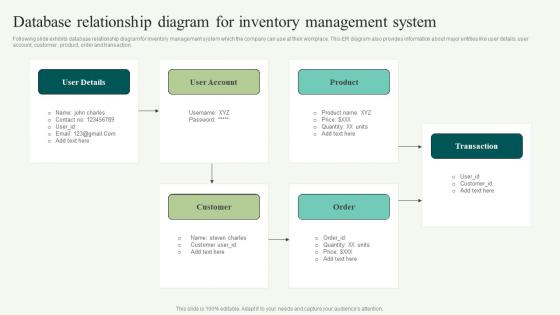
Following slide exhibits database relationship diagram for inventory management system which the company can use at their workplace. This ER diagram also provides information about major entities like user details, user account, customer, product, order and transaction.
People who downloaded this PowerPoint presentation also viewed the following :
Content of this Powerpoint Presentation
The inventory management system covers item-sourcing, storage, sales, and replenishment. It facilitates a company’s production and fulfillment processes to run more smoothly. Did you know that Amazon distributes almost 1.6 million packages from their brand to third-party sellers every day? It is the quality and work put into inventory management that keeps it smooth for their business.
Once an inventory management process is in place, its maintenance and attention to detail is critical to success. The best way to do it through a Database Relationship Diagram. Such a diagram allows you to create a conceptual data model and then turn it into a physical one. It is useful to provide a visual depiction of a database, process, or system.
Browse and download this PPT to demonstrate database relationship diagram for online shopping system to help firms in storing humungous amounts of data.
This blog demonstrates how to design a database relationship diagram to determine requirements, interdependence, and risks. It displays significant entities such as user details, user accounts, customers, products, orders, and transactions to help arrange the data and identify relationships. Use SlideTeam’s ready-to-download PPT Template to create a comprehensive database relationship diagram, resulting in better operations and higher customer satisfaction.
Also, check out this PPT Design to show organized data and build linkages between data groupings and inventory management system.
Template 1: Database Relationship Diagram for Inventory Management System
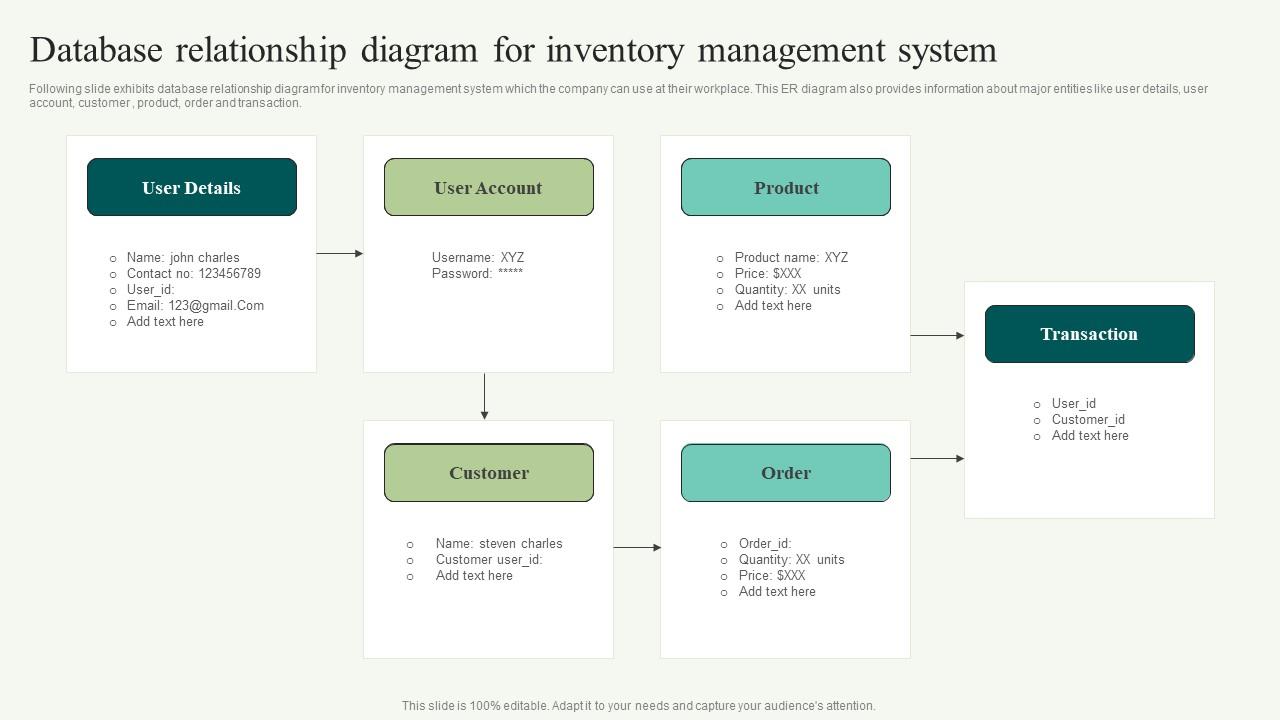
This PPT Template depicts the structure and relationships among entities engaged in the inventory management system. It contains information about elements such as user details, user accounts, customers, products, orders, and transactions. Use the slide as a communication tool that helps in strategy and provides accurate and real-life depiction of the database structure. The idea is to all stakeholders get a hang of entities, user-needs and expectations.
Define the data elements.
This PowerPoint Presentation describes the database structure. Use SlideTeam’s PPT Template to depict the inventory framework infrastructure. This will facilitate the effective tracking of products, suppliers, warehouses, and orders.
P.S. Explore our pre-designed Database Relationship Diagram for Library Management System.
Database Relationship Diagram For Inventory Management System with all 6 slides:
Use our Database Relationship Diagram For Inventory Management System to effectively help you save your valuable time. They are readymade to fit into any presentation structure.





FAQs for Database Relationship Diagram For
So relational databases are basically tables that connect to each other - way better than Excel honestly. Each table has rows (your actual records) and columns for different info. Primary keys give each row a unique ID, while foreign keys link tables together. You can set up rules to keep everything clean too. The cool part? You query across multiple tables without copying data everywhere. Makes finding specific info super easy since everything's connected properly. Way more organized than throwing everything into one massive spreadsheet.
So primary keys make every record unique in your table. Foreign keys connect tables by pointing to another table's primary key. Without them you'd have orphaned records floating around - basically references to stuff that doesn't exist anymore. It's like having a filing system where folders have unique IDs and cross-references only point to real folders. The database won't even let you delete a parent record if kids are still referencing it, which honestly saves you from yourself. Just set up these relationships when you're designing your schema or you'll hate yourself later when your data gets messy.
So normalization gets rid of duplicate data, which is huge. You won't have those annoying update problems where you change something in one spot but forget to update it everywhere else - I've wasted hours on that before. It saves storage space too since you're not copying the same info all over. Plus your data stays consistent because there's only one place where each piece lives. Honestly, just aim for third normal form and you'll be fine for most stuff. Going beyond that gets weird unless you really need it.
Honestly, denormalization can be a real game-changer for read speed. You're basically trading off storage space for faster queries - instead of joining a bunch of tables together, everything's right there in one spot. But here's the catch: writes become a total pain since you've got to update the same data in multiple places. Plus you're storing way more duplicate stuff, which gets expensive. I usually tell people to look at their slowest queries first and see if denormalizing just those specific tables actually moves the needle. Don't go crazy with it though - learned that one the hard way.
So indexes are like shortcuts for your database - instead of scanning whole tables, it jumps straight to the right spot. Picture a book index where you look up "foreign keys" and boom, page 47. Your database builds these reference structures pointing to where data actually sits on disk. WHERE clauses and JOINs especially love them. Honestly, I'd start with any columns you're constantly searching or filtering on - that's where you'll see the biggest wins. Just heads up though, they'll make your writes slower since the index has to get updated every time too.
Data types totally shape your whole schema - they control storage space, how fast your indexes run, and query speed. I learned this the hard way when a coworker used TEXT for literally everything because "what if we need more space later?" Total storage nightmare. Your foreign keys have to match exactly too. User ID as BIGINT? Every related table needs BIGINT. Pick the tightest type that actually fits your data. You can always expand later if needed, but starting small saves you headaches down the road.
Oh man, schema mismatches are gonna be your worst enemy - plus all the data type weirdness between systems. Date formats alone will make you want to scream. Performance tanks with big datasets too. Special characters get mangled because of encoding stuff, and don't get me started on foreign key constraints behaving differently everywhere. Zero downtime? Good luck with that headache. Honestly though, map out your schema differences first. Test everything on a tiny data chunk before you go crazy. Have a rollback ready because something always breaks when you least expect it.
So ACID is basically four rules that stop your database transactions from completely screwing up. Atomicity means everything works or nothing does - no weird half-done states. Consistency keeps your data following whatever rules you set up. Isolation stops different transactions from messing with each other (which gets messy fast with multiple users). Durability means once something's committed, it survives crashes and whatnot. Honestly, it's like having training wheels for your database. Just double-check your DB actually does full ACID compliance - some don't.
So inner joins are like finding matches - you only get rows where both tables have the data. Left joins are what I use most actually, they keep everything from your main table and just fill in NULLs where there's no match. Right joins are the opposite (though honestly, just flip your tables and use left instead). Cross joins... yeah don't touch those unless you want every single row paired with every other row. That gets messy fast. I'd say start with inner joins to get the concept, but you'll probably end up using left joins way more in real work. They're just more practical when you don't want to lose data.
So basically, views are like saved queries that look like regular tables. Super useful when you're constantly joining the same tables together or need to hide certain columns from users. I probably use them most for dashboards - makes it way easier for business folks to grab data without writing crazy complex queries. They're also clutch when your table structure changes but you don't want to break existing reports. Just heads up though, since views don't actually store data, they can be slow if the underlying query is messy.
So ERDs are basically like maps for your database - they show you how all the tables connect. Way easier than staring at actual table schemas, trust me. You can see the foreign keys, what relationships you're dealing with (one-to-many, many-to-many, whatever), and how data moves around. Super helpful when you're writing those messy complex queries. Plus if you ever need to explain your database to someone else, having a visual makes it so much simpler. Honestly, I always sketch one out before doing any big database changes - saves me from screwing things up later.
Start with indexes - seriously, that's where you'll see the biggest difference. Create them on columns you're always searching or joining on. I'd also clean up those queries - ditch the SELECT * habit and make sure your JOINs are tight. Oh, and check your execution plans! They'll show you exactly where things are crawling. If you've got massive tables, partitioning might help too. Honestly, most performance issues I've dealt with come down to missing indexes that should've been obvious. Database design plays a role, but indexing your common query patterns will fix like 80% of your problems right off the bat.
So referential integrity is like having guardrails for your database relationships. It stops you from creating orphaned records or broken links between tables. Like, you can't delete a customer who still has orders sitting there, or add an order for a product that doesn't even exist anymore. Trust me, explaining that bug to your boss is not fun. The database handles this automatically through foreign key constraints - way better than trying to catch everything in your app code. Just set up your foreign keys right and you're golden.
Here's what I'd do if I were you - start with strong authentication and role-based access. Don't give people more permissions than they actually need. Encrypt your sensitive stuff, both stored data and anything moving around. SQL injection protection is huge too, so use parameterized queries. Regular backups are obvious but worth mentioning. Keep your database software updated since new vulnerabilities pop up all the time. Audit logging helps you track who's doing what. Honestly, if you just nail down proper user roles and encryption first, you'll handle most of the big risks right there.
So stored procedures are basically just bundled SQL code that runs on your database server. Performance gets way better because there's less back-and-forth network chatter, plus the execution plans get cached. Security's probably the biggest reason I'd use them though - you can let users run procedures without giving them direct table access, which is clutch for sensitive stuff. Business logic stays consistent too since it's all in one spot instead of scattered across different apps. Honestly, I'd just pick your slowest, most complex queries first and turn those into procedures. You'll probably be surprised how much faster things run.
-
Extremely professional slides with attractive designs. I especially appreciate how easily they can be modified and come in different colors, shapes, and sizes!
-
Stunning collection! With a wide variety of options available, I was able to find a perfect slide for my presentation. Thank you, SlideTeam!