

Entity Relationship Diagram Of Inventory Management System




Try Before you Buy Download Free Sample Product
 Impress Your
 Audience
 100%
100% Editable
 Save Hours
 of Time


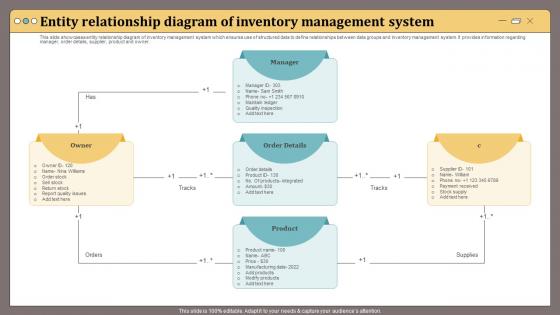
This slide showcases entity relationship diagram of inventory management system which ensures use of structured data to define relationships between data groups and inventory management system.It provides information regarding manager, order details, supplier, product and owner.
People who downloaded this PowerPoint presentation also viewed the following :
Entity Relationship Diagram Of Inventory Management System with all 6 slides:
Use our Entity Relationship Diagram Of Inventory Management System to effectively help you save your valuable time. They are readymade to fit into any presentation structure.





FAQs for Entity Relationship Diagram Of
Definitely prioritize real-time inventory tracking and automated reordering - that'll save you so much headache. Multi-location support is key if you've got different warehouses or stores. Make sure whatever you pick integrates well with your current ERP and accounting stuff, plus any e-commerce platforms. Good reporting is a must so you can actually see patterns and trends. Honestly, user-friendliness might be the most important thing because if your team hates using it, they just won't. Also think about scalability - you don't want to be shopping for a new system again in like 18 months. I'd demo maybe 3 or 4 options with your real data to see how they actually perform.
Your inventory system should track sales patterns and use real-time data for demand forecasting - basically keeps stock levels balanced. Set up automated reorder alerts so you don't run out of stuff. The math behind reorder points gets complicated (safety stock calculations and all that), but decent software handles it automatically. Watch for slow-moving inventory too, since dead stock just eats your cash flow. Seasonal trends matter more than you'd think. Monthly reviews of your forecasting accuracy help catch problems early. Honestly, start small with basic reorder notifications and build from there.
Honestly, tech makes a huge difference for inventory stuff. Barcode scanners and RFID tags give you real-time updates instead of relying on people to manually track everything (which never works perfectly anyway). Your POS system can automatically adjust stock levels when things sell. The automated alerts are pretty sweet too - they'll tell you when you're running low or if numbers don't add up. I've seen companies go from like 70% accuracy to over 95% just by switching over. Oh, and if you're starting from scratch, definitely go with barcode scanning first. Biggest impact for the money and you'll notice the difference right away.
Honestly, start by comparing what you're saving versus what you spent on the system. Track stuff like lower carrying costs, fewer stockouts, and less dead inventory sitting around. Labor efficiency is probably where you'll see the biggest wins - especially if your team was doing everything by hand before, which is just brutal. Better stock availability should boost sales too. Add up all your savings and extra revenue, subtract the system costs, then divide by those costs for your ROI percentage. I'd check this quarterly so you can show leadership the trending improvements and prove it was worth the investment.
Oh man, stockouts and overstocking are the worst - plus all those manual tracking mistakes when you're stuck with spreadsheets. Trust me, I've been there. A good inventory system fixes this stuff by setting up automatic reorder points so you don't run out of your bestsellers. It optimizes stock based on real demand patterns and gives you live updates across locations. The forecasting gets way better too since it accounts for seasonal changes. Just make sure whatever you pick plays nice with your current sales setup - you want something that actually simplifies your day, not creates more work.
Dude, integration is a game changer - it kills all that tedious manual data entry nobody wants to do. Your inventory automatically updates when something sells, purchase orders sync with accounting, and you can actually see what's happening in real time. No more awkward "uh, how many do we have?" moments during meetings. Sales knows what's available, accounting gets accurate numbers, and you won't oversell or scramble for emergency orders. Honestly, the API setup seems intimidating but it's worth it. You'll stop spending hours every week trying to make spreadsheets match up.
Honestly, start with cleaning up your current data - if those numbers are trash, any forecasting you do will be useless. Do ABC analysis to group stuff by value and how fast it moves. Automated reorder points work great once you factor in lead times and safety stock. I'd dump the annual inventory thing and do cycle counts throughout the year instead. Pull in your sales data for better demand planning, and don't forget seasonal patterns when you're forecasting. Real-time tracking makes a huge difference too. Trust the data over gut feelings - we've all learned that lesson the hard way!
Data analytics can spot demand patterns and help you figure out which stuff is just sitting there collecting dust. It catches trends you'd miss otherwise - seasonal spikes, products that always sell together, that kind of thing. Honestly, the automated alerts for low stock are a game changer. You can even predict when you'll run out of specific items before it happens. Oh, and it shows you what's actually moving versus what's eating up warehouse space and money. I'd start with something simple like turnover rate - build a basic dashboard around that first instead of trying to track everything at once.
Look, bad inventory management is basically an environmental nightmare. You're dealing with expired stuff, way too much packaging from panic orders, and don't even get me started on all those rush deliveries - the carbon footprint is insane. But here's the thing: when you actually plan your inventory right, you can predict what people want before you're scrambling. No more overordering random stuff or paying crazy shipping fees. Your supply chain runs smoother, less packaging gets wasted, and products don't sit around going bad. It's honestly one of those win-win situations where being smarter about planning saves money AND helps the planet.
Honestly, you'll probably see way better results than huge companies do. They've already got fancy systems, so any upgrade is just tweaking around the edges. You're coming from spreadsheets and guessing games - the jump is massive. Modern systems are built for small businesses now anyway, so you get all the good stuff without drowning in complexity. Best part? You'll finally know what's actually selling vs what's just taking up space (and eating your cash flow). Trust me, going from counting everything by hand to having real data is a game changer.
So basically, perpetual inventory tracks everything in real-time - like every single item coming and going gets logged immediately. Pretty neat but expensive to set up. Periodic is way simpler though, you just do manual counts every month or quarter. Honestly, if you're dealing with expensive stuff or things move fast, you'll want perpetual for sure. The real-time data is clutch. But periodic works fine for smaller operations - it's just that you're kinda guessing what you have between counts, which can get sketchy.
Look, you need multiple security layers for that inventory data. Role-based access is huge - only let people see what they actually need for their job. Two-factor authentication is non-negotiable because regular passwords are basically garbage at this point. Encrypt everything, both when it's moving around and just sitting there. Back up regularly and stay on top of security updates. Oh, and audit your user accounts every few months - you'd be shocked how many ex-employees still have access. This stuff is gold to competitors who want your supplier costs and stock numbers, so don't mess around.
Mobile apps are honestly a lifesaver - you can scan barcodes and update stock right from the warehouse floor. No more running back to your computer constantly (my legs were getting tired lol). Everything syncs instantly so your whole team sees real numbers, which cuts down on those annoying oversell situations. Push notifications for low stock are clutch too. I'd start with just basic barcode scanning if you're new to this. It'll slash your data entry time and catch way fewer mistakes. Once you see how much easier it makes things, you'll wonder why you waited so long to try it.
Honestly, AI is crushing it with demand forecasting right now - way better than the old methods. IoT sensors and RFID tags give you real-time tracking, which makes manual counting feel super outdated. Most companies are switching to cloud systems since you can check inventory from anywhere and scale fast. Oh, and sustainability tracking is massive now because customers actually care about environmental impact. My cousin's company just implemented this stuff last year. Start with AI demand planning tools that match your industry - that's probably your best bet for upgrading.
Honestly, training makes or breaks everything with these systems. I've watched companies drop serious cash on inventory software that nobody uses because they skipped the whole "teaching people how it works" part. Pretty frustrating to see. You'll definitely want solid onboarding sessions and maybe some quick reference guides they can actually find later. Short sentences work better than long training marathons too. Don't just dump the new system on everyone and walk away - that's a recipe for disaster. Set up ongoing support so people aren't stuck when weird issues pop up.
-
I was able to find the right choice of PPT template for my thesis with SlideTeam. Thank you for existing.
-
Loved the templates on SlideTeam, I believe I have found the go to place for my presentation needs!