


Entity Relationship Diagram For Hospital Management System




Try Before you Buy Download Free Sample Product
 Impress Your
 Audience
 100%
100% Editable
 Save Hours
 of Time


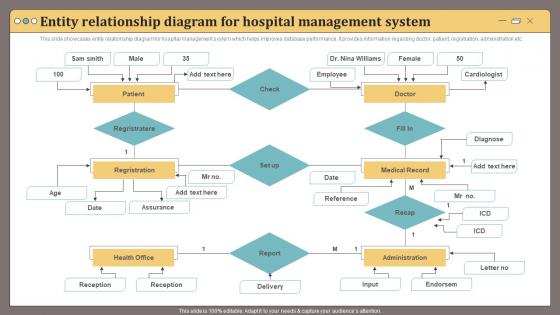
This slide showcases entity relationship diagram for hospital management system which helps improves database performance.It provides information regarding doctor, patient, registration, administration etc.
People who downloaded this PowerPoint presentation also viewed the following :
Entity Relationship Diagram For Hospital Management System with all 6 slides:
Use our Entity Relationship Diagram For Hospital Management System to effectively help you save your valuable time. They are readymade to fit into any presentation structure.





FAQs for Entity Relationship Diagram For
You'll need the obvious ones - Patient, Doctor, Nurse, Appointment, Medical Record, Department, Room, and Billing. Most places throw in Medicine/Pharmacy stuff too, plus a general Staff entity. But here's the thing - identifying these is the easy part. The real headache is mapping all the relationships. Patients see multiple doctors through different appointments, medical records need to link to specific visits, billing has to connect everything... it gets messy fast. My advice? Start with the patient's journey through the system first. Then build out all the staff and admin workflows around that core path. Way easier than trying to do it all at once.
So basically it starts when you register someone as a patient, right? Then they get admitted and that's when things really get moving. The patient ID connects everything - doctors get assigned, medical records pile up with diagnoses and treatments, billing starts tracking charges. Think of it like breadcrumbs but in reverse - you can follow the whole journey from start to finish. Just don't mess up your foreign keys or you'll be hunting down lost patient data later (been there, not fun). It's actually pretty neat how everything flows together once you see the big picture.
So doctors and patients? That's gonna be many-to-many. One doc treats tons of patients, and patients bounce between different doctors all the time. You'll need a junction table - call it "Treatments" or whatever. It sits between your Doctor and Patient tables. Makes sense since people see specialists, switch doctors, get referred around constantly. I swear I've seen like 5 different doctors this year alone. The junction table tracks who saw whom and when. Don't forget to add treatment date and diagnosis fields in there too.
So basically the ERD connects everything - patient records flow right into treatments, procedures, and insurance stuff. Really cuts down on typing the same info over and over. Your billing records and claims entities link straight to patient visits, which is actually pretty smart design. The system pulls procedure codes and costs automatically, then checks against insurance coverage limits to generate invoices. You can see payment status and what's still owed in real-time too. Honestly though, I'd map out how you currently handle billing first - makes it way easier to see where the ERD fits into what you're already doing.
So appointment scheduling is basically the heart of your whole ERD - everything connects back to it. Patient, Doctor, Department, Room entities all link there, which creates this messy web of relationships. Honestly, it's a pain to design because everyone needs different views of the same info. Your scheduling entity becomes the main record for transactions, tracking time slots and status updates and who's using what resources. Oh, and make sure those foreign keys can actually handle rebooking chaos and cancellations. That part always gets overlooked but it'll bite you later.
So I'd set up a Staff table with the basics - staff_id, name, department, role. Then create a separate Credentials table that links back to staff. Way cleaner than cramming everything together. The credentials table handles license numbers, certifications, expiration dates, all that compliance stuff. Makes sense because doctors have like 5 different credentials they need to maintain. Pain in the ass for HR otherwise. You'll probably want a Departments table too, maybe Specializations if you're getting fancy. The whole point is making it easy for HR to track renewals - trust me, they'll thank you when audit time comes around.
Honestly, the trickiest part is dealing with all the different departments - they each have their own weird workflows and equipment needs that just don't mesh well together. Your database design needs to be flexible enough for cardiology's specialized tests AND orthopedics' imaging stuff without turning into a complete nightmare of tables. Patient flow gets messy too when you're tracking referrals and transfers between departments, plus shared resources like labs. I'd start with the obvious entities first - Patient, Doctor, Appointment - then build out the specialty stuff on top of that.
So you'll want an "Inventory" or "Medical_Supplies" table with the basics - item ID, name, quantities, reorder levels, expiration dates. Link it to your "Supplier" table for procurement stuff and connect departments that actually use the supplies. Honestly, adding a "Supply_Usage" table is worth the extra work if you want to track consumption patterns. Makes budgeting way easier down the line. The relationships should show which departments order what and when restocking kicks in. Don't forget minimum stock threshold fields - those automatic reorder alerts will save you so much hassle later.
So you'll want to encrypt the really sensitive stuff like SSNs and medical records right in the database itself. Role-based permissions are huge - set up user tables that control who sees what. Honestly, HIPAA compliance is such a pain but you can't ignore it. Add timestamps and user IDs to every table for audit trails. Oh, and definitely plan for data masking when you're testing - you don't want real patient info floating around dev environments. Maybe separate your most sensitive data into its own tables? Start with identifying what's most critical and build from there.
So basically you'll want to create separate entities for those external systems - like "ExternalLabOrder" or "PharmacyRequest" - that connect to your main Patient and Order stuff. Don't try to mirror their whole data structure though, that gets messy fast. Just store the reference IDs, status updates, and timestamps you actually need for tracking. The key is making these integration points super obvious in your ERD so when developers are building it, they immediately know "oh, this is where we hand off to the external system." Honestly, this part trips up a lot of people because they overthink it.
So basically, a central database is like the heart of the whole hospital setup. Everyone pulls from the same real-time patient info instead of having doctors checking old records while nurses update completely different systems - which honestly sounds like chaos. It kills those annoying data silos and cuts down on mistakes. Departments can actually talk to each other properly. Oh, and you get way better reporting when everything feeds into one spot. Just make sure your ERD has solid data integrity and access controls built in so the right people can grab what they need fast when patients are counting on it.
Look, the ERD is basically your cheat sheet for pulling reports that actually matter. Instead of randomly hunting through tables, you can trace connections between patients, appointments, billing - all that stuff. Need to see which departments are swamped? Just follow the dots from appointments to departments to doctors. Makes writing queries way less of a headache. Your analytics tools will even start suggesting reports automatically once they understand the relationships. Honestly, I'd start by figuring out what reports management actually looks at first - then you'll know which connections are worth focusing on.
Start with flexible entities like "TechnologyIntegration" and "DeviceData" - they'll handle whatever new tech comes up without breaking your schema. Don't hardcode specific devices (learned this the hard way). JSON fields are your friend for evolving requirements. Throw in entities for digital health records, remote monitoring, and AI insights even if you're not using them yet. Honestly, it feels weird adding empty tables, but you'll be so grateful later when adding wearables becomes a config tweak instead of rebuilding everything. Generic attribute tables work great too.
Privacy rules make your ERD way more complicated, not gonna lie. You can't just throw everything into one massive Patient table anymore - gotta split sensitive stuff across different entities. Medical records go here, billing there, personal info somewhere else. Linking everything directly becomes risky too, so relationships get weird. Honestly though? It actually makes for cleaner design once you get used to it. I'd start by figuring out your most sensitive data first, then build the whole thing around protecting those bits. More work upfront but saves headaches later.
So basically, take each ERD entity and make it its own screen section - patient records, scheduling, billing, whatever. Don't try to stuff everything on one page just because it's all in the same database (I've seen that disaster way too many times). Your database relationships should tell you how to set up navigation - like going from a patient's profile straight to their appointments or history. Keep forms dead simple and make sure your field validation matches what's actually in your database constraints. Oh, and start with wireframes for your main entities first. Then figure out how they'll connect. Way easier that way.
-
“I really like the convenient operation and professionalism I saw on the SlideTeam website. I want to express my regards and appreciation to the team.”
-
The information is visually stunning and easy to understand, making it perfect for any business person. So I would highly recommend you purchase this PPT design now!