

Food Ordering System Data Flow Diagram




Try Before you Buy Download Free Sample Product
 Impress Your
 Audience
 100%
100% Editable
 Save Hours
 of Time


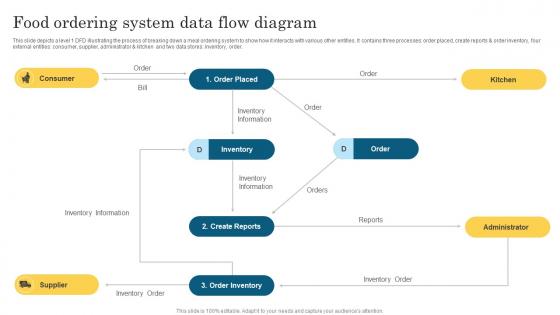
This slide depicts a level 1 DFD illustrating the process of breaking down a meal ordering system to show how it interacts with various other entities. It contains three processes order placed, create reports and order inventory, four external entities consumer, supplier, administrator and kitchen and two data stores inventory, order.
People who downloaded this PowerPoint presentation also viewed the following :
Food Ordering System Data Flow Diagram with all 6 slides:
Use our Food Ordering System Data Flow Diagram to effectively help you save your valuable time. They are readymade to fit into any presentation structure.





FAQs for Food Ordering System
Honestly, the biggest thing is making search and filtering super intuitive - people get frustrated when they can't find what they want fast. Real-time tracking is huge too, nobody wants to wonder where their food is. I'd also focus on that checkout flow being smooth with saved payment info. Personalized recs based on what they've ordered before work really well. Clear restaurant details matter - ratings, delivery times, good photos. And seriously, test everything on mobile since that's how most people order. Oh, and make sure it doesn't crash when people are already hangry! Speed beats fancy features every time.
Check what APIs your current restaurant software has first - that's your starting point. Most ordering platforms can sync with POS systems, but honestly, getting the data formats to match up is where things get messy. Some systems are super picky about how they receive info. Map out what data goes where - orders need to hit your POS, inventory updates should flow back to the ordering platform, stuff like that. Look for ordering systems that specifically work with your current setup. The real-time syncing part usually works fine once you get it configured right.
Honestly, I'd go with Stripe for your food ordering thing. Their fraud protection is really good and they handle Apple Pay, Google Pay, all that stuff. Square's decent too, especially if you might do pickup orders later. PayPal works but feels kinda dated to me? All of them are PCI compliant so you don't have to worry about the security headaches. Stripe's the most developer-friendly though - their docs are actually readable. Start there and see how their fees work with your order volume.
Dude, mobile responsiveness will literally make or break your food app. People are hangry and scrolling on their phones - if something's glitchy, they're gone in like 2 seconds. I've done this myself honestly, bounced right to DoorDash when an app was being weird. Your menu needs to scroll smoothly, checkout can't be a nightmare, and payments better work perfectly on tiny screens. Abandoned carts = lost money, period. Test it on different phones regularly because what works on your iPhone might be trash on Android. Don't let technical issues kill your sales when people are already ready to buy.
Honestly, user feedback is like gold - it shows you what's actually busted instead of what you're guessing is wrong. You'll discover stuff you never thought of, like people getting lost during checkout or wanting better dietary filters. My last company spent forever building this elaborate recommendation engine when customers literally just wanted the search bar to work properly lol. The trick is setting up different ways for people to complain - app ratings, surveys after they order, support tickets. Then you've gotta actually look at the patterns regularly instead of letting feedback pile up. It's way better than building features that sound awesome but nobody uses.
So you track customer ordering patterns and use that data to predict what they'll want - crazy how well it works with stuff like time/weather factors. Machine learning catches weird orders before they hit the kitchen too (like someone ordering 50 pizzas to an apartment, which happens more than you'd think). The recommendation part gets smarter as it learns what actually sells vs just pushing expensive items. Your error rates will drop pretty fast once the system learns your customers' habits. I'd measure your current mistake rate first so you can see the difference later.
Honestly, real-time data accuracy is gonna be your biggest pain point. GPS tracking from drivers, order updates from restaurants - getting all these systems to talk to each other smoothly is rough at first. Driver apps will murder phone batteries too, which nobody warns you about. Poor signal areas mess up location tracking constantly. Customers expect perfect ETAs and live maps now, so the pressure's real. Oh, and basic status updates are way more important than fancy GPS stuff - learned that the hard way. Start simple with "confirmed, preparing, out for delivery" before you get all complicated.
Look for systems with solid ingredient databases and filtering - allergies, vegan, keto, religious stuff. Customization features are clutch too, like swapping ingredients or removing things. Some platforms save your dietary profile which is honestly so convenient (nobody wants to re-enter that info every time). The really slick ones will suggest alternatives automatically. Oh, and make sure whatever you pick has those filters front and center in the interface. I've used apps where they bury that stuff and it defeats the whole purpose. You want people to actually see and use these features.
Start with clear navigation - categories, search, and cart need to be obvious right away. Your menu photos are HUGE though, people literally decide with their eyes so make them consistent and high-quality. The whole flow should be super simple: browse, customize, add to cart, done. Big buttons for mobile users (thumbs aren't precise lol). Stick with icons everyone knows - shopping cart, heart for favorites. Always show order status and delivery times in real-time. Oh and test it with actually hungry people if you can - they're way more impatient than normal users and you'll catch issues faster.
Honestly, just build sharing right into your ordering process - let people post their food pics for discounts or whatever. Instagram and TikTok are obviously perfect for food shots, plus you can target ads by location and what people actually eat. Don't sleep on Facebook either, it's surprisingly good for local spots. Create a hashtag and repost customer photos - people love seeing themselves featured. The trick is making it feel natural, not pushy. Maybe loyalty points for posts? Custom packaging photographs really well too. Oh and pick one platform first - better to nail Instagram than suck at everything.
Dude, real-time inventory tracking is such a lifesaver for food orders. No more awkward "oops we're out" conversations that slow everything down. Your system updates automatically when stuff gets ordered, so you can't accidentally sell something that's gone. Staff stops wasting time hunting around to see what's left - they can just focus on making food. Plus you get alerts before you completely run out of ingredients, which honestly should be standard everywhere by now. Way better than manually counting everything like we're still in the stone age. Trust me, busy rush periods become so much smoother.
Oh man, privacy laws are such a headache right now. GDPR kicks in if you've got EU users, and CCPA covers California folks. Plus there's all these new state laws coming out constantly - it's honestly hard to keep track. The main stuff you gotta nail down: get clear consent before collecting data, let people delete their accounts completely, and be super upfront about what you're doing with their info. Payment data? That's where PCI DSS comes in and there's zero wiggle room there. My advice? Find a good privacy lawyer who can look at what you're doing now and build something that won't break when the next law drops.
Honestly, loyalty points work super well for this stuff. Give people badges for trying different cuisines or hitting order streaks - they eat it up. Something like "5 more orders = free delivery" keeps them coming back. Oh, and leaderboards are genius if you can swing it. People get genuinely competitive about their takeout habits, which is hilarious but effective. Weekly challenges help too. "Order from 3 new places" type thing. Just don't make it feel too salesy, you know? Start basic with points and see what sticks based on how people actually use it.
Honestly, the biggest thing is cutting down your checkout steps - like seriously, every extra click loses people. Show all the fees upfront too, nobody likes surprise delivery charges at the end. Let people checkout as guests because making them create accounts is conversion death. Send those abandoned cart emails fast, maybe with free shipping to get them back. I'd literally time your own checkout process and see how brutal it is. Mine took like 6 minutes once, no wonder people were bouncing. Keep it simple and don't hide costs - that's basically it.
So basically you'll want queue management and load balancing for rush times. Auto-scaling servers is huge - set it up to kick in during dinner rush automatically. Priority queuing helps too - VIP customers and big orders jump the line. When kitchens get slammed, most apps just throttle new orders because honestly nobody wants to wait 2 hours for cold pizza. Real-time monitoring is your friend here. Watch order volumes vs kitchen capacity constantly. Set alerts for volume spikes and have those scaling rules ready to go. It's all about adjusting quickly before things go sideways.
-
This PowerPoint layout is very helpful from a business point of view, and it's visually stunning too! I'm so happy with this product because it has helped me understand and deliver great presentations.
-
The best part about SlideTeam is their meticulously prepared presentations (complete-decks and single-slides both), infused with high-quality graphics and easy to edit. All-in-all worthy products.