

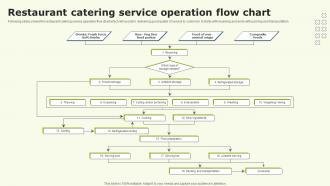
Restaurant Catering Service Operation Flow Chart





Try Before you Buy Download Free Sample Product
 Impress Your
 Audience
 100%
100% Editable
 Save Hours
 of Time


Following slides shows the restaurant catering service operation flow chart which will assist in delivering good quality of service to customer. It starts with receiving and ends with packing and transportation
People who downloaded this PowerPoint presentation also viewed the following :
Restaurant Catering Service Operation Flow Chart with all 6 slides:
Use our Restaurant Catering Service Operation Flow Chart to effectively help you save your valuable time. They are readymade to fit into any presentation structure.





FAQs for Restaurant Catering Service
So basically you've got menu planning first, then procurement and ordering. After that comes prep, production, packaging - the usual kitchen stuff. Transportation's where things get tricky though, especially keeping temps right during transport. Service and delivery are next, then cleanup obviously. Honestly, I'd map out who's doing what and when before you even think about your first big event. Food safety checkpoints need to happen at every single stage - trust me on this one. Most caterers I know also do some kind of feedback thing afterward to see what went wrong or right. Walking through your setup ahead of time will save you so much stress.
Look, flow charts are honestly game-changers for catering. Map out everything you're currently doing - I mean EVERYTHING. You'll instantly spot where people are bumping into each other or doing the same prep twice. Super annoying inefficiencies become obvious when you see it all laid out visually. Then you can figure out which tasks can happen at the same time and reorganize the whole sequence. Your staff placement gets way better too. I'd start with documenting what you do now, then go through and mark all the dumb redundant stuff you can cut. Trust me, there's always more waste than you think!
Ugh, catering is basically controlled chaos - you've got timing nightmares, kitchen staff not talking to servers, and inventory going sideways. Flow charts actually save your sanity though. Map out who does what and when each task happens. Different swim lanes for each person work great so nobody's stepping on each other. You'll catch bottlenecks before they wreck everything. Honestly, anything that prevents those insane last-minute scrambles is worth it. Trust me, your prep-to-service handoffs will thank you later.
Honestly, tech can save your butt at every step. Start with order management software - it's way better than juggling emails and texts. Inventory tracking keeps you from running out of stuff mid-event (learned that the hard way). For your crew, scheduling apps are clutch. GPS makes deliveries less stressful, and mobile payment systems work great on-site. Oh, and digital checklists! No more soggy paper in the kitchen - that was always so gross. Cloud platforms sync everything so nobody's working with old info. Don't try to automate everything at once though. Pick your biggest headaches first and go from there.
Look, communication basically holds your whole catering operation together. Without it, you'll have sales promising one thing while the kitchen's doing another - total disaster waiting to happen. Build in specific checkpoints where teams actually talk to each other. Like when sales hands off to kitchen, or setup crew confirms timing with the venue. One missed allergy or timing change can mess up everything (learned that the hard way). Your flow chart needs those communication spots mapped out clearly. Otherwise people just assume someone else handled it, and that's when stuff gets dropped.
Dude, menu planning is literally where everything starts. Get that locked down first or you'll be scrambling later - trust me on this one. Your ingredient orders, prep schedules, how many people you need working, what equipment to bring... it all flows from what you're actually serving. I always tell people to finalize the menu at least a week out. That way purchasing has time to hunt down ingredients (especially if you need something weird) and the kitchen crew can actually plan their prep instead of just winging it. Honestly, nail this part early and the rest becomes way less stressful.
Start with a basic timeline - just boxes and arrows showing each step from order to delivery. Use different colors for each department, like blue for kitchen and green for delivery. Diamond shapes work great for decision points where your team has to choose something. Honestly, most people go way overboard and create these massive charts nobody ever looks at! Add time estimates and maybe bold the potential bottlenecks. Oh, and definitely test it with your actual team first - they always catch stuff you totally missed.
Honestly, flow charts are game-changers for keeping clients from losing their minds. Nothing slips through the cracks when you've got every step mapped out - from that first meeting all the way to cleanup. Your team knows exactly what they're doing and when, which makes everything run way smoother. Clients can actually relax because you're giving them real timelines instead of just winging it. Plus you'll spot problems early instead of dealing with total disasters later (trust me on this one). Just start by writing down what you're already doing, then figure out where things usually go wrong. That's where you'll see the biggest difference.
Honestly, I'd go with linear flows first - just map out your basic timeline from order to cleanup. Super straightforward for standard events. Swimlane diagrams are where it gets interesting though (probably my go-to). You split everything into columns by who handles what - kitchen, service, management. Makes accountability crystal clear. Decision trees work when you're dealing with multiple scenarios, like indoor vs outdoor or different guest counts. Most places I know mix and match depending on how complex the event is. Start simple with linear, then once your team's comfortable, add swimlanes. Way less overwhelming that way.
Quarterly updates are a good baseline, but don't get too hung up on the schedule. I'd say tackle it whenever you're noticing things getting messy - like orders backing up or your team looking confused. Big changes definitely need chart updates: new suppliers, menu additions, kitchen rearrangements. Summer always throws us off too since we're suddenly hauling equipment to parks every weekend. Honestly, I just keep a notes app going on my phone for when stuff breaks down. Then every few months I'll sit down and fix the whole chart at once. Way easier than trying to be perfect about it.
Honestly, training is what separates a working system from complete disaster. Your flow chart means nothing if people don't actually get how to use it. I learned this the hard way at my last job - we had this beautiful process mapped out but nobody bothered explaining it properly. Total mess. Walk new people through every single step, show them how their part connects to everyone else's work. Short sentences work better than long explanations, trust me. Don't just tell them what to do, explain the timing too. And yeah, do refreshers because people forget stuff.
Build feedback loops right into your flow chart at decision points and after big milestones. Add checkboxes or notes sections where you jot down what worked or didn't - stuff like "kitchen timing was off" or "client loved how we set up appetizers." Honestly, I've watched so many teams just think "oh we'll remember that" and then totally forget! Make a post-event review step that connects back to your planning phase. Your flow chart becomes something that actually gets better each time. Oh, and make the feedback thing required, not just "we should probably do this."
Timing is everything in catering - seriously, it'll make or break you. Start from your service time and work backwards. Map out when prep begins, cooking starts, staff shows up, all of it. One delay screws up everything downstream. Cold food and stressed staff? Yeah, been there. Build buffer time into your timeline because something always goes wrong (usually multiple somethings). Your flow chart needs realistic timeframes for each step. Without solid timing, you're basically guaranteed angry clients and chaos in the kitchen.
Honestly, weddings are just way more of a headache - you've got multiple tastings, endless vendor meetings, and all that ceremony stuff corporate events skip. Corporate gigs are pretty predictable with their standard menus and quick setup times. Your serving style totally changes the workflow too. Plated dinners vs buffets vs cocktail hour - they're all different beasts. I'd start with mapping out your most complicated wedding first (probably helps that it's the most profitable anyway), then you can strip it down for the simpler corporate stuff later.
Look, inventory management sounds super boring but it'll save your ass. Trust me on this one. When you're planning menus and figuring out costs, you need to know what you actually have. Same goes for ordering supplies and prepping food. I learned this the hard way when we ran out of salmon at a wedding - not fun explaining that to the bride! Track your top 10 ingredients religiously and you'll spot problems before they happen. Plus it helps with food costs and waste, which honestly adds up faster than you'd think. Your clients are counting on you to deliver what you promised.
-
“There is so much choice. At first, it seems like there isn't but you have to just keep looking, there are endless amounts to explore.”
-
Innovative and creative templates with high-quality designs. Helped me with my presentation as the slides were easy to edit.