


Work Flow Diagram Of Pharmacy Management System Structure




Try Before you Buy Download Free Sample Product
 Impress Your
 Audience
 100%
100% Editable
 Save Hours
 of Time


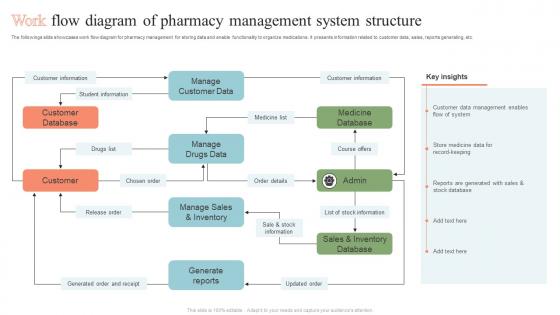
The followings slide showcases work flow diagram for pharmacy management for storing data and enable functionality to organize medications. It presents information related to customer data, sales, reports generating, etc.
People who downloaded this PowerPoint presentation also viewed the following :
Work Flow Diagram Of Pharmacy Management System Structure with all 6 slides:
Use our Work Flow Diagram Of Pharmacy Management System Structure to effectively help you save your valuable time. They are readymade to fit into any presentation structure.





FAQs for Work Flow Diagram Of Pharmacy
Honestly, start with inventory management - you need to track stock and expiration dates or you're screwed. Customer management is huge too for prescriptions and insurance stuff. The billing automation will save your sanity, trust me on that one. Prescription tracking for refills and drug interactions is obviously critical. Most systems throw in barcode scanning now which is nice. Oh, and reporting features for compliance because the state loves their paperwork. Maybe write down what's driving you crazy daily? That'll help you figure out what features actually matter instead of getting sold on bells and whistles you don't need.
Honestly, it's like having a safety net that catches everything before it goes wrong. The system automatically checks prescriptions against patient records and flags drug interactions or dosage issues. Barcode scanning is huge - no more trying to decipher doctors' handwriting (seriously, why is it always so bad?). Your inventory gets tracked in real time, so you'll know right away if meds are expired or running low. It also catches duplicate prescriptions and insurance problems. Just make sure you set up all the alerts properly from the start, because it'll spot errors you'd totally miss doing things manually.
Honestly, inventory management is probably the most useful part of any PMS system. It'll track your stock levels and expiration dates automatically, plus handle reordering so you don't run out of anything important. You can see which meds are popular vs. which ones just sit there forever. The alerts for expiring drugs are clutch - saves you from having to manually check everything. Oh, and it does lot tracking too in case there's ever a recall situation (trust me, you don't want to deal with that manually). Most systems connect with suppliers now, which makes ordering so much easier. Just make sure you set realistic reorder points early on and let it run itself.
Look, these systems are total lifesavers for catching drug interactions and allergy flags before you mess up. The barcode scanning cuts down on so many dumb mistakes too. What I love is how it tracks medication histories - makes patient counseling way easier when you can actually see patterns. Your patients will thank you for the automated refill reminders since half of them can't remember to take their pills anyway lol. The dosage verification is clutch. Start with those interaction alerts though - seriously, use them every single time because manual checking is just asking for trouble.
You're gonna save so much time, seriously. No more trying to decode doctors' handwriting or calling offices back and forth. Everything flows straight into your system automatically. Drug interactions get flagged right away too, which is pretty clutch. Your inventory tracking becomes way smoother since you can see what's coming in real-time. Honestly the workflow change is insane - we probably cut our processing time in half. Oh and definitely start with whoever sends you the most scripts first. You'll notice the difference immediately and it'll make the whole transition feel worth it.
So basically your system checks every med against what the patient's already taking and alerts you to sketchy combos. Like warfarin + aspirin = bleeding nightmare. Super helpful when you're swamped and might miss something obvious. Alerts show severity levels too, sometimes suggest alternatives. You can manually run checks if someone asks about OTC stuff - honestly patients ask about that constantly. Just make sure your interaction database is set up right from the start. Trust me, those alerts will save your butt legally speaking.
Hey! So for tracking your PMS, I'd start with prescription processing time - basically how long from when it's entered to dispensed. Super important. Check your inventory turnover too because nobody wants stuff sitting around forever. Error rates are obviously critical since medication mix-ups are terrifying. Staff productivity matters (prescriptions per hour) along with customer wait times. Revenue per prescription and insurance rejection rates show you the money side. Honestly though? Don't go crazy with every metric at once - pick like 3-4 that matter most for safety and profits first.
Dude, a PMS will save your sanity. It tracks all your controlled substances automatically, monitors drug interactions in real-time, and handles DEA reporting without you lifting a finger. Every prescription and inventory change gets logged – no more paper trail nightmares. When inspectors randomly show up (and they will), you can pull reports in minutes instead of digging through boxes like a maniac. Insurance verification happens automatically too. Honestly, it's like having someone handle all the boring compliance stuff while you focus on actual pharmacy work. Best investment you'll make.
Dude, start with inventory stuff - AI learns your ordering patterns and tells you when to restock before you're scrambling. Drug interaction checks happen way faster than doing it manually, which is honestly a lifesaver. Those chatbots can handle the boring calls about prescription status and hours (seriously, people call about store hours when Google exists?). You'll also spot prescription trends better - like stocking up on flu meds before flu season hits. Don't go crazy though, pick one thing first and see how it goes.
Honestly, staff pushback is gonna be your biggest headache. People hate learning new systems when the old one works fine (even if it's terrible). Data migration is another nightmare - you don't want patient records getting messed up or lost. Budget for way more training time than you think, especially with older staff who aren't super tech-savvy. Downtime during the switch will stress everyone out too. I'd definitely run both systems side by side for at least a week, maybe longer. Sounds expensive but beats discovering problems after you've already switched over completely.
Dude, get a pharmacy management system if you haven't already. It'll automate all that tedious prescription lookup stuff and track patient histories automatically. No more digging through files while customers tap their feet impatiently. Real-time inventory means you actually know what's in stock, plus it handles insurance checks instantly. The electronic refill reminders are clutch too - way better than sticky notes everywhere (been there). You'll catch drug interactions right away, which patients really appreciate. Honestly? Start with whatever fixes your worst daily headaches first. Those "let me check the back" moments will disappear.
Definitely get encryption set up for everything - data in transit and at rest. Multi-factor authentication is a must too. I'd set up role-based permissions so staff can't access stuff they shouldn't see. Oh and please don't skip the backups - I swear half the small businesses I know learned this the hard way. You'll want security audits on the regular, plus system logging and intrusion detection. Since you're dealing with patient info, HIPAA compliance isn't optional. Honestly? Start with a security assessment first to see where you're vulnerable, then work from there.
So basically, a PMS connects straight to insurance companies and submits everything electronically - cuts your processing time from weeks down to like 2-3 days. Pretty huge difference. You can check coverage in real-time before you even hand over the meds, which saves those super awkward moments when someone's insurance says no. It'll catch common rejection stuff automatically and help you fix claims way faster. Oh, and it tracks which insurers are being slow or difficult - honestly that data alone is worth it. I'd start with just the electronic claims part first since that'll save you the most time upfront.
Look, your staff will be staring at this thing for 8+ hours daily, so if it's a pain to use, you're screwed. Clunky interfaces mean longer training, more errors with dosages, and cranky employees who'll take it out on customers. Nobody wants that headache. The whole point is making prescription processing fast and smooth - fewer clicks, clear menus, stuff that actually makes sense. I've seen pharmacies where techs spend half their time just figuring out how to navigate the system instead of helping patients. Get something intuitive and your team can focus on actual pharmacy work instead of wrestling with bad software.
Honestly, the reporting stuff is a game changer - you'll actually know what's happening instead of just winging it. Track which meds are selling like crazy and which ones are just sitting there burning cash. Peak hours become super obvious for scheduling, plus you can spot those weird seasonal patterns before they smack you. Insurance reimbursements make way more sense too. Most systems do automated reports so you're not stuck pulling numbers every damn week - thank god for that. Start with inventory turnover first though. That's where the real money is hiding.
-
SlideTeam is a great place for PPT templates. They have many templates on a single topic. It has made my life a lot easier.
-
Great combination of visuals and information. Glad I purchased your subscription.