

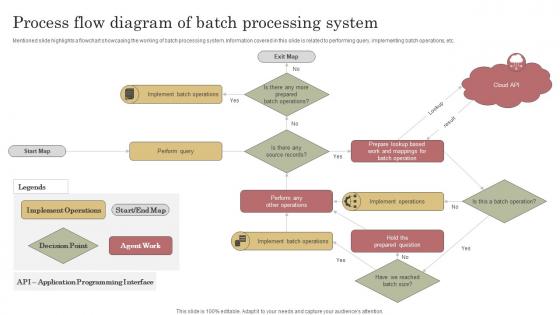
Process Flow Diagram Of Batch Processing System




Try Before you Buy Download Free Sample Product
 Impress Your
 Audience
 100%
100% Editable
 Save Hours
 of Time


Mentioned slide highlights a flowchart showcasing the working of batch processing system. Information covered in this slide is related to performing query, implementing batch operations, etc.
People who downloaded this PowerPoint presentation also viewed the following :
Process Flow Diagram Of Batch Processing System with all 6 slides:
Use our Process Flow Diagram Of Batch Processing System to effectively help you save your valuable time. They are readymade to fit into any presentation structure.





FAQs for Process Flow Diagram Of
So batch processing is like doing laundry - you collect everything and run it all at once, usually during off-peak hours. Real-time hits every data point immediately as it comes in. Think payroll vs fraud detection, you know? You can wait a few days for your paycheck to process, but nobody wants their card getting stolen while the system "thinks about it." Batch handles huge volumes way more efficiently, but there's always that built-in delay. Really comes down to whether your users can chill and wait or if they need answers right now.
So batch processing is where you dump all your data into one big job instead of handling it record by record. Way more efficient - like meal prepping on Sunday vs cooking every single meal from scratch. You can run these jobs overnight when your servers aren't busy, which honestly saves you a ton on compute costs. Less overhead too since you're not constantly spinning up new processes. Oh and the time savings are insane. I'd probably start with whatever boring repetitive stuff you do most often and batch that first.
Honestly, batch processing is everywhere once you start looking. Banks do all their end-of-day stuff in batches - transactions, statements, the works. Retail companies run inventory updates overnight instead of constantly throughout the day (which would be chaos). Manufacturing uses it for production scheduling and quality control analysis. Healthcare processes insurance claims in batches too - nobody wants their medical records getting updated at random 3am intervals. Oh, and streaming services? They batch process all that viewing data to figure out what you might want to watch next. Really any repetitive, high-volume work is perfect for batching.
So basically you group similar tasks together and run them when your system isn't busy - like during nights or weekends. Way more efficient than processing stuff one by one all day long. It's kinda like batch cooking on Sundays instead of making individual meals (though I'm terrible at meal prep lol). Your CPU and memory get used way better, plus you save money since compute costs are cheaper during off-peak times. Works great for things that aren't super urgent - data reports, analytics, that kind of stuff. You'll definitely notice the performance boost.
Oh man, the scheduling stuff will drive you crazy - batch jobs always seem to break at 2am on weekends (learned that the hard way). Resource management gets messy too since these things eat up CPU and memory like nobody's business. Monitoring overnight jobs is such a pain. Data consistency becomes a nightmare when your batch craps out halfway through millions of records. Honestly, just build solid retry logic from the start and set up good alerts. Trust me, you don't want to be debugging this stuff in production at 3am.
Look for stuff that doesn't change much - sales records, server logs, financial data, customer transactions. Batch processing loves big, stable datasets that can sit around waiting to be crunched. Perfect for ETL jobs, report generation, ML training. Basically anything where you don't need instant results. I'd start with whatever data analysis you're doing by hand right now (that's usually low-hanging fruit). Skip anything that needs real-time updates though. The whole point is processing chunks of data when it's convenient, not when it's urgent.
So for tracking your batches, I'd focus on throughput first - like how much data you're crunching per hour. Job completion times matter too, obviously. Error rates are clutch though, and honestly? The failed jobs tell you way more than the successful ones sometimes. Monitor your CPU and memory usage during runs - I/O too if you can. Queue wait times are worth watching if you've got multiple batches running. Oh, and definitely set up some kind of dashboard so you can actually see trends developing. One thing - establish your baselines before you start optimizing anything. Can't really improve stuff if you don't know where you started, right?
Honestly, I'd start with Apache Airflow or Jenkins - both are pretty solid choices. Airflow's got this nice UI and handles messy dependencies without breaking a sweat. Jenkins works great if you're already using it for other stuff (no point switching tools for no reason). AWS Batch and Google Cloud Dataflow are decent cloud options too. For simple workflows though? Just use cron jobs or maybe Celery. I always map out what I actually need first - saves you from over-engineering the hell out of everything. Pick whatever matches your setup and complexity level.
Honestly, how you design your batch system makes or breaks everything when data starts growing. Build it right with partitioning and parallel processing? You can just throw more nodes at it later. Go the monolithic route where everything runs one after another... yeah, you'll be stuck buying bigger and bigger machines which gets ridiculous expensive. Break your jobs into smaller chunks that don't depend on each other - that's the secret sauce. Even if your data feels tiny now, design like it'll be massive tomorrow. I learned this the hard way watching a project completely fall apart when we hit scale. Trust me on this one.
Oh man, scheduling is huge for batch processing - probably the most important piece honestly. You want to run those jobs when your systems aren't getting hammered, usually late nights or weekends. Otherwise you'll tank performance during peak hours and everyone will hate you lol. The cool thing is you can chain jobs together so they run in sequence, plus set up retry logic for when stuff inevitably breaks. I'd start by checking when your current system usage dips, then slot your batches into those quiet periods. Makes a world of difference.
So batch processing basically means you split huge datasets into chunks and run them on a schedule instead of trying to do everything at once. Perfect for stuff like daily reports or training ML models - anything where you don't need results instantly. I've seen people use Spark jobs to churn through terabytes overnight instead of crashing their systems during business hours. Way smarter approach honestly. Look at your current analytics and figure out what could run during off-peak times. You'll save money and your infrastructure won't hate you.
Three big things to nail down: data protection, access controls, and audit trails. Encrypt everything - data sitting around and data moving between systems. Never hardcode credentials into your batch scripts (seriously, I've seen this mess up so many teams). Authentication needs to be solid for any system connections. Logging is huge here since you'll want to track what got processed and when. Honestly, the more detailed the better when something goes wrong. Run these jobs in their own isolated space if you can. Oh, and don't forget to regularly check who can actually modify your batch scripts - that list tends to grow over time without anyone noticing.
Dude, start with automating your most annoying, repetitive jobs first - that's where you'll feel the biggest relief. Scripts can handle scheduling, retry stuff that fails, and ping you when things break. No more babysitting every single process! The dependency management is pretty sweet too since jobs will run in the right order automatically. I'd focus on getting basic scheduling and error handling down first, then you can get fancy with monitoring later. Honestly took me way too long to realize how much time this saves.
Honestly, serverless batch processing is where it's at right now - no more infrastructure headaches, which is perfect if you're on a small team. Cloud-native stuff is everywhere, plus you're getting way better integration with streaming platforms like Kafka. Real-time hybrid processing is picking up steam too. The AI optimization part is actually pretty cool since it'll auto-tune your jobs for better performance (though I'm still figuring out how much that actually helps day-to-day). Containerization makes everything portable. You should mess around with AWS Batch or Google Cloud Dataflow - might totally change how you handle your current workflows.
So batch processing - you gotta nail the error handling first. Jobs always crash at 3am, I swear. Monitor your resources and run stuff during off-peak hours if you can swing it. Logging is huge too, otherwise you're blind when things break. Oh and validate your data going in AND coming out - saves you tons of headaches later. Set up alerts for failures or when performance tanks. Honestly, most people skip the monitoring part entirely. Start there - check which jobs don't have proper tracking. That's usually where everything falls apart first.
-
The customer care of SlideTeam is very responsive. I was having a payment issue and they fixed it for me in no time.
-
It's always a delight to see new templates from you! I am extremely pleased with the fact that they are easy to modify and fit any presentation layout in seconds!