

Process Flow Chart For Financial Document Management




Try Before you Buy Download Free Sample Product
 Impress Your
 Audience
 100%
100% Editable
 Save Hours
 of Time


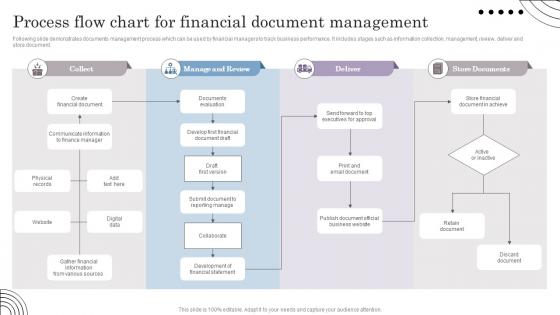
Following slide demonstrates documents management process which can be used by financial managers to track business performance. It includes stages such as information collection, management, review, deliver and store document.
People who downloaded this PowerPoint presentation also viewed the following :
Process Flow Chart For Financial Document Management with all 6 slides:
Use our Process Flow Chart For Financial Document Management to effectively help you save your valuable time. They are readymade to fit into any presentation structure.






FAQs for Process Flow Chart For
Honestly, the time savings alone are worth it - you go from digging through files for hours to finding stuff in seconds. No more playing detective with missing invoices, which keeps everyone way less stressed. Automatic backups mean you'll never lose important docs again (learned that the hard way once). The search is pretty sick too - just type in a client name or date range and boom, there it is. Oh, and audit prep becomes basically effortless instead of that nightmare scramble. I'd start with whatever files you access most, then slowly work through the old stuff when you have time.
Honestly, automation just takes care of all that mind-numbing stuff you're probably drowning in. Your invoices get sorted automatically, data like amounts and dates gets pulled out without you touching anything, and everything goes to the right person for approval. Who wants to spend their day typing invoice numbers into Excel anyway? Processing gets way faster, compliance checks happen on their own, and you get proper audit trails. Best part is your team can actually do meaningful work instead of endless data entry. I'd start with invoice processing first - that's where most people see the biggest difference right off the bat.
Honestly, start with an access audit first - figure out who can see what right now. You'll probably find some scary stuff. Role-based permissions are your best friend here, plus encrypt everything (storage AND transfers). Version control helps you track changes too. Physical security matters more than people think - I've seen companies nail the digital side then leave sensitive docs on random printers. Lock up those filing cabinets! The encryption part might seem like overkill but trust me, it's not. Tighten those permissions ASAP once you see the current mess.
So basically, all those regulations - SOX, GDPR, SEC stuff - they control everything about your financial docs. What you keep, how long you store it, who gets access. It's honestly a pain but you can't just dump everything in random folders like we used to. Audit trails are mandatory now, plus retention schedules and security controls. When auditors show up (and they will), you've got to prove you're doing it right. My advice? Figure out which regulations actually hit your business first - that's like half the battle right there.
Honestly, cloud storage changed everything for my financial stuff. All your receipts, invoices, tax docs - they're backed up automatically so you won't lose them when your computer inevitably dies. What's really nice is your accountant can just jump in and grab whatever they need without you having to dig through folders and email stuff back and forth. I use Google Drive but there are tons of options. Just pick something legit with decent security since it's your financial info. Way better than those random paper piles I used to have everywhere.
Okay so first thing - pick a folder system and actually stick to it. I do "Invoices," "Receipts," "Tax Docs," "Banking" with subfolders by year. Scan everything right away because paper just disappears into the void somehow. Name your files with dates so you can actually search for stuff later. I got audited once and spent like three days digging through random boxes - never again! Cloud storage helps too since you can search from anywhere. Just clean up monthly or you'll end up with that one "random receipts" folder we all pretend doesn't exist.
Ugh, the worst part is definitely losing important stuff in folder chaos - like hunting for tax docs when you're already stressed. People save files with ridiculous names too ("Budget_FINAL_v3_REALLY_FINAL.xlsx" anyone?). Compliance rules are confusing as hell - nobody knows how long to keep anything. Security's sketchy when you're sharing sensitive files around. Different formats that don't work together drive me nuts. Honestly though, just pick a decent naming system and stick with it from the start. Sounds boring but it'll save your sanity later.
Honestly, it's a lifesaver for organizing all your financial stuff in one spot where you can actually find things. The search function alone will save you hours. Set up approval workflows so documents don't sit in limbo forever. Version tracking is huge - no more "wait, is this the final spreadsheet or not?" moments. Your accountant will love the audit trails showing who touched what and when. Oh, and it plays nice with QuickBooks and similar software, which is clutch. I'd start small though - just digitize your tax docs and invoices first, then build from there.
Your staff basically need three types of training for financial docs. Compliance stuff first - SOX, GAAP, all those regulations that keep changing every year. Then technical training on whatever document systems you're using, scanning, backups, the usual. Security training's the third one, and honestly? Most places totally slack on this part even though they're dealing with super sensitive financial data. I'd probably roll out compliance first, then add the tech and security pieces over a few months. Don't try to cram it all in at once - that never works.
So basically blockchain makes your financial docs tamper-proof - once something's in there, you can't change it without everyone knowing. It's like having a filing cabinet that multiple people watch but nobody can break into. Each document gets its own unique "fingerprint" through cryptographic hashing, and since it's stored across multiple locations, there's no way one server crash wipes everything out. Smart contracts handle who can access what automatically too, which is honestly pretty neat. I'd say try it first with your audit trails or compliance stuff - just to test the waters before going all in, you know?
Track how fast people can find docs and whether they're actually using the system. Processing speed for invoices/contracts is crucial - nobody wants approval workflows crawling along. Storage costs should drop too. Compliance audits will show if it's really working (that's honestly where most systems prove themselves). Error rates are critical, especially with financial stuff where one mistake costs you. User satisfaction surveys matter because a system everyone hates isn't effective. Oh, and definitely get baseline measurements first, then check monthly progress.
Start with a solid naming system - something like "Budget_v1.2_2024-03-15" so nobody's confused about which version they're working with. Your document system probably has version control built in, which is honestly a lifesaver when someone inevitably messes something up. Use the check-out features so people aren't editing on top of each other - trust me on this one. Brief comments when you upload help too, just note what actually changed. Oh, and set up those automatic backups. Pick someone responsible to approve final versions because otherwise it's chaos.
Think of digital signatures as your legal proof that you actually signed something and nobody messed with it later. They're super important for financial stuff - contracts, loans, whatever - because courts actually accept them as legit. Unlike just typing your name (which honestly my 8-year-old nephew could fake), these things encrypt the whole document. You can't back out and say "wasn't me" later either. There's a difference between digital signatures and electronic ones though - make sure you're using the real deal for anything money-related. Creates a solid paper trail too.
Honestly, you've gotta bake disaster recovery into your workflow from day one. Automate backups to the cloud for all your financial stuff. I learned this when our server died last year - what a nightmare! Create backup systems for critical docs and write down recovery steps your team can actually use when everything hits the fan. Test those backups regularly too. Keep digital AND physical copies in different spots. Oh, and document everything from tax records to audit trails. Start with your most important financial documents first, then figure out the rest from there.
So AI and machine learning are absolutely crushing it right now - they're handling data extraction and fraud detection like it's nothing. You've also got blockchain making document verification way more secure, which is clutch for compliance stuff. Honestly, if you're still doing local file management, you're just torturing yourself at this point. RPA is making workflows so much smoother too. Oh, and everything's moving to the cloud obviously. I'd probably start by looking at your current setup and figuring out where you're wasting the most time - that's your biggest win right there.
-
Nothing beats the well-formatted and professionally designed templates offered. Kudos to SlideTeam for their amazing collection of PPT slides.
-
Appreciate the research and its presentable format.