


Process Flow Chart For Financial Budgeting




Try Before you Buy Download Free Sample Product
 Impress Your
 Audience
 100%
100% Editable
 Save Hours
 of Time


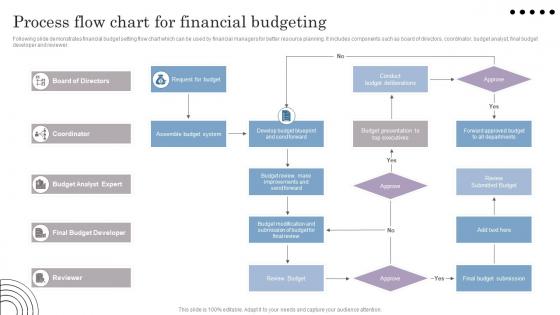
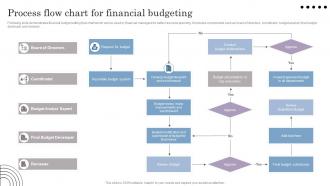
Following slide demonstrates financial budget setting flow chart which can be used by financial managers for better resource planning. It includes components such as board of directors, coordinator, budget analyst, final budget developer and reviewer.
People who downloaded this PowerPoint presentation also viewed the following :
Process Flow Chart For Financial Budgeting with all 6 slides:
Use our Process Flow Chart For Financial Budgeting to effectively help you save your valuable time. They are readymade to fit into any presentation structure.





FAQs for Process Flow Chart
So for budgeting flowcharts, you'll want the usual suspects: goal setting, pulling historical data, revenue forecasts, expense estimates. Most charts show department inputs flowing through management review to final approval. But here's the thing - people always forget about monitoring after everything's approved, which is honestly where budgets fall apart. Add feedback loops between stages too since this stuff never goes smoothly in real life. My advice? Map your current process first, then figure out where things usually get stuck. Oh and don't make it too linear - budgeting's messier than that.
Honestly, budgeting flowcharts are a game-changer for cutting through all that "wait, who's supposed to do this?" chaos. Map out every step from data collection to final sign-off, with clear owners for each piece. The visual aspect really helps - you'll spot bottlenecks way earlier and catch weird dependencies between departments that nobody talks about. Nothing's worse than discovering halfway through that Marketing needs Finance's input before IT can even start their part. Document what you're doing now first, then figure out how to make it better. Trust me, it beats those painful budget meetings where everyone's pointing fingers.
So stakeholders are like your checkpoints through the whole budget process. Department heads give you their spending forecasts, then executives review the big stuff. Finance validates everything along the way. Honestly, it's kind of a pain but you need their buy-in or nothing moves forward. Your flowchart should show exactly where each group weighs in - saves you headaches later. Without them involved, you're just making fancy spreadsheets nobody will follow. Map out who needs to approve what before you even start. Trust me on this one.
Flow charts are seriously underrated for budgets. Your team can actually see who does what instead of guessing from those awful procedure docs nobody reads anyway. Short sentences help too - people spot their role fast and know what's coming next. When you map everything out visually, those annoying bottlenecks become super obvious. I swear, half the budget delays come from approval loops that nobody even realizes exist until you draw them out. Even a basic flow chart cuts down on all the "wait, what now?" confusion. Worth trying on your next cycle - your stakeholders will actually understand the timeline for once.
Honestly, I'd go with Lucidchart first - it's web-based and super easy to share with people. Microsoft Visio is the classic choice if your company already has it, plus it plays nice with Excel. Draw.io works great too and it's free, which is always a win. SmartDraw's decent for desktop stuff. You could even use PowerPoint if you're just doing something basic (though it'll look a bit amateur). My take? Start with whatever your team's already using so you don't have to bug everyone about new logins and stuff.
Flow charts are honestly game-changers for spotting budget risks. Map out your whole process and you'll see exactly where things can go sideways. Like when everyone's waiting on the CFO for approval - instant bottleneck. Dependencies become super obvious too. Marketing needs those sales forecasts, but they're always late? You'll catch that timing mess right away. Manual processes are usually where errors creep in, so those jump out. Just trace through what you're doing now and mark every spot that could cause delays. Trust me, you'll find stuff you didn't even realize was risky.
Honestly, the worst thing you can do is overcomplicate the whole flowchart - nobody wants to follow 20 steps just to approve office supplies. Skip important people in the loop and you're screwed. I learned this the hard way when two departments were on totally different schedules and our budget went completely off the rails. Always build in extra time for revisions because your first draft will definitely get torn apart. Oh, and figure out who actually makes the final call at each step, otherwise everyone just keeps passing it around like a hot potato. Start simple, maybe test it on something small first. Plan for when stuff inevitably goes wrong too.
At minimum, do it once a year. But honestly? Update that thing whenever you make big changes to your actual process. Switching software or messing with approval chains? Fix the chart immediately or it'll just gather digital dust. Growing companies sometimes need quarterly check-ins since they're always tweaking stuff. I've seen too many teams working off completely wrong flowcharts - that's actually worse than having none at all. The whole point is keeping it useful and accurate. Oh, and set a reminder right now or you'll totally forget.
So start with the basics - revenue projections, your fixed/variable costs, and cash flow timelines. ROI calculations are huge for any big spending, plus break-even points. Don't forget approval limits at each stage because honestly, there's nothing worse than requests just sitting there with no one knowing who decides what. Variance thresholds matter too. For tracking, focus on actual vs. budgeted percentages and monthly burn rates - those two will tell you everything you need to know. Oh, and you can always add fancier metrics once you've got the foundation down. Better to start simple and build up.
So basically, these flow charts are gold for audits. Regulators eat this stuff up because they can see exactly where your compliance checks happen - SOX controls, approval limits, all that fun paperwork. During audits you just point and say "look, here's where we verify X" and boom, you're covered. The visual thing really helps too since auditors don't have to dig through endless procedures. Oh and definitely build the regulatory stuff in from day one - I learned that the hard way trying to add it later. Trust me, it'll save you headaches when audit season rolls around.
Look, first thing you gotta do is figure out *why* there's a variance - bad timing, surprise costs, or revenue took a hit? Document everything so you don't forget later. Impact on your goals matters too, obviously. Here's where it gets interesting though - now you decide if you're cutting future spending, moving money between departments, or just accepting that your original assumptions were off. Don't sit on significant variances either. Tell your stakeholders what's up and update those forecasts. Honestly, waiting around hoping things fix themselves next month never works.
Ugh, external economic stuff is seriously the worst part of budgeting. Inflation, interest rates, market swings - they all mess with your revenue and cost numbers. Just when you think you're finished, boom, the Fed does something and you're back to square one. My advice? Build in review points throughout your process so you can adjust when economic indicators shift. Oh, and make your whole system flexible from the start - way easier than scrambling later. Trust me, learned that one the hard way last quarter!
Look, you need clear decision points and visual hierarchy that actually makes sense. Don't use vague stuff like "review and approve" - be specific about who does what and when. Color-coding works great (green for done, red for stuck). Put deadlines and names right on the chart itself. Here's what I always do: grab someone who wasn't involved in making it and see if they can follow along without asking a million questions. That's honestly the best test. Also throw in what triggers each next step - people get lost without those breadcrumbs.
So basically, you want your forecasts feeding directly into your budget decisions - sales forecasts drive revenue planning, which then shapes your expense budgets. Build in decision points where you compare actual results to what you forecasted. When variances get too big, that triggers budget revisions. The trick is making it dynamic, not just some static document you ignore all year. Update your forecasts monthly or quarterly so everything stays current. Honestly, most companies mess this up by keeping the two processes totally separate. Start by figuring out where your current forecasts already influence budget calls - there's probably more overlap than you think.
Honestly, having a clear budget flow is a game changer. No more of those endless email threads where everyone's confused about who needs to sign off on what. Your team can actually focus on the important stuff - analyzing numbers and making real decisions. Plus you'll catch problems early, like realizing Janet always bottlenecks things in March (why is it always March?). Map out your current approval process and I bet you'll cut 2-3 weeks off your timeline. It's wild how much time gets wasted just figuring out the steps.
-
Slideteam offers pocket-friendly products. As a college student this is a really necessary thing to look at while paying for something.
-
Definitely a time saver! Predesigned and easy-to-use templates just helped me put together an amazing presentation.