

Flow Chart For Expense Management Process




Try Before you Buy Download Free Sample Product
 Impress Your
 Audience
 100%
100% Editable
 Save Hours
 of Time


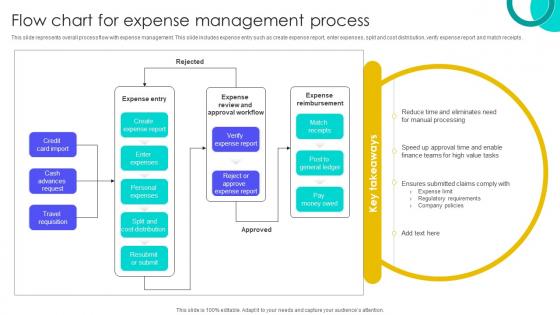
This slide represents overall process flow with expense management. This slide includes expense entry such as create expense report, enter expenses, split and cost distribution, verify expense report and match receipts.
People who downloaded this PowerPoint presentation also viewed the following :
Flow Chart For Expense Management Process with all 9 slides:
Use our Flow Chart For Expense Management Process to effectively help you save your valuable time. They are readymade to fit into any presentation structure.








FAQs for Flow Chart For
Honestly, it's all about control and actually seeing where money's going. Start with expense policies people can understand - not some 20-page manual nobody reads. Automated approvals are huge because stuff won't get lost in email chains. Real-time spending tracking helps too. Manual processes suck for everyone, so get a decent platform if you can swing it. Oh, and don't make policies so strict that people just work around them - I've seen that backfire. Regular reports help you catch weird spending patterns early. Really though, just audit what you're doing now and fix the most annoying parts first.
Dude, just grab Expensify or QuickBooks to start with - they're both solid. You can literally just take photos of receipts and they categorize everything automatically. Plus they sync with your bank account which is clutch. I used to throw everything in a shoebox like an idiot until I tried Google Sheets (it's free and works great if you're just starting out). Tax season becomes way less painful when everything's already organized. These apps also show you where you're bleeding money, which honestly surprised me when I first saw the reports. Pick whatever you'll actually use consistently - that's the real trick.
Look, training your employees on expense policies is huge - seriously makes or breaks the whole system. Once people actually understand the rules and know how to use whatever software you're using, you'll get way fewer headaches with rejected reports. Companies literally save thousands just from proper onboarding (I've seen it firsthand). People also make better spending choices when they know what flies and what doesn't. Start with a solid training session covering the basics. Then maybe do refreshers every few months? Trust me, it's worth the time upfront.
Track your current manual costs first - that's your baseline. Then compare time savings, cost cuts, and compliance wins against what you spent on the system. Most places measure stuff like how long each expense report takes (manual vs automated) and how many policy violations dropped. Honestly, the fraud detection can be worth it alone - I know companies that caught thousands in sketchy claims they never would've spotted by hand. Finance team hours saved is huge too. Look at total costs over maybe 2-3 years, then add up benefits like cheaper processing and fewer audit headaches.
Ugh, the worst thing is when companies don't set clear expense policies from day one. People submit stuff without receipts, and then it's chaos. Manual spreadsheets are the devil - nobody wants to fill those out, and mistakes happen constantly. I've seen places where approval workflows are so strict that it takes weeks to get a $20 lunch reimbursed. That's insane. Oh, and actually look at your expense data once in a while! That's how you catch weird patterns or someone trying to game the system. Basically, automate whatever you can and don't make people jump through hoops.
Check what your accounting software supports first - QuickBooks, Xero, whatever you're using. Most expense tools hook up through APIs and sync everything automatically. Chart of accounts, vendors, the whole deal. Real-time syncing is where it gets good though, saves so much headache at month-end. The better ones handle categorization and approval flows, then dump finalized expenses straight into your general ledger. No manual entry needed. Honestly I'd start with compatibility and work backwards from there rather than falling in love with features you can't actually use.
Dude, real-time expense tracking is honestly worth the hassle. You can actually see where money's going *right now* instead of finding out weeks later when it's too late. Your finance people will love having current data to work with, and employees get reimbursed way faster since there's no pile of receipts sitting around. Plus you'll catch weird spending or fraud super early. I learned this the hard way at my last job - we were hemorrhaging money on vendor payments and had zero clue until month-end reports came in. The instant visibility thing really does make budgeting less of a guessing game. Push for that integration if you can.
Honestly, data analytics is a game-changer for expense forecasting. Pull your last 2-3 years of spending data and you'll start seeing patterns you totally missed before. Seasonal stuff becomes obvious, plus it catches weird anomalies - like that random spike when everyone went to that conference. Way better than just copying last year's budget and hoping for the best. You can break things down by department and category, then run different scenarios to see what happens if costs change. My favorite part? It actually makes your budgets realistic instead of just wishful thinking. Start with monthly trends by category - that's where the good stuff shows up.
Honestly, it all comes down to what leadership actually does vs what they say. People copy what they see at the top - always have, always will. Your CEO drops $200 on client dinners without receipts? Yeah, everyone's gonna push boundaries too. But when there's real accountability and transparency, spending gets way more reasonable. I've seen this play out so many times. You can write the prettiest policies ever, but if your culture rewards different behavior, guess which one wins? Fix the culture first, then worry about the rulebook.
Travel policies are honestly a game-changer for keeping expenses under control. Your team knows upfront what they can spend on flights, hotels, meals - no more guessing games or waiting around for approvals on basic stuff. Processing expense reports becomes so much smoother since everything's already within guidelines. Here's the thing though: make your policies realistic or you'll just get buried in exception requests. I learned this the hard way when we set hotel limits too low and everyone needed special approval. Bottom line - good policies save you headaches and keep costs predictable.
Honestly, start with spending limits and make people submit receipts for anything over $25. You'll want approval workflows based on department and dollar amount too. Review stuff within a few days while it's still fresh in everyone's mind. Personal expenses always slip through - I swear it happens at every company. Train your team upfront on which categories to use, otherwise you'll get random stuff everywhere. Speaking of categories, audit what you have now because I bet half aren't even being used right. Create ones that actually match your business instead of generic ones that'll make reporting hell later.
Honestly, you've gotta nail down your expense policies first - make them crystal clear and actually match current tax rules. Get some expense software that'll automatically catch the sketchy submissions because trust me, your employees will test boundaries. The IRS is obsessed with paper trails, so every receipt needs the business purpose, date, amount, all that fun stuff. I've watched companies get absolutely destroyed in audits just because they couldn't prove expenses were legit. Train everyone on what's actually deductible too - people assume way too much stuff counts. Oh, and check if your current policy is even up to date with recent tax changes. You'd be shocked how outdated most are.
Honestly, zero-based budgeting is pretty solid - basically you justify every expense from scratch instead of just tweaking last year's budget. For personal stuff, that 50/30/20 rule (needs/wants/savings) is clutch, though I know some people think it's too rigid. Envelope budgeting works great for business expenses too - you set limits for each category and actually stick to them. Track your spending for like a month first to see where your money's really going. Then pick whatever method doesn't make you want to quit after two weeks, because consistency beats perfection every time.
Start with a solid dispute process - clear steps, set timeframes. Get designated reviewers who can make quick decisions without the endless email chains (trust me, those are the worst). Digital tools are honestly game-changers here since everything's documented. Your expense policy needs to be super clear upfront so you're not dealing with confusion later. Track patterns when the same issues keep popping up. Oh, and set realistic response times - maybe 48-72 hours for initial reviews. Nobody wants to wait forever wondering if their reimbursement got lost in the void.
Honestly, AI receipt scanning is where it's at right now - way better than manually entering stuff. Mobile apps with real-time tracking are standard now, and virtual corporate cards let you control spending instantly. Carbon footprint tracking is getting big too since everyone wants to look sustainable. The integration between expense apps and accounting software has gotten so much smoother (finally!). What's really cool is predictive analytics catching weird spending before it becomes a headache. If your current software doesn't have mobile-first features, you're behind. Time to upgrade.
-
“Slides are formally built and the color theme is also very exciting. This went perfectly with my needs and saved a good amount of time.”
-
The best and engaging collection of PPTs I’ve seen so far. Great work!