

Payroll Accounting Process Flow Chart




Try Before you Buy Download Free Sample Product
 Impress Your
 Audience
 100%
100% Editable
 Save Hours
 of Time


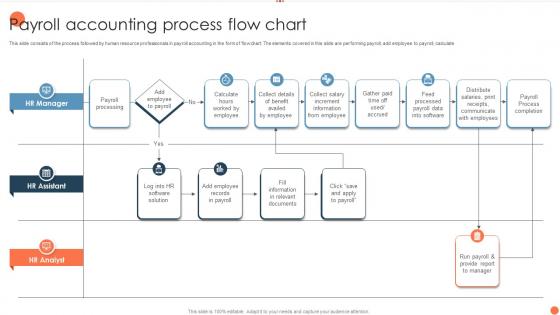
This slide consists of the process followed by human resource professionals in payroll accounting in the form of flowchart. The elements covered in this slide are performing payroll, add employee to payroll, calculate.
People who downloaded this PowerPoint presentation also viewed the following :
Payroll Accounting Process Flow Chart with all 6 slides:
Use our Payroll Accounting Process Flow Chart to effectively help you save your valuable time. They are readymade to fit into any presentation structure.





FAQs for Payroll Accounting
So basically you grab all the timesheets first, then do the math on wages and taxes. Processing the actual payments comes next - that's when people start being nice to you again lol. After that you've got to file those tax forms with the government and update your records. Pay stubs need to go out too. Honestly, I'd make a checklist because there's so many moving parts. Oh, and don't forget to update your accounting system or your books will be a mess later.
Dude, automation will save you SO much time - we're talking like 70-80% less work on payroll. All that calculating hours and tax stuff? Gone. No more data entry mistakes either since it just pulls everything straight from your time tracking system. The approval process gets way faster too, so you won't have managers holding things up anymore. Honestly my favorite part is not having to worry about tax law changes - the system just updates itself. Oh and compliance gets easier which is huge if you've ever dealt with an audit. Just look at whatever takes you the longest each week and automate that first.
Honestly, data accuracy is your biggest nightmare - people forget timesheets or punch in wrong hours constantly. Tax compliance stuff changes all the time too, which is super annoying. Manual processes will drive you crazy because they're so slow and mistakes happen way too easily. Then you've got different systems that refuse to work together, plus all the deductions and benefits variations between departments. Oh, and don't get me started on trying to manage different pay structures. My advice? Automate whatever you can and build in good checkpoints before running payroll so you catch errors upfront.
Oh man, so with salaried people you just divide their yearly pay by however many pay periods you have - easy peasy. Hourly workers though? That's where things get messy real quick. You're tracking actual hours, calculating overtime for anything over 40, dealing with time off... it's honestly a pain. Plus if someone works different roles at different rates, that adds another layer of complexity I don't even want to think about. My advice? Get solid time tracking set up from day one and automate that overtime math. Trust me, you don't want to be doing that manually every payroll.
Okay so payroll taxes are honestly where most people mess up big time. You're juggling federal income tax, Social Security, Medicare, plus whatever your state and city want. The rates change constantly too which is super annoying. Missing a deadline will cost you - trust me on that one. I'd definitely set up some kind of calendar system with all your due dates marked. Oh and unemployment taxes are separate from everything else, which threw me off at first. It's really the foundation of your whole payroll system though, so you can't wing it.
Honestly, start with encryption - both for stored data and anything being transmitted. That's like the bare minimum these days. Only give access to people who absolutely need it, and use role-based permissions to keep things tight. Multi-factor authentication is a must too. Keep your payroll software updated with security patches (I know, annoying but necessary). Train your team regularly since people accidentally clicking weird links is usually how things go sideways. Oh, and definitely do a security audit of what you've got now - you'll probably find some gaps you didn't even realize were there.
Honestly, it depends on your company size. QuickBooks Payroll and Gusto are great if you're small - super easy to use and handle the basics like taxes and direct deposit. ADP and Paychex cost more but they're way more powerful for mid-sized companies. Got complex stuff like multiple locations? Workday or BambooHR might be worth it. Most of these play nice with existing HR systems now, which is awesome. Oh, and definitely try free trials of like 2-3 options first. You'll know pretty quick which one feels right for how you work.
Yeah, so each classification totally changes your payroll game. Exempt employees get their full salary no matter what - work 30 hours or 50, same pay. Non-exempt folks? You've gotta pay overtime after 40 hours. Contractors are where it gets weird though - no tax withholding at all on your end. Benefits, taxes, labor laws - it all depends on how someone's classified. Honestly, getting this wrong is expensive as hell. Your payroll system needs the right classification from day one or you'll be dealing with compliance headaches later.
Honestly, benefits and deductions turn payroll into such a mess. Instead of just calculating gross pay, now you're juggling health insurance, 401k stuff, taxes, maybe union dues - the whole nine yards. Each one has different rules too, which is annoying. Pre-tax vs post-tax matters, and apparently the order you process them actually changes the final amount? Who knew. I learned that the hard way once. My suggestion is make yourself a good checklist for each pay period. Also double-check any benefit changes before you run everything - trust me on that one.
Honestly, the
-
The designs by SlideTeam are honestly the best I have seen so far. Will be definitely coming back for more.
-
I have been using SlideTeam for the past six months. Very happy and satisfied!