


Accounting Flow Chart With Financial Reporting Process




Try Before you Buy Download Free Sample Product
 Impress Your
 Audience
 100%
100% Editable
 Save Hours
 of Time


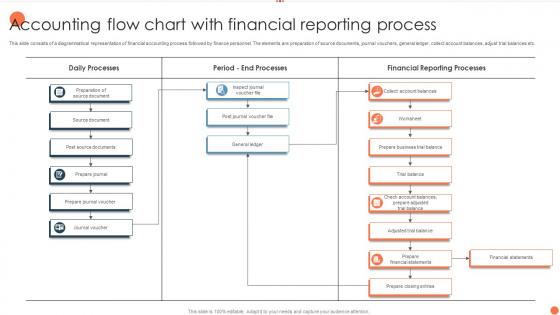
This slide consists of a diagrammatical representation of financial accounting process followed by finance personnel. The elements are preparation of source documents, journal vouchers, general ledger, collect account balances, adjust trial balances etc.
People who downloaded this PowerPoint presentation also viewed the following :
Accounting Flow Chart With Financial Reporting Process with all 6 slides:
Use our Accounting Flow Chart With Financial Reporting Process to effectively help you save your valuable time. They are readymade to fit into any presentation structure.





FAQs for Accounting Flow Chart With
So basically you're looking at source documents first - invoices, receipts, that stuff. Then it flows into journals where you record everything, then ledgers for posting entries. After that comes trial balances to make sure nothing's screwed up, and finally your financial statements. Most charts throw in adjusting entries and closing procedures too (honestly the most tedious part). It's like following breadcrumbs through your whole accounting cycle. Best thing? Grab your company's actual chart and trace through one transaction. You'll get it way faster than just staring at the flowchart.
Honestly, flow charts are game-changers for accounting stuff. They show you exactly where things get stuck and which steps are just wasting time. Training new people becomes so much simpler - they can just follow the visual instead of bugging you with questions every five minutes. You'll catch mistakes early before they turn into major headaches. The consistency thing is huge too since everyone follows the same process. Start by writing down what you're currently doing, then figure out what's obviously broken. Trust me, there's always something that can be streamlined or automated.
Honestly, I'd go with Lucidchart or Visio for accounting flowcharts. Both have great templates already built in. Lucidchart's web-based so your whole team can jump in and edit stuff together, which is pretty handy. Visio works really well if you're already using Microsoft everything, but the interface feels kinda outdated to me. If you're watching your budget, draw.io is free and does the job. SmartDraw's another solid pick - way more intuitive than Visio. I'd probably test out Lucidchart's free trial first though, just to see how it feels before you spend any money on it.
Flow charts are honestly a game-changer for figuring out where your accounting processes get messy. Map out what you're doing now first - like, literally every step. You'll start noticing patterns pretty quick. Maybe invoices always sit on your manager's desk too long, or that one reconciliation always kills your month-end close (ugh, we've all been there). Look for the longest paths or where things branch out into complexity hell. It's basically like finding all your bottlenecks at once. Super helpful for seeing the big picture instead of just feeling constantly behind.
Look, using standard symbols is a game changer for your flowcharts. Anyone can look at them and get it immediately - ovals for start/end, rectangles for processes, diamonds for decisions. No confusion. When you're training someone new or dealing with auditors (ugh), they already know what everything means. Saves you from having to explain your weird custom shapes every time. I learned this the hard way when my boss couldn't follow my "creative" chart last year. Trust me, stick with the standards and your charts will actually make sense to people.
So flow charts basically show you how money moves through your books visually. Way less confusing than trying to memorize all the debit/credit rules. Like when you buy equipment - you can actually see your cash going down while your assets go up on the other side. Honestly changed everything for me when I was learning this stuff. The visual part helps you get WHY you're doing each entry instead of just following steps blindly. I'd start by mapping out whatever transactions you do most often. Trust me, it'll click way faster than cramming rules.
Honestly, just start by writing down every single step in your accounting process - from when a transaction first happens all the way to your final reports. Map out who does what, where approvals happen, how data moves around. I usually just sketch it out messy first, then clean it up later. Walk through some real transactions using your chart to catch anything you missed. The goal is making something so clear that if you hired someone tomorrow, they could actually follow it without constantly asking questions. Include all the paperwork requirements too - that stuff always trips people up.
So flowcharts are basically your best friend when auditors show up. They create this clean paper trail that shows exactly how your financial data moves around - regulators eat that stuff up. When compliance teams review everything, the visual format makes it way easier to catch gaps before they blow up into actual problems. Most regulatory frameworks want documented processes anyway, so you're killing two birds with one stone. I'd start with your riskiest financial processes first since those'll bite you hardest if something goes wrong. Trust me, having that visual map ready makes the whole audit thing way less stressful.
Don't overcomplicate it - that's the biggest trap. Focus on major processes, not every tiny detail. You need decision points where things branch off (approval workflows and stuff like that). Walking through each step with someone who actually does the work is crucial - don't just rely on written procedures. Most people skip validation and regret it later, trust me. Clear labels matter too - "Process A" means nothing to anyone. Oh, and start small! Pick one process, test it with your team first, then build from there. It's way less overwhelming that way.
Flow charts are honestly a lifesaver for accounting teams. Complex stuff becomes way easier to follow when you can see the visual path instead of reading through boring manuals. New hires pick things up faster, and explaining processes to other departments doesn't turn into a nightmare anymore. The cool thing is bottlenecks become super obvious - like, you'll wonder how you missed them before. I'd start with whatever process people bug you about most. Trust me, you'll cut down on those "wait, how do I do this again?" Slack messages pretty quick.
So basically, your accounting flowchart is like a roadmap that shows auditors how transactions move through your whole system. They use it to spot control points and risk areas - honestly, they'll find something to nitpick regardless. You can trace sample transactions with it and prove your controls actually work. Makes everything way smoother since auditors get your workflow instantly instead of you walking them through each boring step. The best part? It saves tons of time during audit season. Just keep it updated year-round or you'll be kicking yourself later trying to fix everything last minute.
Honestly, flowcharts are a game-changer for training newbies in accounting. Instead of drowning them in those boring procedure manuals, you're giving them actual visual step-by-step guides they can follow. I'd start with your top three processes - maybe invoice processing and month-end stuff? New people can see exactly where decisions get made instead of trying to remember walls of text. Way more effective. You can even laminate the important ones (old school but it works) or just keep digital copies on everyone's desktop. My old manager used to say people learn faster when they can actually see the workflow, and she wasn't wrong.
So high-level charts are like the 30,000-foot view - you'll see the main steps like "get invoice → approve → pay → record." Perfect for when you're training someone new or explaining things to management. Detailed ones break everything down into tiny pieces. Instead of just "approve," you get all the nitty-gritty like "manager reviews, checks budget, sends to finance." I actually end up using the big picture ones way more than I expected - they're just easier to digest. Start broad first, then only get into the weeds for stuff that's confusing or needs to meet compliance rules.
So basically you want to map out how your financial stuff connects to everything else. Like when someone places an order, that kicks off invoicing, then payment collection, then reporting - it's all linked. Start by finding where money actually changes hands in your current processes and focus there first. Most BPM tools let you build approval steps right into your workflows, which is honestly pretty neat. The whole point is seeing where things get stuck and automating the handoffs between departments. Think of accounting charts as your financial backbone - they should plug into your operational process maps so you can spot bottlenecks and keep compliance stuff baked in.
Dude, flow charts are honestly a game changer for financial stuff. Like, suddenly you can actually *see* where your money's going instead of drowning in endless Excel sheets. Bottlenecks become super obvious, and you'll catch inefficiencies you never noticed before. They're great for showing leadership too - way easier than explaining spreadsheet formulas to executives who hate numbers. I'd start by just mapping what you're doing now. Seriously, even that basic step reveals so much weird stuff about how departments interact. Cash flow patterns jump out at you, plus you can spot exactly where costs stack up or revenue gets stuck.
-
The templates are handy and I can personalize them as per my needs. Glad to be your subscriber!
-
I joined SlideTeam last month and there’s no doubt that I tend to find our bond only strengthening over time. Best place to find world-class themes, templates, and icons.