

Monthly Employee Salary Payment Process Flow Chart




Try Before you Buy Download Free Sample Product
 Impress Your
 Audience
 100%
100% Editable
 Save Hours
 of Time


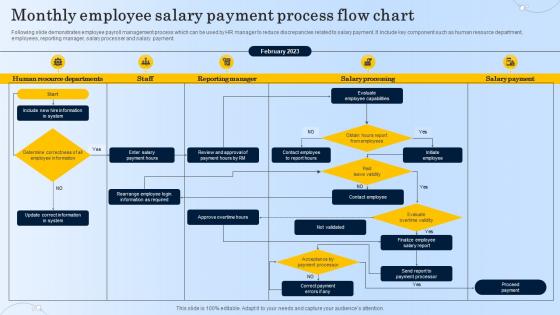
Following slide demonstrates employee payroll management process which can be used by HR manager to reduce discrepancies related to salary payment. It include key component such as human resource department, employees, reporting manager, salary processer and salary payment.
People who downloaded this PowerPoint presentation also viewed the following :
Monthly Employee Salary Payment Process Flow Chart with all 6 slides:
Use our Monthly Employee Salary Payment Process Flow Chart to effectively help you save your valuable time. They are readymade to fit into any presentation structure.





FAQs for Monthly Employee Salary Payment
Okay so basically you start by gathering all the time sheets and attendance stuff - double check everything because people always mess up their hours. Calculate gross pay next, don't forget overtime rates. Then comes the annoying part where you subtract taxes, insurance, 401k, all that jazz. Honestly this step takes forever and I always triple-check it. Generate the pay stubs after that, then actually send the money via direct deposit or cut physical checks if you're still living in 2005 lol. Hand out pay stubs to everyone and update your records. Pro tip: verify those calculations twice before processing - trust me, payroll errors turn into absolute nightmares real quick!
So payroll software basically does all those annoying calculations for you - wages, taxes, deductions, the whole thing. No more spreadsheets! It handles direct deposits and spits out pay stubs automatically. The compliance stuff is huge too since tax laws change constantly and who has time to keep track of that mess? You'll get detailed reports for your accountant, which is nice. Honestly, if you're still doing payroll by hand you're making your life way harder than it needs to be. My cousin switched last year and said it saves her like 6 hours every pay period.
Oh man, payroll errors are the worst - wrong calculations, late payments, employees constantly bugging you about missing money. Then there's all the compliance stuff that'll make your head spin, especially if you're dealing with multiple locations and their different labor laws. Don't even get me started on integration issues between HR and payroll systems - like seriously, why can't software just work together in 2024? Manual processing slows everything down too. Honestly though, most of this goes away once you automate things and actually audit regularly. Push hard for better systems if you're still doing manual work.
So basically you're pulling money from everyone's checks for federal taxes, state taxes (depending where you are), Social Security, and Medicare. The government wants their cut on a schedule too - can't just hold onto it forever lol. Your payroll software should handle most calculations, but honestly those tax brackets change so much I swear they're just messing with us at this point. Double-check your settings every few months though. Missing a deposit deadline or screwing up withholdings will give you a major headache later.
So payroll reconciliation is basically double-checking all your payroll stuff against bank statements, timesheets, and deductions. It's like balancing your checkbook but with way higher stakes since people's rent money is involved. You'll catch errors before employees do - things like duplicate payments or messed up overtime calculations. Trust me, angry employees are not fun to deal with. The whole process helps you spot tax withholding mistakes and other discrepancies that could turn into compliance headaches later. I'd run it after every pay period if possible, but monthly at minimum. Better safe than sorry with this stuff.
Honestly, bi-weekly is probably your best bet. Weekly payroll is a total nightmare - you'll be drowning in admin work constantly. Monthly saves money but your employees will struggle with bills and honestly hate you for it (learned that one the hard way). Bi-weekly hits that sweet spot where people can actually manage their finances without you going crazy with paperwork costs. If cash flow's really tight when you're starting out though, monthly might be unavoidable. Just pick something and stick with it - changing payroll schedules later is messy.
Oh man, so many good choices now! ADP, Gusto, and Paychex are the big ones - they'll handle taxes, direct deposit, all that boring stuff automatically. QuickBooks Payroll's pretty decent too if you're already using their accounting side. Wave and Patriot work fine for smaller teams, honestly anything beats those nightmare spreadsheets I used to mess with. My cousin swears by Gusto but idk, might be overkill for you? I'd definitely try free trials of like 2-3 different ones first. Just make sure whatever you pick plays nice with your current systems.
Honestly, wage laws are a nightmare because they change all the time and every state does things differently. You've gotta track federal, state, AND local rules. Pay at least minimum wage obviously, do the 1.5x overtime thing after 40 hours, and don't mess up deductions. Document literally everything - timesheets, pay stubs, all of it. Your state probably has weird meal break rules too. I'd do compliance checks every quarter and maybe get an employment lawyer on speed dial. Sounds expensive but it's nothing compared to what the Department of Labor will do to you if they come knocking.
Your gross pay is what you earn before they take anything out. Net pay? That's the actual money hitting your account after taxes and all that other stuff gets deducted. Like if you're earning $5k gross monthly, you'll probably see around $3,800 net - depends on your tax situation and what benefits you picked. Pretty brutal difference, honestly. Your gross stays the same unless you get a raise, but net can change if you mess with your 401k or insurance. Oh and definitely peek at your pay stub each month. They screw up deductions way more than they should.
Honestly, direct deposit is a game changer. Your money just shows up in your account on payday - usually super early in the morning. No more sprinting to the bank before they close or dealing with lost checks (ugh, happened to me too many times). You can hit up any ATM or check your balance online right away. Way more secure too since there's no paper floating around. Just set it up once with HR and you're done. Oh, and if you ever switch banks, don't forget to update your info or you'll be wondering where your paycheck went lol.
Encrypt everything - both when it's stored and moving around. Honestly, the number of companies that skip this still amazes me. Only let HR and payroll people access it with proper role permissions, and definitely use multi-factor auth because passwords are basically useless now. You'll want regular security audits to catch problems early. Set up logging so you can see who looked at what and when. Oh, and don't keep old salary records forever - have clear retention policies. Really though, just audit what you've got now first. Most places have way more gaps than they realize.
Honestly, paying international employees isn't as complicated as it seems. Wire transfers work but they're painfully slow and expensive - learned that the hard way. Digital platforms like Wise or Payoneer are game-changers though. They handle all the currency stuff and tax paperwork automatically, which is huge. Some bigger companies go with local payroll providers in each country, but that's probably overkill if you're just starting out. I'd definitely go with a platform first - way less stress dealing with compliance headaches.
Look, it's night and day difference between employees and contractors. Employees mean you're doing full payroll - taxes, benefits, the whole nine yards. Contractors? You just pay them whatever amount you agreed on and they deal with their own tax mess. Way easier honestly. But don't get cute and try labeling everyone as contractors just to skip the paperwork - learned that one the hard way at my last job. The IRS has pretty strict rules about who actually counts as what, based on how much control you have over their work. Screw it up and you'll get hit with penalties plus all the back taxes you should've been paying. Double-check before you set anything up.
Definitely get everything digital first - direct deposit, online pay stubs, the whole thing. ADP and Gusto are solid choices for remote teams since everyone can log in and handle their own stuff. Tax compliance gets weird though if your people are scattered across different states (learned that one the hard way). Digital signatures help too for any pay changes or new hire paperwork. Oh, and walk everyone through the payroll portal when they start - half the questions you'll get are just people not knowing where to find things. Beats dealing with physical checks getting lost in the mail.
Dude, late paychecks are basically relationship suicide with your employees. People start panicking about rent and bills - I mean, who wouldn't? Your team's already wondering if the company's going under and probably browsing job boards during lunch. Once that trust breaks, it's nearly impossible to rebuild. Stressed workers make more mistakes too, which just creates this whole mess of problems. Honestly, even being late once can undo years of good management. Payroll isn't just paperwork - it's literally how people survive, so you've got to nail it every single time.
-
Awesome use of colors and designs in product templates.
-
The best and engaging collection of PPTs I’ve seen so far. Great work!