

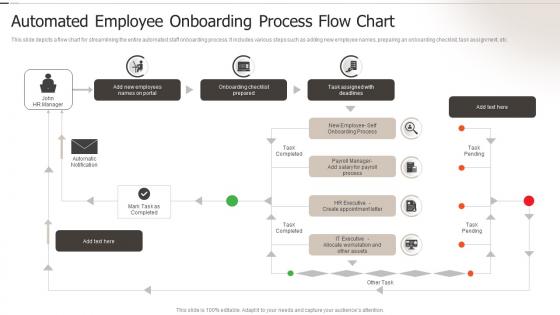
Automated Employee Onboarding Process Flow Chart




Try Before you Buy Download Free Sample Product
 Impress Your
 Audience
 100%
100% Editable
 Save Hours
 of Time


This slide depicts a flow chart for streamlining the entire automated staff onboarding process. It includes various steps such as adding new employee names, preparing an onboarding checklist, task assignment, etc.
People who downloaded this PowerPoint presentation also viewed the following :
Automated Employee Onboarding Process Flow Chart with all 6 slides:
Use our Automated Employee Onboarding Process Flow Chart to effectively help you save your valuable time. They are readymade to fit into any presentation structure.





FAQs for Automated Employee Onboarding
You'll save so much time, honestly. No more "crap, did we set up their laptop?" moments. Everything gets done the same way every time - paperwork, training, all of it. When you're onboarding like 5 people in one week (nightmare scenario), automation is a game changer. New hires actually love it too since they can work through stuff when they want and see what's left to do. I'd start by writing down everything you do manually now. You'll be shocked how much can run itself. Frees up hours for actual important stuff.
Dude, automated onboarding is a game changer. New hires actually know what they're supposed to be doing instead of sitting around wondering if someone forgot about them. They can knock out paperwork whenever, access stuff 24/7, and see where they stand. No more "wait, did I get the healthcare forms?" confusion - though honestly that happened to me at my last job and it was super awkward. Your HR team gets to do the actual relationship-building instead of drowning in admin work. I'd start by writing down everything you do manually now. You'll probably spot the obvious pain points pretty quick.
BambooHR or Workday are solid for the HR stuff - employee data, workflows, all that. For training, grab an LMS like Cornerstone or TalentLMS. Slack works great for automated welcome messages too. Honestly? The integrations are kind of a nightmare at first, but totally worth it once you get everything talking to each other. Zapier's your friend here - it'll connect all these platforms without you wanting to pull your hair out. Oh, and don't try to do everything at once. Pick one system and build from there. Trust me on this one.
Track time-to-productivity and how long training modules actually take to complete. Post-onboarding surveys are clutch for satisfaction scores. Watch for drop-off points - that's where your automation is probably broken. The follow-up part is honestly the most telling though. Check in at 30, 60, and 90 days to see if people actually feel ready and how they're performing versus your old manual way. Don't go crazy measuring everything at first. Pick 3-4 things you can track easily and expand later. Oh, and completion rates for each step will show you exactly where people bail.
Honestly, your biggest pain point will be getting people on board - nobody likes change when it feels cold and corporate. Your IT folks are gonna have a nightmare trying to get systems to actually work together (they never do the first time). Moving all your training stuff and documents without screwing something up? Good luck with that mess. Plus keeping things feeling personal when you've gone full digital is tricky. My advice? Pick one department to test it out first. Get them excited about it, work out the kinks, then roll it out everywhere else.
Honestly, role-specific paths are the way to go here. Map out what each team actually needs first - sales gets CRM stuff and product demos, devs need coding standards and system access. Your onboarding platform should have conditional logic so people automatically get sorted into the right track when they pick their role. HR needs compliance training, IT gets security protocols, that kind of thing. Some roles need way more setup time too, so don't make everyone follow the same timeline. Figure out day-one essentials versus what can wait until week one.
So you can totally use AI to personalize onboarding for each person based on their role and how they learn best. Document verification gets automated which saves tons of time. Chatbots handle the basic questions - honestly they're pretty decent now, way better than those awful ones from like 2019. Sentiment analysis helps spot people who are struggling before they quit. Oh and it can predict where people usually get stuck in the process. I'd start small though, maybe just automate your paperwork stuff first or add a simple bot for FAQs. Don't try to do everything at once.
So you basically track where people bail out of your onboarding - completion rates, how long they're spending on each step, that kind of thing. Honestly, the data gets pretty detailed if you want it to. Some users fly through everything while others need way more guidance, and you can spot those patterns. Start with simple funnel tracking first (way easier to wrap your head around), then add the fancy behavioral stuff later. The whole point is figuring out who needs what - maybe Sarah's stuck on step 3 while Mike already finished everything. Pretty useful for not losing people halfway through.
Honestly, just bake the compliance stuff right into your workflows from the start. Set it up so the system grabs all the required docs - I-9s, tax forms, background checks - automatically at each step. Don't rely on people remembering to follow up later because they won't. Digital signatures and timestamps are clutch for audits too. Here's what I'd do: map out every legal requirement first, then build your automation around that. Way easier than trying to fix it afterward (learned that the hard way). Also set alerts for missing docs so nothing gets lost.
Don't throw everything at users right away - that's a recipe for confusion. Start with just the bare minimum they need to see value fast. Then you can add the fancy stuff later. Each step should actually mean something and push them toward that "oh wow, this is useful" moment. Progress bars help a ton so people aren't wondering how much more they have to slog through. And honestly? Most onboarding flows I see just parade features around without connecting to what users actually want to accomplish. Keep steps bite-sized, always give people an out if they're lost, and watch your analytics obsessively - dropoff points tell you everything.
Honestly, just bake the feedback stuff right into your onboarding. Drop quick surveys after each big step - like those "How was that?" pop-ups that take 30 seconds tops. I'd set up automated check-ins at day 3, week 1, month 1. Pretty standard timing that actually works. The real trick though? Actually doing something with all that feedback. Most teams collect it and then... nothing. Set up some basic dashboards to spot patterns, A/B test fixes for the stuff people complain about most. And yeah, tell users what you've changed based on their input - they love that. Start small with just one feedback point and build from there.
Honestly, automated onboarding makes such a huge difference for keeping people around. No more awkward waiting periods where new hires sit there twiddling their thumbs for IT access or whatever. Digital guides give people confidence - way better than the chaotic "wing it" method most places used to do (and some still do, unfortunately). Companies with good automated systems see like 25% better retention in year one, which is pretty solid. Start by looking at where your current process totally sucks and fix those pain points first. It's one of those things that actually pays off quickly once you get it rolling.
Honestly, skip the boring mission statement stuff everyone ignores. Focus on the real day-to-day things - how people actually communicate, make decisions, work together. Your core values only matter if you can show actual examples of employees living them out. The social stuff is huge too! Team traditions, celebrating wins, work-life balance approach. I'd make it interactive with employee stories instead of those text walls nobody reads. Oh, and don't forget decision-making processes - that's where culture really shows up. People want to know what working there actually feels like, you know?
Honestly, just automate all the tedious paperwork and system setup stuff - nobody enjoys doing that manually anyway. But then add personal touches where they count: custom welcome messages, training that fits their actual role, real check-ins with their manager. The goal is freeing up time so managers can have actual conversations instead of drowning in admin work. I'd start by looking at your current process and figuring out what feels robotic versus what genuinely needs a human touch. It's like... you don't need to handwrite every form, but you should definitely have real conversations about career goals.
Honestly, I'd focus on time-to-productivity first - like how fast your new people actually get good at their jobs. Then track completion rates for those onboarding modules and satisfaction scores from your 30/60/90 day check-ins. The retention numbers at 6 months and a year are probably the most telling though. That's where you'll know if your system actually works or if it's just a expensive way to overwhelm people. Oh, and don't forget to measure how much time your HR folks are getting back - that was the whole point, right? Pick maybe 3 or 4 of these instead of going crazy trying to track everything.
-
The templates are the best in class. Very clear and innovative graphics! I am excited to explore and download more presentations.
-
Superb! The innovative and inspiring template designs provide an edge to the presentation.