Customer Onboarding Process Flowchart

Rating:
90%
A diagram illustrating a customer onboarding process for businesses allowing customization
Slide 1 of 6

or

Favourites Favourites

Try Before you Buy Download Free Sample Product

Audience Impress Your
Audience
Editable 100%
Editable
Time Save Hours
of Time
The Biggest Sale is ending soon in
0
0
:
0
0
:
0
0
Rating:
90%
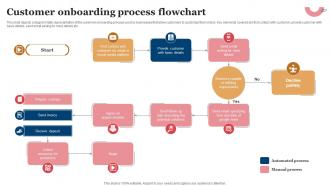
This slide depicts a diagrammatic representation of the customer onboarding process used by businesses that allow customers to customize their orders. Key elements covered are first contact with customer, provide customer with basic details, send email asking for more details etc. Introducing our premium set of slides with Customer Onboarding Process Flowchart. Ellicudate the thirteen stages and present information using this PPT slide. This is a completely adaptable PowerPoint template design that can be used to interpret topics like Contract, Send Invoice, Receive Deposit. So download instantly and tailor it with your information.

FAQs for Customer

Start with the basics - product overview, key features that solve their specific problems, next steps. Show them around their account and where to find help. I always do a quick win early on so they can knock something out right after we hang up. Honestly, that momentum piece is huge. Walk them through who their contacts are and what support looks like. Don't overwhelm them though - keep it chill and conversational. Leave tons of time for questions because that's really where the magic happens and you'll learn what they actually care about.

Honestly, visuals just work better than boring text dumps. People remember what they see way more than what they read. Try animated walkthroughs or even simple comics showing how your product fits their day-to-day stuff. This one company I saw did a whole superhero theme thing - kinda cheesy but it worked! Map out where your customer starts (their problem) and where they end up (happy with your solution). Then figure out what visuals make each step super clear. Oh, and illustrated user journeys are gold for this.

Dude, you NEED user feedback for onboarding - it's the only way to know if people actually get your product or just bounce. Collect it at signup, halfway through, and when they finish. Ask specific stuff like "what step confused you?" instead of boring generic questions. Most teams totally ignore this step and then act shocked when nobody converts lol. Once you have the data, look for patterns in what's tripping people up. Fix the biggest pain points first. I usually review feedback monthly, but honestly sometimes I get lazy and do it every six weeks. The whole point is finding where users get stuck so you can smooth things out.

Honestly, focus on three main things: how fast users hit their first "aha moment" (time-to-value), what percentage actually finish the key setup steps, and retention at 7/30/90 days. Support tickets are clutch too – if people are flooding your inbox in week one, that's a red flag. You also want to see if they're really digging into your core features or just browsing around aimlessly. I mean, what's the point of great onboarding if nobody sticks around to use the good stuff? These metrics will tell you pretty quickly if your flow actually works or if it just looks nice.

Honestly, templates are a game changer for keeping everyone on the same page. Map out your best onboarding process first - like what actually works, not what you think should work. Then turn that into workflows and email sequences your whole team can use. Whether it's sales, support, or implementation, your customers get the same solid experience every time. New hires love having a clear playbook too instead of figuring it out as they go. I've seen teams where one person's amazing at onboarding and another's... well, not so much. Templates fix that inconsistency problem fast.

Dude, don't dump everything on them at once - instant turnoff. Keep onboarding short too because people bounce if it drags on. I learned this the hard way lol. Personal follow-ups beat generic emails every time, even though automation's tempting. You gotta spell out timelines and next steps clearly. Never assume they remember your sales pitch either - their heads were probably spinning during that conversation anyway. Break stuff into small pieces they can actually handle. Always end with "here's what happens next" so they're not left wondering.

B2B onboarding is totally different - way more hands-on since you're dealing with multiple people and longer decision cycles. These customers are worth more, so assign dedicated account managers and plan out detailed implementations with regular check-ins. For B2C? Complete opposite. Make everything self-service with automated emails and slick product tours. Those users will literally disappear if they can't figure things out in like 2 minutes - it's brutal honestly. With B2B, schedule actual training sessions and set success milestones. B2C needs instant gratification and quick wins right upfront.

Don't separate product training from onboarding - that's where most companies screw up. Do hands-on demos right in the welcome call, then build training that matches where they actually are in setup. Honestly, dumping a huge training library on people is basically useless. Instead, trigger specific content based on what they're doing and when they hit certain milestones. Mix it up: live sessions for the tricky stuff, self-serve for basics. Oh, and always connect it back to their actual goals - not some generic use case. Makes all the difference.

Honestly, you gotta tailor those templates to whatever industry drama your clients are dealing with. SaaS folks are all about product adoption - they want those feature walkthroughs and usage metrics. Financial services? They're drowning in compliance docs and regulatory nonsense. Healthcare is basically just security paranoia and HIPAA requirements 24/7. Pick their top 3 headaches first, then work backwards from there. Your timelines and milestones should reflect what actually keeps them up at night, not some generic checklist. Makes the whole process way more relevant.

Honestly, interactive demos are game-changers - way more engaging than boring slide decks. I'd start with something like Loom or Walnut for that. Then maybe add a customer success platform (Gainsight's solid) to automate follow-ups so you're not manually chasing people down. Knowledge bases help too - Notion works well for letting customers look stuff up later. Oh, and don't overthink the survey piece at first. Just focus on your biggest headache first, then build from there. You can always layer on scheduling tools and feedback stuff once you've got the basics working smoothly.

Dude, personalization is huge for onboarding - honestly can't stress this enough. Generic flows just scream "we don't care about you specifically." When you segment users into like 2-3 personas and tailor the experience to their role or industry, completion rates jump 30-40%. Small stuff matters too - using their terminology, showing relevant examples. I've seen companies nail this by making customers think "wow, this actually gets what I do." Even something as simple as tweaking copy for different use cases makes people feel way less like they're in some assembly line process. Trust me, it's worth the extra effort upfront.

Honestly, I'd map out a 30-60 day follow-up plan right after onboarding wraps up. Check in at day 3, week 1, and month 1 - those are the sweet spots where people usually hit snags. Mix some automated stuff with personal calls, especially for your bigger accounts. Don't just wait around for them to come to you when they're confused (they probably won't). Throw in some extra resources too - maybe best practice guides or quick video walkthroughs that build on the basics. Oh, and set those calendar reminders or you'll totally forget. Being ahead of problems beats scrambling to fix them later.

Oh totally, culture makes a massive difference in onboarding. Direct feedback works great for some users but can feel harsh to others. Germans might want every detail spelled out while Americans prefer figuring things out themselves - honestly depends on the person too though. Response time expectations are wild - some cultures expect instant replies, others don't mind waiting days. You'll need to think about language barriers, how formal your tone should be, even visual preferences. I'd say research your main markets first, then build your flow so it can adapt based on where people are coming from.

Hey! So for boosting onboarding engagement - progress bars and checklists are your best friends. Gamify it with badges or whatever. Videos beat walls of text every single time (learned this the hard way lol). Don't just send stuff on a timer - trigger based on what people actually do. Oh, and throw in some success stories when people hit rough spots. Honestly though? The game-changer is creating different paths for different user types. Someone who's tech-savvy doesn't need the same hand-holding as a newbie. Pick one thing and test it first before you go crazy with everything.

Dude, psychology is huge for onboarding. The peak-end rule is clutch - give them one amazing moment and nail the ending since that's what sticks. Don't dump everything on them at once though. Social proof helps too, like showing testimonials from similar users. Oh, and get them customizing something early - even small stuff makes them feel invested (endowment effect or whatever). I'm probably overthinking this but those tricks work. Test one at a time to see what clicks with your users.

Ratings and Reviews

90% of 100
Review Form
Write a review
Most Relevant Reviews
  1. 80%

    by Demarcus Robertson

    Their professional templates are very impressive, even my manager was curious about the source. I am very grateful.
  2. 100%

    by Jake Smith

    “Excellent information with easy access.”

2 Item(s)

per page: