


Online Customer Onboarding Process Flowchart




Try Before you Buy Download Free Sample Product
 Impress Your
 Audience
 100%
100% Editable
 Save Hours
 of Time


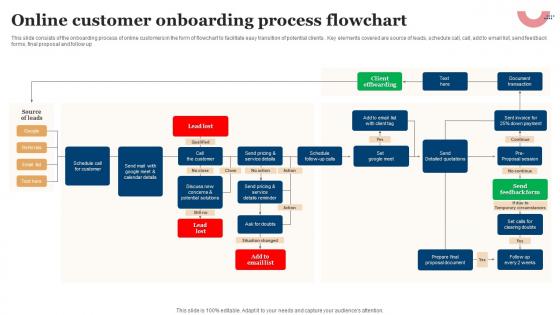
This slide consists of the onboarding process of online customers in the form of flowchart to facilitate easy transition of potential clients . Key elements covered are source of leads, schedule call, call, add to email list, send feedback forms, final proposal and follow up.
People who downloaded this PowerPoint presentation also viewed the following :
Online Customer Onboarding Process Flowchart with all 6 slides:
Use our Online Customer Onboarding Process Flowchart to effectively help you save your valuable time. They are readymade to fit into any presentation structure.





FAQs for Online Customer
Honestly, it's all about making people feel like they know what they're doing from the start. Build a solid welcome flow that shows them exactly what to expect. Walk them through setup step by step - and definitely make support super easy to find because trust me, everyone gets stuck somewhere. Track how they're doing so you can give them a little push if they're not moving forward. Those first month or two? Check in regularly. You want them hitting that "holy crap, this actually works" moment as fast as possible. I'd start by figuring out where people usually bail out in your process.
Honestly, visual templates are a game-changer for onboarding. Your customers won't have to wade through boring text walls or guess what to do next. People absorb visual stuff so much faster anyway - like slide decks, quick infographics, or those interactive walkthroughs that actually walk you through things. I'd start with templates covering your biggest onboarding situations first. Then you can tweak them based on what's working. It's wild how much smoother the whole process gets when people can actually see what they're supposed to do instead of just reading about it.
Honestly, just focus on a handful of things that actually matter. Track how long it takes people to hit their first real win with your product - that "aha moment" stuff. Also watch your activation rate (how many finish the key setup steps) and early engagement like logins or which features they're using. The big one though? Churn in those first 30-60 days. That'll tell you everything you need to know about what's broken. I'd start with maybe 2-3 of these max - don't try to track everything at once or you'll just overwhelm yourself. Get those nailed down first, then add more later.
Honestly, customer stories are way more powerful than just rattling off features. When I show new clients how Company X went from struggling with [specific problem] to hitting their goals, people actually lean in. It's like they can finally see themselves succeeding too. Structure it simple: where they started, what sucked, how we fixed it, where they ended up. Oh and don't save all the stories for the end - sprinkle mini-stories throughout each section. Makes the whole thing feel less like a boring product demo and more like actual proof this stuff works.
Honestly, customer feedback is gold for fixing your onboarding mess. Grab it at different points - after major steps, when they finish, and like a month later when reality hits. Three people complaining about the same thing? That's your cue to change it. I've watched teams totally overhaul their setup because of feedback patterns. The trick is actually doing something with it though - don't just hoard responses in some spreadsheet. Set up monthly reviews where you dig through comments and make real changes. Otherwise you're just collecting digital clutter.
Honestly, start by figuring out where people bail on your current process - that's your biggest clue. Auto-fill forms help tons, and chatbots handle the repetitive stuff so you don't have to. Welcome email sequences are solid too. Digital signatures save SO much hassle (seriously, nobody wants to print and scan anymore). Maybe throw in some step-by-step tutorials if your product's complex. I'd pick just one problem area first though - like if everyone gets confused at signup, fix that before moving on. Don't try to automate everything at once or you'll go nuts.
Don't dump everything on people day one - that's the worst thing you can do. Space it out over weeks instead. Make it interactive too, not just boring presentations where you talk at them. Companies always forget to explain WHY they do things certain ways, which honestly drives me crazy because then newbies are totally lost about the culture. Oh, and cover the basics! Where to park, good lunch places, even where the bathrooms are. Trust me, that stuff matters way more than anyone admits. Take a look at your current setup and see where people usually get confused.
Honestly, personalized onboarding is a game changer because people actually feel seen instead of getting some cookie-cutter experience. You're basically showing them stuff that matters to their specific situation - their role, company size, whatever. They hit those "aha" moments way faster. Nobody has time to watch demos about features they'll literally never touch, you know? Use whatever data you've got on them already to customize the whole flow. Even small things like tweaking your communication style helps. Oh, and definitely create like 2-3 different tracks for your main customer types. You'll probably see engagement jump pretty quick.
Dude, interactive templates are a game changer for onboarding. Instead of another snooze-fest demo, customers actually DO stuff - clicking hotspots, watching embedded videos, going through walkthroughs at their own speed. It feels way more like a conversation than being talked at. Each section should build on the last one so people feel they're actually getting somewhere. I'd honestly start with just one template for whatever use case you see most. Then compare how people engage vs your regular sessions - the difference is usually pretty obvious.
Honestly, just be super upfront about everything from day one - it'll save you so much drama later. I always give clients a simple roadmap showing who's doing what and when. No more of those awkward "wait, wasn't that your job?" conversations. People actually love knowing what to expect next instead of being left in the dark. Oh and it totally stops scope creep too, which is probably the worst part of client work. You'll avoid those uncomfortable talks about stuff that wasn't clearly outlined. Trust me, a little transparency goes a long way.
Focus on getting customers those quick "aha moments" early on - you know, where they actually see how your product solves their specific problem. Don't dump all your features on them at once (seriously, that's where most companies mess up). Map out what success looks like for your typical user first, then build your onboarding around getting them there fast. Celebrate small wins along the way. The first 30-60 days are make-or-break territory, so check in regularly during that window. People decide pretty quickly if they're sticking around or bailing.
Basically you want to meet people where they're hanging out instead of making them jump through one boring hoop. Mix up emails, in-app stuff, texts, maybe even actual phone calls - I know that sounds old school but it works crazy well for complicated products. People can bounce between whatever works for their schedule. You'll see way better completion rates that way. The data's better too since you're tracking everything. I'd map out what you're doing now first, then find like 2-3 spots where another channel would stop people from bailing. Don't overthink it.
Honestly, you've gotta mix up your content formats because everyone learns differently. Some people are visual - they want infographics and videos with screenshots. Others learn better by listening, so record yourself walking through the process. Then there are folks who just want to read detailed guides at their own speed. The tricky ones are the hands-on learners who need interactive demos where they can actually click around and mess with things. I'd start with your most important concepts and create like 2-3 different ways to teach each one. Don't force everyone down the same boring path.
Gaming works great - collect user info bit by bit instead of dumping a huge form on them upfront. Slack's really smart about this, they let you jump into the core features right away, then add complexity later. Oh, and that "empty state" thing? Show sample data or templates instead of blank dashboards. Way better first impression. Retail apps do this social proof thing too during onboarding, like "people similar to you bought this." Bottom line: make that first session feel like a win, not like they're doing homework for you.
Dude, most people bounce within the first month or two if they can't figure out your product quickly. You've got to get them to that "oh, this actually works!" moment ASAP. I always think of it like - imagine handing someone car keys without showing them where the gas pedal is, you know? Map out where users usually get confused or stuck, then fix those spots before they become deal-breakers. Quick wins are everything. Show them value fast, and they'll stick around way longer than if you just throw them into the deep end.
-
Great quality slides in rapid time.
-
Crisp and neat slides. Makes it fun and easier to curate presentations.