

SAP Payroll System Work Flowchart




Try Before you Buy Download Free Sample Product
 Impress Your
 Audience
 100%
100% Editable
 Save Hours
 of Time


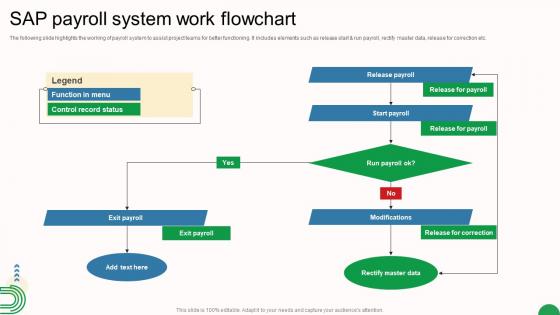
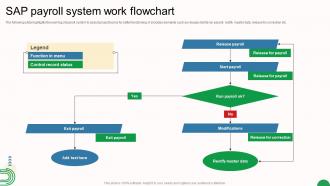
The following slide highlights the working of payroll system to assist project teams for better functioning. It includes elements such as release start and run payroll, rectify master data, release for correction etc.
People who downloaded this PowerPoint presentation also viewed the following :
SAP Payroll System Work Flowchart with all 6 slides:
Use our SAP Payroll System Work Flowchart to effectively help you save your valuable time. They are readymade to fit into any presentation structure.





FAQs for SAP Payroll
So the main stuff you need to know: payroll schemas are like the brain of everything - they run the show. Wage types define what you're paying for, processing classes handle the math. Personnel calculation rules deal with all the country-specific legal stuff (honestly this part's a headache sometimes). Infotypes store your employee data. Features and functions control when things get processed - super complex territory but don't stress about knowing it all right away. Then you've got payroll periods and results tables finishing up the core pieces. I'd start with schemas first since everything else flows from there.
Basically it automates all those annoying manual steps that drag out your payroll forever. No more jumping between screens or chasing managers down for timesheet approvals - honestly the worst part of my old job! Guided workflows handle approvals, error fixes, and data validation automatically. Everything gets routed to the right people when it needs to be. You get real-time updates and can actually see where things are stuck instead of guessing. My advice? Map out what you're doing now first, then figure out which parts you can automate. Makes the whole thing way less painful.
Oh man, data integration will absolutely wreck you if you're not careful. Your HR master data has to be spotless or SAP's workflow engine just loses its mind. Plus customizing those standard workflows? Total nightmare - every company swears their approval process is somehow revolutionary when it's really not. People will fight you on the new system too, obviously. Here's what actually works: pick a small pilot group first. Get your data clean before you touch anything else. And seriously, whatever time you think testing will take? Triple it. Trust me on that one.
So you've got a few main spots to hit for customizing SAP Payroll Workflow. First thing - tweak those standard workflow templates to match how your company actually approves stuff. Role-based routing is huge too, gets tasks flowing to the right people without manual handoffs. Business rules config lets you get really specific (honestly sometimes too specific, but whatever works). Oh and definitely customize your notifications and deadlines - nobody wants to miss payroll stuff. I'd map out your current process with the tech team before diving in. Build it piece by piece rather than trying to do everything at once.
Dude, automation totally transforms SAP payroll workflows. No more drowning in manual data entry or waiting forever for approvals. Set up rules for standard calculations and time validations - boom, done automatically. What really saves your sanity though? Exception flagging. Instead of digging through endless records (ugh, we've all been there), the system just highlights problems for you. Automated notifications are clutch too since nobody has to chase people down constantly. Honestly, just pick your most annoying repetitive tasks first and automate those. You'll feel the difference immediately.
Oh man, this thing is actually pretty slick. It pulls in all the local tax rules and labor laws automatically, so you're not scrambling to keep up with changes. Real-time validation catches problems before you run payroll - honestly saved my butt a few times already. The system updates regulations on its own, which is huge during tax season when everything's chaotic. You can pull compliance reports whenever auditors come knocking. Just make sure your local config is solid from the start. After that? It basically runs itself and handles most of the compliance headaches for you.
Dude, SAP Payroll Workflow is actually pretty solid for multi-country stuff. Everything gets centralized so you're not constantly switching between different systems. It handles local compliance automatically - tax codes, labor laws, all that boring but crucial stuff. Manual errors drop way down since it's automated. The dashboard gives you a real-time view of where payroll stands across all locations, which is honestly huge. Your reporting gets cleaner too since it's all feeding from one source. Oh, and definitely scope out your current country requirements before diving in - learned that one the hard way on a previous project. Makes the whole setup smoother.
Real-time analytics lets you see what's going wrong with payroll as it happens instead of finding out later. Honestly, it's way better than the old method where you'd just cross your fingers and hope everything worked. You can catch overtime spikes or approval bottlenecks right away. Processing delays? You'll spot them before they mess up your entire cycle. The trick is getting your dashboards set up properly from the start - otherwise you'll be staring at a million data points that don't actually help. Oh, and compliance issues become way less stressful when you see them coming.
So SAP Payroll Workflow connects pretty well with the main HR stuff - Personnel Admin, Time Management, Benefits. It automatically grabs employee data, time entries, all that good stuff so you don't have to do manual transfers (seriously saves so much headache). Plus it hooks into Org Management for approvals and sends payroll results back to Finance and Controlling. Most of this works right out of the box, which is nice. You can tweak the data flow if needed though. Honestly, I'd start by figuring out where your data currently lives first - makes the whole setup way smoother.
So first thing - definitely track your processing times to see if payroll's actually running faster. Error rates are obviously huge too. I'd grab employee satisfaction scores and see how your compliance audits are going. The cost savings add up quick when you're not doing everything manually anymore. Oh, and user adoption rates matter way more than people think - I've seen companies blow tons of money on systems nobody wants to touch. Set up monthly dashboards for all this stuff. Just make sure you've got solid baseline numbers from before you switched everything over, otherwise you can't prove jack to the higher-ups.
For SAP Payroll Workflow training, I'd definitely hit up SAP Learning Hub first if you can get access. The hands-on system practice is huge - way better than just reading through docs. Your company might already have SAP Enable Now too, which has some decent interactive stuff. Oh and check if there are any internal materials from old implementations lying around, those can be gold. LinkedIn Learning and Skillsoft have okay intro courses but honestly they're pretty basic. The real system access through Learning Hub is what made everything actually make sense for me. Short sentences work better when you're actually configuring workflows instead of just watching videos.
So basically SAP's payroll workflow catches errors automatically and sends them to whoever needs to fix them - usually HR people or approvers. Missing data, calculation mess-ups, validation problems - you name it, it'll flag it. The system creates these work items that get assigned based on how you've got everything set up. You can even add escalation rules so if someone ignores an exception for too long, it bumps up to their boss or whatever. Honestly though, if you don't configure the exception paths right from the start, you'll just have a bunch of payroll errors sitting there with nobody knowing they're supposed to deal with them.
First thing - get your approval chains sorted and standardize those workflow templates. Test everything in dev before going live because explaining payroll screwups to angry employees is literally the worst. Automated notifications are a lifesaver so approvers don't blow past deadlines. Document your configurations properly (I know, boring but necessary). Oh, and meet with HR regularly to review everything - business processes shift way more than you'd expect, and you don't want workflows that made sense six months ago breaking things now.
Honestly, SAP Payroll Workflow is a game-changer for getting employees to handle their own stuff. They can submit timesheets, update bank info, request pay changes - all without calling HR constantly. The system routes everything to the right managers automatically. What I love is you can set approval levels so people only see requests they actually need to approve. Oh, and employees get status updates too which cuts down on the "where's my request?" emails. I'd start by figuring out what requests you get most often - probably time entries and bank changes. That's where you'll save the most headaches.
SAP's payroll workflow has some solid security features. Role-based controls limit who sees what data, and there's audit trails for everything. Data gets encrypted during transmission, plus they use secure authentication - way better than the legacy stuff we used to deal with, honestly. One thing I really like is the segregation of duties setup. Nobody can just run payroll solo without approvals, which is smart. Your admin should definitely stay on top of user permissions though. And don't forget to kill access for people who've left - saw that bite a company once.
-
Loved the collection. Editing the presentation was seamless with their templates.
-
The templates are the best in class. Very clear and innovative graphics! I am excited to explore and download more presentations.