

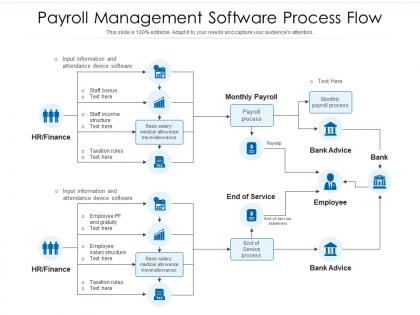
Payroll management software process flow




Try Before you Buy Download Free Sample Product
 Impress Your
Audience
 100%
Editable
 Save Hours
of Time


Our Payroll Management Software Process Flow are topically designed to provide an attractive backdrop to any subject. Use them to look like a presentation pro.
People who downloaded this PowerPoint presentation also viewed the following :
Payroll management software process flow with all 2 slides:
Use our Payroll Management Software Process Flow to effectively help you save your valuable time. They are readymade to fit into any presentation structure.


FAQs for Payroll management
Automated tax stuff is honestly where I'd start - that's the biggest nightmare to mess up manually. Direct deposit is pretty much expected these days. Make sure employees can grab their own pay stubs online instead of bugging you constantly. Integration with whatever accounting system you're using will save your sanity, especially during tax season. Different pay schedules and overtime calculations should run themselves without constant tweaking. Customer support matters way more than you think when things break at 2am before payday. I'd write down what's driving you crazy right now and find software that actually fixes those specific headaches.
So payroll software is a game changer - it automatically handles tax calculations and all that paperwork mess. Throughout the year it's tracking wages, deductions, withholdings, then spits out your W-2s and 941s when you need them. The software stays current with tax rates too, which is clutch because who has time to keep up with that stuff? Most can file electronically for you. Honestly, your accountant will love you for having clean records instead of... well, whatever chaos you're dealing with now. Way better than scrambling with spreadsheets at the last minute.
So payroll automation just takes care of all that tedious stuff - wage calculations, tax deductions, paystubs. No more manual number crunching every two weeks. The best part? Way fewer mistakes that could tick off employees or mess with compliance. Your system pulls hours automatically and processes everything based on tax rules. Honestly, the time savings alone make it worth it. Instead of being buried in spreadsheets, you can actually do meaningful work. Oh and the reporting gets way better too. If you haven't explored what your current setup can automate, you're probably missing out.
Honestly, good payroll software is a lifesaver for staying compliant. It'll auto-calculate all your taxes, deductions, and overtime based on where you're located. The decent ones update their tax tables regularly too, so you won't miss new regulations or rate changes - trust me, doing that stuff manually is absolutely brutal. You'll also get all the reports needed for audits, plus it handles different state requirements if your employees are scattered around. Just pick one that actually covers your area and keeps their database current. Outdated software will bite you in the ass fast.
Honestly, most companies save like 40-80% when they ditch manual payroll or those expensive outsourcing services for automated software. The time savings alone are huge - no more endless data entry or sitting there doing calculations by hand. Human errors cost way more than people realize too, between penalties and accidentally overpaying someone. If you're outsourcing now, you'll obviously cut those monthly fees. Takes about 6-12 months to see real ROI usually. Oh, and definitely crunch the numbers on what you're spending per hour on payroll stuff right now vs. what software would cost you monthly.
Yeah, most payroll software talks to your other HR stuff through APIs or whatever. Employee data, timesheets, benefits - it all syncs up automatically so you don't have to enter everything twice. Time tracking feeds into payroll, salary updates go to benefits platforms, the whole thing flows back and forth. Honestly, the integration part usually works better than you'd expect. Just double-check that your current systems actually work together before you commit - some platforms are weirdly picky about what they'll connect to.
Okay so definitely focus on end-to-end encryption and multi-factor authentication first - those are must-haves. Role-based access controls too. SOC 2 Type II compliance is huge, plus they should do regular security audits. Automatic backups are obviously critical, and honestly? Even good companies get breached sometimes, so make sure they have a solid incident response plan. Ask exactly where your data lives and who can access it. Oh, and don't feel weird about requesting their security docs upfront - legit vendors will share that stuff no problem.
Honestly, most payroll screwups happen because someone fat-fingered data entry, so double-check everything twice - especially salary changes and tax stuff. Your payroll software probably has error detection built in, but don't rely on it completely. Run monthly reconciliations between payroll and accounting records. Don't let random people update employee info without approval workflows in place. Set up alerts for weird changes too. Oh, and definitely run a test cycle first and compare it against your old manual calculations. Trust me, catching setup issues early beats explaining payroll mistakes to angry employees later.
Oh yeah, payroll software definitely helps with employee satisfaction! No more screwed up paychecks or late payments - that stuff used to make people lose their minds. Employees can grab their pay stubs anytime, request time off through the system, all that good stuff. The self-service thing is huge because people don't have to bug HR for every little thing. Plus there's way more transparency around their pay info, which builds trust. I mean, nobody really thinks about payroll until it's wrong, you know? But removing that whole "is my check gonna be right?" stress makes a real difference.
Yeah, definitely! Modern payroll software handles all that stuff pretty easily. You can mix hourly people, salary folks, contractors, commission workers - whatever combo you've got going. Once you get it set up initially, it just runs itself honestly. Overtime gets calculated automatically, different tax stuff is handled, pay schedules work themselves out. I'd double-check during setup that yours covers everything you need, but most do these days. Way easier than trying to juggle it all manually - been there, not fun.
Ugh, data migration is where everything goes sideways - your payroll info gets totally scrambled if you're not super careful. Plus people absolutely hate learning new software, even when it's obviously better. Getting it to play nice with your current HR and accounting systems? Total nightmare. Oh, and training always takes way longer than you think it will. There's literally always that one person who's like "but the old system worked fine!" Trust me, plan for double whatever timeline you're thinking and test everything multiple times before you flip the switch.
Your employees can literally check everything from their phones - pay stubs, time-off requests, updating bank info, all that stuff. No more bugging HR every five minutes or waiting to get back to their computer. Remote workers especially go crazy for this kind of access. Honestly, I've seen companies cut their payroll support tickets in half just by rolling out a decent mobile app. Field staff love it too since they're never at a desk anyway. Those "when's my paycheck coming?" emails basically disappear. It's pretty wild how much easier it makes everyone's life.
Dude, go cloud for sure. You can literally run payroll from your couch, which is pretty sweet. Updates just happen automatically - no IT guy needed. The monthly costs are way easier to budget than dropping a ton upfront for servers and all that jazz. Your team will probably love checking reports on their phones too. I mean, unless you've got crazy data security stuff going on, I honestly don't see the point of on-premise anymore. Oh, and definitely demo a few different providers first - some interfaces are just clunky as hell and you'll hate using them daily.
Look, payroll data is seriously underrated - most companies just use it for basic stuff but there's so much more there. You can figure out which departments are bleeding people and why, check if you're paying competitively, and actually predict your labor costs for next year's budget. The overtime patterns alone will tell you a story. Plus you can see who's actually using benefits and spot productivity trends. Honestly, I'd start simple - just pull turnover numbers by department for the last quarter. I bet you'll find some weird patterns that'll totally change how you think about retention.
Definitely prioritize 24/7 support - payroll emergencies happen at the worst times. Good onboarding is clutch too since these systems are confusing as hell to set up. I'd also want solid self-help stuff like tutorials and searchable FAQs for quick fixes. The big thing though? Make sure they actually have people available during your payroll run days, not just regular hours. I've watched companies totally panic when support goes dark right before payday. Oh, and test their response time during your trial - that'll tell you everything you need to know about what you're really getting into.
-
Colors used are bright and distinctive.
-
Informative presentations that are easily editable.
-
Excellent design and quick turnaround.
-
Use of different colors is good. It's simple and attractive.
-
Helpful product design for delivering presentation.