

Employee Payroll Processing Flow Diagram




Try Before you Buy Download Free Sample Product
 Impress Your
 Audience
 100%
100% Editable
 Save Hours
 of Time


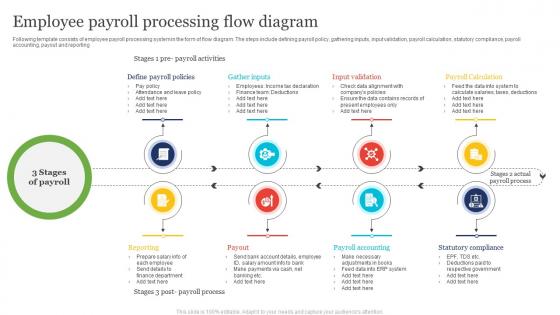
Following template consists of employee payroll processing system in the form of flow diagram. The steps include defining payroll policy, gathering inputs, input validation, payroll calculation, statutory compliance, payroll accounting, payout and reporting
People who downloaded this PowerPoint presentation also viewed the following :
Employee Payroll Processing Flow Diagram with all 6 slides:
Use our Employee Payroll Processing Flow Diagram to effectively help you save your valuable time. They are readymade to fit into any presentation structure.





FAQs for Employee Payroll
So first thing - collect all your employee hours and data. Calculate gross pay with overtime and bonuses. Then the annoying part: figure out every deduction (taxes, benefits, retirement stuff... there's always something). Process payments and get pay stubs out. Honestly, keeping detailed records is crucial or you'll get burned during audits. Oh, and make yourself a checklist! I learned that the hard way after forgetting to process someone's 401k contribution once. Trust me, following the same steps each pay period saves your sanity.
Honestly, start with whatever's driving you crazy - probably time tracking or tax calculations. Automation takes care of all that repetitive nonsense like calculating hours and deductions from your system. No more hunting down data entry mistakes (seriously the worst part of my week). Your managers can approve stuff automatically so payroll doesn't get stuck waiting around. Direct deposit just happens, employees can grab their own pay stubs online. Tax law updates? Handled automatically. I'd pick your biggest headache first then add more features as you go. Way less stressful than doing everything manually.
Honestly, tax compliance stuff will drive you crazy - there's always some new rule to follow. Manual data entry mistakes happen constantly too. Employee classification is such a pain, like figuring out who's actually a contractor vs full-time employee. Time tracking is probably the worst though, everyone submits different formats or forgets entirely. Missing info from employees, late submissions, systems that don't talk to each other... it's a mess. Good automated software helps tons, and setting hard deadlines actually works if you stick to them.
Yeah, payroll gets weird depending on what industry you're in. Healthcare has all these shift differentials and labor law stuff to deal with. Manufacturing usually means union contracts and overtime math - fun times. Restaurants are honestly the worst though - tips, different hourly rates, weird wage reporting rules. Financial services keeps it "simple" with bonus structures and a million regulatory hoops. Construction's got prevailing wages and project pay to figure out. Point is, you gotta know your industry's quirks upfront or you'll be fixing your payroll setup later.
Dude, payroll compliance is honestly such a pain but here's what you can't mess up: federal/state/local tax withholdings are non-negotiable. FLSA stuff too - minimum wage and overtime calculations. Social Security, Medicare, and whatever random state disability insurance your state requires. Record-keeping is huge for audits. Oh, and you'll probably get garnishments or child support orders at some point - those are legally binding so don't ignore them. The rules change constantly which is super annoying. I'd make a checklist for each pay period and maybe get on some payroll newsletter so you don't get blindsided by new regulations.
Automated validation rules are your friend - they'll catch the obvious stuff like negative hours. Have someone double-check inputs before you run payroll too. Excel is honestly a nightmare for this stuff, but if you're stuck with it, at least make everyone format data the same way. I swear half the problems come from people entering dates differently! Set up reports that flag weird patterns - saved my butt when someone accidentally got paid 80 hours of overtime once. Regular reconciliation with your timekeeping system catches issues early before they become disasters.
Ugh payroll taxes - they're literally the most annoying part of running payroll but also the most important. You've got federal income tax, Social Security, Medicare, plus state and sometimes local taxes to deal with. Your software should handle the calculations automatically using employee W-4s and current tax rates, which honestly saves your sanity. The tricky part is staying on top of deposit deadlines and making sure you update everything when rates change. I always double-check the numbers before hitting "process" because tax mistakes are not fun to fix later.
So employee self-service portals are pretty clutch - your team can handle their own payroll stuff instead of bugging you constantly. They update direct deposit, check pay stubs, fix tax withholdings, request time off. All that routine stuff that usually lands on your desk. Honestly, it cuts down on data entry mistakes too since people input their own info. Your workload shrinks big time and employees actually like having control over their pay details. I set one up at my last job and the difference was night and day - way fewer "quick question" emails flooding my inbox.
Ugh, payroll mistakes are the worst! Hit up the employee right away - nobody wants to find out their check is wrong after the fact. Dig into what happened by checking timesheets, pay rates, all that fun stuff. Document everything because you'll need it later. Keep the employee in the loop about when you'll fix it (they're probably stressed). Get the correction into the next pay run if possible. Oh, and maybe figure out why it happened so you're not dealing with this mess again next month. Trust me, a little prevention goes a long way here.
Dude, you should totally set that up. No more entering the same payroll data twice every pay period - wages, taxes, deductions just automatically flow into your accounting system. Saves me like 2 hours every month, no joke. Way fewer mistakes too since you're not typing everything manually. Your financial reports stay current without you having to think about it. Most software these days connects pretty easily, so just hit up your vendors and ask how to link them. Once it's running, you'll wonder why you didn't do it sooner.
Honestly, it saves you so much time - payroll companies handle all the tax stuff automatically. Way better security than what most small businesses have too. Downside is you lose some control over when things happen, and yeah it costs more upfront. But if you're already spending hours on payroll each cycle, the math works out. Plus dealing with employee changes means more back-and-forth with them. I got burned once trying to rush a correction through. Bottom line though - if payroll's eating up your evenings, outsource it and focus on actual business stuff instead.
Look, your pay schedule totally controls when money flies out the door. Weekly payroll means smaller amounts leaving more often - actually kinda nice for budgeting since there's no surprises. Bi-weekly hits that sweet spot most companies go for. Monthly? Feels weird in 2024 but hey, bigger chunks less frequently. Here's the thing though - match it to when cash actually comes in. Don't pick weekly if you only get paid by clients monthly, you'll hate yourself. Time it right and payroll becomes way less stressful.
Oh man, payroll's been such a pain lately with all these new labor laws! You're gonna be updating systems way more often now. Overtime calculations are trickier, minimum wage keeps changing, and don't even get me started on sick leave - every state's doing something different. Plus they want crazy detailed records for audits now. The contractor vs employee thing got way stricter too, so definitely review how you've classified people. Honestly? Set up quarterly check-ins or you'll get blindsided by some random new rule. Trust me on that one.
Okay, so first thing - encrypt literally everything. Data sitting around, data moving between systems, all of it. Then lock down who can actually access this stuff with role-based permissions. Multi-factor authentication is absolutely mandatory (seriously, after what happened to my old company, don't even think about skipping this). Get payroll software that's actually compliant with SOX and PCI standards. Keep your systems updated - I know it's annoying but those security patches matter. Oh, and audit who currently has access to your payroll data. You'll probably find way too many people can see things they shouldn't.
Track how long each payroll cycle takes and your error rates - those are the big ones. Cost per employee is solid too. Honestly, employee satisfaction matters way more than people think because angry employees = angry HR calls all day. I'd also watch how fast you fix screw-ups and how much manual work you're doing each cycle. If you're constantly putting out fires, something's broken. Oh, and compliance accuracy because nobody wants the IRS knocking. Start with maybe 3 metrics max - I made the mistake of tracking everything once and just got buried in spreadsheets.
-
I've been looking for a good template source for some time. I'm happy that I discovered SlideTeam. Excellent presentations must try!
-
The designs are very attractive and easy to edit. Looking forward to downloading more of your PowerPoint Presentations.