

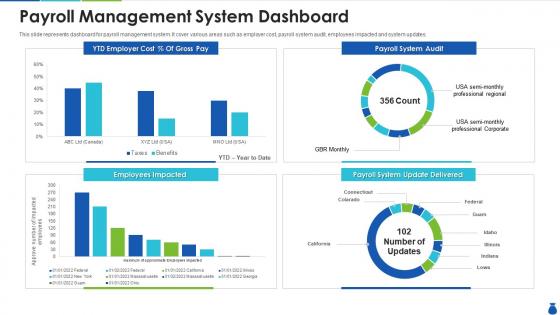
Payroll management system dashboard




Try Before you Buy Download Free Sample Product
 Impress Your
 Audience
 100%
100% Editable
 Save Hours
 of Time


Our Payroll Management System Dashboard are topically designed to provide an attractive backdrop to any subject. Use them to look like a presentation pro.
People who downloaded this PowerPoint presentation also viewed the following :
Payroll management system dashboard with all 7 slides:
Use our Payroll Management System Dashboard to effectively help you save your valuable time. They are readymade to fit into any presentation structure.





FAQs for Payroll
Honestly, automated tax stuff is non-negotiable - I learned that the hard way trying to calculate payroll taxes manually once. Never again. Direct deposits and pay stubs are obvious must-haves. Integration with whatever accounting software you're already using will save you hours of data entry hell. If people track time, make sure that connects too. Oh and check it can handle your mix of employees - salaried people, hourly workers, contractors, whatever. My advice? Write down what's currently driving you crazy about payroll, then find something that fixes those specific headaches first.
Dude, it seriously saves so much time. No more manually calculating overtime or figuring out tax stuff - it just pulls everything from your time tracking and does the math. I used to waste entire afternoons double-checking payroll formulas, which was honestly brutal. Now it handles direct deposits, spits out reports, all that jazz. You set it up once and you're basically done. The best part? You can actually focus on real HR work instead of living in Excel hell. Trust me, once you automate this stuff you'll wonder why you waited so long.
Honestly, payroll systems are lifesavers for staying compliant with all the legal stuff. Tax withholdings, overtime rules, wage laws - there's so much to track. The system handles most calculations automatically and keeps records for audits (which nobody wants to deal with manually). Laws change all the time too, so having something that updates itself is clutch. It'll generate whatever reports the IRS or state agencies need. Just double-check that your system actually gets updated regularly and matches your local regulations - learned that one the hard way at my last job.
Honestly, get your employees set up with portal access - it'll change everything. They can check pay stubs, update their info, and mess with tax withholdings themselves. No more "can you send my W-2?" emails clogging up your day (trust me on this one). PTO tracking and time-off requests go through there too. The training part is pretty straightforward - just walk them through the basics once. I mean, most people figure it out pretty quick anyway. You'll be shocked how much time you get back from not handling all those routine requests manually.
Honestly, connecting your HR software to payroll will save you so much time. All that tedious data entry just disappears - new hires, salary updates, PTO requests all sync automatically. No more entering stuff twice or dealing with those stupid typos that mess everything up. Processing time drops by like 60-70%. I set this up at my last job and it was such a relief. Check if your HR system already has payroll integration built in. The initial setup is kind of a pain but totally worth it once you're done.
So most payroll systems use automated tax engines that pull from federal, state, and local tables. The good ones like ADP update in real-time when rates change. Smaller systems? They're usually monthly or quarterly updates. Some lag behind when new stuff hits though - super frustrating. You'll want to check how often yours updates and if it handles all your locations. Oh, and multi-state employees can be tricky depending on the system. Definitely worth figuring out before you're scrambling during tax season.
Honestly, it's all over the place depending on what route you take. Most people go with cloud stuff like Gusto or ADP - you're looking at maybe $2-15 per employee monthly. Way easier than dealing with those massive on-premise systems that cost like $10K-50K upfront (plus you're stuck with maintenance forever). Implementation usually runs another 10-20% on top, and don't forget training time. Oh, and if your HR system hates your payroll system, integration fees are a thing too - learned that one the hard way at my last job. I'd honestly just make a list of what you actually need and get quotes from a few vendors. Start there and see what doesn't make you cry looking at your budget.
Honestly, payroll systems are way more secure than whatever spreadsheet setup you've got now. They encrypt everything and only let certain people access stuff based on their role. Plus there's audit trails showing exactly who looked at what - super helpful if something goes wrong. The backup situation is automatic too, which beats manually saving files everywhere. Oh and they handle all that compliance stuff for privacy laws. When you're shopping around, definitely look for SOC 2 certified ones. Multi-factor authentication is pretty standard now too. Way less risky than having payroll data scattered across different computers where anyone could mess with it.
Track processing time per cycle and error rates first - those'll tell you if the system actually works. Employee satisfaction around pay accuracy matters too, obviously. Cost per employee is where you see real ROI though. Compliance stuff is critical since payroll screwups can land you in legal trouble fast. Honestly, the biggest red flag is how much manual work your team still does each cycle. If they're constantly fixing things, the automation isn't really automating. I'd start with maybe 2-3 of these and check them monthly. Don't try tracking everything at once or you'll go crazy.
So the best payroll systems basically update themselves automatically when laws change. You'll get alerts whenever there's new tax rates or labor regulations that hit your business. Most platforms have teams constantly monitoring this stuff and pushing updates straight to you - which honestly beats the old days of scrambling to figure out compliance changes yourself. Tax calculations, withholdings, all that gets adjusted automatically. You definitely want a system that does this because missing payroll regulations is stupid expensive. Oh, and the reporting formats update too so you're not stuck reformatting everything manually.
Oh man, data migration is going to be your worst nightmare - all those ancient spreadsheets with weird formatting and missing info. Your team will hate you at first because nobody likes learning new systems when the old one "works fine." Integration with whatever HR stuff you're already using gets messy too. Honestly the compliance piece during transition makes me want to hide under a rock sometimes. Everything takes forever while people figure it out. Definitely try it with just a few people first and triple your timeline estimate.
Honestly, scalable payroll is a game-changer for small biz. Start with basic payroll for your 5 people, then tack on benefits or time tracking when you need it. No point paying for fancy features you won't use yet, right? The beauty is you won't hit a wall at 50 employees and have to migrate everything - been there with accounting software and it's a nightmare. Look for ones that let you add modules piece by piece. Way smarter than those bloated packages that try to sell you everything upfront when you're just trying to pay your team without screwing up taxes.
Honestly, the biggest things to watch are AI handling your complex calculations and real-time payments - seriously, once employees taste instant pay they'll never go back. Cloud systems are pretty much mandatory now since they actually play nice with your other software. Nobody wants to deal with some ancient desktop portal anymore, so mobile design matters way more than it used to. Oh, and make sure whatever you pick has decent APIs so you don't need weird workarounds when connecting stuff. Employee self-service portals are getting better too, plus compliance automation is clutch since regulations change constantly. Worth checking how your current setup handles this stuff before you upgrade.
Definitely survey your team first - they're stuck using it every day. Ask about current pain points like confusing pay stubs or awful time tracking. Different departments will want different things too. Mobile access is usually big, plus easy PTO requests and clear tax breakdowns. Trust me, if the interface sucks, you'll get bombarded with help desk tickets. I've seen companies pick systems that look slick to executives but employees absolutely hate using. Their input saves you from that nightmare. What features does your team actually care about most?
You'll need basic navigation training for everyone, then split into role-specific stuff - HR learns employee setup, managers get approvals and reporting. Most people catch on fast though. Hands-on sessions work best for payroll processing, taxes, compliance features. Oh and don't skip ongoing training because payroll laws never stop changing, which is honestly such a pain. I'd do a full-day workshop first, then maybe monthly check-ins after that. Try to find a couple tech-savvy people who can be your internal help desk when things get weird.
-
Enough space for editing and adding your own content.
-
Very unique, user-friendly presentation interface.
-
Perfect template with attractive color combination.