

Payroll Management Powerpoint Presentation Slides






Try Before you Buy Download Free Sample Product
 Impress Your
 Audience
 100%
100% Editable
 Save Hours
 of Time


Maintaining employee’s financial records can be troublesome. Use professionally designed content-ready Payroll Management PowerPoint Presentation Slides to keep a record of employee’s salaries, wages, bonuses, deductions, and more. Make sure there is no delay and the salaries are paid accurately so that they do not underperform which results in less productivity. Let employees believe in the financial credibility of your organization and have an efficient payroll system using ready-made payroll management PowerPoint presentation slideshow. This payroll process system PowerPoint presentation comprises of templates such as recruitment tacker, recruitment budget, employee information management, training management, goal setting & tracking, performance evaluation, leave tracker management, loan management, claim management, exit clearance tracker, and more. Keep a tab on the leaves, analyse performances, hours and more. Ensure that your employees are happy. Run payroll effectively with the help of easy-to-understand payroll management PowerPoint templates. Develop payslip components such as basic, variable pay, etc, gather payroll inputs, calculate gross salary, release employee salary with the help of ready-to-use payroll management PowerPoint slides. HR managers can get access to this amazing presentation to keep the employees happy and make the work easy of releasing salaries on time. Ensure everything advances flawlessly with our Payroll Management Powerpoint Presentation Slides. It helps you avoid any hiccups.
People who downloaded this PowerPoint presentation also viewed the following :
Content of this Powerpoint Presentation
Slide 1: This slide presents Payroll Management. State Your Company Name and begin.
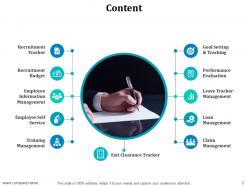
Slide 2: This slide showcases Content with these points to be noted- Exit Clearance Tracker, Recruitment, Tracker, Recruitment Budget, Employee Information Management, Employee Self Service, Training Management, Goal Setting & Tracking, Performance Evaluation, Leave Tracker Management, Loan Management, Claim Management.
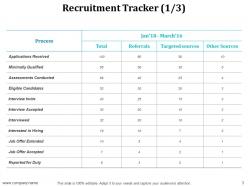
Slide 3: This slide showcases Recruitment Tracker (1/3) with these important factors like process, Referrals, targated sources.
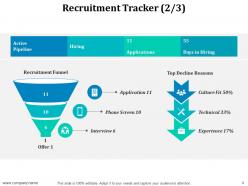
Slide 4: This slide presents Recruitment Tracker (2/3) Active Pipeline, Hiring Applications, Days in Hiring, Top Decline Reasons, Culture Fit, Technical, Experience Application Phone Screen Interview Recruitment Funnel
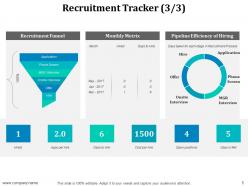
Slide 5: This slide shows Recruitment Tracker (3/3). You can add the the data as per your need.
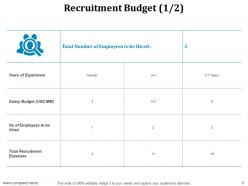
Slide 6: This slide presents Recruitment Budget (1/2). Make use of this table and use it accordingly.
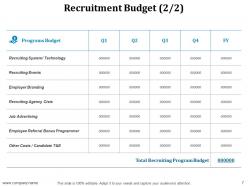
Slide 7: This slide shows Recruitment Budget (2/2). Use this budget table to make it for your company.
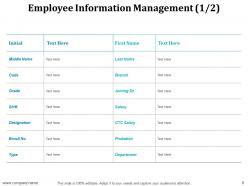
Slide 8: This slide presents Employee Information Management (1/2) with which you can add every financial year.
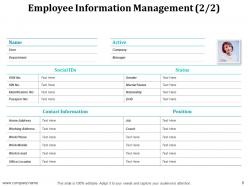
Slide 9: This slide shows Employee Information Management (2/2) which you can use it for information.
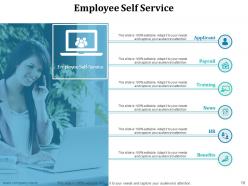
Slide 10: This slide presents Employee Self Service with these six steps- Payroll, Applicant, HR, News, Benefits, Training, Employee Self-Service.
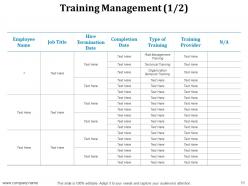
Slide 11: This slide showcases Training Management (1/2) with table. Use this table and add our own data.
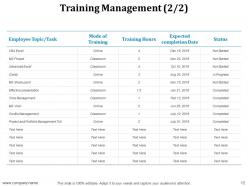
Slide 12: This slide presents Training Management (2/2) table which further shows the employee name, Job title and many more options you can use.
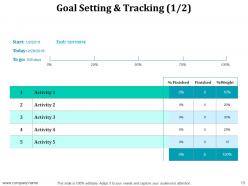
Slide 13: This slide showcases Goal Setting & Tracking (1/2) with these activities and add your data as per your requirement.
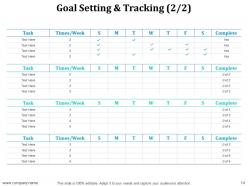
Slide 14: This slide presents Goal Setting & Tracking (2/2). You can add the task and use it accordingly.
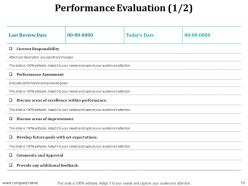
Slide 15: This slide shows Performance Evaluation (1/2) with the last review date and todays date you can mention.
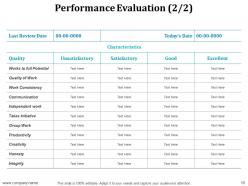
Slide 16: This slide presents Performance Evaluation (2/2). You can add your details as per you want.
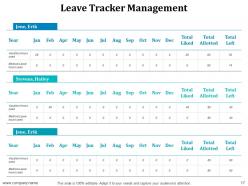
Slide 17: This slide presents Leave Tracker Management with which you can add the months and dates.
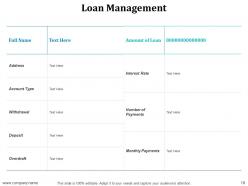
Slide 18: This slide shows Loan Management . You can add the name, address and the amount of loan.
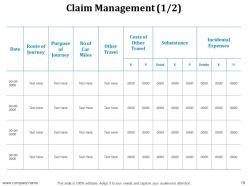
Slide 19: This slide showcases Claim Management (1/2) with which you can add your own content.
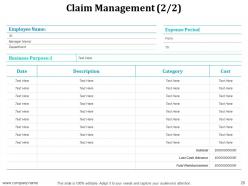
Slide 20: This slide Claim Management (2/2) . Add the data with date, description and category.
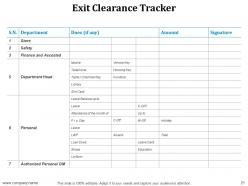
Slide 21: This slide presents Exit Clearance Tracker table. You can add the information as per your requirement.
Slide 22: This slide showcases Payroll Management Icons Slide.
Slide 23: This slide shows Coffee Break image.
Slide 24: This slide is titled Additional slides.
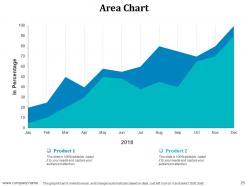
Slide 25: This slide presents a Area Chart graph/chart. Compare Product 01, Product 02 and use as per required.
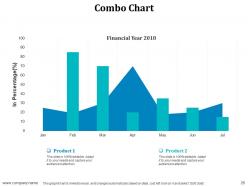
Slide 26: This slide shows a combo Chart for two product comparison.
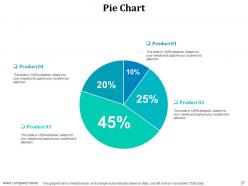
Slide 27: This slide shows a Line Chart for three product comparison.
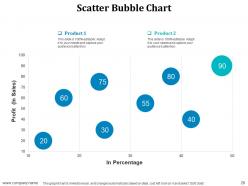
Slide 28: This slide presents a scatter bubble Chart graph/chart. Compare Product 01, Product 02 and use as per required.
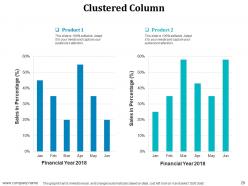
Slide 29: This slide showcases Clustered Column. Compare the product as required.
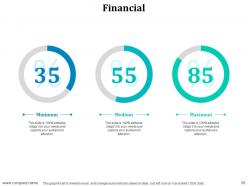
Slide 30: State your Financial score in this slide with relevant imagery and text.
Slide 31: This idea shows an image of Bulb Or Idea to state your facts, notes etc.
Slide 32: This slide presents Sticky Notes. You can use it for your own benefits.
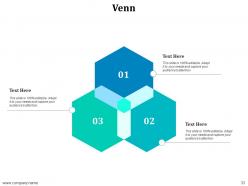
Slide 33: This is a Venn diagram image slide to show information, specifications etc.
Slide 34: This slide contains Our Mission with text boxes.
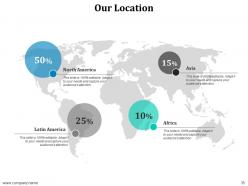
Slide 35: This is a Location slide to show global growth, presence etc. on world map.
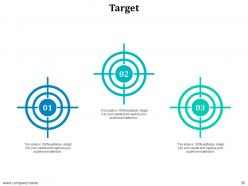
Slide 36: This slide shows Target image with text boxes.
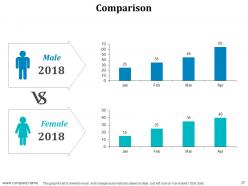
Slide 37: This slide shows Comparison of Positive Factors v/s Negative Factors with thumbsup and thumb down imagery.
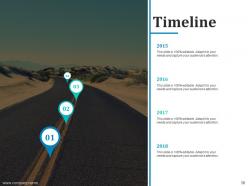
Slide 38: This is a Timelines slide to show- Plan, Budget, Schedule, Review.
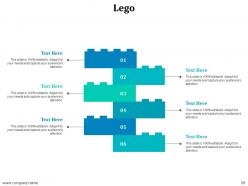
Slide 39: This is a Lego Box slide with the following subheadings- Teach, Encourage, Increase, Build.
Slide 40: This is a Thank You slide for acknowledgement.
Payroll Management Powerpoint Presentation Slides with all 40 slides:
Fix emerging flaws with our Payroll Management Powerpoint Presentation Slides. Amend them before they cause harm.



FAQs for Payroll Management
Ugh, payroll is such a pain right now. Compliance stuff is probably the worst - tax rules keep changing and when you've got employees in different states? Total headache. Then there's all the manual data entry that leads to mistakes, which employees obviously hate. Plus your HRIS probably doesn't talk to your payroll system properly, so you're doing everything twice. COVID made it worse since everyone moved around. Honestly, I'd just figure out where you're spending the most time putting out fires and start there. Fix the biggest mess first, you know?
Honestly, payroll automation is a lifesaver. It handles all the boring stuff - calculating hours, taxes, deductions - so you don't have to sit there crunching numbers. No more spreadsheet hell, basically. The error rate drops way down too, which is huge when you're dealing with people's paychecks. Direct deposits happen automatically, reports generate instantly. I'd start with automating time tracking first since that's where most people waste hours (pun intended). Once you get that running, you can actually focus on the bigger picture stuff instead of drowning in data entry every week.
Honestly, start with payroll accuracy - you want 99%+ because even tiny mistakes snowball into huge headaches. Processing time matters too, like how long it takes from collecting hours to actually paying people. Track your cost per cycle so you know if you're burning money. Employee satisfaction surveys are gold - nothing tanks morale faster than messed up paychecks (learned that one the hard way). Don't forget compliance stuff like late tax filings or penalties. Also check your payroll-to-revenue ratio against industry benchmarks. But seriously, nail accuracy and speed first. Everything else gets so much easier once those are solid.
Your payroll software can pull employee info straight from your HRIS and grab hours from time tracking systems. APIs handle most of this automatically now - honestly, it's pretty sweet not doing manual data entry anymore. It'll also connect with benefits platforms for deductions and accounting stuff like QuickBooks. Some even link to recruiting tools so new hires get set up faster. Oh, and performance management systems too if you're into that. Before shopping around though, I'd figure out what systems you're already stuck with, then find payroll software that actually works with those specific ones.
Oh man, payroll compliance is honestly a nightmare but you've gotta get it right. The IRS will come for you if you mess up tax withholdings - trust me on that one. Federal stuff like FLSA covers your basic minimum wage and overtime rules, but then each state throws their own curveball requirements on top. Don't even get me started on figuring out if someone's an employee or contractor. Record-keeping is huge too, plus all the equal pay regulations. Honestly? Get payroll software that updates automatically because trying to track every law change yourself will drive you insane.
Look, employee self-service is seriously a lifesaver - your team can handle their own stuff through an app or portal instead of constantly hitting up HR. People can update their info, grab pay stubs, download tax forms, request time off. The best part? No more "where's my W2?" emails bombing your inbox every January (though honestly some people will still call anyway lol). It cuts down on mistakes too since employees enter their own changes. If your company doesn't have this yet, you should really push for it. Makes everyone's life easier.
I'd say quarterly at minimum, but monthly's way better if you can manage it. Catching errors early saves you from massive headaches later - trust me on this one. We once discovered a six-month overtime mess that ended up costing us serious money. Ugh, what a nightmare that was. Monthly checks help you spot mistake patterns and keep everything compliant. Your payroll stays cleaner too. Start quarterly if you're stretched thin, then work up to monthly once you've got the hang of it. It's honestly worth the extra effort.
Honestly, cloud payroll is such a huge upgrade from those clunky desktop programs. Being able to check everything from your phone when you're out? Total game changer. The automatic updates are clutch too - no more scrambling with tax table disasters (learned that one the hard way). Your data backs up automatically, which beats praying your computer doesn't die. Real-time stuff with your team just works better, and it plays nice with other HR tools. Oh, and remote work actually becomes possible. Definitely try a demo with your real data first though - you'll see what I mean about the difference.
Honestly, you'll need different processes since the tax stuff is totally different. Remote employees are just like regular employees - same payroll, but you've gotta deal with whatever state they're in (which gets annoying if they keep moving). Contractors are so much easier though - just pay their invoices and send 1099s if they make over $600. I'd definitely get payroll software that handles multiple states automatically. That or just hire a payroll company to deal with it. First thing though - make sure your contracts are crystal clear about who's an employee vs contractor.
Automate whatever you can - get your time tracking synced directly with payroll so you're not manually entering stuff. Always have someone double-check the math before you hit submit, especially overtime calculations. I swear half the payroll disasters I've heard about could've been avoided right there. Build a checklist for each pay period and actually stick to it. Document everything so if you're out sick, someone else can handle it without panicking. Oh, and audit your payroll reports against the general ledger regularly. Trust me, catching mistakes early beats explaining them to angry employees later.
Honestly, picking the wrong payroll system is such a pain - I watched my last company's HR team pull their hair out every week fixing stuff that should've been automatic. You want something that handles taxes without you babysitting it, plus updates compliance rules on its own. Good ones play nice with whatever HR software you're already using. Employee self-service is huge too - nobody wants to answer "where's my paystub?" fifty times. Oh, and make sure it can grow with you because switching later is brutal. Trust me, spending a bit more upfront beats dealing with constant glitches and angry employees.
Okay so first thing - grab all their paperwork during hiring. Tax forms, direct deposit stuff, salary details, deduction choices. Get their payroll profile set up before they even start because scrambling on day one is the worst (been there, done that). I-9 docs need verification and everything goes in your system within a few days. Their tax withholdings and beneficiary info should get double-checked too. Then walk them through the basics - pay schedule, how to find pay stubs, who to bug with questions. Oh and definitely follow up after that first paycheck hits.
Honestly, you're probably sitting on a ton of useful payroll data and not even realizing it. Start by pulling reports on your biggest cost drivers from the past 6-12 months - look for patterns in overtime, turnover, seasonal hiring costs. I bet you'll find some departments that consistently blow their budgets. It's pretty eye-opening actually. The analytics help catch compliance issues early too, which saves headaches later. Most companies just... don't do this analysis for some reason? But spotting these trends makes budget planning way more accurate and can save you serious money.
Look, if your employees don't care about work, they're definitely not reading those payroll emails you send out. Engaged people actually open that stuff and ask questions when something's confusing. The disengaged ones? They'll just stay mad about their paystub in silence. It's honestly kind of a cycle - better communication gets people more invested, which means fewer angry messages to HR later. I'd start making those updates way less corporate-speak and more about what actually matters to them. Like, nobody cares about "policy modifications" but they do care about "your overtime just changed." Short sentences work. But don't make everything choppy - mix it up so it flows naturally when people read it.
Ugh, payroll gets messy fast when you're juggling different worker types. Your old monthly setup won't cut it anymore - freelancers want weekly pay, contractors work project-based, gig workers get paid per task. It's honestly such a pain at first! Modern payroll tools can handle multiple cycles though, plus they'll manage both 1099s and W-2s automatically. You'll need to rethink tracking too - focus on completed tasks instead of just logged hours. Oh, and definitely audit your current worker mix first to see what payment flexibility people actually want. Some might not even care as much as you think.
No Reviews