

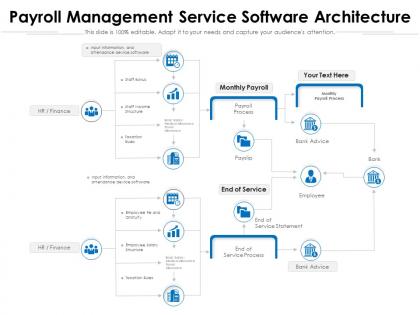
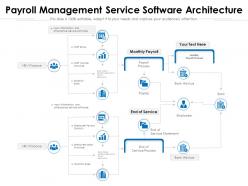
Payroll management service software architecture




Try Before you Buy Download Free Sample Product
 Impress Your
 Audience
 100%
100% Editable
 Save Hours
 of Time


Our Payroll Management Service Software Architecture are topically designed to provide an attractive backdrop to any subject. Use them to look like a presentation pro.
People who downloaded this PowerPoint presentation also viewed the following :
Payroll management service software architecture with all 2 slides:
Use our Payroll Management Service Software Architecture to effectively help you save your valuable time. They are readymade to fit into any presentation structure.
FAQs for Payroll management
So you're gonna need a few key pieces. Data layer handles employee info and calculations. Processing engine does the heavy lifting - taxes, deductions, all that compliance stuff. Integration layer is honestly the most critical part - connects HR systems, time tracking, accounting software. Trust me on this one. Also need solid reporting modules and security for audits. Oh, and the UI should actually make sense for both admins and employees (shocking concept, right?). I'd start by mapping your data flows first. That'll show you which components need to talk to each other most.
So basically you'd split your payroll into separate pieces - employee data, tax stuff, benefits, reporting. Each part runs on its own. The cool thing? Only the tax calculation bit needs extra power during big payroll runs, not everything. You can update one section without breaking the rest (trust me, this is huge). Different services work at the same time instead of waiting around. Honestly though, don't go crazy at first - just pull out whatever's slowing you down most. Way less drama than dealing with one massive system.
Honestly, start with encryption and multi-factor authentication – those two will save your ass from like 90% of attacks. Role-based access is huge too, so Karen from accounting can't accidentally see executive salaries or whatever. Don't forget regular security audits and pen testing to catch stuff before the bad guys do. Data masking for your dev environments is smart, and definitely keep audit logs of who's accessing what. I know it sounds like a lot, but seriously don't skip the MFA part. That's where most companies get burned these days.
So basically, cloud payroll runs on their servers and you just log in through your browser. They deal with all the annoying update stuff and backups. On-premises means it's literally sitting on your company's servers - which honestly sounds like a headache unless you've got a solid IT team. Cloud's super flexible when you're growing or shrinking. The other way gives you more control but you're babysitting hardware. I'd think about whether you actually want to manage servers or just want payroll to work without the hassle.
Dude, you absolutely need scalability or you'll regret it later. Going from 50 to 500 employees? Your payroll can't just crash every month - I've seen companies deal with that mess and it's brutal. Cloud-based systems are your best bet since they automatically adjust resources when you need them. More transactions, complex pay structures, new integrations - a good architecture handles all that without slowing down. Honestly, spending money upfront on something that scales beats scrambling to rebuild everything when you hit those growth spurts. Way less stressful.
Start with API integration - most payroll systems have REST APIs that'll sync employee data and benefits with your HR platform. The tricky part? Mapping all those data fields correctly so records don't get messy. Honestly took me forever the first time I did this setup, but totally worth it once it's running. If direct integration won't work, try middleware like Zapier or MuleSoft as a backup. First step is just documenting what data needs to move between systems, then see if your HR system already has connectors built in.
Okay so first thing - do a complete data audit before you touch anything. Trust me on this one, it'll save you so much pain later. Clean up all your existing data, get rid of duplicates, fix the formatting mess. Test your migration like three times minimum in a safe environment, and have a solid rollback plan ready because something always goes wrong with payroll stuff. Run both systems side by side for two pay cycles at least. Double-check everything twice - employee info, taxes, benefits, all of it. Oh and time your launch right after a pay period ends so you've got breathing room.
Dude, tax stuff will make you go modular whether you like it or not. Different places have completely different rules - federal, state, whatever local nonsense they dream up. Don't hardcode anything because they change regulations constantly (I swear politicians have nothing better to do). Your database needs to remember old tax rates for audits, which is honestly kind of a pain. Log everything or you'll hate yourself later. Build in flexibility now or you'll be scrambling to rewrite code every April when they drop new requirements on you.
So APIs let your payroll software talk to other tools - HR systems, time trackers, benefits stuff. Pretty handy but also kinda scary since you're moving sensitive employee data around. Real-time syncing sounds great until something breaks and suddenly everyone's paychecks are wrong (been there, not fun). You definitely want solid authentication and error handling built in. Oh, and audit trails are huge because payroll screw-ups cost serious money. Honestly, I'd focus on security first, then worry about all the fancy integrations later. Way easier to lock things down from the start.
For real-time payroll stuff, I'd go with event-driven architecture using Kafka or RabbitMQ. Every time someone clocks in or a manager approves something, it triggers immediate processing instead of waiting for those overnight batch jobs. Apache Flink handles the stream processing really well - though honestly the initial setup is kind of a pain. WebSockets push updates straight to your frontend so users see changes right away. Oh, and definitely figure out what actually needs real-time processing first. Some things can totally wait until the nightly run.
Keep things super clean and simple - your users are drowning in data all day. Put the stuff they use most right upfront because hunting through menus for basic payroll functions is just annoying. Stick with the same UI patterns everywhere so people don't have to relearn everything on each page. Good error messages will literally save your sanity later when support calls roll in. Oh, and make sure it works on phones too since everyone's constantly switching devices. Honestly though, map out how people actually work first, then build around that instead of whatever your database looks like.
Honestly, redundancy is everything with payroll systems. Get multiple servers running across different data centers - when one crashes, the others jump in automatically. Real-time monitoring catches problems before they blow up into disasters (learned that one the hard way). Load balancing saves your ass during month-end when everyone's hitting the system at once. You'll want to test your disaster recovery plan monthly too, not just assume it works. Most places I know do this religiously. Start with auditing what you've got now. Trust me, discovering your backup doesn't work during actual payroll week is... not fun.
Ugh, the tax and labor law differences will absolutely kill you - every country has its own weird rules for overtime, benefits, all that stuff. Payroll cycles are all over the place too. Some places do monthly, others bi-weekly. Then you've got currency conversion headaches and multiple languages to deal with. The regulatory changes never stop, which is honestly the worst part. I'd go modular - build it so you can just plug in different rule engines for each country instead of hardcoding everything. Way easier to manage. Start with wherever you're making the most money and build out from there.
Look for stuff that happens over and over - that's your goldmine. Set up triggers so things kick off automatically, like overtime calcs when someone hits 40+ hours. APIs are clutch for connecting different systems together. For tricky scenarios (multi-state taxes are a nightmare), rule engines handle the heavy lifting way better than hardcoding everything. I'd honestly start super simple - maybe auto-approving basic timesheets first. Once you nail that pattern, you can build out microservices for other functions. The whole event-driven approach makes scaling way easier down the road.
Oh man, legislative changes are such a pain for payroll systems. You're constantly updating tax calcs and compliance stuff because some jurisdiction decides to change their rules. The timing is always terrible too - like right before a major deadline or something. Build everything modular from the start so you can swap pieces out fast. Otherwise you'll be scrambling every time new regulations drop. The maintenance never stops honestly - it's like playing whack-a-mole with different states and localities doing their own thing. Focus on flexibility over fancy features. You need to push updates without everything exploding.
-
Commendable slides with attractive designs. Extremely pleased with the fact that they are easy to modify. Great work!
-
Unique design & color.
-
Unique research projects to present in meeting.