

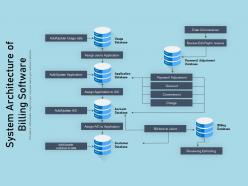
System architecture of billing software





Try Before you Buy Download Free Sample Product
 Impress Your
Audience
 100%
Editable
 Save Hours
of Time


Our System Architecture Of Billing Software are topically designed to provide an attractive backdrop to any subject. Use them to look like a presentation pro.
People who downloaded this PowerPoint presentation also viewed the following :
System architecture of billing software with all 2 slides:
Use our System Architecture Of Billing Software to effectively help you save your valuable time. They are readymade to fit into any presentation structure.

FAQs for System architecture
So you'll want five main pieces for this. Subscription management handles all the plan changes and customer stuff. Then there's the pricing engine - honestly this part gets messy fast if you're doing usage-based billing. Invoice generation comes after that, plus you'll need payment processing (Stripe's pretty solid). Don't forget reporting and analytics for tracking revenue. Keep everything loosely connected so you can swap components later without everything breaking. I'd start with subscription management first, then build out from there.
So basically, microservices let you scale just the parts of your billing system that actually need it. Payment processing getting slammed? Spin up more instances of just that service, not your whole system. Pretty smart, right? Each service does one thing - invoicing, payments, subscriptions - so you're not wasting money on stuff that's running fine. If payments crash, your invoicing still works. The real win is handling those crazy payment spikes without having to beef up everything else. Way more efficient than the old monolithic approach.
Dude, UX in billing software is HUGE. Nobody wants to deal with bills anyway, so if your interface sucks, you're basically asking for angry customers and late payments. Map out how different people use it - like executives want quick summaries while accounting folks need all the nitty-gritty details. Clear invoices are non-negotiable. Same with simple payment flows and dashboards that actually make sense. Oh, and make sure it works on mobile because people pay bills from their phones now. Honestly, every confusing button just creates more support headaches for you later.
APIs are usually your best bet - most ERPs like SAP or NetSuite have REST APIs for pushing invoice data and payment records back and forth. Pre-built connectors can be a lifesaver if they exist for your setup, honestly saves so much headache. The tricky part is getting your data fields mapped right and setting up real-time sync for inventory and pricing. Oh, and don't forget customer info needs to flow both ways too. I'd dig into what APIs your current ERP actually exposes first - that'll tell you how much custom work you're looking at versus plug-and-play options.
Encryption's your starting point - lock down payment data and PII both stored and moving around. MFA and role-based access are must-haves, plus regular security audits. PCI compliance isn't optional if you're touching card data (seriously, those fines will ruin your day). Set up monitoring for sketchy activity and rate limit your APIs. Database connections need encryption too. Pen testing should happen regularly - honestly, most breaches could've been caught this way. Keep dependencies updated because outdated libraries are low-hanging fruit for hackers. Start with encryption and PCI stuff since that's where you're most vulnerable.
So real-time processing is actually pretty sick for billing - you catch usage spikes and payment issues right when they happen instead of waiting around for overnight batch runs. Customer balances update instantly, overdue notices go out automatically, and you spot weird billing stuff before it becomes a nightmare. No more awkward "our systems are down until morning" calls with customers, which honestly saves everyone's sanity. Revenue recognition gets way more accurate too. Oh, and dynamic pricing becomes possible based on what people are actually using. I'd start by figuring out what data absolutely needs real-time processing vs what can just run in batches.
Currency conversion timing will mess with your head - do you lock rates at quote, invoice, or payment? That choice shapes everything else. Storage becomes a pain because you're juggling different decimal rules and rounding standards per country. Then tax calculations hit you since rates shift based on currency pairs and where stuff's happening. The reporting side honestly made me want to cry when I dealt with this last year. Database schema should follow whatever conversion strategy you pick first, or you'll be rebuilding later. Also, don't underestimate how regulatory stuff varies everywhere.
Build a flexible tax engine that handles different rules per country - configurable rates, exemptions, all that stuff. Automated updates are crucial because tracking global tax changes manually will destroy your sanity. Oh, and separate your tax logic from billing so you can swap in services like Avalara later if needed. Log everything for audits. I'd honestly start by listing which countries you're dealing with first - their requirements vary wildly and some are way more complex than others.
Honestly, most billing systems I've worked with use Java or .NET on the backend - they're just really solid for financial stuff and security. Python's great too if your team's into that. Database-wise, PostgreSQL or Oracle are pretty much the standard because billing data can't ever be wrong (learned that the hard way once). React or Angular handle the frontend fine. Oh, and you'll probably need something like RabbitMQ for payment processing since that stuff needs to happen in the background. AWS makes hosting easy. But honestly? Just start with whatever your devs already know, then worry about PCI compliance later when you're actually making money.
Dude, cloud architecture is a game-changer for billing software. Your system can automatically scale up when you hit those crazy month-end processing loads instead of crashing. Plus you get redundancy across different data centers - one goes down, billing keeps running. Database queries are way faster too since they hit local replicas rather than one poor overworked server. Honestly, I used to stress so much about our billing dying during peak times. Oh, and definitely run some load tests on your current setup first - you might be surprised where the real bottlenecks are hiding.
Dude, automation is seriously worth it - you'll cut billing time from hours down to like 20 minutes, maybe less. Manual errors basically disappear, which is huge when you're processing tons of invoices. The system handles everything automatically: generating invoices, processing payments, following up on late accounts, reconciliation... all of it. Your throughput goes up 10x easy, and honestly? I wish I'd done it sooner. It scales way better too since you won't need to hire more people when transaction volume spikes. Just start with your most boring, repetitive billing stuff first - that's where you'll see the money back fastest.
Honestly, the hardest part isn't the basic recurring billing - it's all those annoying edge cases that'll bite you later. Map out your subscription flows first before picking a platform. You need something that handles prorations when people upgrade mid-cycle, processes renewals automatically, and deals with failed payments gracefully. Don't forget webhook support to keep everything synced. Trial periods and cancellations are trickier than they seem too. I'd rather choose a billing system that actually fits your business logic instead of cramming your requirements into whatever's popular right now.
Dude, start with unit testing your calculation logic - that's where the nasty bugs love to camp out. Integration testing with payment processors is huge too. I always run end-to-end tests that copy real billing cycles because honestly? Edge cases will destroy you in production. Oh, and load testing since most billing runs in batches anyway. Don't skip data validation for different currencies and tax stuff - learned that one the hard way. Set up automated regression tests before every deploy. Trust me, billing bugs that slip through will literally drain your company's bank account.
Honestly, your API design will make or break everything. Clean RESTful APIs with good docs? Other devs will love you when they're hooking up payment processors or whatever CRMs. But if you've got messy endpoints and wonky data structures - oof, prepare for angry Slack messages. I learned this the hard way on my last project. Standard protocols are your friend here. Version properly so you don't break existing integrations. And please, write error messages that actually tell people what went wrong instead of just throwing generic 500s everywhere.
Go with responsive web design instead of native apps unless you're swimming in cash. Your billing interface has to work on phones - collapsible menus, big touch buttons, simple forms. API-first architecture is key since it feeds data to both web and mobile efficiently. Most billing stuff is pretty basic anyway, so mobile web handles it fine. Oh, and definitely optimize your payment processing for mobile too. Just test your current setup on real phones first - you'll spot the broken stuff immediately. Way easier than guessing what needs fixing.
No Reviews