

Systems Design Powerpoint Presentation Slides




Try Before you Buy Download Free Sample Product
 Impress Your
 Audience
 100%
100% Editable
 Save Hours
 of Time


Improve product quality and performance along with providing the value to the company using content-ready Systems Design PowerPoint Presentation Slides. Create a customize application or design with existing or new hardware through ready-to-use systems designs PPT presentation templates. This professionally designed systems integration PowerPoint presentation deck covers topics like star integration, common data format, vertical and horizontal integration, and more. Incorporate relevant system integration process steps to help your company save time and money. Choose the best system to manage business operations. With systems design PPT presentation, enhance employee communication and collaboration, increase productivity, intensify real time data visibility, etc. Improve data accuracy, organizational change readiness by executing the system design process accurately. Add system integration PowerPoint templates for better products and services. Not just this, it will help you evaluate your business, have all data in one place, improve system security, accelerate growth and innovation, and more. Get access to the system design PowerPoint presentation slides for improved systems to enhance performance of the business. Find the design that highlights your cause in our Systems Design Powerpoint Presentation Slides. Insert the image of your choice.
People who downloaded this PowerPoint presentation also viewed the following :
Content of this Powerpoint Presentation
Slide 1: This slide introduces Systems Design. State Your Company Name and begin.
Slide 2: This slide shows Our Agenda. Use it to add your business agenda.
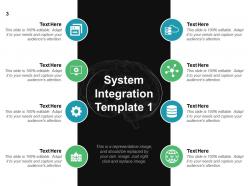
Slide 3: This slide showcases System Integration Template 1. We have mentioned some of the relavant icon with text boxes. You can use as per your requirement.
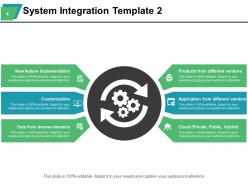
Slide 4: This slide presents System Integration Template 2. Given are some of the parameters in slide- Products from different vendors, Application from different vendors, Cloud (Private, Public, Hybrid), New feature Implementation, Customization, Data from diverse domains.
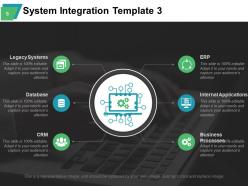
Slide 5: This slide shows System Integration Template 3. Some the important facors we have put in slide, you can add as per requirement. ERP, Internal Applications, Business Processes, Legacy Systems, Database, CRM.
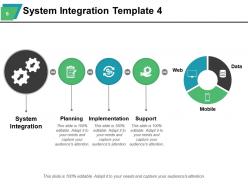
Slide 6: This slide showcases System Integration Template 4. Major steps for integration we have mentioned such as- Planning, Implementation, Support, System Integration.
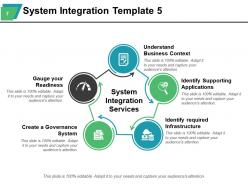
Slide 7: This slide presents System Integration Template 5. This is presenting in flow diagram with these parameters- System Integration Services, Understand Business Context, Identify Supporting Applications, Identify required Infrastructure, Gauge your Readiness, Create a Governance System.
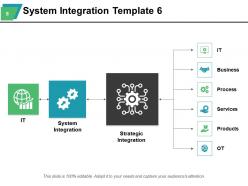
Slide 8: This slide showcases System Integration Template 6 which is showing these main parameters- System Integration, Strategic Integration.
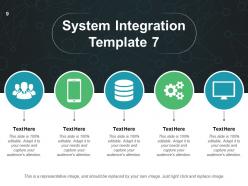
Slide 9: This slide displays System Integration Template 7 with relevant icons it is showing. You can add your content and use as per your requirement.
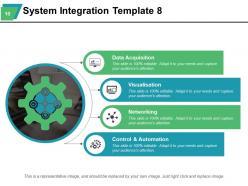
Slide 10: This slide showcases System Integration Template 8. This slide also include - Data Acquisition, Visualisation, Networking, Control & Automation.
Slide 11: This slide diplays Icons. You can use as per requirement.
Slide 12: This slide is a Coffee Break image for a halt.
Slide 13: This slide is titled Additional Slides.
Slide 14: This slide showcases Our Team with Name and Designation to fill.
Slide 15: This slide displays Our Target with a background image.
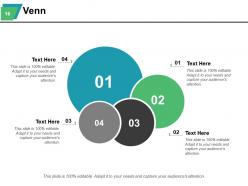
Slide 16: This is a Venn diagram image slide to show information, specifications etc.
Slide 17: This is a Quotes slide to convey message, beliefs etc.
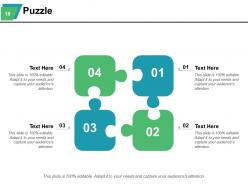
Slide 18: This slide showcases a Puzzle with imagery.
Slide 19: This slide displays a Bulb or idea image.
Slide 20: This slide showcases Project Locations with a World map and text boxes to make it explicit.
Slide 21: This slide shows a Magnifying glass with text boxes.
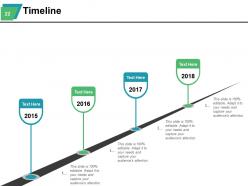
Slide 22: This is a Timeline slide to show milestones, growth or highlighting factors.
Slide 23: This slide forwards to Charts & Graphs.
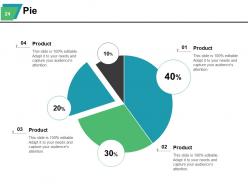
Slide 24: This slide diplays pie chart for comparison of four products.
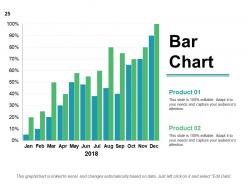
Slide 25: This is a Bar Graph image slide to show product comparison, growth etc.
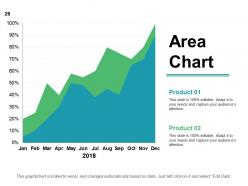
Slide 26: This slide shows Critical areas to be assessed and worked on.
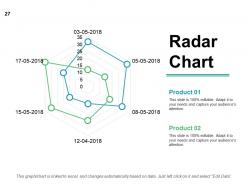
Slide 27: This is a Radar Chart slide for product/entity comparison.
Slide 28: This is a Thank You slide with Address# street number, city, state, Contact Numbers, Email Address.
Systems Design Powerpoint Presentation Slides with all 28 slides:
Ensure gains all around with our Systems Design Powerpoint Presentation Slides. They help you dole it out.





FAQs for Systems Design
You gotta nail scalability, reliability, and maintainability first - basically making sure your system can grow without breaking and won't make future you want to scream. Design for failure because stuff WILL break. Keep components loosely coupled so one change doesn't destroy everything else. Honestly, there's never a perfect solution - it's all trade-offs. Oh and don't over-engineer things, I've seen that kill way more projects than keeping it simple. Figure out your actual requirements first, then work backwards to pick the right tech stack.
So modular design is basically breaking your system into separate pieces that don't mess with each other. Way easier to debug when something breaks - you just look at one module instead of digging through everything. Your team can work on different parts without stepping on each other's toes, which honestly saves so much headache. Think LEGO blocks vs a concrete slab. You can swap modules out, scale up the busy ones, or upgrade stuff independently. Oh and if you're starting from scratch, look for natural boundaries in what you're building. Then just pull those chunks into their own modules with clean interfaces.
Honestly, UX should be driving your tech choices from day one, not something you slap on later. I've watched so many smart systems totally bomb because users hated them - doesn't matter how clever your code is if nobody wants to touch it. Map out user journeys before you even think about what database to use. Consider how much mental effort you're asking from people, how they'll actually move through tasks, what happens when stuff breaks. Short version: build for humans first, then figure out the technical bits. Your adoption rates will be way better, trust me.
So basically you want to set up monitoring points that feed info back to whatever's making decisions in your system. Pick key spots to collect metrics, then use that data to auto-adjust things or trigger fixes when needed. It's like a thermostat honestly - checks temp, adjusts heat, repeat. The real challenge is getting feedback that's quick enough to matter but not so noisy it's useless (learned that one the hard way). Start with one metric that actually matters. Get that working smoothly first, then add more complex stuff once you figure out what genuinely impacts your results.
Don't overthink it from day one - that's the biggest trap. I've watched teams debate microservices for weeks while their competitors actually shipped something. Over-engineering kills momentum, and ignoring stuff like scalability early means you're screwed when real users show up. Perfect architecture doesn't exist anyway. Build the simplest thing that works first. Your actual requirements matter way more than some theoretical nightmare scenario you dreamed up. You can always refactor later once you have real data and feedback telling you what actually needs fixing.
So basically, it's like negotiating - everyone's gotta bend a little. First, figure out what users really need (not just what they're asking for, because those can be totally different things). Then see how that lines up with reality - your budget, timeline, what tech you're already stuck with. I make these priority grids to sort everything out. User needs that are super important AND doable? Boom, that's your low-hanging fruit. The annoying part is explaining why some requests are impossible without sounding like a total buzzkill. Always write down your limitations and offer alternatives when you can't deliver something.
So redundancy is huge - always have backup databases ready to jump in when your main one craps out. Circuit breakers will save your ass from cascading failures, trust me on this one. Health checks and alerts are a must because finding out from angry users sucks (learned that the hard way). Design everything assuming it'll break eventually. Partition your system so one component failing doesn't torch the whole thing. Oh, and graceful degradation - your app should limp along even when stuff's broken rather than just dying completely. Start with these and you're already doing better than most systems I've seen.
Honestly, your architecture choice will make or break you down the road. Pick something too rigid upfront and you'll hate yourself when requirements change (and they definitely will). Monoliths turn into absolute nightmares to maintain. But going full microservices from day one? That's just asking for operational hell. Start simple with clean boundaries - you can always break things apart later. Focus on keeping components loosely coupled so you're not stuck rebuilding everything when you need to scale or pivot. Future you will thank present you for not overthinking it.
Start with stakeholder interviews - seriously, this is make-or-break stuff. I'd do process mapping next to see how things actually work (vs how people think they work). Data flow analysis helps too, shows where info gets stuck or lost. User journey mapping is solid if customers are involved. Root cause analysis for any major headaches you find. Mix the touchy-feely stuff like interviews with hard numbers - metrics don't lie. Pick maybe 2-3 techniques that fit your timeline. Don't try to boil the ocean here.
Look, each group brings totally different perspectives to your design. Users show you what they actually do (not what you think they do). Business people set your budget and deadlines - can't ignore that reality. Your dev team knows what'll actually work with your current setup. Yeah, it's like juggling sometimes, but you need all their input. I'd map out who matters early on and set up regular check-ins. That way their feedback helps shape things instead of completely derailing your progress halfway through. Trust me, it's way better than surprises later.
So three main things to nail down: architecture diagrams that actually make sense, solid data flow docs, and good API specs. Your diagrams should be self-explanatory - seriously, if it takes someone 20 minutes to figure out what you built, you've overcomplicated it. Don't skip the boring stuff like performance targets and security requirements. Oh, and document why you made certain trade-offs because future you will thank past you. Keep it all in version control and actually update it when things change (I know, I know, nobody wants to do documentation). Just start simple and add as you go.
Dude, just sketch it out first! Seriously, prototyping saves so much headache later. Paper mockups, wireframes, whatever - just get something visual going before you code. I learned this the hard way on my last project (ugh). Testing with real users early catches the big problems when they're still cheap to fix. Even basic clickable prototypes work great. You'll figure out if you're actually solving the right problem and avoid building something nobody wants. Most teams skip this step and then wonder why they're doing massive rewrites six months in. Start super simple - it's worth it.
Data modeling is basically your system's foundation - it shows how data flows, gets stored, and connects everything. First step? Understand your domain and figure out the main entities and relationships before touching databases or APIs. Honestly, I always sketch this on paper first because it's so much faster than diving into fancy tools. You'll want to think about access patterns and how things need to stay consistent. Oh, and definitely consider how it'll scale when requirements inevitably change. Start simple with core entities, then add complexity once you've tested your assumptions through some quick prototypes.
Dude, you can't just slap security on later - trust me on this one. Build it in from day one or you'll hate your life later. Start with threat modeling and figure out your attack surfaces early. Design proper auth flows, encryption, and access controls right into your architecture. I've watched teams try to retrofit security afterwards and it's honestly brutal. You end up with these janky band-aid fixes that just create more vulnerabilities and tech debt. Way better to do the hard work upfront than scramble around patching fundamental flaws later when you're under pressure.
Honestly, just start with Draw.io (they renamed it diagrams.net but whatever). It's free and handles most stuff you'd need. Lucidchart's pretty solid too for architecture diagrams. If you're doing team brainstorming sessions, Miro is amazing - I get way too carried away making everything look perfect on there though lol. Visio's still the best for technical network diagrams, but it costs a fortune. Oh, and if you're already in Figma for UI stuff, it actually works great for system diagrams too. Try the free ones first before spending money.
-
Excellent products for quick understanding.
-
Wonderful templates design to use in business meetings.