

System integration powerpoint presentation slides





Try Before you Buy Download Free Sample Product
 Impress Your
 Audience
 100%
100% Editable
 Save Hours
 of Time


Do you want to integrate your various company system or functions at once? Then we have come with a system integration PowerPoint Presentation slides which will help you in describing the various elements and facts related to your business system integration process. One of the fascinating features of this system integration PowerPoint image is to illustrate the concept of business growth with continues improvement in the business structure and its productivity as well as its profitability. You can also describe various components affecting the system integration with the need of the same with this PPT layout as with the introduction of IT framework in business such as ERP or CRM. It gives rise to the need of integrating the company system to streamline the business process and for managing the business database. Start integrating your company systems to improve its market position with this presentation design. Thus, create a result-oriented permutation to your audiences. Folks get drawn in by your friendly attitude due to our System Integration Powerpoint Presentation Slides. You will exhibit a congenial approach.
People who downloaded this PowerPoint presentation also viewed the following :
Content of this Powerpoint Presentation
Slide 1: This is an introductory slide to System Integration. State Your Company Name and get started.
Slide 2: This is an Agenda slide. State your agendas here.
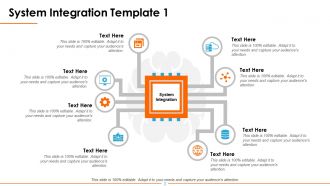
Slide 3: This slide presents System Integration Template with respective image and text boxes.
Slide 4: This slide showcases System Integration Template with the following sub headings- Products from different vendors, Application from different vendors, Cloud (private, public, hybrid), New feature implementation, Customization, Data from diverse domains.
Slide 5: This slide presents System Integration Template with the following sub headings- ERP, Internal Applications, Business Processes, Legacy Systems, Database, CRM.
Slide 6: This slide displays System Integration Template with Planning, Implementation, Support, Web, Data, Mobile.
Slide 7: This slide showcases System Integration Template with the following sub headings- System Integration Services, Understand Business Context, Identify Supporting Applications, Gauge your Readiness, Identify required Infrastructure, Create a Governance System.
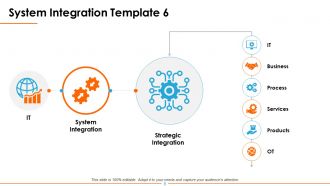
Slide 8: This slide shows System Integration Template starting from IT- to System Integration- to Strategic Integration( IT, Business, Process, Services, Products, OT).
Slide 9: This slide presents System Integration Template with respective imagery and text boxes.
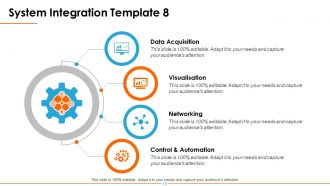
Slide 10: This slide showcases System Integration Template with following subheadings- Data Acquisition, Visualisation, Networking, Control & Automation.
Slide 11: This is System Integration Icons Slide. Choose icons as per your need.
Slide 12: This is Tea Break slide to halt.
Slide 13: This slide is titled Additional Slides to proceed forward.
Slide 14: This is an Our Team slide with name and designation.
Slide 15: This is a Target slide. State your targets, goals etc. here.
Slide 16: This is a Quotes slide. The following quote has been shown as an exmaple. You can state highlights, information etc. here.
Slide 17: This is a Puzzle slide to show information, specifications etc.
Slide 18: This is a Venn slide to show information, specifications etc.
Slide 19: This is a Bulb or Idea to show information, ideas, specifications etc.
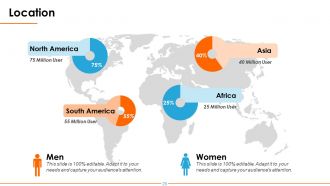
Slide 20: This is a Location slide in terms of men and women to show segregation globally.
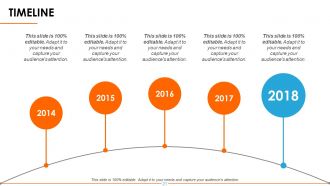
Slide 21: This slide shows a TIMELINE over the years to present in one place.
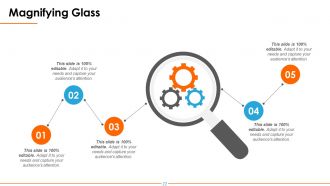
Slide 22: This slide shows a Magnifying Glass with imagery and text boxes to go with.
Slide 23: This slide is titled Charts & Graphs to proceed forward.
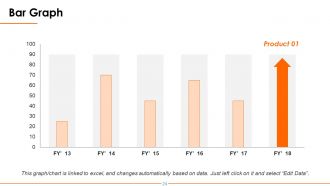
Slide 24: This slide presents a Bar Graph for product growth etc.
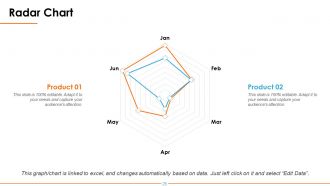
Slide 25: This is a Radar Chart slide to show product comparison etc.
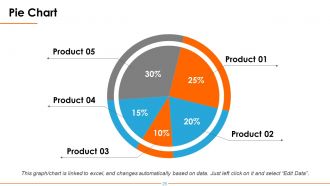
Slide 26: This is a Pie Chart slide to show product comparison etc.
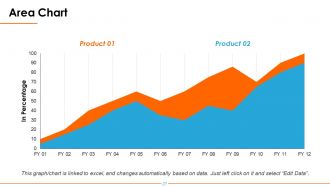
Slide 27: This slide shows an Area Chart for product comparison, growth etc.
Slide 28: This is a Thank You slide with Address # Street number, city, state, Email Address, Contact Numbers.
System integration powerpoint presentation slides with all 28 slides:
Our System Integration Powerpoint Presentation Slides are like a catchy tune. Add your lyrics and compose a sure winner.
-
System Integration
-
Agenda
-
System Integration Template 1
-
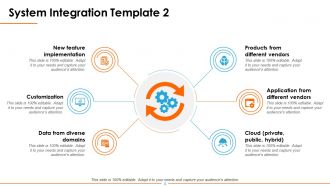
System Integration Template 2
-
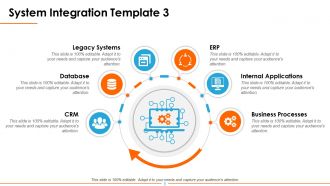
System Integration Template 3
-
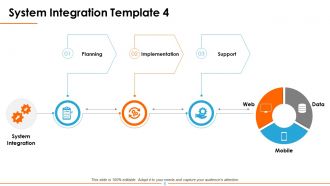
System Integration Template 4
-
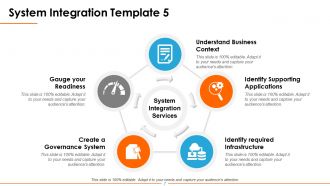
System Integration Template 5
-
System Integration Template 6
-
System Integration Template 7
-
System Integration Template 8
-
System Integration Icon Slide
-

It s Time For Tea Break
-

Additional Slides
-

Our Team
-
Target
-

System Integration
-
Puzzle
-
Venn
-
Bulb or Idea
-
Location
-
Timeline
-
Magnifying Glass
-

Charts Graphs
-
Bar Graph
-
Radar Chart
-
Pie Chart
-
Area Chart
-

Thank You
FAQs for System integration
Honestly, start with mapping out your current systems and data flows - it's boring but saves you from disaster later. You absolutely need solid data mapping, good API management, and bulletproof error handling. Testing protocols are huge too, plus having rollback plans ready because stuff always breaks at the worst times. Security and monitoring can't be afterthoughts either. Oh and documentation - nobody wants to write it but you'll thank yourself when someone asks how something works six months from now. I learned this the hard way on my last project.
So APIs are basically like translators for software - they let different apps talk to each other without caring what language they're coded in. Pretty handy, right? Instead of building custom connections for every single thing (which would be absolutely brutal), you just use standard API calls to move data around. Your mobile app needs to grab info from a web service? API handles it. Syncing stuff between cloud platforms? Same deal. Honestly, they're kind of magic at hiding all the messy technical stuff. Oh, and start by figuring out what data you actually need to share first - saves you headaches later.
Oh man, data format issues are the absolute worst - your old system and new one just refuse to talk to each other properly. API problems will make you want to scream, especially when the docs are garbage (which they always are). Performance hits come out of nowhere too. And don't even get me started on users losing their minds over any tiny workflow change. Unexpected downtime during go-live is basically guaranteed at this point. Honestly, just pad your testing timeline like crazy and have that rollback plan locked and loaded before you even start.
Honestly, cloud integration is a game changer. You get all these ready-made APIs and connectors instead of building everything from scratch - saves so much time. I worked on a project last year where we used Azure Logic Apps and it was like night and day compared to our old custom setup. The auto-scaling thing is pretty sweet too since you don't worry about traffic spikes. We cut our integration time by more than half, which was wild. I'd start by looking at what's currently breaking or slowing you down, then see what cloud tools can replace those headaches you're dealing with.
So middleware is basically like having a universal translator for all your different software systems. It handles the annoying stuff - converting protocols, reformatting data, routing messages between apps. Pretty much saves you from building custom connections for every single integration, which honestly becomes a nightmare when you're trying to get some ancient mainframe to play nice with modern APIs. You'll want to pick middleware that actually fits how your systems need to work together. Real-time messaging? Batch jobs? API stuff? First step is just mapping out what connects to what and how your data moves around.
So basically you want validation checks everywhere - checksums, data type checks, constraint validation before writing anything to your target systems. Transaction rollbacks are a lifesaver when things crash halfway through (trust me on this one). I'd use staging tables first to double-check everything looks good before hitting production. Audit logs are clutch for tracking down what went wrong later. Oh, and definitely test with a small dataset first to make sure your integrity checks actually work. Don't go full-scale until you're confident it won't blow up.
Honestly, go with Agile for system integration. You can break things into smaller pieces and actually catch problems before they blow up on you. Waterfall might seem tempting if everything's super well-defined, but come on - that's like never in real life, right? The cool thing about Agile is you're constantly testing how your systems talk to each other instead of crossing your fingers at the end. Focus on building your APIs first and keep your docs updated as you go. Oh, and definitely start with whatever integrations are most critical - learned that one the hard way. Build out from there and you'll be golden.
Ok so with complex systems, definitely go incremental - don't try testing everything at once or you'll lose your mind. I'd do the sandwich thing where you test user flows top-down and data stuff bottom-up at the same time. Mock your external dependencies right away (seriously, saves you hours of headaches later). The interfaces between big subsystems? That's where bugs love to hide, so hit those first. Get your test environments matching prod as much as possible. Oh and test the failure stuff too - timeouts, db crashes, all that fun chaos. Build it up piece by piece.
First thing - figure out what sensitive data you're moving between systems, then build security around those flows. Encryption everywhere (data moving AND stored), plus solid authentication so systems actually verify who they're talking to. The regulatory maze is honestly the worst part - GDPR, HIPAA, SOX all have their own weird requirements you'll need to hit. Network segmentation helps too since it limits damage if something gets breached. Don't forget audit trails for compliance reporting. Last thing you want is creating new attack vectors when you're just trying to connect systems.
Honestly, you need to measure both the techy stuff and actual business impact. System uptime, data accuracy - basically is it working without breaking? But also track if processes are faster, costs dropped, people happier using it. Here's what I learned the hard way - get your baseline numbers BEFORE you start anything. So many people skip this step and then can't prove their project worked. Measure reduced manual hours, fewer screw-ups, faster customer responses. Define what winning looks like first, then actually track against it instead of just crossing your fingers.
Honestly, start by mapping what you've got first - saves so much time later. MuleSoft and Dell Boomi are great for bigger setups, but Zapier works fine if you're doing simpler stuff. Docker's been a lifesaver for us when deploying across different environments. Azure Logic Apps is solid too if you're already in Microsoft's ecosystem. Oh, and definitely use Postman for testing APIs - it's free and actually good. New Relic's worth it for monitoring performance issues. Pick whatever matches your budget though, some of these tools get pricey fast.
Honestly, cross-functional training is your lifeline here - get your devs, analysts, and ops people talking to each other instead of staying in their bubbles. Documentation sucks but you'll thank yourself later. Sandbox environments are clutch for testing without nuking production (learned that one the hard way). Regular syncs between everyone keep things from going sideways. Oh, and start with small pilot integrations first - builds confidence before you tackle the nightmare-level system connections. Clear communication protocols sound boring but they're what separate the successful projects from the dumpster fires.
Honestly, the ROI is pretty solid once you get past the initial sticker shock. Manual data entry becomes a thing of the past, which alone saves tons of time. Errors get caught way earlier too - before they turn into those nightmare scenarios that keep you up at night. Better visibility means you can actually make informed decisions instead of just guessing. Most companies I've heard about hit their break-even point around 12-18 months through lower operational costs. My advice? Start with whatever's causing your team the biggest headaches right now. Those disconnected systems are usually your best bet for quick wins.
Dude, those data silos are killing your speed. Getting your systems to actually communicate changes everything - suddenly you're not stuck waiting around for manual reports from like 5 different platforms. Real-time info means you can jump on opportunities or fix problems right when they happen. The whole "responding to market changes" thing becomes so much easier when departments aren't working in isolation. Honestly, I'd start by figuring out where your biggest delays are happening right now. Map out what's connected and what isn't. You'll probably find some obvious wins pretty fast.
Honestly, AI and machine learning are about to flip system integration on its head. They're already automating data mapping and predicting when stuff's gonna break before it happens. Cloud-native setups with microservices? Game changer - you can just snap components together now. Everyone's going API-first these days, and those low-code platforms mean your business folks can handle basic integrations without bugging you constantly (thank god). Oh, and edge computing's moving everything closer to where the data actually lives. You should definitely start playing around with AI-powered integration tools - I've been messing with a few and they're pretty wild.
-
Informative presentations that are easily editable.
-
Easy to edit slides with easy to understand instructions.