

System integration in business powerpoint presentation slides





Try Before you Buy Download Free Sample Product
 Impress Your
 Audience
 100%
100% Editable
 Save Hours
 of Time


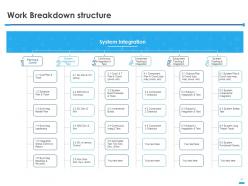
Align technology with business strategy and goals with the help of System Integration In Business Powerpoint Presentation Slides. Discuss in detail types of system integration such as enterprise application integration, data integration, electronic document integration, etc. Speed up information flows and reduce operational costs for the organization. Highlight the importance of integration which speeds up information flows and reduces operational costs for the organization. Mention the key advantages of system integration such as cost and storage savings, improved system security, accelerated growth, and innovation, etc. Take advantage of business system integration PPT layouts and showcase the components of integration. Also, highlight some common problems in integrating systems. After that, showcase the ways to eliminate system integration issues and complexities. Develop a hierarchical list of project tasks that defines the scope of the project by utilizing the integrating process PowerPoint graphic. Hence monitor the progress of system integration by downloading this ready to use project monitoring system PPT Presentation.
People who downloaded this PowerPoint presentation also viewed the following :
Content of this Powerpoint Presentation
Slide 1: This slide introduces System Integration in Business. State your company name and begin.
Slide 2: This slide displays the content of Systems Integration.
Slide 3: This slide displays the Systems Integration Introduction.
Slide 4: This slide discusses Systems Integration Issues.
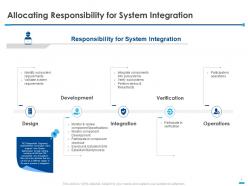
Slide 5: This slide showcases Allocating Responsibility for System Integration.
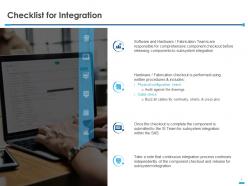
Slide 6: This slide depicts the Checklist for Integration.
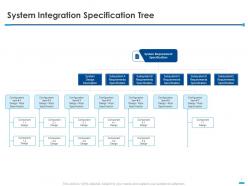
Slide 7: This slide System Integration Specification Tree.
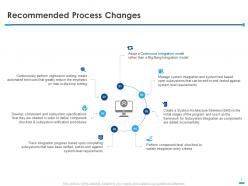
Slide 8: This slide showcases Recommended Process Changes
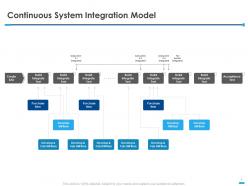
Slide 9: This slide represents Continuous System Integration Model.
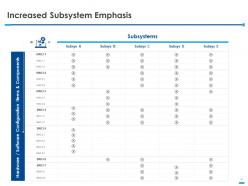
Slide 10: This slide presents Increased Subsystem Emphasis.
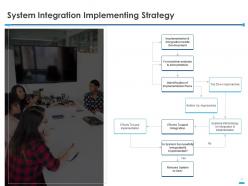
Slide 11: This slide showcases System Integration Implementing Strategy.
Slide 12: This slide depicts Work Breakdown structure.
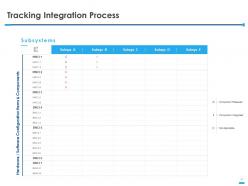
Slide 13: This slide describes Tracking Integration Process.
Slide 14: This is System Integration in Business Icons Slide.
Slide 15: This slide is titled as Additional Slides.
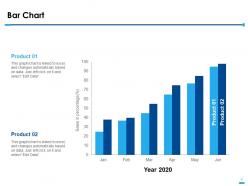
Slide 16: This slide displays the Bar Chart with product comparison.
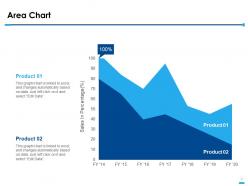
Slide 17: This slide displays the Area Chart with different product comparison.
Slide 18: This is About us slide to showcase company specifications.
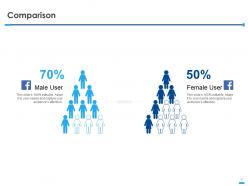
Slide 19: This is Comparison slide showcasing comparison showcasing comparison between female and male users.
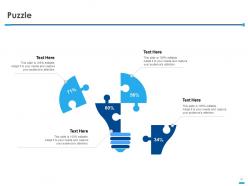
Slide 20: This is Puzzle slide with icons and text boxes.
Slide 21: This is Financial slide. Showcase your finance related stuff here.
Slide 22: This is Thank You slide with Contact number, address and email address.
System integration in business powerpoint presentation slides with all 22 slides:
Use our System Integration In Business Powerpoint Presentation Slides to effectively help you save your valuable time. They are readymade to fit into any presentation structure.





FAQs for System integration in business
Honestly, the biggest thing you'll notice is how much smoother everything runs once your systems actually talk to each other. No more copying data between platforms (which is soul-crushing work anyway). Your team gets real-time info instead of waiting around for someone to compile reports manually. Data accuracy goes way up since there's less human error in the mix. Those annoying silos disappear too - you know, where marketing has one set of numbers and sales has completely different ones? ROI happens pretty fast because people can actually do strategic stuff instead of data entry all day. I'd start by figuring out your current data flows first.
Okay so basically you're getting rid of those annoying data silos that make everything take forever. Like when sales enters customer info and then finance has to type it all over again - such a pain. With integrated systems, that data just flows automatically between platforms. Way fewer mistakes, no more duplicate work, and everyone sees the same current info. Your people can actually do their real jobs instead of constantly transferring data around. Oh, and start by figuring out where you're doing the most manual handoffs - that's where you'll see results fastest.
Ugh, data compatibility is gonna be your biggest nightmare - nothing ever plays nice together right off the bat. Legacy systems are the absolute worst for this. Budget for way more time and money than you think, like 20% minimum because these projects always balloon. Staff will probably hate the new workflows too, which is fun to deal with. Oh and expect some downtime during the switch, plus potential security holes between systems. Honestly? Do a full audit first and brace yourself. My last integration took literally twice as long as planned.
So basically, when your systems actually connect, you stop having that nightmare where your sales team thinks you have 50 widgets but inventory shows zero. Everything syncs in real time, which means no more manual typing between platforms (thank god). You'll get one clean version of the truth instead of contradictory data everywhere. The best part? You can build in checks that flag weird stuff before it spirals. Honestly, I'd start by just writing down where all your data currently lives - that mess will show you exactly what needs fixing first.
Start by figuring out what systems you're actually working with and where data needs to move between them. Budget and timeline matter here - legacy systems are usually a nightmare to connect compared to newer cloud stuff. Simple setups? Point-to-point connections work fine. Complex environments need middleware or APIs though. Here's the thing nobody tells you: your data is probably way messier than you think once you start digging in. I'd tackle your most critical integrations first, then build out based on what's actually going to move the needle for your business.
Honestly, cloud computing is a game-changer for getting your systems to work together. You know how connecting everything point-to-point becomes a nightmare? Well, platforms like AWS or Azure basically act as the middleman - they've got pre-built connectors and APIs that do most of the work for you. No more managing your own servers either, which is nice. The scalability thing is huge too. I'd say start by figuring out what systems you actually need connected, then find a cloud provider that already plays well with your main platforms. Way less headache than the old approach.
So APIs are basically like translators between your software systems. Your CRM can finally understand what your accounting software is sending over, even though they're built totally differently. Honestly, it's pretty cool when everything just flows together smoothly. Map out which systems need to share data first - that'll save you headaches later. Look for existing APIs before you go building custom stuff from scratch (trust me on this one). Way better than copying data manually between programs. Think of them like universal adapters that convert all the different formats and protocols so everything actually talks to each other.
Honestly, system integration is a game changer for customers. When your systems actually talk to each other, people get the same info whether they're on your website, calling in, or using your app. No more of that annoying "hold on, let me transfer you" runaround. Your support people can pull up someone's full history right away - way faster fixes and they can actually personalize things. Customers expect stuff like single sign-on these days too. I'd map out where your systems currently create those awkward friction points first, then tackle the worst ones.
Honestly, just pick your biggest headache first - like if you're constantly copying customer info between your CRM and email tool. Most apps these days play nice together anyway. Zapier's clutch for connecting stuff without any coding (I probably use it way too much lol). Your accounting software can probably link to your store already. Don't overthink it with fancy enterprise solutions yet. Manual data entry is the worst, so tackle that first. Build one solid connection, see how it goes, then add more as you need them. Way less overwhelming than trying to automate everything at once.
Okay so first thing - get everyone on the same page about what you're actually building before you write any code. Trust me on this one. Map out how data's gonna flow between systems and plan your testing early. Integrations are sneaky and will break in ways you never expected, so pad your timeline. Keep people posted regularly about what's working and what's not. Document stuff as you build it too, because you'll forget the weird workarounds you had to do. And please don't try to launch everything at once - start with like 10% of users, fix whatever goes wrong, then roll it out to everyone else.
Don't treat security like something you'll deal with later - that's how things get messy. Encrypt everything that moves between systems and lock down your APIs properly. Figure out your data flows first, then set up role-based access so nobody sees more than they should. Regular audits during integration are a must (boring but necessary). Document it all for compliance stuff. Oh, and test your backup processes now, not after launch when something breaks. Honestly, just make a checklist and don't skip steps when deadlines get tight.
Track both tech metrics and business ones - that's where you'll see if it's actually working. Tech stuff like data accuracy, uptime, response times, error rates. Business side is process efficiency, cost savings, how many people are using it, workflow completion times. ROI numbers make the bosses smile too. Honestly though, don't go crazy measuring everything under the sun. Pick maybe 4-5 metrics that match what you originally wanted to achieve. Set up some dashboards that update automatically and check them monthly - way easier to spot problems before they get messy.
Honestly, think of it like this - when your systems actually talk to each other, scaling up doesn't become this massive headache. You can add new tools or hire more people without everything breaking. Super boring to set up, but you'll thank yourself later. Otherwise you end up in those awful situations where your sales team is locked out of customer data that's stuck in like three different places. Been there, it sucks. Good integration means growth doesn't equal chaos - your systems just handle more volume naturally. Even if you're tiny now, start figuring out what needs to connect.
So everyone's going cloud-first with API-driven stuff these days. iPaaS solutions are huge right now - way easier than dealing with old-school middleware headaches. The AI tools for data mapping are actually getting scary good, which is cool but also kind of weird? Low-code platforms let business teams handle basic integrations themselves now, so IT isn't constantly bottlenecked. Real-time streaming is pretty much expected at this point. You should probably look at your current setup and see what needs updating - some of this stuff moves fast and you don't want to get left behind.
Start by mapping out your current data flows - you'll see where things are breaking down. Set up standardized formats so your systems can actually talk to each other properly. APIs or middleware work great as translators between different platforms. Message queues are lifesavers when dealing with slow legacy systems (ugh, those things). Monitor everything religiously because failures love to snowball. Oh, and document your data mappings obsessively - seriously, you'll hate yourself later if you don't. I learned that one the hard way during a 3am crisis call.
-
Excellent design and quick turnaround.
-
Top Quality presentations that are easily editable.