

Systems engineering powerpoint presentation slides





Try Before you Buy Download Free Sample Product
 Impress Your
 Audience
 100%
100% Editable
 Save Hours
 of Time


Describe the need and relevance of system engineering for the business to manage various business functions and process with our system engineering PowerPoint presentation slides. Explain the concepts of system engineering? What are its needs? Its features and benefits for the company. Thus, the concept is emerged due to an increase in demand of the business customers. The system engineering offers an association a reasonable competitive edge with the right use of system standards and practices which will help in acknowledging the significant advantages to the company. Describe its advantages with this PPT layout as it helps in managing the business risk, improves the business decisions, helps the business to manage any business change effectively, overall business developments and many more. Thus, this system engineering presentation also help the business to maintain the accuracy of their company projects also. Therefore, start initializing this presentation slide to create an appealing presentation documents for the business customers. Every angle gets complete consideration with our Systems Engineering Powerpoint Presentation Slides. They ensure fruitful debates.
People who downloaded this PowerPoint presentation also viewed the following :
Content of this Powerpoint Presentation
Slide 1: This slide introduces System Engineering. State your company name and begin.
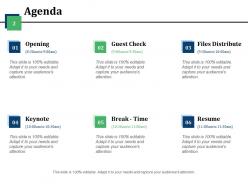
Slide 2: This is an Agenda slide showing various events with their respective timings- (8:30am to 9:00am)- Opening, (9:00am to 9:30am)- Guest Check, (9:30am to 10:00am)- Files Distribute, (10:00am to 10:30am)- Keynote, (10:30am to 11:00am)- Break - Time, (11:00am to 11:30am)- Resume.
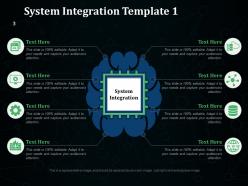
Slide 3: This is the first slide showing System Integration Template with mind map imagery and tex boxes. Mentions aspects, factors etc. of system integration here and use it accordingly.
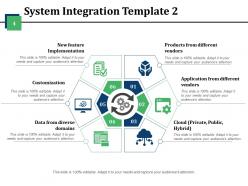
Slide 4: This is the second slide showing System Integration Template with- Products from different vendors, Application from different vendors, Cloud (Private, Public, Hybrid), Data from diverse domains, Customization, New feature Implementation.
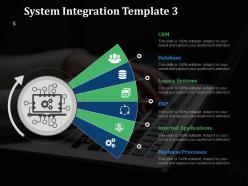
Slide 5: This is the third slide showing System Integration Template with the following points- CRM, Database, Legacy Systems, ERP, Internal Applications, Business Processes.
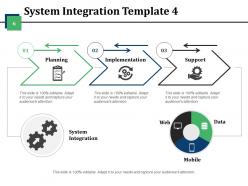
Slide 6: This is fourth slide showing System Integration Template with these three basic steps- Planning, Implementation, Support. It also shows- Web, Data and Mobile.
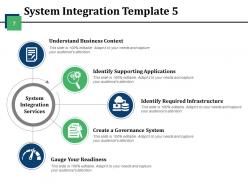
Slide 7: This is the fifth slide showing System Integration Template consisting of the System Integration Services. These services include- Understand Business Context, Identify Supporting Applications, Identify Required Infrastructure, Create a Governance System, Gauge Your Readiness.
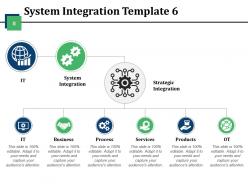
Slide 8: This is sixth slide showing System Integration Template with the following components- System Integration, Strategic Integration, IT, Business, Process, Services, Products, OT.
Slide 9: This is seventh slide showing System Integration Template with text boxes and icon imagery.
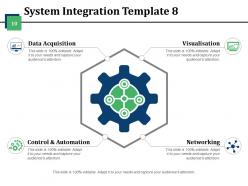
Slide 10: This is eighth slide showing System Integration Template with the following steps- Data Acquisition, Control & Automation, Networking, Visualisation.
Slide 11: This is System Engineering Icons Slide with various icons. You can alter/ edit the icons as per need.
Slide 12: This slide is titled Additional Slides to move forward. You can change the slide content as per need.
Slide 13: This is ABOUT THE COMPANY slide to state information, specifications of your company.
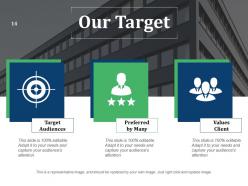
Slide 14: This is Our Target slide with Target Audiences, Preferred by Many and Values Client as examples. You can state your targets here.
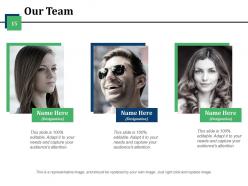
Slide 15: This slide helps depict Our Team with text boxes.
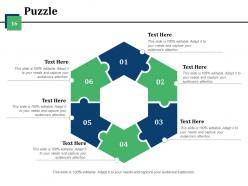
Slide 16: This is a Puzzle pieces image slide to show information, specifications etc.
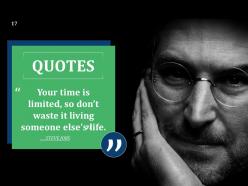
Slide 17: This is a Quotes slide. Put a quote or anything you want to highlight here.
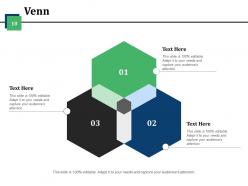
Slide 18: This is a Venn diagram image slide to show information, specifications etc.
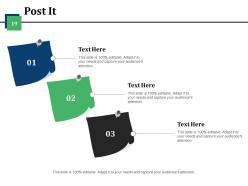
Slide 19: This is a Post It slide to mark events, important information etc.
Slide 20: This is a LEGO slide with text boxes to show information.
Slide 21: This slide shows Charts & Graphs to move forward. Alter the content as per need.
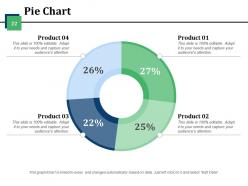
Slide 22: This is a Pie Chart slide to show product comparison etc.
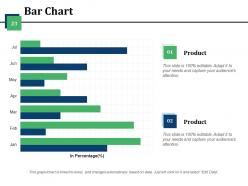
Slide 23: This is a Bar chart slide to present product/ entity comparison, specifications etc.
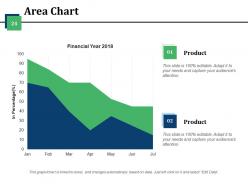
Slide 24: This is an Area Chart slide to present product/ entity comparison, information etc.
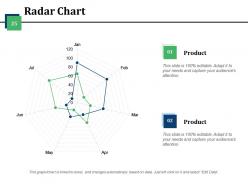
Slide 25: This slide presents a Radar Chart to show product/ entity growth, comparison etc.
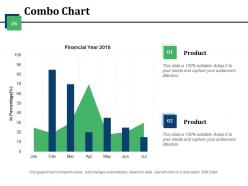
Slide 26: This slide presents Combo Chart to show product/ entity growth, comparison etc.
Slide 27: This is a Thank You slide with Email Address:Contact Numbers, Address# street number, city, state.
Systems engineering powerpoint presentation slides with all 27 slides:
Our Systems Engineering Powerpoint Presentation Slides have alluring design patterns. Your ideas will get attractive too.
FAQs for Systems engineering
So there's basically six phases you'll go through: concept development, system design, implementation, integration & testing, deployment, then operations & maintenance. It's kinda like building a house - start with the idea, make blueprints, build the thing, test that everything actually works together, move in, and then spend forever fixing stuff that breaks. Honestly, the testing phase always takes longer than you think it will. Each phase has deliverables and reviews with stakeholders. But here's the thing - these phases overlap constantly and you'll end up cycling back through them when requirements change or problems come up.
Think of systems engineering and project management like a good partnership. SE handles the technical stuff - what you're building and how it should work. PM takes care of timing, budgets, and keeping everyone happy. Honestly, the verification and validation steps from SE line up pretty well with your project milestones anyway. Your systems engineer figures out the "what" and "how," while you're dealing with "when" and "who's gonna do it." Map out those SE deliverables against your timeline early though - trust me on this one, it prevents chaos later.
Honestly, requirements analysis is make-or-break for any project. Without solid requirements, you're basically shooting in the dark and hoping something works out. Listen to your stakeholders first - really listen, don't just nod along. Document everything clearly because vague requirements will absolutely come back to haunt you later (learned that one the hard way). It's like building a house without knowing if they want a studio or a mansion. Good requirements give everyone the same playbook and help you spot problems before they become expensive disasters. Short version: figure out what you're actually building before you start building it.
Look, MBSE gives you one place where everything lives - no more digging through email threads when requirements change. You build these digital models that link requirements, architecture, and testing together. When something shifts upstream, you'll see exactly what breaks downstream right away. Way better than juggling hundreds of docs that never match up. Plus your stakeholders can actually see what you're building instead of just imagining it, which honestly saves so many headaches later. The "wait, this isn't what I wanted" conversations drop dramatically. Try it on just one subsystem first though - easier to show the wins that way.
Ugh, scope creep is the absolute worst - everyone suddenly needs "just one tiny thing" added when you're already halfway done. Getting stakeholders aligned? Good luck with that mess. Integration stuff will make you want to pull your hair out too since nothing ever connects as smoothly as it should. Requirements change constantly, deadlines get tighter, and you're juggling like fifty different priorities. Honestly, document literally everything (I mean everything) and talk to your team way more than feels necessary. Trust me on the over-communication thing, especially when you're trying to get systems to play nice together.
Think of it like this - verification is checking "did we build what we said we'd build?" You're basically comparing your finished system against the original specs and requirements. Validation's different though. That's asking "does this thing actually solve the problem people have?" Way trickier to nail down. Here's the kicker - you can have a perfectly verified system that's completely useless in the real world. Seen it happen way too many times, honestly. Your code matches the requirements perfectly, but turns out the requirements were garbage. Do both throughout the project, not just at the end when it's too late to fix anything major.
Start with DOORS or Jama Connect for requirements - they're your go-to for tracking what the system actually needs to do. Enterprise Architect or Cameo are decent for modeling, but wow, the learning curve hits hard initially. Basic project management stuff like Jira or Monday.com helps with tasks and dependencies. Git's surprisingly useful even for non-code stuff - version control everything. My buddy learned this the hard way after losing weeks of work. Pick one requirements tool and one modeling platform first. You can always add more tools later when things get messier.
Yeah totally! Systems engineering works great outside tech stuff. So like in healthcare, you'd map out how patients move through the system and find where things get stuck. Wedding planning is honestly just systems engineering with flowers - you're coordinating vendors, timelines, all that chaos. Break big messy problems into smaller pieces first. Then figure out how everything connects to everything else. Project management, org changes, whatever - same deal. I'd start by just writing down what you're doing now and see where the relationships are. Makes the whole thing way less overwhelming.
Dude, you absolutely have to talk to your stakeholders first - like, before you build anything. Map out who actually cares about this project and what they need. I've watched so many teams skip this step and it's honestly brutal. They'll spend months building something that works perfectly but solves the wrong problem entirely. Schedule regular check-ins with these people throughout the whole thing. Trust me, flying blind never works out. You'll save yourself tons of headache later if you just figure out what everyone wants upfront. Short story: involve them early and keep them looped in.
Honestly, systems engineering is a game-changer because you do all the hard thinking upfront. Map out your architecture and interfaces before you start building anything - trust me on this one. You'll catch those nasty integration problems early when they don't cost an arm and a leg to fix. Plus your whole team stays on the same page about what you're actually making, so no weird scope surprises pop up later. The requirements-to-testing flow becomes way cleaner too. Yeah, it feels like extra work at first, but finding issues late is brutal and expensive.
Honestly, stick with the basics first - schedule adherence, budget performance, and requirements traceability. Those three will show you if things are actually working. Defect rates matter once you're live, obviously. But here's what I think is underrated: change request frequency. If you're drowning in change requests, your initial requirements gathering probably sucked. Focus on leading indicators like milestone completion rather than just looking backward. Performance specs are crucial too, but don't overcomplicate it early on. Add other metrics based on what your stakeholders actually care about.
So risk management runs through every single phase of systems engineering - you're constantly finding, checking, and dealing with risks from day one through operations. When you're defining requirements, that's where you catch the big technical and programmatic risks early. Design and development is all about watching how those risks change and actually doing something about them. Honestly, it feels like drinking from a fire hose at first but then becomes routine. The trick is getting your risk processes locked down early and - this is crucial - updating that risk register at every milestone review religiously. Just start with a basic risk matrix and bring it to team meetings. Trust me on this one.
Dude, systems engineering is actually perfect for sustainability stuff. Instead of fixing one piece at a time, you're looking at the whole picture - that's where you catch all the waste and inefficiencies hiding between departments. I always tell people to bake environmental metrics right into their requirements upfront. Way easier than trying to retrofit green initiatives later (trust me on that one). The lifecycle thinking really pays off too. Next project you work on, just map out where your system touches the environment during requirements. You'll probably spot issues you never noticed before.
Honestly, data analytics is pretty clutch for this stuff. Start by collecting metrics from your systems - performance logs, how users actually behave, failure rates, all that good data. Then throw it into some visualization tools to spot patterns and bottlenecks you didn't even know existed. The cool part? You can actually predict when things might break before they do. Plus it helps you make design decisions based on real evidence instead of just winging it (which, let's be real, we've all done). I'd say pick one component you're curious about first and track a few key metrics there. Don't go overboard initially.
So digital twins are huge right now, plus AI/ML for predictive stuff. MBSE is basically becoming the norm - took me forever to wrap my head around it but it's everywhere now. Agile and DevOps completely changed how we do development cycles too. Everything's connected these days so you've gotta think cloud-native and bake security in from the start. Oh, and if you don't know Cameo or Rhapsody yet, definitely check those out. Maybe grab a course on systems thinking with AI integration? That combo's pretty hot in the job market right now.
-
Much better than the original! Thanks for the quick turnaround.
-
Use of different colors is good. It's simple and attractive.