

 0 Comment
 Customer Reviews

In engineering, imagination meets reason and vision meets accuracy. Whether your project is developing a robot, designing a bridge, or streamlining a supply chain, every outstanding idea starts with a solid procedure. Now enter the Engineering Design Process, a methodical sequence of actions taken by engineers to address challenges and generate ideas. The hitch is that, even if your ideas are really great, they might never ever leave the drawing board if you cannot adequately express them. Strong presentation tools therefore come quite handy.
Get your hands on our “Top 10 Engineering Slides Templates with Samples and Examples” by clicking on the link provided!
PowerPoint presentations are storytelling canvases in today’s fast-paced visually driven world. And in terms of presenting engineering design techniques, the correct template can either strengthen or undermine your message. From ideation to prototyping, testing, and refining, each phase of the design process can be brilliantly depicted, clarified, and brought to life with well chosen templates.
Studies reveal, in fact, that images improve understanding and memory by up to 400%. When presenting difficult concepts—not only to teams but also to stakeholders, customers, and even students—engineers who employ organized visual tools such as flow charts, diagrams, and timelines are far more effective. Consider NASA's Mars Rover team, who painstakingly mapped every choice using visual processes, or Tesla's design teams, which depend on iteratively driven diagrams to propel innovation.
This carefully chosen collection of Top 10 Engineering Design Process PPT Templates offers precisely that—a toolkit of clarity, inventiveness, and utility. Every template on this collection is more than just visual candy; they are supported by true engineering design process steps: Ask, Research, Imagine, Plan, Create, Test, and Improve. Sample data, layouts following the actual engineering design process, All editable and ready to fit your next major concept, you will find circular flows, linear timelines, mind maps, and feedback loop graphics.
So grab on tight! These templates are your road map for successful communication whether you're simply outlining how your widget works or addressing the next major challenge. Get diving and learn how to turn your design path into a gripping, unforgettable narrative.
Access our “Top 10 Product Design Process Templates with Samples and Examples” by clicking on the link provided.
Template 1: Engineering Design Process vs Computational Thinking PPT Graphics
With this lively PowerPoint presentation, unlock the synergy of invention. Designed for trainers, experts, and teachers, it provides concise explanations, side-by-side comparisons, and practical implementations of both systems. Whether you're running a workshop, a classroom, or a team, this book simplifies difficult ideas and provides practical advice. Share strong problem-solving techniques, encourage critical thinking, and inspire creative ideas to equip your audience. Perfect for STEM teaching, project planning, and cooperative learning contexts, this talk is your go-to arsenal for combining analytical precision with creative design thinking. Ready to turn concepts into influence?
[product_image id=1385566]
Template 2: Introduction to Engineering Design Process
With this PowerPoint slide, learn the foundations of invention. Emphasizing three fundamental pillars—Product Development, Problem Solving, and System Optimization—perfect for classrooms, seminars, or professional meetings The slide shows how actual engineering success is driven by iterative design, user feedback, prototyping, and efficiency enhancements. It's perfect for team projects and classroom instruction since clear images and succinct descriptions help to simplify difficult concepts. This presentation provides clarity, organization, and visual appeal whether you're introducing engineering concepts or improving technical talks, therefore enabling your audience to think critically and design successfully. Download now!

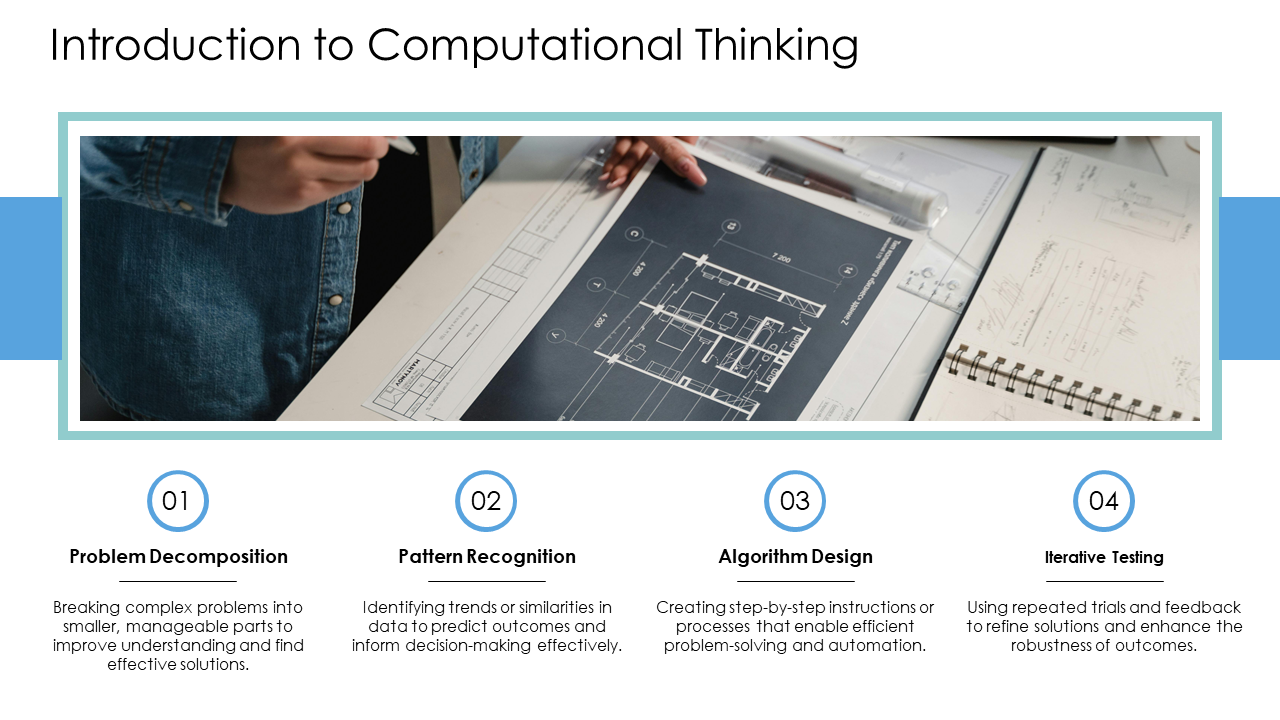
Template 3: Introduction to Computational Thinking
Using this PowerPoint slide, master the foundations of contemporary problem-solving. Designed for professionals, trainers, and teachers, it simplifies fundamental ideas including Problem Decomposition, Pattern Recognition, Algorithm Design, and Iterative Testing into easily appealing bits. Ideal for computer science, STEM education, and innovation seminars, this presentation clarifies for students how to use data-driven techniques, organize ideas, and reason logically. Whether applied to improve analytical thinking or teach coding ideas, this presenting method offers a clear, succinct, and pragmatic basis for developing actual digital and technical solutions.
Template 4: Design Process vs. Computational Thinking Comparison
Use this PPT Template to emphasize the fundamental distinctions between computational thinking's logical, algorithm-based approach and engineering design's methodical, outcome-driven approach. This PowerPoint improves conceptual understanding and starts important debate by clearly side-by-side comparisons on structured approach, problem decomposition and tangible outcomes, etc. Ideal for team onboarding, seminars, or classrooms, it offers a clear, interesting approach to show how both approaches enhance one another in the current scene of problem-solving.

Template 5: Historical Context of Engineering Design
With this PowerPoint slide, investigate the development of creativity. Perfect for teachers, engineers, and STEM presenters, this chronology shows significant events from 1900 to 2020 including the development of systematic design techniques, standardizing, computer integration, CAD revolution, and artificial intelligence developments. This presentation can be used to illustrate technical advancement, offer historical context, or start conversations on next engineering design trends. Perfect for presentations, seminars, or professional development materials emphasizing the past, present, and future of engineering innovation, it is visually appealing and historically coherent.

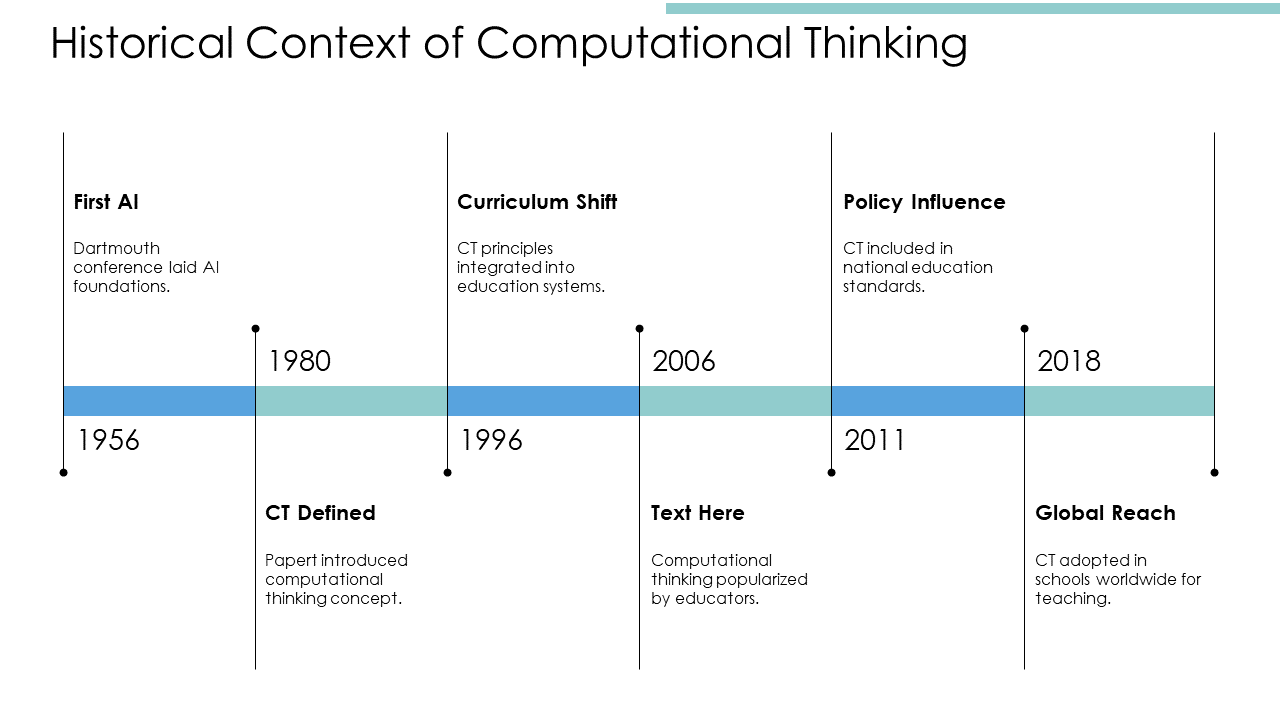
Template 6: Historical Context of Computational Thinking
The timeline slide provides a clear visual trip across the major turning points influencing the development of computational thinking (CT). From the 1956 Dartmouth conference that set the groundwork for artificial intelligence to the worldwide acceptance of CT in education by 2018, this presentation emphasizes significant events like curricular modifications, policy reforms, and educational integration. Perfect for teachers, curriculum designers, and STEM communicators, this slide streamlines the CT for presentations, seminars, and lectures' development. It will help to spark debates on the value of CT in contemporary education and its continuous influence on world affairs.
Template 7: Engineering Design Process with Problem Definition
Capturing the core of organized engineering thought, this Template depicts a one-stage process for teachers, engineers, and project managers trying to transmit design approaches including problem definition, design process, and evaluation. This presentation streamlines difficult processes into a straightforward, understandable shape whether it's used in technical seminars, classrooms, or strategy meetings. This professional and perceptive design tool encourages decision-making, creativity, and critical thinking across the engineering design process thereby improving your presentations.

Template 8: Engineering Design Process with Imagine and Ask
Here is a PPT template that helps users follow a logical process. Important phases in the slide include Imagine, Ask, and Evaluate stress critical thinking, inquiry, and innovation. This PPT slide streamlines difficult engineering ideas for clear presentation and easy grasp. It's apt for STEM education and project-based learning environments whether applied in businesses or schools since it promotes creativity and methodical problem-solving.

Template 9: Engineering Design Process with Ask Identity
Introducing the visually striking seven-stage slide deck ideal for showing the essential aspects of the engineering design process. For teachers, engineers, and professionals outlining methodical problem-solving, this ready-to-use PowerPoint template features important steps including Ask, Identify, Imagine, Plan, Create, Test, and Evaluate. This slide set facilitates straightforward and efficient communication of difficult ideas by means of neat, professional design and adaptable content. Download right now to improve your presentations, seminars, or classroom instruction and leave a professional and ordered design impression on your audience.

Template 10: Engineering Design Change Control Process
Designed for teams in quality assurance, project managers, and engineers, this slide guarantees a comprehensive knowledge of how modifications are assessed, accepted, and implemented effectively. It reduces mistakes, encourages responsibility all through the product life, and helps efficient communication between departments. Present this slide in audits, training courses, or presentations to improve your team's capacity for methodically and successfully handling design modifications.

Conclusion
More than just presentations, the Top 10 Engineering Design Process PPT Templates are strategic tools meant to improve the way engineering ideas are conveyed and comprehended. These templates let you see every phase of the design process, whether you're teaching, presenting, or problem-solving. From historical background to contemporary techniques, every template is meant to captivate viewers, streamline complexity, and encourage creativity. Show your work, but also effectively narrate its tale. Discover, download, and turn your next engineering presentation into an engaging, perceptive experience that speaks to people outside of the boardroom or classroom.
PS: Access our “Top 10 Design Framework Examples With Samples and Templates” by clicking on the link provided
.
FAQs
Q: What are the 7 steps of the engineering design process?
The seven steps—ask, research, imagine, plan, create, test, and improve—form a methodical strategy to solving engineering challenges by means of iterative critical thinking.
Q: What is basic engineering design?
Using methodical planning and technical concepts, basic engineering design is the fundamental process of producing solutions by means of problem identification, analysis of requirements, and creation of functional, safe, and efficient systems or products.
Q: What are the steps of design thinking?
Five fundamental steps comprise design thinking: empathize; define; ideate; prototype; test. It emphasizes human-centered creative, iterative, user feedback-based problem-solving.